
이 페이지는 앱이나 개발자의 공식 페이지가 아니며, 정보 제공 및 논평을 목적으로 작성된 독립 편집 간행물입니다. 명시적으로 달리 언급되지 않는 한, 해당 앱이나 개발자는 MWM, Apple, Google Play, 앱 퍼블리셔 또는 앱 개발자와 제휴, 보증, 후원, 승인 또는 공식적으로 연결되어 있지 않으며, 이 페이지의 어떤 내용도 해당 앱이 MWM의 서비스를 사용하여 개발되었음을 의미하지 않습니다. 모든 상표, 로고, 스크린샷 및 기타 콘텐츠는 해당 소유자의 자산입니다.


ieGeek Cam
이 앱은 당신의 시야를 확장하고, 당신의 통제력을 강화한다. ieGeek Cam은 당신의 눈과 귀가 되어, 물리적 제약 없이 당신의 공간을 감시한다.
다운로드
750k+사용자 평점
총 평가 수
10.7K개발사
카테고리
Lifestyle지원 언어
17최신 버전
6.0.0크기
242.3 MB출시일
2022년 3월 9일주요 기능을 통해 홈 및 소규모 비즈니스 보안 솔루션으로서의 가치를 진단합니다.
ieGeek Cam 앱 심층 분석: 보안 및 원격 모니터링 기능 평가
움직임 감지 시 즉각적인 푸시 알림
이 도구는 움직임이 감지되면 즉시 사용자에게 푸시 알림을 보내어 잠재적인 보안 위협에 신속하게 대응하고 필요한 조치를 취할 수 있도록 지원합니다.
실시간 비디오 스트리밍
이 앱은 사용자가 어디에 있든 연결된 보안 카메라의 실시간 비디오 피드를 스트리밍하여 재산을 지속적으로 원격 모니터링할 수 있도록 제공합니다.
녹화 영상 재생 및 확인
이 앱은 녹화된 비디오 영상을 재생하고 확인할 수 있는 기능을 갖추고 있어 사용자가 과거의 이벤트를 검토하고 중요한 순간을 놓치지 않도록 보장합니다.
스마트 감지 구역 맞춤 설정
이 앱은 사용자가 특정 관심 영역을 정의하여 감지 구역을 맞춤 설정할 수 있게 해줌으로써, 불필요한 알림을 줄이고 중요한 영역에 대한 감시 효율성을 높입니다.
자주 묻는 질문
에 대해 알아야 할 모든 것 ieGeek Cam
What is ieGeek Cam?
ieGeek Cam is a security camera system surveillance app. It provides live video, motion detection recording, and instant push messages to inform users of their home's security status.
Does ieGeek Cam offer live video surveillance?
Yes, ieGeek Cam offers real-time live video surveillance. Users can view their camera feeds live through the app interface.
How does ieGeek Cam handle motion detection alerts?
ieGeek Cam sends instant push messages via its alarm system when motion is detected. This functionality enables users to take protective measures promptly.
Can I customize motion detection zones in ieGeek Cam?
Yes, ieGeek Cam allows users to customize smart detection zones. This feature helps define specific areas within the camera's view for motion monitoring.
What are the main features of the ieGeek Cam app?
The main functions of ieGeek Cam include real video playing, video image sharing, playback image checking, time and message reminding, and customizable smart detection zones.
Can I share camera access with others using ieGeek Cam?
Yes, ieGeek Cam allows users to share device access. Sharing can be performed by scanning a QR code or by entering an account within the app.
How can I review past events in ieGeek Cam?
ieGeek Cam provides a playback image checking feature to review past events. Users can access a history of motion detection events with corresponding timestamps.
Does ieGeek Cam offer different alarm working modes?
Yes, ieGeek Cam offers Power Saving Mode, Performance Mode, and Custom Mode for alarm working. Each mode features distinct settings for video length, power consumption, and humanoid detection.
How long are video clips in ieGeek Cam's Power Saving Mode?
In ieGeek Cam's Power Saving Mode, the length of video clips does not exceed 10 seconds. People Detection is enabled by default in this mode for efficient monitoring.
Does ieGeek Cam support humanoid detection?
Yes, ieGeek Cam supports humanoid detection. It is enabled by default in Power Saving Mode and can be customized further in the Custom Mode settings.
Where can I find the privacy policy for ieGeek Cam?
The privacy policy for ieGeek Cam is available via the link provided in the app description: "https://meari-us.s3.us-west-1.amazonaws.com/html/audit/81/storage_server.html".
Can I adjust the motion detection sensitivity in ieGeek Cam?
Yes, ieGeek Cam allows users to adjust motion detection sensitivity. The sensitivity can be precisely set on a numerical scale ranging from 1 to 10.
Does ieGeek Cam offer cloud storage?
Yes, ieGeek Cam offers cloud storage capabilities. This feature is indicated by the presence of a dedicated "Cloud" tab within the app's live view interface.
다음 스크린샷과 설명은 앱의 공식 스토어 목록에서 직접 가져온 것이며 앱 개발자의 자산입니다.
앱 스토어
스크린샷

이 앱은 라이브 영상 피드를 통해 주택 보안을 실시간으로 보여주며, 사용자는 동작 감지 및 인터콤과 같은 주요 제어 버튼에 쉽게 접근할 수 있습니다.
실시간 감시 제어
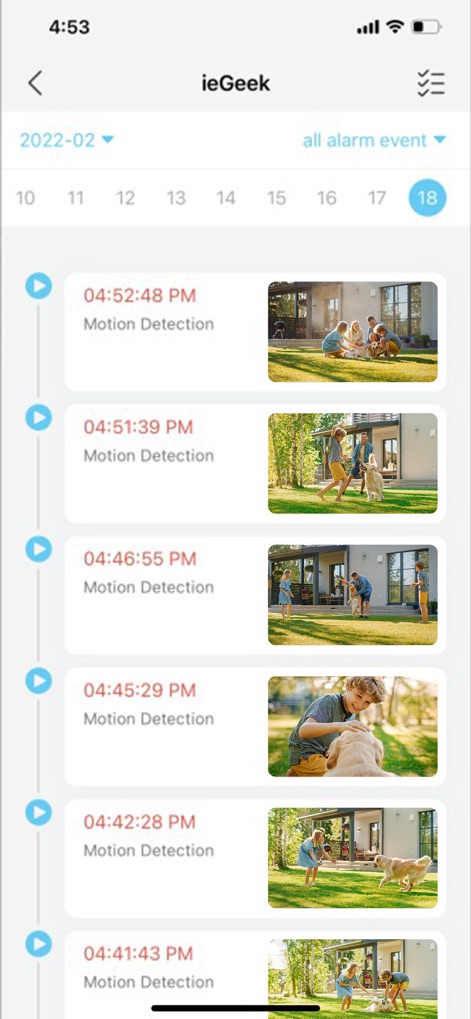
사용자는 시간별로 정렬된 동작 감지 이벤트를 편리하게 확인할 수 있으며, 각 이벤트에 대한 시간 기록과 관련 영상 미리보기를 제공합니다.
이벤트 기록 확인

장치 공유 기능을 통해 QR 코드 스캔 또는 계정 입력을 통해 카메라 접근 권한을 다른 사용자에게 쉽고 안전하게 부여할 수 있습니다.
장치 공유 간편화

사용자의 개인 프로필 정보와 함께 가족 관리 및 공유 콘텐츠 보기와 같은 다양한 설정 및 관리 옵션을 직관적으로 제공합니다.
개인화된 설정 관리

사용자는 동작 감지 기능을 활성화하거나 비활성화할 수 있으며, 감지 민감도 슬라이더를 조절하여 맞춤형 알림 환경을 설정할 수 있습니다.
고급 동작 감지 설정

이 앱은 절전 모드와 성능 모드를 포함한 다양한 알람 작동 모드를 제공하며, 각 모드별 상세한 설명과 함께 사용자에게 최적의 선택을 안내합니다.
알람 모드 선택

사용자는 여러 장치를 집 안의 다양한 구역으로 분류하여 관리할 수 있으며, 각 장치의 상태를 한눈에 확인하고 필요에 따라 재생을 제어할 수 있습니다.
효율적인 장치 관리
설명
Download
비슷한 앱
유사한 기능과 사용자 경험을 가진 앱

DMSS
Hangzhou Dong Bin Information Technology Co., Ltd.

Joolink
Shenzhen Jooan Technology Company

VicoHome: Smart Home Camera
PHOTON SAIL TECHNOLOGIES PTE. LTD.

Ubox
洪波 王

SimpliSafe Home Security App
SimpliSafe, Inc.

Active Mobile V4
JFL Equipamentos Eletronicos Industria e Comercio Ltda.

Dzees Home
Shenzhen Weixi Technology Co., Ltd

Ring - Always Home
Bot Home Automation, INC

Hik-Connect - for End user
Hangzhou Hikvision Digital Technology Co., Ltd.
이 페이지는 앱이나 개발자의 공식 페이지가 아니며, 정보 제공 및 논평을 목적으로 작성된 독립 편집 간행물입니다. 명시적으로 달리 언급되지 않는 한, 해당 앱이나 개발자는 MWM, Apple, Google Play, 앱 퍼블리셔 또는 앱 개발자와 제휴, 보증, 후원, 승인 또는 공식적으로 연결되어 있지 않으며, 이 페이지의 어떤 내용도 해당 앱이 MWM의 서비스를 사용하여 개발되었음을 의미하지 않습니다. 모든 상표, 로고, 스크린샷 및 기타 콘텐츠는 해당 소유자의 자산입니다.