이 페이지는 앱이나 개발자의 공식 페이지가 아니며, 정보 제공 및 논평을 목적으로 작성된 독립 편집 간행물입니다. 명시적으로 달리 언급되지 않는 한, 해당 앱이나 개발자는 MWM, Apple, Google Play, 앱 퍼블리셔 또는 앱 개발자와 제휴, 보증, 후원, 승인 또는 공식적으로 연결되어 있지 않으며, 이 페이지의 어떤 내용도 해당 앱이 MWM의 서비스를 사용하여 개발되었음을 의미하지 않습니다. 모든 상표, 로고, 스크린샷 및 기타 콘텐츠는 해당 소유자의 자산입니다.
iMovie
영화 제작은 더 이상 전문가의 전유물이 아니다. 이 앱은 당신의 평범한 영상을 특별한 서사로 둔갑시키는 능력을 부여한다.
주요 수치
다운로드
50M+
사용자 평점
4.2/5
총 평가 수
855.2K
개발사
Apple Inc.
카테고리
Photo & Video
지원 언어
33
최신 버전
3.0.5
크기
660.0 MB
출시일
2010년 6월 24일
기능
iMovie 핵심 기능 분석: 사용자 친화적인 영상 편집의 강점
iMovie는 직관적인 인터페이스와 강력한 기능으로 모든 사용자가 전문가 수준의 비디오를 쉽게 제작하고 공유할 수 있도록 지원합니다.
간편한 공유 및 내보내기 옵션
이 앱은 Mail, Messages를 통한 직접 공유와 함께, 최대 4K 60fps로 사진 보관함에 저장하거나 Instagram, YouTube와 같은 인기 플랫폼에 최적화된 비디오를 내보낼 수 있는 기능을 제공하여 사용자가 자신의 창작물을 쉽게 공유하고 배포할 수 있게 합니다.
매직 무비 자동 생성
이 앱은 사용자가 선택한 사진이나 비디오 클립으로 제목, 전환 및 음악이 포함된 아름다운 맞춤형 비디오를 자동으로 생성하여 편집 경험이 없는 사용자도 쉽게 고품질 영상을 만들 수 있게 해줍니다.
풍부한 오디오 및 음악 기능
이 도구는 자동으로 비디오 길이에 맞춰지는 130개 이상의 사운드트랙, 다양한 음향 효과, 개인 음악 라이브러리 추가, 그리고 나레이션 녹음 기능을 제공하여 사용자가 완벽한 오디오 환경을 조성할 수 있게 해줍니다.
스토리보드를 활용한 쉬운 스토리텔링
이 도구는 인기 있는 비디오 유형에 대한 20가지 스토리보드 템플릿을 제공하여 사용자가 스토리를 효과적으로 구성하고 각 장면에 미디어를 추가하며 역동적인 시각적 스타일을 적용하여 일관된 내러티브를 만들 수 있도록 돕습니다.
다양한 영상 편집 도구
사용자는 8가지 테마, 13가지 Apple 디자인 비디오 필터, 11가지 애니메이션 제목 스타일 및 PIP(화면 속 화면), 그린 스크린, 분할 화면과 같은 다양한 효과를 활용하여 비디오의 시각적 요소를 정교하게 제어하고 향상시킬 수 있습니다.
할리우드 스타일 예고편 제작
이 앱은 전문가가 제작한 그래픽과 오리지널 스코어가 포함된 14가지 예고편 템플릿을 갖추고 있어 사용자가 영화 스튜디오 로고, 출연진 이름, 크레딧을 사용자 정의하여 짧은 시간에 인상적인 할리우드 스타일 예고편을 만들 수 있게 해줍니다.
Apple 기기 간 프로젝트 연동 및 확장성
사용자는 AirDrop 또는 iCloud Drive를 사용하여 iPhone 및 iPad 간에 프로젝트를 전송하고 Mac으로 보내 iMovie 또는 Final Cut Pro에서 편집을 마칠 수 있어 Apple 생태계 내에서 유연한 작업 흐름과 전문적인 편집으로의 확장을 가능하게 합니다.
시네마틱 모드 영상 편집
이 앱은 iPhone 13 이상에서 촬영된 시네마틱 모드 비디오를 가져와 편집할 수 있으며, 사용자가 초점 지점을 추가, 조정, 삭제하고 피사계 심도 효과를 수정하여 전문적인 영화적 미학을 구현할 수 있도록 합니다.
다음 스크린샷과 설명은 앱의 공식 스토어 목록에서 직접 가져온 것이며 앱 개발자의 자산입니다.
앱 스토어
스크린샷
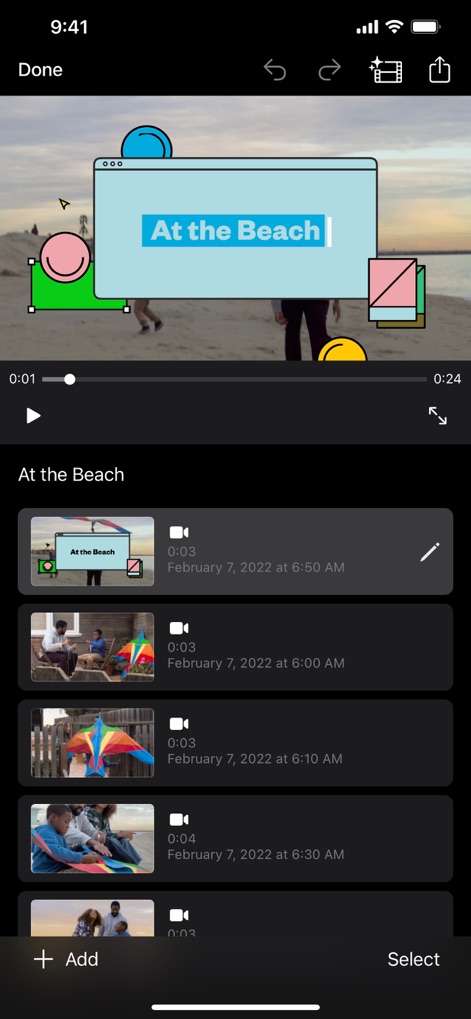
매력적인 제목 추가
사용자는 비디오 클립에 'At the Beach'와 같은 맞춤형 제목을 오버레이하고, 편집할 클립 목록을 하단에서 손쉽게 확인할 수 있습니다.
스토리보드 템플릿 탐색
이 앱은 'Storyboards' 기능을 통해 다양한 비디오 제작을 위한 템플릿을 제공하며, 'Cooking'이나 'Gaming'과 같은 특정 주제를 위한 가이드도 포함합니다.
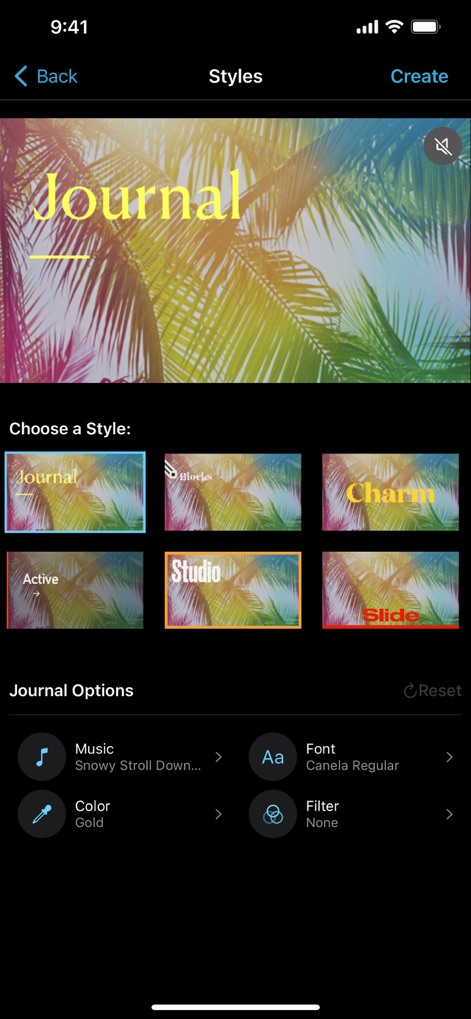
개성 넘치는 스타일
사용자는 'Journal'과 같은 다양한 시각적 스타일을 선택하여 영상의 분위기를 바꾸고, 음악 및 폰트 옵션을 통해 세부적인 편집을 할 수 있습니다.
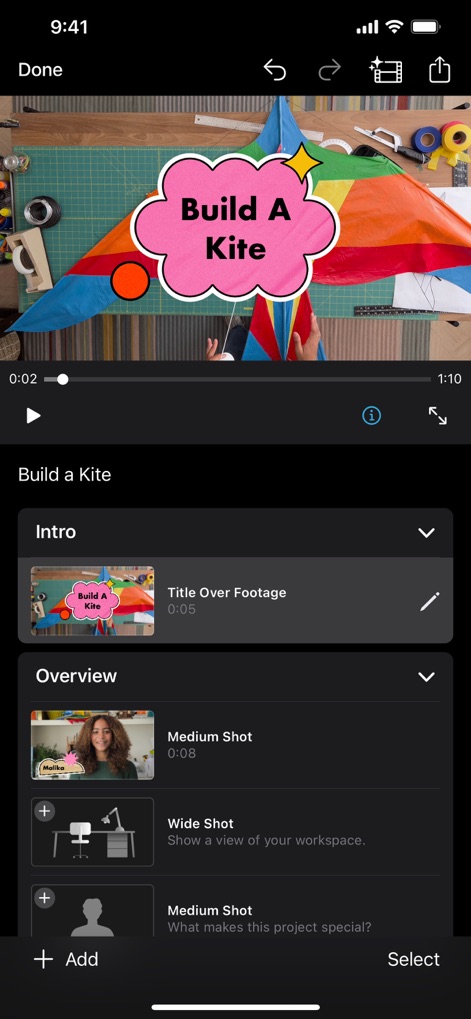
스토리텔링 구성
이 앱은 'Intro'와 'Overview'와 같은 섹션으로 구성된 스토리라인을 제공하여 영상 흐름을 쉽게 구성하고, 'Medium Shot' 및 'Wide Shot'과 같은 특정 촬영 유형을 위한 자리 표시자를 포함합니다.
시네마틱 효과 조절
사용자는 영상 클립에 시네마틱 모드를 적용하여 'f3.5'와 같은 피사계 심도를 조절할 수 있으며, 인물에 자동으로 초점을 맞추는 얼굴 감지 기능을 활용할 수 있습니다.
다채로운 제목 애니메이션
이 도구는 'TOLUCA TREK'과 같은 맞춤형 제목에 'SLIDE' 및 'SPLIT'과 같은 다채로운 애니메이션 효과를 적용하여 영상의 시작을 특별하게 만듭니다.
크로마키 활용
사용자는 이 앱의 크로마키 기능을 활용하여 배경을 제거하고, 여러 비디오 클립을 타임라인에 배치하여 복합적인 영상 효과를 구현할 수 있습니다.
독특한 필터 적용
이 앱은 'Comic'과 'Ink'와 같은 다양한 비디오 필터를 제공하여 영상에 예술적인 분위기를 더하고, 필터 강도 조절 막대를 사용하여 원하는 효과를 미세하게 조정할 수 있습니다.
설명
With a streamlined design and intuitive Multi-Touch gestures, iMovie lets you create Hollywood-style trailers and beautiful movies like never before.
Instantly create Magic Movies
• With just a few taps, you can create and share a beautiful, custom video
• Select an album or group of videos or images and iMovie will create a video for you—no video editing required—with titles, transitions, and music
• Easily rearrange or delete clips in the simplified shot list
• Apply a different style to change up the look and feel of the whole video
Learn storytelling with Storyboards
• Choose from 20 Storyboards that help you get started with popular video types
• Record video or take photos right into each placeholder clip, or add media from your Photos library
• Add, reorder, and delete clips as needed to organize and customize your story
• Apply a dynamic visual style that includes title layouts, fonts, filters, color palettes, and music
Make Hollywood-style trailers
• Choose from 14 trailer templates with stunning graphics and original scores by some of the world’s top film composers
• Customize movie studio logos, cast names, and credits
• Select videos and photos for your trailer or record video right in iMovie
Create beautiful movies
• Choose from 8 unique themes with matching titles, transitions, and music
• Give your movie the perfect look with 13 Apple-designed video filters
• Choose from 11 animated title styles like Split, Reveal or Pop-up
• Adjust any title by changing its font, color, size, location, and more
• Add solid, gradient, and patterned backgrounds to your movie
• Import and edit video captured in Cinematic mode on iPhone 13 or later
• Add, adjust, and delete focus points and modify the depth of field effect in video recorded in Cinematic mode*
• Easily add picture in picture, green screen, and split screen effects
• Select from more than 130 soundtracks that automatically adjust to the length of your movie
• Add sound effects, songs from your music library, and your own narration
• Connect a keyboard and use simple shortcuts to edit movies quickly
• Connect a trackpad or mouse to iPad for fast and accurate moviemaking
iMovie everywhere
• Transfer projects between your iPhone and iPad using AirDrop or iCloud Drive
• Send projects to your Mac via AirDrop or iCloud Drive to finish editing with iMovie or Final Cut Pro
• Connect an external display to your iPhone or iPad and choose to mirror the iMovie interface or display your video fullscreen while you edit**
Share with friends and family
• Send videos with Mail and Messages
• Save to your Photos library in resolutions up to 4K at 60 frames per second***
• Export videos optimized for Instagram, YouTube, and other popular video destinations
* Requires iPhone XS or later, iPad mini (5th generation or later), iPad Air (3rd generation or later), iPad Pro 11-inch or iPad Pro 12.9-inch (3rd generation or later)
** External display support requires iPhone 7 or later, iPad (6th generation) or later, iPad Air 3 or later, iPad Pro 12.9-inch (2nd generation) or later
*** 4K at 60 frames per second support requires iPod touch (7th generation), iPhone SE (2nd generation), iPhone 7, iPad (6th generation) or later, iPad mini (5th generation), iPad Air 3 or later, iPad Pro 10.5-inch or later
Download
이 페이지는 앱이나 개발자의 공식 페이지가 아니며, 정보 제공 및 논평을 목적으로 작성된 독립 편집 간행물입니다. 명시적으로 달리 언급되지 않는 한, 해당 앱이나 개발자는 MWM, Apple, Google Play, 앱 퍼블리셔 또는 앱 개발자와 제휴, 보증, 후원, 승인 또는 공식적으로 연결되어 있지 않으며, 이 페이지의 어떤 내용도 해당 앱이 MWM의 서비스를 사용하여 개발되었음을 의미하지 않습니다. 모든 상표, 로고, 스크린샷 및 기타 콘텐츠는 해당 소유자의 자산입니다.
