
이 페이지는 앱이나 개발자의 공식 페이지가 아니며, 정보 제공 및 논평을 목적으로 작성된 독립 편집 간행물입니다. 명시적으로 달리 언급되지 않는 한, 해당 앱이나 개발자는 MWM, Apple, Google Play, 앱 퍼블리셔 또는 앱 개발자와 제휴, 보증, 후원, 승인 또는 공식적으로 연결되어 있지 않으며, 이 페이지의 어떤 내용도 해당 앱이 MWM의 서비스를 사용하여 개발되었음을 의미하지 않습니다. 모든 상표, 로고, 스크린샷 및 기타 콘텐츠는 해당 소유자의 자산입니다.


Inside - App Lock Manager
당신의 디지털 영역, 이제 당신의 통제 하에 놓입니다. 이 앱은 무단 접근을 차단하고, 스크린 타임을 강제하며, 디지털 경계를 설정하는 냉혹한 도구입니다.
다운로드
250k+사용자 평점
총 평가 수
158개발사
카테고리
Utilities지원 언어
2최신 버전
1.2.0크기
17.0 MB출시일
2024년 9월 30일디지털 웰빙, 앱 보안 및 자녀 보호를 위한 핵심 기능 평가
Inside - App Lock Manager 앱 심층 분석
종합적인 자녀 보호 기능
이 앱은 미성년자의 휴대폰 사용 시간 제한, 게임 및 엔터테인먼트 앱 접근 제한, 앱 설치/삭제 및 인앱 구매 금지, 성인 웹사이트 접속 차단 등 포괄적인 디지털 환경 관리를 제공합니다.
강력한 앱 잠금 및 개인 정보 보호
이 앱은 모든 앱을 제한하여 다른 사람이 사용자의 휴대폰을 엿보는 것을 효과적으로 방지합니다. 또한 시작 암호를 설정하여 민감한 데이터와 개인 정보를 보호할 수 있습니다.
자동 제한 및 스케줄링
사용자가 미리 기간, 스케줄 또는 위치 범위를 설정할 수 있게 해줍니다. 이 도구는 조건이 트리거되면 자동으로 제한 기능을 적용하여 수동으로 기능을 켜는 것을 잊을 염려 없이 일관된 관리를 보장합니다.
침입 방지 및 감지
이 앱은 잘못된 PIN 코드가 입력될 경우 침입자를 자동으로 캡처하여 휴대폰을 엿보려는 시도로부터 사용자의 장치와 개인 정보를 보호합니다.
위장 모드
이 도구는 원터치로 앱의 인터페이스를 계산기로 변경하여, 앱 잠금 관리 도구를 사용하고 있다는 사실을 다른 사람에게 숨길 수 있도록 지원합니다.
시스템 수준 제어
이 앱은 앱 설치/삭제 금지, 인앱 구매 금지, 계정 정보 수정 금지 등 시스템 수준의 세부적인 제어 기능을 제공하여 장치 관리를 강화합니다.
자주 묻는 질문
에 대해 알아야 할 모든 것 Inside - App Lock Manager
What parental control features does Inside - App Lock Manager provide?
Inside - App Lock Manager helps with parental control by restricting minors' screen time, limiting game and entertainment apps, and prohibiting app installation, in-app purchases, or access to adult websites.
How does Inside - App Lock Manager ensure my privacy?
Inside - App Lock Manager protects privacy by restricting access to any app, preventing others from looking through your phone, requiring a startup password, and offering a camouflage mode.
Can Inside - App Lock Manager control system settings?
Yes, Inside - App Lock Manager supports system-level controls such as prohibiting app installation/deletion, in-app purchases, and modification of account information.
Does Inside - App Lock Manager support automatic app restriction?
Yes, Inside - App Lock Manager offers automatic restriction. Users can pre-set duration, schedules, or location ranges to automatically restrict applications when triggered.
What is the camouflage mode in Inside - App Lock Manager?
The camouflage mode in Inside - App Lock Manager allows the app to instantly change its appearance into a calculator with a single tap, providing an extra layer of privacy protection.
How does Inside - App Lock Manager handle intrusion protection?
Inside - App Lock Manager protects against intruders by automatically capturing their images when an incorrect PIN code is entered.
Which applications can Inside - App Lock Manager secure?
Inside - App Lock Manager can protect a wide range of applications, including WhatsApp, Instagram, Facebook, TikTok, YouTube, Netflix, and other social and entertainment apps.
Does Inside - App Lock Manager utilize password protection?
Yes, Inside - App Lock Manager employs digital password protection. Users must enter a PIN to unlock applications.
Does my Inside - App Lock Manager membership auto-renew?
Yes, membership for Inside - App Lock Manager automatically renews upon expiration. Users must cancel their subscription at least 24 hours before the expiration date to prevent renewal.
What quick operations are available in Inside - App Lock Manager?
Inside - App Lock Manager supports quick operations, including shaking or flipping the phone screen to immediately return to the desktop.
다음 스크린샷과 설명은 앱의 공식 스토어 목록에서 직접 가져온 것이며 앱 개발자의 자산입니다.
앱 스토어
스크린샷

이 앱은 주요 앱 아이콘에 자물쇠 심볼을 표시하여, 사용자가 민감한 애플리케이션에 대한 무단 접근을 효과적으로 차단할 수 있음을 명확하게 보여줍니다.
앱 잠금 보호
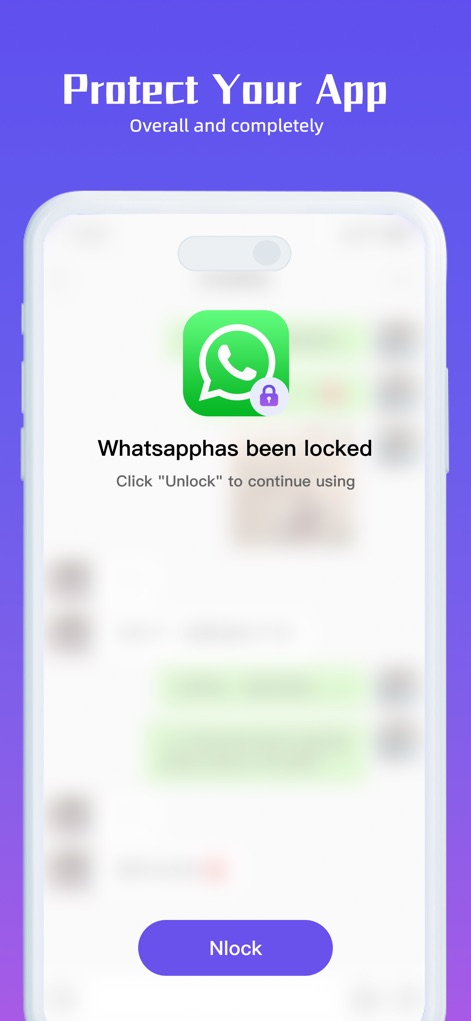
이 스크린샷은 잠긴 앱을 열려고 할 때 표시되는 메시지를 보여주며, 잠금 해제 버튼과 WhatsApp 아이콘을 통해 사용자가 안전하게 앱을 이용할 수 있도록 안내합니다.
앱 실행 보호

사용자는 비밀번호 입력 필드를 통해 앱에 접근하며, 화면 하단의 보호막 그래픽과 함께 강력한 디지털 비밀번호 설정 기능을 통해 개인 정보를 안전하게 유지할 수 있습니다.
비밀번호로 잠금
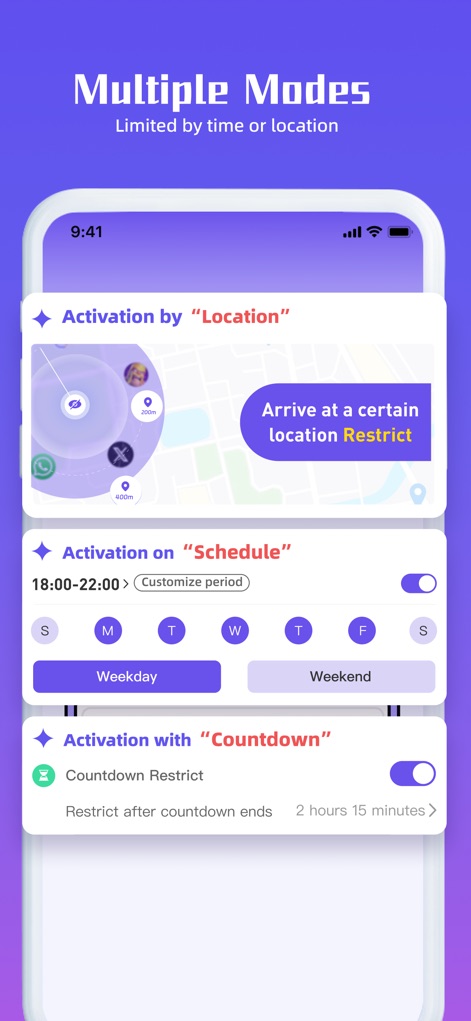
이 앱은 위치 기반 제한 기능과 요일별 시간표 설정 옵션을 제공하여, 사용자가 특정 조건에 따라 앱 사용을 자동으로 제어할 수 있도록 합니다.
자동 제한 설정

사용자는 앱 아이콘 변경 메뉴를 통해 다양한 아이콘 스타일을 선택할 수 있으며, 계산기 위장 모드를 활성화하여 앱의 존재를 숨기는 등 개인 정보 보호 기능을 맞춤 설정할 수 있습니다.
맞춤형 개인 정보
설명
Download
비슷한 앱
유사한 기능과 사용자 경험을 가진 앱

이 페이지는 앱이나 개발자의 공식 페이지가 아니며, 정보 제공 및 논평을 목적으로 작성된 독립 편집 간행물입니다. 명시적으로 달리 언급되지 않는 한, 해당 앱이나 개발자는 MWM, Apple, Google Play, 앱 퍼블리셔 또는 앱 개발자와 제휴, 보증, 후원, 승인 또는 공식적으로 연결되어 있지 않으며, 이 페이지의 어떤 내용도 해당 앱이 MWM의 서비스를 사용하여 개발되었음을 의미하지 않습니다. 모든 상표, 로고, 스크린샷 및 기타 콘텐츠는 해당 소유자의 자산입니다.