
이 페이지는 앱이나 개발자의 공식 페이지가 아니며, 정보 제공 및 논평을 목적으로 작성된 독립 편집 간행물입니다. 명시적으로 달리 언급되지 않는 한, 해당 앱이나 개발자는 MWM, Apple, Google Play, 앱 퍼블리셔 또는 앱 개발자와 제휴, 보증, 후원, 승인 또는 공식적으로 연결되어 있지 않으며, 이 페이지의 어떤 내용도 해당 앱이 MWM의 서비스를 사용하여 개발되었음을 의미하지 않습니다. 모든 상표, 로고, 스크린샷 및 기타 콘텐츠는 해당 소유자의 자산입니다.


Intune Company Portal
번거로운 기업 네트워크 접근? 그런 시대는 끝났습니다. 이 앱은 당신에게 디지털 업무 공간에 대한 절대적인 통제권을 부여하며, 스스로 보안과 접근을 관리하게 합니다.
다운로드
25M+사용자 평점
총 평가 수
2.1M개발사
카테고리
Business지원 언어
22최신 버전
5.2602.0크기
121.1 MB출시일
2013년 11월 19일Intune Company Portal 핵심 기능 분석
직원 생산성 및 보안 강화를 위한 주요 기능 개요
기업 리소스 접근 및 장치 등록
이 앱은 사용자가 개인 또는 회사 지급 장치를 기업의 Intune 환경에 안전하게 등록하여 Office, 이메일, OneDrive for Business 등 핵심 업무 리소스에 접근할 수 있게 해줍니다.
장치 셀프 서비스 관리
사용자는 등록된 모든 장치의 목록을 확인하고, 분실 또는 도난 시에는 원격으로 장치의 데이터를 안전하게 초기화할 수 있어 보안 침해 위험을 줄입니다.
간편한 비밀번호 재설정
이 도구는 사용자가 업무 계정의 비밀번호를 잊어버렸을 때 신속하게 재설정할 수 있는 기능을 제공하여 업무 연속성을 보장합니다.
회사 승인 앱 검색 및 설치
이 앱은 기업 IT 부서에서 승인하고 제공하는 업무 관련 애플리케이션을 사용자가 쉽게 검색하고 설치할 수 있도록 지원합니다.
자주 묻는 질문
에 대해 알아야 할 모든 것 Intune Company Portal
Does Microsoft Intune Company Portal help simplify work-related tasks for employees?
Yes, Microsoft Intune Company Portal simplifies tasks like enrolling your device to access corporate resources, resetting work account passwords, finding company-provided apps, and managing enrolled devices.
What are the requirements to use the Intune Company Portal app?
To access corporate resources through Intune Company Portal, your IT admin must set up your work account, and your company must have a subscription to Microsoft Intune.
Can my company see my personal data through Intune Company Portal?
No, your company cannot view your browsing history, personal emails, contacts, calendar, passwords, photos, or the location of a personal device via Intune Company Portal.
How do I find and access company apps using Intune Company Portal?
You can find apps provided by your company within the Intune Company Portal by navigating to the 'Apps' section, which displays featured and recently published applications.
Is device management required to install apps from Intune Company Portal?
Yes, some applications found in Intune Company Portal, such as Microsoft PowerPoint, require device management for installation and access to corporate resources.
How do I install the management profile for Intune Company Portal on my device?
To install the management profile for Intune Company Portal, go to the Settings app, select 'Profile Downloaded,' then navigate to 'General' > 'VPN & Device Management,' and follow installation instructions.
Can I view details about my enrolled devices using Intune Company Portal?
Yes, you can view and manage all your enrolled devices, including their manufacturer, model, and operating system, within the Intune Company Portal's 'Device' section.
Can I remotely wipe my device if it is lost or stolen using Intune Company Portal?
Yes, Intune Company Portal allows you to wipe your enrolled device yourself if it gets lost or stolen, helping protect corporate data and resources.
How can I contact my IT department for support with Intune Company Portal?
You can get help from your IT department by finding their contact information (phone, email, IT link) in the 'Support' section of the Intune Company Portal app.
다음 스크린샷과 설명은 앱의 공식 스토어 목록에서 직접 가져온 것이며 앱 개발자의 자산입니다.
앱 스토어
스크린샷

기기 설정 단계
이 앱은 사용자가 기업 리소스에 접근하기 위해 기기를 설정하는 과정을 안내합니다. 개인 정보 검토 단계와 프로필 설치 지침이 명확히 제시됩니다.

개인 정보 보호
이 스크린샷은 기업의 기기 관리 정책과 사용자 개인 정보 보호 범위를 명확히 보여줍니다. 기업이 열람할 수 없는 정보 목록과 'Can't' 및 'Can' 탭이 구분되어 있습니다.
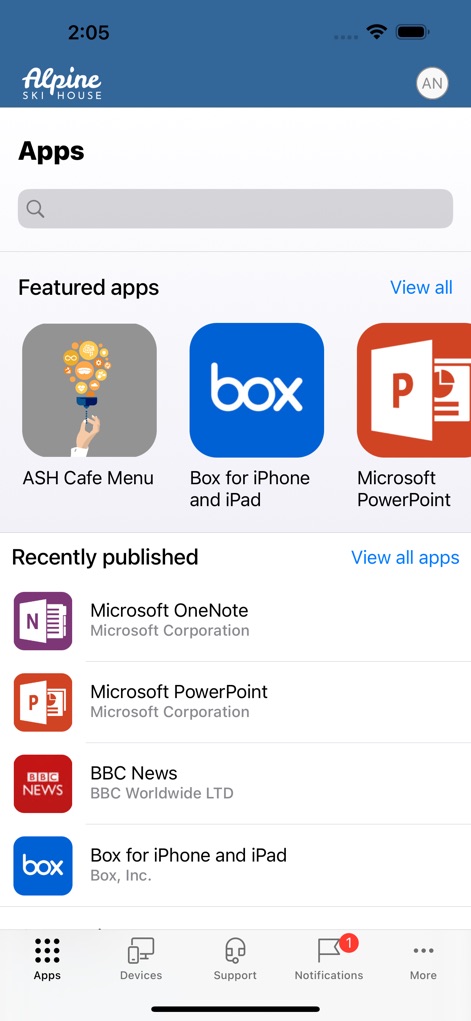
앱 검색 및 탐색
사용자는 이 화면에서 업무용 앱들을 쉽게 탐색하고 설치할 수 있습니다. '추천 앱' 목록과 '최근 게시된 앱' 섹션을 통해 필요한 도구를 빠르게 찾을 수 있습니다.

앱 상세 정보
이 화면은 특정 앱에 대한 상세 정보를 제공하여 사용자가 설치 여부를 결정할 수 있도록 돕습니다. 'Install' 버튼과 자세한 앱 설명이 표시되어 있습니다.

앱 필터링 옵션
사용자는 이 필터 기능을 통해 앱 목록을 효율적으로 분류할 수 있습니다. '관리 필요 여부'와 '발행자'별 필터링 옵션이 제공됩니다.
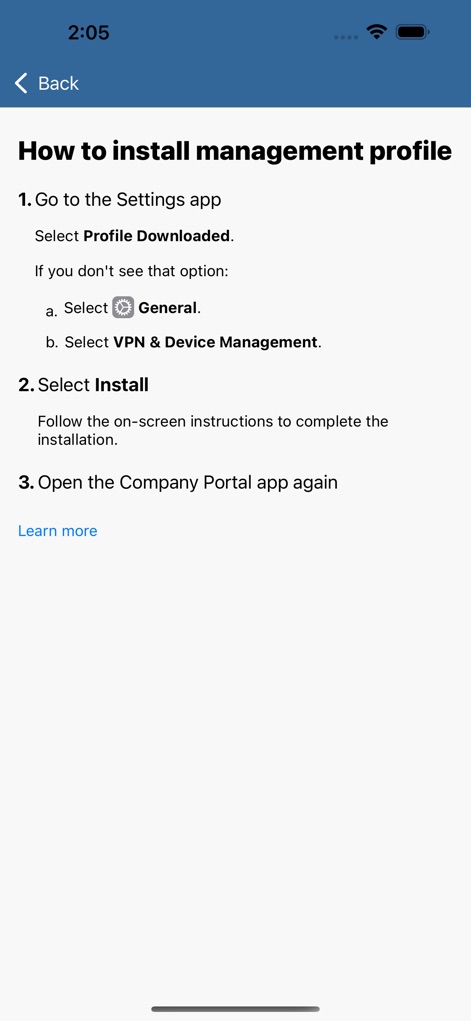
프로필 설치 방법
이 스크린샷은 관리 프로필 설치를 위한 명확하고 단계별 지침을 보여줍니다. '설정 앱으로 이동'하는 방법과 'VPN 및 기기 관리' 메뉴 선택이 설명되어 있습니다.

등록된 기기 정보
사용자는 이 화면에서 등록된 기기의 상세 정보를 한눈에 확인할 수 있습니다. 기기의 '제조업체'와 '운영 체제' 정보가 명확하게 표시됩니다.
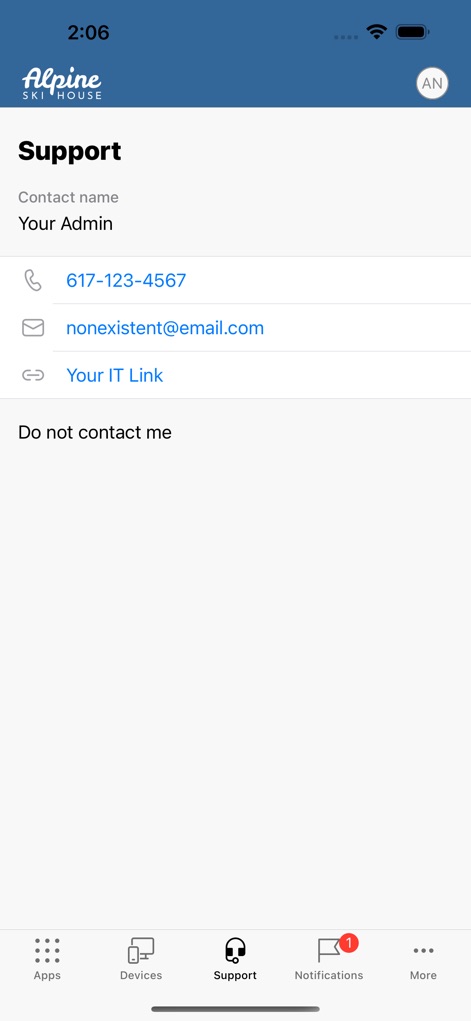
IT 지원 연락처
이 화면은 사용자가 IT 부서에 쉽게 연락할 수 있도록 지원 정보를 제공합니다. '관리자 연락처'와 '이메일 주소'가 포함되어 있습니다.
설명
Download
비슷한 앱
유사한 기능과 사용자 경험을 가진 앱

Zoom Workplace for Intune
Zoom Communications, Inc.

Kiosker Pro: Web Kiosk
Top North AB

Intelligent Hub
Wandering WiFi LLC

Kiosk Pro Plus
Kiosk Group, Inc.

Kiosker: Fullscreen Web Kiosk
Top North AB

Kiosk Pro Basic
Kiosk Group, Inc.

Ivanti Mobile@Work™ Client
MobileIron

PIA S5 Control
MARS BROTHERS LIMITED

Apple Configurator
Apple Inc.
이 페이지는 앱이나 개발자의 공식 페이지가 아니며, 정보 제공 및 논평을 목적으로 작성된 독립 편집 간행물입니다. 명시적으로 달리 언급되지 않는 한, 해당 앱이나 개발자는 MWM, Apple, Google Play, 앱 퍼블리셔 또는 앱 개발자와 제휴, 보증, 후원, 승인 또는 공식적으로 연결되어 있지 않으며, 이 페이지의 어떤 내용도 해당 앱이 MWM의 서비스를 사용하여 개발되었음을 의미하지 않습니다. 모든 상표, 로고, 스크린샷 및 기타 콘텐츠는 해당 소유자의 자산입니다.