이 페이지는 앱이나 개발자의 공식 페이지가 아니며, 정보 제공 및 논평을 목적으로 작성된 독립 편집 간행물입니다. 명시적으로 달리 언급되지 않는 한, 해당 앱이나 개발자는 MWM, Apple, Google Play, 앱 퍼블리셔 또는 앱 개발자와 제휴, 보증, 후원, 승인 또는 공식적으로 연결되어 있지 않으며, 이 페이지의 어떤 내용도 해당 앱이 MWM의 서비스를 사용하여 개발되었음을 의미하지 않습니다. 모든 상표, 로고, 스크린샷 및 기타 콘텐츠는 해당 소유자의 자산입니다.
KANTAN Chord
작곡가 및 예배 인도자를 위한 최고의 Safari 확장 프로그램입니다. 웹 기반 코드를 음계로 변환하고, 키를 자동으로 분석하며, 복잡한 탭을 클릭 한 번으로 보컬 범위 및 기술 수준에 맞게 단순화합니다.
주요 수치
다운로드
1K+
사용자 평점
3.9/5
총 평가 수
0
개발사
InstaChord Corp.
카테고리
Music
지원 언어
2
최신 버전
2025.3.6
크기
1.1 MB
출시일
2022년 3월 23일
기능
음악 이론을 몇 초 만에 마스터하세요
복잡한 키 때문에 고생하지 마세요. KANTAN Chord는 Safari 브라우저에서 바로 모든 코드 시트를 실제로 연주할 수 있는 형식으로 변환합니다.
즉각적인 키 감지
모든 곡의 "기준점"을 자동으로 찾아 탭 한 번으로 변환하여 보컬 범위나 악기에 완벽하게 맞추세요.
Nashville 전문가처럼 연주하세요
표준 코드를 Nashville 넘버링 또는 로마 숫자로 변환하여 좋아하는 곡의 이론과 논리를 마스터하세요.
다음 스크린샷과 설명은 앱의 공식 스토어 목록에서 직접 가져온 것이며 앱 개발자의 자산입니다.
앱 스토어
스크린샷
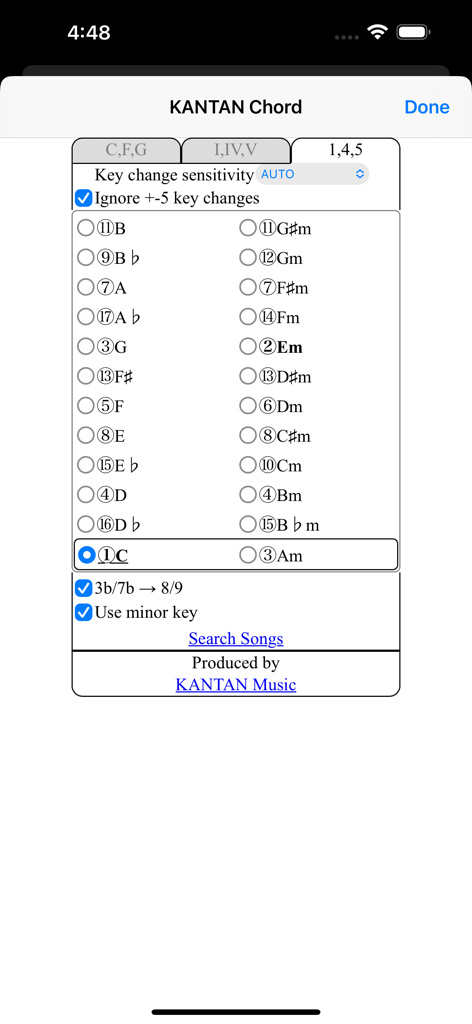
음악가들을 위한 Nashville 넘버링 시스템 설정 및 음계 선택을 보여주는 KANTAN Chord 앱 인터페이스.
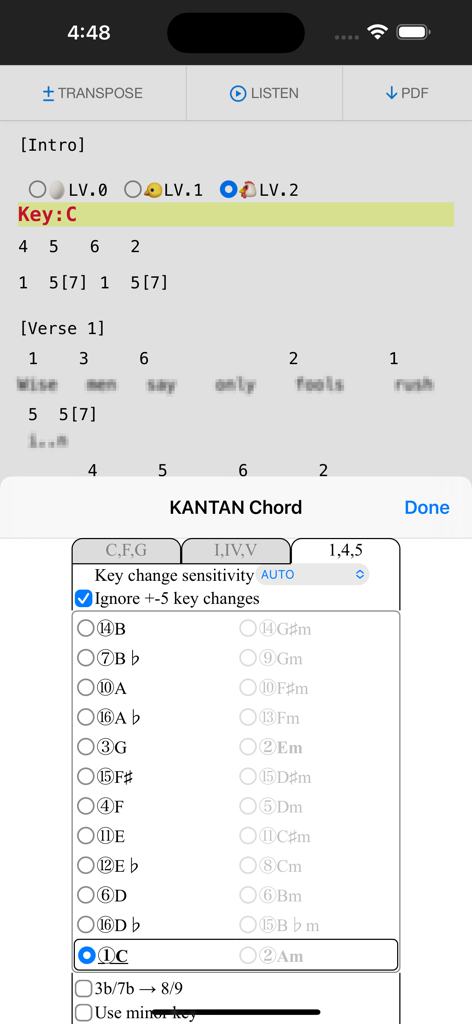
브라우저에서 곡 코드를 Nashville 넘버링으로 변환하는 KANTAN Chord 확장 프로그램
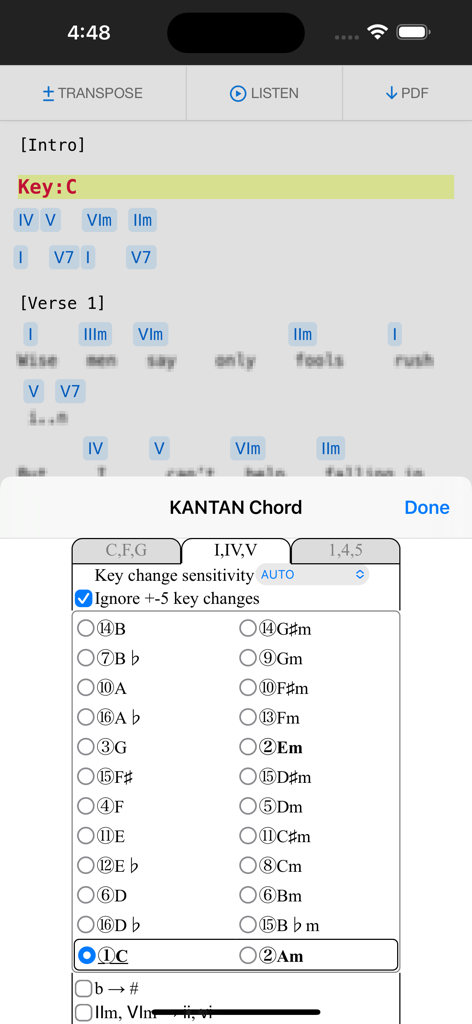
iPhone에서 곡 코드를 로마 숫자 음계로 변환하는 KANTAN Chord Safari 확장 프로그램
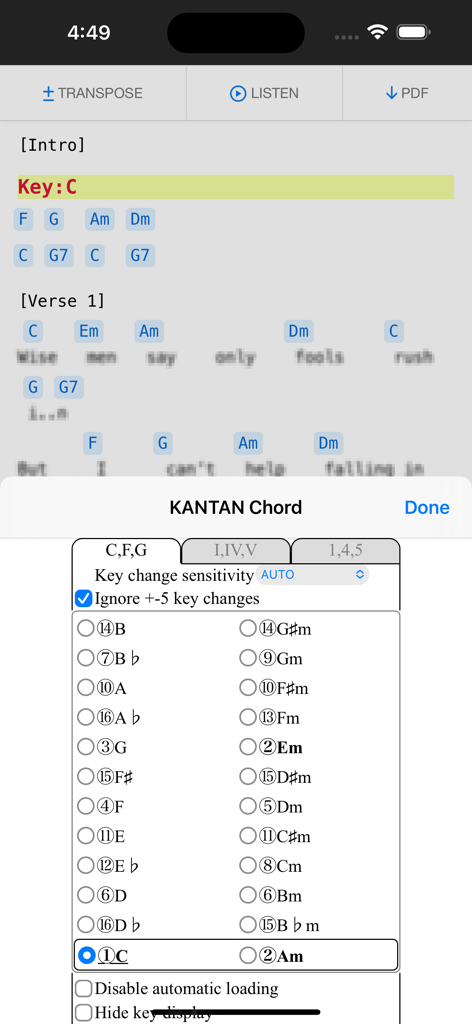
모바일 기기에서 음계 선택 및 변환 설정을 표시하는 KANTAN Chord 브라우저 확장 프로그램
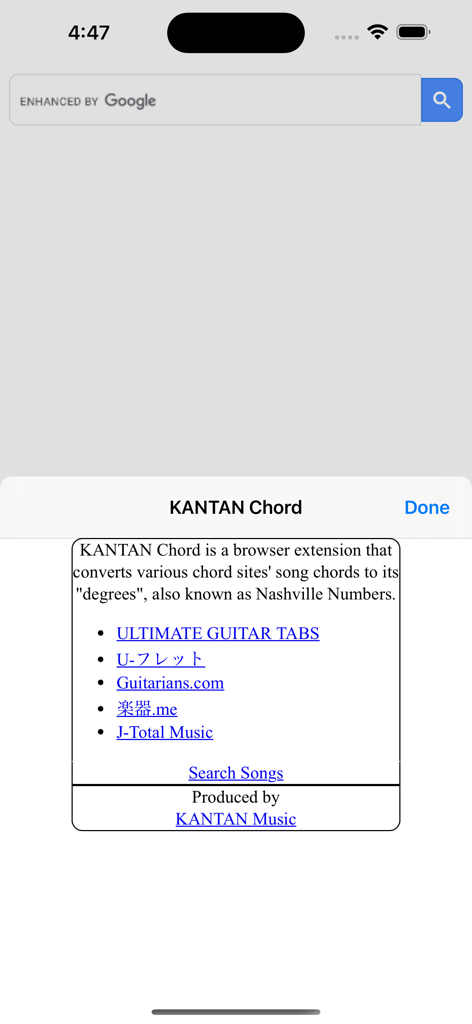
Ultimate Guitar와 같은 호환되는 음악 사이트 목록과 Nashville 넘버링 변환 정보를 보여주는 KANTAN Chord 확장 프로그램의 소개 화면
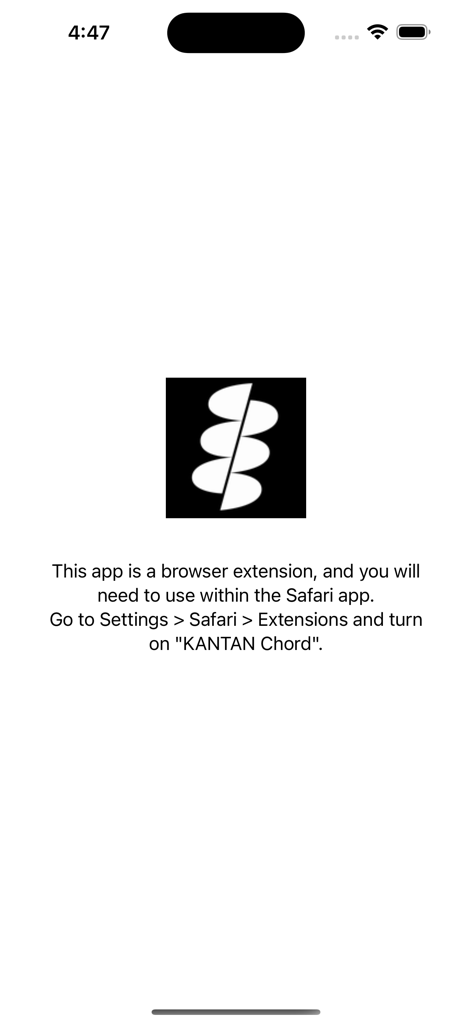
iOS 설정에서 KANTAN Chord Safari 확장 프로그램을 활성화하는 방법에 대한 지침이 있는 설정 화면.
설명
• Overview
KANTAN Chord is a browser extension that converts various chord sites' song chords to its "degrees", also known as Nashville Numbers.
(Former name: InstaChordizer)
• Compatible sites
- ULTIMATE GUITAR TABS(https://www.ultimate-guitar.com/)
- U-フレット(https://www.ufret.jp/)
- 楽器.me(https://gakufu.gakki.me/)
- J-Total Music(https://music.j-total.net/)
- Guitarians.com(https://guitarians.com/)
- 91譜(https://www.91pu.com.tw/)
• How to use
Open the chord web page.
From the browser extensions, choose KANTAN Chord icon and it opens a pop-up window.
Choose from tabs "C,F,G" (original) , "I,IV,V" (roman numerals), or "1,4,5" (degrees).
- "C,F,G" (original)
Displays the chords in its original form.
Select radio buttons change keys.
- "I,IV,V" (roman numerals)
Displays the chords' degrees, in standard roman numerals format.
- "1,4,5" (degrees)
Displays the chords' degrees, in numbers.
Different symbols follow the "KANTAN Chord" system, based on the Nashville Number System.
For more details, please visit this page: https://instachord.com/instruction/icn/
• Key analyzation
KANTAN Chord automatically analyzes the song's key and displays it in red text with a yellow background banner.
When the key changes during a song, it will be displayed with additional banners.
E.g. "Key:E(-3)" or "Key:Ab(+1)"
Numbers such as (-3) and (+1) represent half steps. If your instrument can transpose, try adjusting to these numbers.
If the key analyzation is wrong or is difficult to play, try adjusting the analyzation sensitivity.
- Ignore +-5 key changes
When changing to a dominant (+5 half steps) or subdominant key (-5 half steps) , chords used will be very similar to its original key. When this option is turned on, KANTAN Chord will ignore +-5 key changes and stay in its original key.
• Displayed keys
You can choose keys outside of the auto-analyzed key.
- Song's analyzed key
The song's auto-analyzed most likely key is outlined in a box.
- Difficulty rank
The numbers in front of the key (Eg. ①, ②, ③...) are difficulty ranks when playing on the InstaChord, from easiest to most difficult. Please use as reference, when the analyzed key if wrong or when the original key is difficult to play.
① and ② are in bold, and ① is underlined.
- Changing they key (in C,F,G tab)
When in the C,F,G tab, you can pick different keys to transpose to.
- Changing they key (in I,IV,V or 1,4,5 tab)
In I,IV,V or 1,4,5 tab, you can change the base key. Apply when the analyzed key is wrong, or when the original key is difficult to play. If other keys are greyed-out, turn off analyzation sensitivity.
• Options for C,F,G tab
- Disable automatic loading
KANTAN Chord will not take effect until the icon is pressed.
Use this option if there are compatibility issues with the site's features or other extensions.
This option is only effective in the C,F,G tab.
- Hide key display
KANTAN Chord displays the song's key and displays it in red text with a yellow background banner.
Use this option to hide the key display.
This option is only effective in the C,F,G tab.
• Options for I,IV,V tab
- b → #
All half tones are represented with #
- IIm, VIm → ii, vi
Minor chords are represented with lower case roman numerals.
• Options for 1,4,5 tab
- 3b/7b → 8/9 (5b/2b → 8/9 for minor key)
For the InstaChord, commonly used chords are allocated on the 8 and 9 buttons.
Using this option will make use of these buttons.
- Use minor key
Allows the use of minor key
• Beginner mode
By selecting LV.0 / LV.1 / LV.2 shown on the first line, you can adjust the difficulty of the chords.
In LV.0 / LV.1 mode, chords will be simplified.
In LV.2 mode, all chords will be in their original form.
This mode isl not available when minor key is selected.
이 페이지는 앱이나 개발자의 공식 페이지가 아니며, 정보 제공 및 논평을 목적으로 작성된 독립 편집 간행물입니다. 명시적으로 달리 언급되지 않는 한, 해당 앱이나 개발자는 MWM, Apple, Google Play, 앱 퍼블리셔 또는 앱 개발자와 제휴, 보증, 후원, 승인 또는 공식적으로 연결되어 있지 않으며, 이 페이지의 어떤 내용도 해당 앱이 MWM의 서비스를 사용하여 개발되었음을 의미하지 않습니다. 모든 상표, 로고, 스크린샷 및 기타 콘텐츠는 해당 소유자의 자산입니다.