Keep It Mobile
Keep It Mobile
다운로드: App Store

이 페이지는 앱이나 개발자의 공식 페이지가 아니며, 정보 제공 및 논평을 목적으로 작성된 독립 편집 간행물입니다. 명시적으로 달리 언급되지 않는 한, 해당 앱이나 개발자는 MWM, Apple, Google Play, 앱 퍼블리셔 또는 앱 개발자와 제휴, 보증, 후원, 승인 또는 공식적으로 연결되어 있지 않으며, 이 페이지의 어떤 내용도 해당 앱이 MWM의 서비스를 사용하여 개발되었음을 의미하지 않습니다. 모든 상표, 로고, 스크린샷 및 기타 콘텐츠는 해당 소유자의 자산입니다.

로고: Keep It Mobile
다운로드: App Store

Keep It Mobile

모든 메모, 링크, 문서를 완벽하게 캡처, 정리, 검색하세요. 강력하고 안전하며 Apple 생태계 경험을 중시하는 전문가를 위해 제작되었습니다.

주요 수치

다운로드

5K+

사용자 평점

4.6/5

총 평가 수

500

개발사

Steve Harris

카테고리

Productivity

지원 언어

3

최신 버전

2.7.7

크기

51.2 MB

출시일

2017년 9월 15일
기능

완벽하게 정리된 당신의 디지털 생활

복잡한 연구부터 일상적인 작업 관리까지, Keep It은 완벽한 Apple 경험을 요구하는 파워 유저를 위해 설계된 궁극의 전문가 작업 공간입니다.

정교한 지식 관리

계층적 폴더, 교차 기능 번들, 색상 코드 레이블을 사용하여 세컨드 브레인을 정리하고 중요한 프로젝트를 분리하여 접근 가능하게 유지하세요.

만능 문서 허브

Markdown으로 작성하거나, 실제 우편물을 스캔하거나, Apple Pencil로 PDF에 주석을 추가하세요. 작업하는 모든 파일 형식을 처리하는 전문가 수준의 라이브러리입니다.

다음 스크린샷과 설명은 앱의 공식 스토어 목록에서 직접 가져온 것이며 앱 개발자의 자산입니다.

앱 스토어

스크린샷
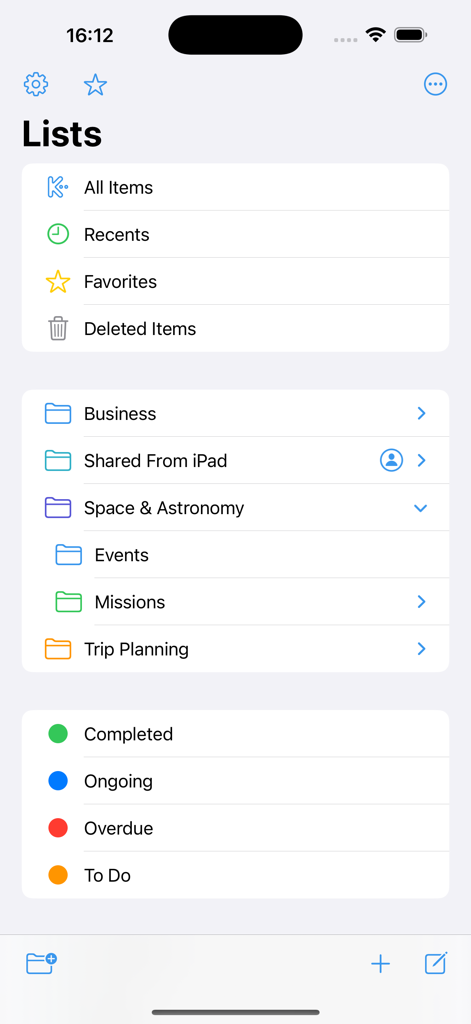
Keep It Mobile - 문서 관리를 위해 다양한 목록, 계층적 폴더 및 색상 코드 상태 레이블을 표시하는 Keep It Mobile 앱 인터페이스.
문서 관리를 위해 다양한 목록, 계층적 폴더 및 색상 코드 상태 레이블을 표시하는 Keep It Mobile 앱 인터페이스.

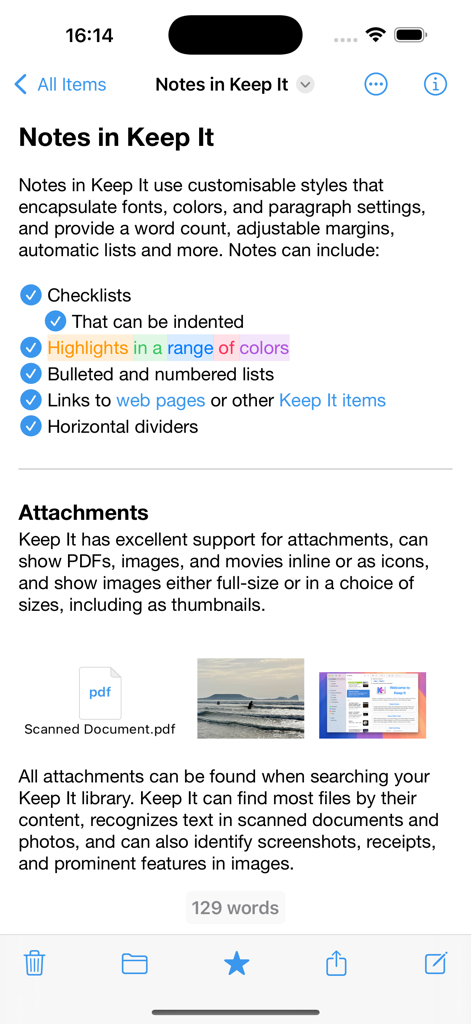
Keep It Mobile - 체크리스트, 색상 강조 표시 및 파일 첨부 파일이 있는 메모를 표시하는 Keep It Mobile 앱 인터페이스
체크리스트, 색상 강조 표시 및 파일 첨부 파일이 있는 메모를 표시하는 Keep It Mobile 앱 인터페이스

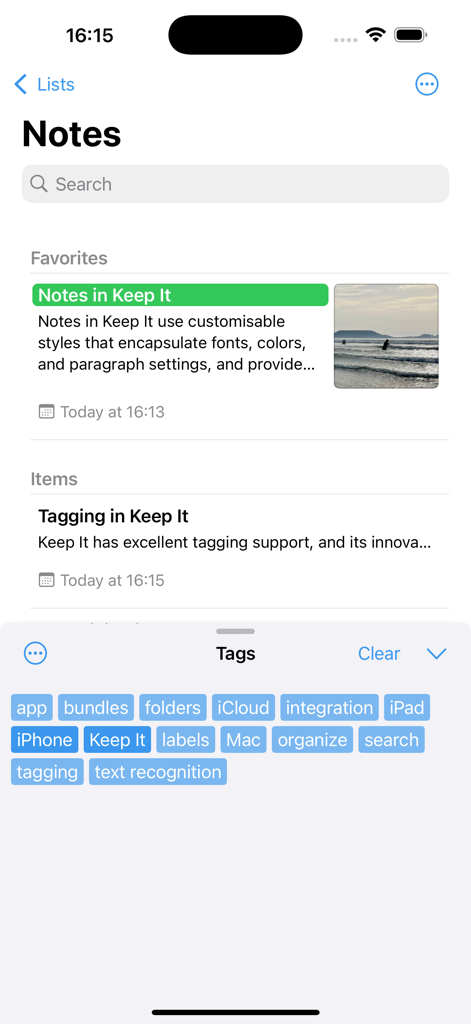
Keep It Mobile - 메모 목록과 디지털 정리를 위한 태그 클라우드 선택을 보여주는 Keep It Mobile 앱
메모 목록과 디지털 정리를 위한 태그 클라우드 선택을 보여주는 Keep It Mobile 앱

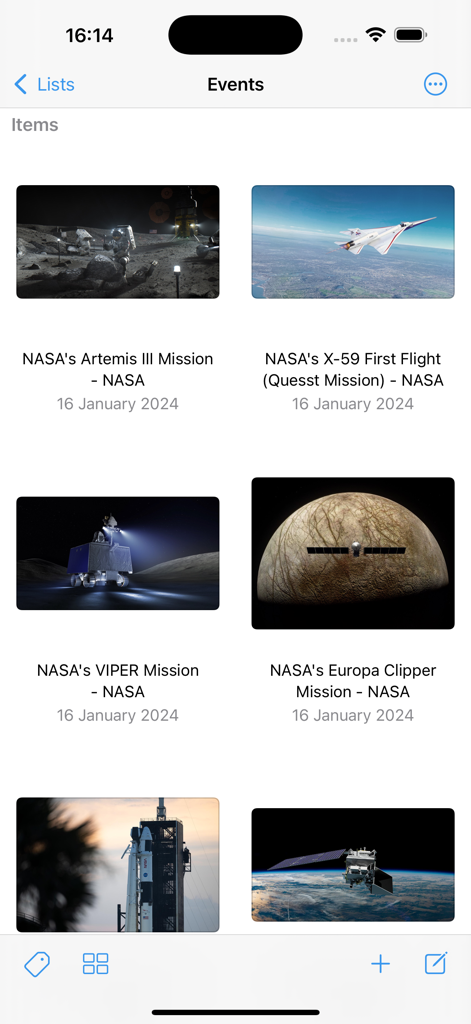
Keep It Mobile - 저장된 웹 링크 및 미션 문서의 그리드 보기를 표시하는 Keep It Mobile 앱

저장된 웹 링크 및 미션 문서의 그리드 보기를 표시하는 Keep It Mobile 앱

설명

Keep It for iPad and iPhone is a powerful notebook and document organizer that can be used on its own or in conjunction with Keep It for Mac, available separately. Keep It can create and edit notes, rich text, plain text and Markdown files, scan documents, edit PDFs, archive emails, save web links in a variety of formats, preview and search just about any kind of file, and organize these in a variety of ways. All the files, folders and tags you store in Keep It are available in the Files app, can be opened and edited in other applications, and shared with other Keep It users via iCloud. Notes, Documents and Everything Else • Create notes with styles, checklists and attachments that look good and read well on all your devices • Create and edit rich text, plain text and Markdown files • Adjustable display margins and word count available in all Keep It’s text editors • Scan documents, add photos or videos, and save any kind of file to Keep It’s library • Edit PDFs, play movies, and preview everything else with Quick Look • Save web links for offline viewing as PDFs or web archives • Create templates or empty files in any format using stationery • View and work with mail messages and their attachments • Merge multiple items into a single note Organize • Use folders to organize things hierarchically • Swipe right on a folder to focus the sidebar on it and its children • Add tags to items and filter items with one touch using the Tag Filter • Use color-coded labels to quickly identify items • Use bundles to collect items together and see them in more than one place • See favorite items, and add lists to the Favorites Bar • All lists can have their own sort settings and colors Works With Other Apps • Add text, links, and files to Keep It using its share extension • Access and manage all the files, folders and tags you add to Keep It in the Files app • Open files for editing in other apps from within Keep It or their document browser • Share items in Keep It to other apps using the Share sheet • Drag text, images, links, files and mail messages to Keep It • Automate Keep It with Shortcuts Search • Search for items by their names, kind, content, dates, tags and more • Combine suggestions to create complex queries with ease • Step through found text in notes, editable text documents, web pages, and PDFs • Save searches to the sidebar for reuse Keep It on iPad • Use Quick File to file items quickly using a keyboard-friendly interface • Use Quick Open to quickly navigate to any list or item by typing its name • Constrain the width when editing notes or text files in full screen mode • Annotate PDFs and images and add sketches to notes with Apple Pencil And More… • Use the Recents list to see things you’ve added or viewed lately • Share folders and items with other Keep It users via iCloud • Encrypt any file with a password • Copy clickable links to items and lists in Keep It • See items that link to the current item and navigate between them SUBSCRIPTIONS Use of Keep It Mobile requires a paid subscription that you can purchase in the app. A choice of monthly and yearly subscriptions is available, and these include a free trial. Payment will be charged to your iTunes Account following the free trial, unless you cancel the subscription at least 24-hours before the end of the trial period. The subscription will automatically renew unless auto-renew is turned off at least 24-hours before the end of the current period. Your iTunes Account will be charged for renewal within 24-hours prior to the end of the current period. Subscriptions may be managed and auto-renewal may be turned off by going to your Account Settings after purchase. Any unused portion of a free trial period, if offered, will be forfeited when the user purchases a subscription to that publication, where applicable. Terms of Use: https://reinventedsoftware.com/keepit/ios/terms.html

Download

다운로드: App Store

이 페이지는 앱이나 개발자의 공식 페이지가 아니며, 정보 제공 및 논평을 목적으로 작성된 독립 편집 간행물입니다. 명시적으로 달리 언급되지 않는 한, 해당 앱이나 개발자는 MWM, Apple, Google Play, 앱 퍼블리셔 또는 앱 개발자와 제휴, 보증, 후원, 승인 또는 공식적으로 연결되어 있지 않으며, 이 페이지의 어떤 내용도 해당 앱이 MWM의 서비스를 사용하여 개발되었음을 의미하지 않습니다. 모든 상표, 로고, 스크린샷 및 기타 콘텐츠는 해당 소유자의 자산입니다.








