
이 페이지는 앱이나 개발자의 공식 페이지가 아니며, 정보 제공 및 논평을 목적으로 작성된 독립 편집 간행물입니다. 명시적으로 달리 언급되지 않는 한, 해당 앱이나 개발자는 MWM, Apple, Google Play, 앱 퍼블리셔 또는 앱 개발자와 제휴, 보증, 후원, 승인 또는 공식적으로 연결되어 있지 않으며, 이 페이지의 어떤 내용도 해당 앱이 MWM의 서비스를 사용하여 개발되었음을 의미하지 않습니다. 모든 상표, 로고, 스크린샷 및 기타 콘텐츠는 해당 소유자의 자산입니다.


다운로드
7.5M+사용자 평점
총 평가 수
66.7K개발사
카테고리
Photo & Video지원 언어
1최신 버전
103크기
32.7 MB출시일
2017년 11월 22일테크 분석가가 본 핵심 기능 및 사용자 영향도
Lens Buddy - 셀프 타이머 카메라 앱 분석
핸즈프리 셀프 타이머
이 앱은 사용자가 버튼을 누르거나 기기를 들고 있지 않아도 개인 또는 단체 사진을 촬영할 수 있도록 지원하여 편리한 핸즈프리 촬영 경험을 제공합니다.
초고해상도 및 RAW 지원
이 도구는 최대 48MP의 초고해상도 사진 촬영 및 RAW 파일 저장을 지원하여 전문적인 수준의 이미지 품질과 후처리 유연성을 제공합니다.
인앱 사진 관리 및 평가
사용자는 앱 내에서 사진을 쉽게 평가하고 정리하여 카메라 롤을 깔끔하게 유지하고 소셜 미디어 업로드에 최적의 이미지를 선별할 수 있습니다.
인물 모드 및 수동 제어
이 앱은 인물 모드를 통해 피사체를 돋보이게 하는 아름다운 배경 흐림 효과를 제공하며, 줌, 초점, 노출 등 다양한 수동 제어로 사진을 정교하게 조정할 수 있습니다.
움직이는 피사체 추적 초점
이 도구는 사용자가 움직이더라도 피사체에 자동으로 초점을 맞춰 흐릿한 사진을 방지하고 항상 선명한 결과물을 얻을 수 있도록 합니다.
고속 연사 및 비디오 녹화
이 앱은 고속 연사 모드로 결정적인 순간을 포착할 수 있게 하며, 사진뿐만 아니라 비디오 녹화 기능도 제공하여 다양한 형식의 콘텐츠를 제작할 수 있습니다.
포토 부스 모드
사용자는 포토 부스 모드를 통해 여러 장의 연속 사진을 재미있게 촬영하며 독특하고 창의적인 콘텐츠를 쉽게 만들 수 있습니다.
직관적인 인터페이스 및 구도 도구
이 앱은 깔끔하고 사용하기 쉬운 인터페이스와 그리드, 수평계 등의 구도 도구를 제공하여 사용자가 쉽게 전문적인 사진을 촬영할 수 있도록 돕습니다.
자주 묻는 질문
에 대해 알아야 할 모든 것 Lens Buddy - Self Timer Camera
What is Lens Buddy and how does it work?
Lens Buddy is a powerful self-timer camera app that enables hands-free photo and video capture. It automatically takes pictures at customizable time intervals, eliminating the need to press buttons or hold the device.
Does Lens Buddy support 48MP or RAW photo capture?
Yes, Lens Buddy supports high-resolution imaging, including 48MP capture and high-quality photos. It also offers RAW photo support on compatible iOS 14.3 devices, starting with iPhone 12 Pro and Pro Max models.
Can I customize the self-timer settings in Lens Buddy?
Yes, Lens Buddy features a fully customizable timer. Users can select from various burst intervals or high-quality timer options, ranging from milliseconds to an hour, to precisely control their photoshoot.
How does Lens Buddy help organize and select the best photos?
Yes, Lens Buddy includes a built-in gallery for managing photos. Users can view, rate, and organize their captured images directly within the app, helping to streamline the selection and export process.
Does Lens Buddy require a paid subscription for camera roll integration?
Yes, Lens Buddy integrates with the device's camera roll. This optional feature, available with a paid subscription, allows users to save, sort into albums, view, and manage their photos directly in the system camera roll.
Can I control the focus settings in Lens Buddy?
Yes, Lens Buddy provides comprehensive focus control options. Users can choose between Auto, Tracking, Manual, and Locked focus modes to ensure subjects remain sharp and clearly defined during their hands-free photoshoots.
Does Lens Buddy include photo editing features?
Yes, Lens Buddy features an editing suite within the app. Users can enhance their photos with various filters and adjust parameters such as auto enhance, straighten, brightness, and contrast directly after capture.
Can Lens Buddy record videos?
Yes, Lens Buddy now supports video recording, in addition to its robust photo capabilities. This new feature allows users to capture hands-free video content alongside their timed photographs.
다음 스크린샷과 설명은 앱의 공식 스토어 목록에서 직접 가져온 것이며 앱 개발자의 자산입니다.
앱 스토어
스크린샷
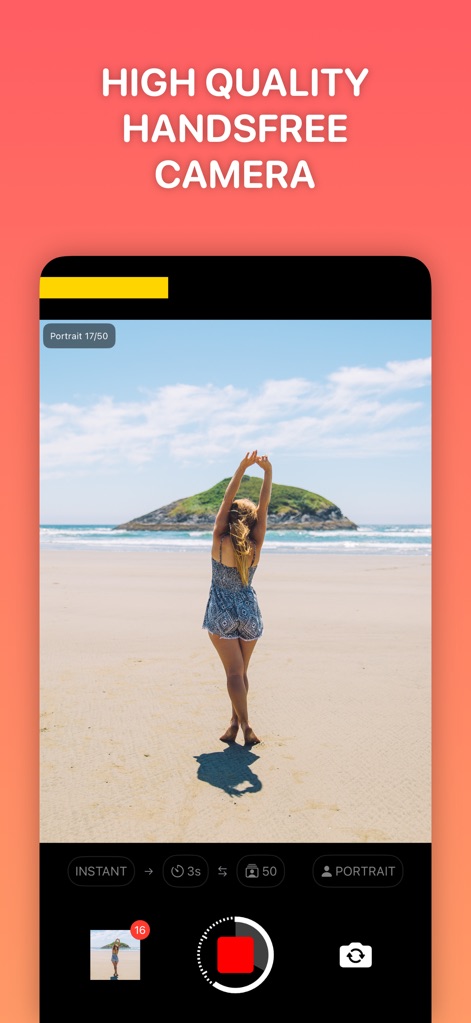
이 앱은 사용자가 버튼을 누르거나 장치를 잡을 필요 없이 고품질 사진을 찍을 수 있도록 지원하며, 즉석 촬영과 인물 모드 설정을 통해 편리함을 제공합니다.
고품질 핸즈프리 카메라
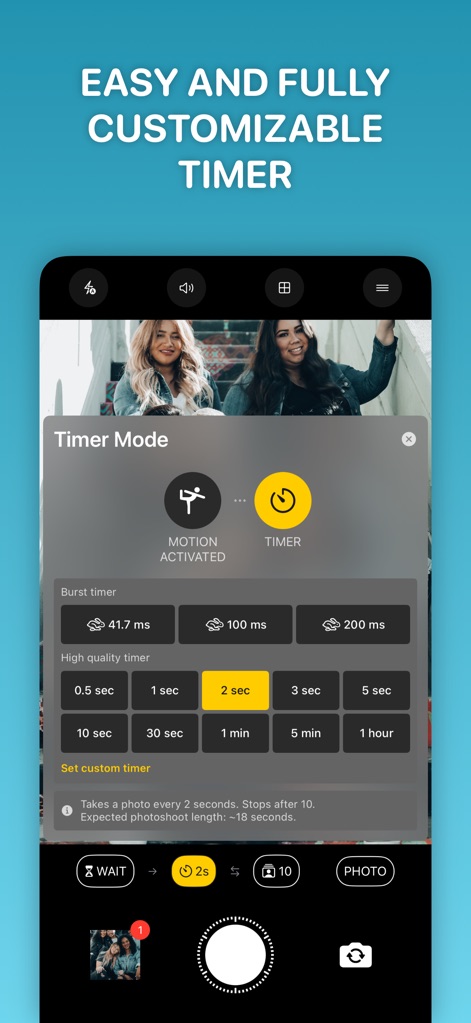
사용자는 모션 활성화 또는 타이머 모드를 선택하여 촬영 간격을 정밀하게 제어하며, 2초 간격으로 사진을 찍도록 커스텀 타이머를 설정할 수 있습니다.
간편한 맞춤형 타이머
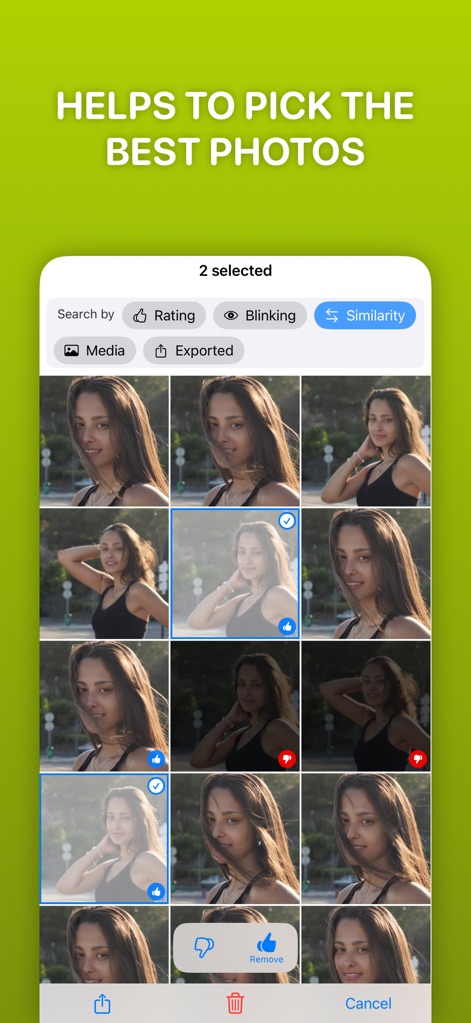
이 도구는 사용자가 '좋아요' 또는 '싫어요' 평가 기능을 활용하여 수많은 사진 중에서 가장 좋은 것을 쉽게 선별하고, 눈 깜빡임 여부와 같은 기준을 통해 유사한 이미지를 효율적으로 분류할 수 있도록 돕습니다.
최고의 사진 선별

이 앱은 사용자가 자동, 추적 또는 수동 포커스 모드를 통해 정밀하게 초점을 제어할 수 있게 하며, 50장의 연속 촬영과 같은 설정을 활용하여 개인 화보 촬영 경험을 극대화합니다.
나만의 개인 화보 촬영

사용자는 다양한 필터를 적용하여 사진의 분위기를 바꾸고, 밝기 및 대비 조절 기능을 통해 이미지 디테일을 섬세하게 편집하여 삼각대 없이도 완벽한 셀카를 완성할 수 있습니다.
삼각대 없이도 완벽한 셀카
설명
Download
비슷한 앱
유사한 기능과 사용자 경험을 가진 앱


이 페이지는 앱이나 개발자의 공식 페이지가 아니며, 정보 제공 및 논평을 목적으로 작성된 독립 편집 간행물입니다. 명시적으로 달리 언급되지 않는 한, 해당 앱이나 개발자는 MWM, Apple, Google Play, 앱 퍼블리셔 또는 앱 개발자와 제휴, 보증, 후원, 승인 또는 공식적으로 연결되어 있지 않으며, 이 페이지의 어떤 내용도 해당 앱이 MWM의 서비스를 사용하여 개발되었음을 의미하지 않습니다. 모든 상표, 로고, 스크린샷 및 기타 콘텐츠는 해당 소유자의 자산입니다.