
이 페이지는 앱이나 개발자의 공식 페이지가 아니며, 정보 제공 및 논평을 목적으로 작성된 독립 편집 간행물입니다. 명시적으로 달리 언급되지 않는 한, 해당 앱이나 개발자는 MWM, Apple, Google Play, 앱 퍼블리셔 또는 앱 개발자와 제휴, 보증, 후원, 승인 또는 공식적으로 연결되어 있지 않으며, 이 페이지의 어떤 내용도 해당 앱이 MWM의 서비스를 사용하여 개발되었음을 의미하지 않습니다. 모든 상표, 로고, 스크린샷 및 기타 콘텐츠는 해당 소유자의 자산입니다.


다운로드
5M+사용자 평점
총 평가 수
57.3K개발사
카테고리
Utilities지원 언어
9최신 버전
5.5크기
103.8 MB출시일
2014년 8월 2일LG 스마트 TV 사용자들을 위한 모바일 원격 제어 솔루션 검토
LGee : TV Remote 앱 분석
통합 스마트 TV 제어
이 앱은 사용자가 자신의 아이폰 또는 아이패드를 활용하여 LG 스마트 TV의 모든 기능을 편리하게 제어할 수 있도록 해줍니다. 이는 물리적 리모컨을 대체하거나 보완하려는 사용자에게 핵심적인 가치를 제공합니다.
아이폰/아이패드 기반 TV 제어
이 도구는 사용자의 아이폰 또는 아이패드를 완전한 기능을 갖춘 TV 리모컨으로 전환하여, 사용자가 모바일 기기에서 직접 미디어 소비를 효율적으로 제어할 수 있도록 돕습니다.
Web OS 및 스마트 TV 호환성
이 애플리케이션은 'Smart TV' 및 'Web OS' 기술을 탑재한 모든 LG TV 모델과 호환되어, 광범위한 LG 스마트 TV 소유자가 앱을 활용할 수 있게 합니다.
자동 TV 검색 기능
앱은 첫 실행 시 네트워크에서 TV를 자동으로 검색하여, 사용자가 복잡한 수동 설정 과정 없이 빠르고 쉽게 자신의 TV와 연결할 수 있도록 지원합니다.
직관적인 초기 설정
사용자는 앱이 TV를 제어하도록 한 번만 허용하면 바로 리모컨 기능을 사용할 수 있어, 매우 간편하고 사용자 친화적인 설정 과정을 제공합니다.
안정적인 네트워크 연결
이 앱은 WiFi 또는 이더넷 네트워크를 통해 TV와 연결되므로, 사용자가 물리적인 리모컨의 범위 제한 없이 안정적이고 효율적으로 TV를 제어할 수 있습니다.
자주 묻는 질문
에 대해 알아야 할 모든 것 LGee : TV Remote
What is the LGee app?
LGee is a remote control application that allows users to control their smart televisions directly from an iPhone or iPad. It supports various TV functions, including a trackpad feature.
Which TVs are compatible with the LGee application?
LGee works with smart televisions equipped with "Smart TV" and "Web OS" technology. The TV must be connected to the same WiFi or Ethernet network as the iPhone or iPad.
Is LGee an official LG television remote app?
No, LGee is not an official LG product. The developers are not affiliated with the LG company. This disclaimer is clearly stated within the app's description.
How do I connect the LGee app to my smart TV?
To connect, LGee searches for your TV on the network during its first launch. You must then allow the application to control your television from your device.
Does LGee require a subscription to use?
Yes, LGee offers auto-renewing subscriptions with yearly, monthly, and weekly durations. Payment for these subscriptions is charged to the user's iTunes Account.
Can I use LGee to control my TV from my iPhone?
Yes, LGee allows users to control their smart television from an iPhone or iPad. The app provides a full remote interface including navigation, number pad, and media controls.
How can I manage or cancel my LGee subscription?
Users can manage their LGee subscriptions and turn off auto-renewal via their iTunes Account Settings after purchase. No cancellation of the current subscription is allowed during its active period.
Does the LGee app include a trackpad for TV control?
The LGee application features a trackpad function. This allows users to control the mouse cursor on their smart TV interface directly from their iPhone or iPad screen.
Where can I find the LGee app's privacy policy?
The Privacy Policy for LGee is available at the provided link: https://nstx.io/LGee/privacy.html. Users can review the terms for data handling and privacy information there.
다음 스크린샷과 설명은 앱의 공식 스토어 목록에서 직접 가져온 것이며 앱 개발자의 자산입니다.
앱 스토어
스크린샷
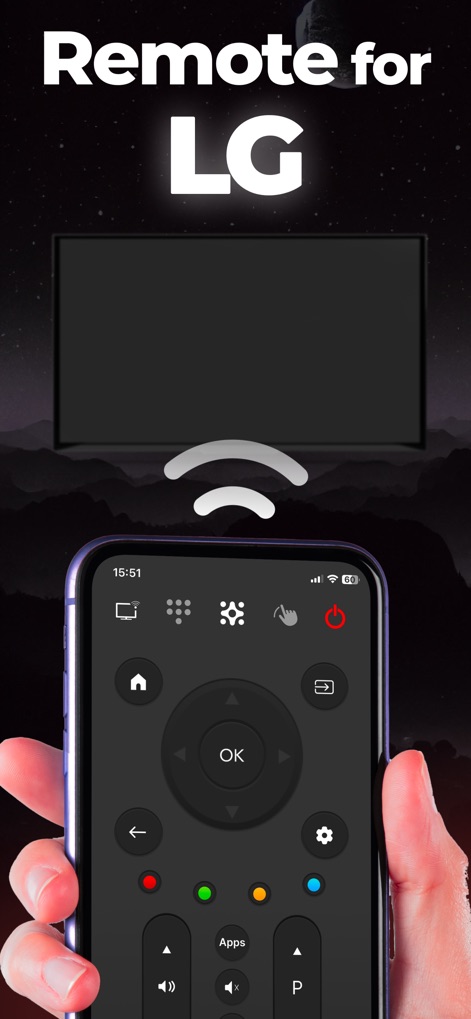
이 앱은 표준 리모컨과 유사한 메인 내비게이션 패드와 볼륨 및 채널 제어 버튼을 포함한 포괄적인 제어 기능을 아이폰에 제공합니다.
LG TV 제어

사용자는 TV 채널을 직접 입력할 수 있는 숫자 키패드와 미디어 재생을 위한 제어 버튼을 통해 TV를 쉽게 조작할 수 있습니다.
직관적인 TV 제어
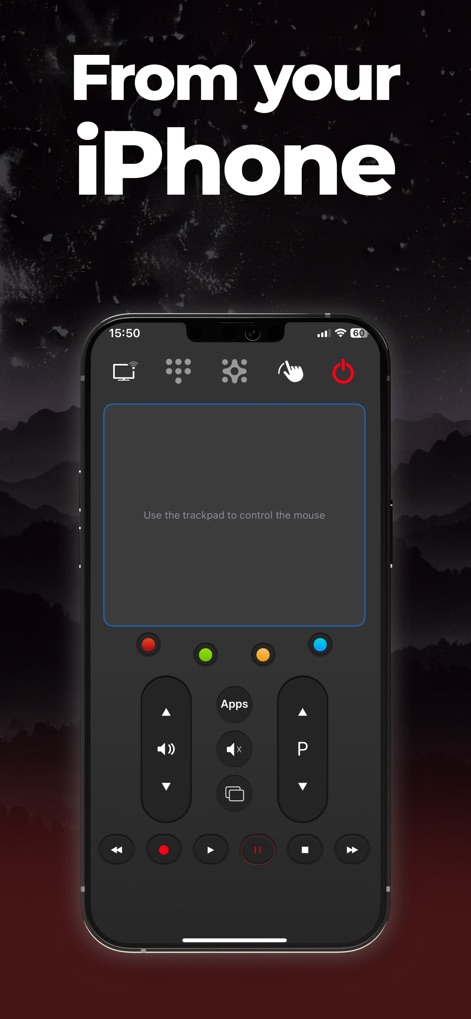
화면에 표시된 대형 트랙패드를 사용하여 마우스 커서를 제어하고, 상단의 포인터 아이콘을 탭하여 이 기능을 활성화할 수 있습니다.
아이폰으로 트랙패드

이 앱은 1,250만 회 이상의 다운로드 수를 기록하며, 높은 사용자 만족도를 보여주는 여러 별점 5개 사용자 리뷰와 함께 검증된 인기를 자랑합니다.
검증된 신뢰성
설명
Download
비슷한 앱
유사한 기능과 사용자 경험을 가진 앱

Skylight App
Glimpse LLC.

Remote Control for Samsung TV・
Red Paket sp. z o.o.

BARDI Smart Home
nadi digital indonesia, pt

LG TV Remote Control Smart TVs
Aleh Piashkou

UPPAbaby Home
Thorley Industries LLC

Calex Smart
Electro Cirkel Retail BV

Remote Control for TV Stick
Pol Nadal Serra

Firestick・Fire TV Remote Stick
Jonathan Reed

Bravia Controller - Sony TV
YONGXING JIN
이 페이지는 앱이나 개발자의 공식 페이지가 아니며, 정보 제공 및 논평을 목적으로 작성된 독립 편집 간행물입니다. 명시적으로 달리 언급되지 않는 한, 해당 앱이나 개발자는 MWM, Apple, Google Play, 앱 퍼블리셔 또는 앱 개발자와 제휴, 보증, 후원, 승인 또는 공식적으로 연결되어 있지 않으며, 이 페이지의 어떤 내용도 해당 앱이 MWM의 서비스를 사용하여 개발되었음을 의미하지 않습니다. 모든 상표, 로고, 스크린샷 및 기타 콘텐츠는 해당 소유자의 자산입니다.