
이 페이지는 앱이나 개발자의 공식 페이지가 아니며, 정보 제공 및 논평을 목적으로 작성된 독립 편집 간행물입니다. 명시적으로 달리 언급되지 않는 한, 해당 앱이나 개발자는 MWM, Apple, Google Play, 앱 퍼블리셔 또는 앱 개발자와 제휴, 보증, 후원, 승인 또는 공식적으로 연결되어 있지 않으며, 이 페이지의 어떤 내용도 해당 앱이 MWM의 서비스를 사용하여 개발되었음을 의미하지 않습니다. 모든 상표, 로고, 스크린샷 및 기타 콘텐츠는 해당 소유자의 자산입니다.


다운로드
100M+사용자 평점
총 평가 수
2.4M개발사
카테고리
Photo & Video지원 언어
23최신 버전
11.2.2크기
316.4 MB출시일
2014년 6월 22일Lightroom: AI Photo Editor 핵심 기능 심층 분석
모바일 환경에 최적화된 강력한 AI 기반 편집 기능 분석
AI 기반 빠른 편집 및 추천
이 앱은 AI가 사용자의 사진을 분석하여 최적의 편집을 제안하고, 한 번의 탭으로 전문가 수준의 보정을 적용하여 시간을 절약하고 만족스러운 결과를 제공합니다.
배경 흐림 및 개체 지우개
이 도구는 사진 배경을 손쉽게 흐리게 하여 피사체에 집중할 수 있도록 돕고, AI 기반 개체 지우개 기능을 통해 사진에서 불필요한 요소를 깔끔하게 제거할 수 있게 해줍니다.
커뮤니티 프리셋 및 스타일 공유
이 플랫폼은 전 세계 크리에이터들이 공유한 다양한 사진 필터와 프리셋을 탐색할 기회를 제공하며, 사용자가 최신 트렌드를 따르거나 자신만의 개성 있는 스타일을 손쉽게 구현할 수 있도록 지원합니다.
전문적인 정밀 편집 기능
이 앱은 노출, 하이라이트, 그림자 등 조명 조절과 색상 등급 지정, 색조, 채도 조정 같은 전문적인 편집 도구를 갖추고 있어, 사용자가 사진의 미세한 부분을 완벽하게 제어할 수 있습니다.
AI 기반 일괄 편집
이 기능은 여러 장의 사진에 동일한 편집 설정을 한 번에 적용할 수 있도록 하여, 대량의 사진을 빠르고 효율적으로 일관된 스타일로 보정할 수 있게 해줍니다.
통합된 동영상 편집 기능
이 앱은 사진 편집과 동일한 강력한 조명, 색상, 프리셋 도구를 동영상 클립에도 적용할 수 있도록 하여, 사용자가 영상 콘텐츠에도 일관된 시각적 미학을 부여할 수 있습니다.
자주 묻는 질문
에 대해 알아야 할 모든 것 Lightroom: AI Photo Editor
Is Adobe Lightroom a free app?
Yes, Adobe Lightroom is a free photo and video editor. It helps users enhance photos and videos with powerful AI editor tools and creative controls.
What AI editing features does Adobe Lightroom offer?
Adobe Lightroom offers AI editor tools such as Generative Remove for object removal, Quick Actions for suggested edits, and Adaptive Presets for enhancing specific photo elements.
Can I remove unwanted objects from photos using Lightroom?
Yes, Adobe Lightroom features Generative Remove, an AI photo eraser tool. It allows users to remove unwanted distractions or objects from photos with a few taps.
Does Adobe Lightroom provide video editing capabilities?
Yes, Adobe Lightroom includes video editing features. Users can apply creative energy to clips using tools for light, color, and presets to match their style.
How does Adobe Lightroom help improve portrait photos?
Adobe Lightroom offers Adaptive Presets for portraits and retouching tools. Users can enhance portraits with one-tap adjustments, including options for blemishes, skin, teeth, and eyes.
Can I apply edits to multiple photos at once in Adobe Lightroom?
Yes, Adobe Lightroom enables batch editing. Users can apply edits once and then fix photos in batches to maintain consistent photo edits across multiple images quickly and easily.
How can I blur the background in my photos using Lightroom?
Adobe Lightroom allows users to blur photo backgrounds for a polished look. It provides a "Background Blur" tool with various shapes and adjustable blur amounts.
Does Adobe Lightroom allow users to adjust sky elements?
Yes, Adobe Lightroom features Adaptive: Sky presets that instantly transform the sky in photos. Users can enhance specific parts of a photo like the sky.
Where can I find the Terms & Conditions for Adobe Lightroom?
The Terms & Conditions for Adobe Lightroom are available at http://www.adobe.com/go/terms_linkfree_en. This link is provided within the app's description.
Does Adobe Lightroom offer color correction tools?
Yes, Adobe Lightroom provides tools to boost color with precision. Users can adjust hue, saturation, color grading, and temperature to achieve the desired look for their photos.
다음 스크린샷과 설명은 앱의 공식 스토어 목록에서 직접 가져온 것이며 앱 개발자의 자산입니다.
앱 스토어
스크린샷

모두를 위한 전문가 보정
이 앱은 에디터 초이스 배지와 다양한 사전 설정 옵션을 통해 전문가 수준의 보정을 제공합니다.

AI 기반 개체 제거
사용자는 이 도구를 통해 배경의 불필요한 인물을 생성형 AI로 감지하고 손쉽게 제거할 수 있습니다.

하늘 즉시 변환
이 기능은 '적응형: 하늘' 프리셋을 활용하여 흐린 하늘을 생기 넘치는 파란색으로 바꾸고 여러 가지 하늘 옵션을 제공합니다.

손쉬운 인물 리터치
이 앱은 '리터치' 메뉴에서 피부 잡티와 치아 미백 같은 다양한 보정 옵션을 제공하여 인물 사진을 완벽하게 다듬을 수 있습니다.

원탭 인물 프리셋
이 도구는 '적응형: 인물' 기능으로 인물 사진의 분위기를 향상시키며, '광택 인물' 및 '세련된 인물'과 같은 다양한 원탭 프리셋을 제공합니다.
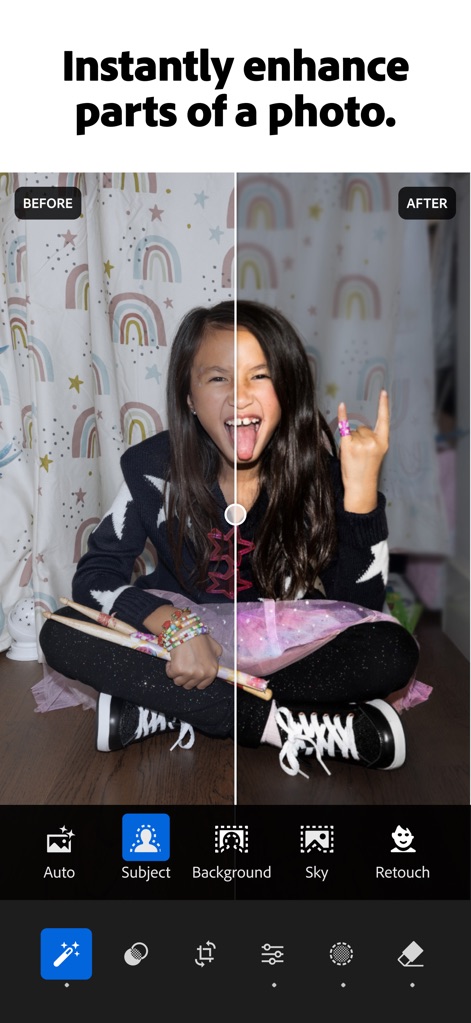
사진 부분별 강화
사용자는 이 앱의 '주제' 및 '배경' 선택 기능을 통해 사진의 특정 부분을 정밀하게 조절하여 즉각적인 개선을 경험할 수 있습니다.

배경 흐림 효과
이 기능은 '원형'과 '링'과 같은 다양한 블러 형태를 제공하여 사진의 배경을 자연스럽고 빠르게 흐리게 처리합니다.
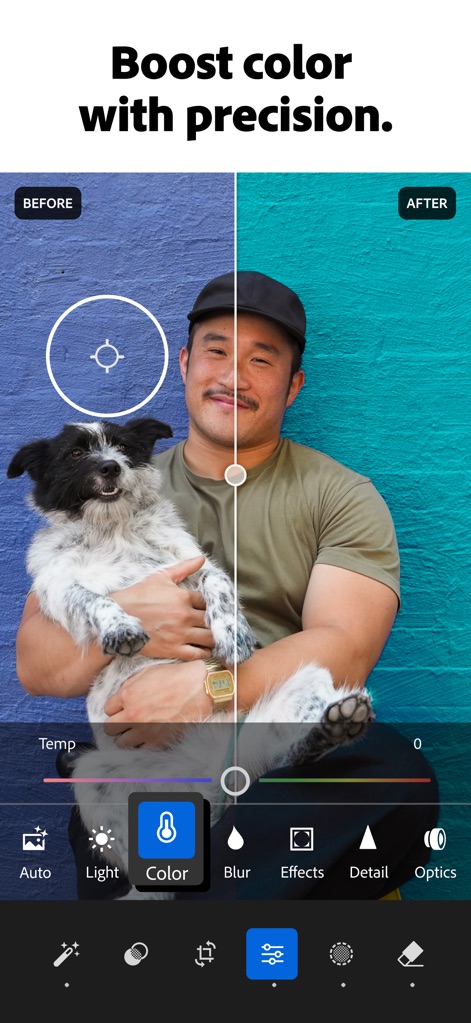
정교한 색상 조정
이 앱은 직관적인 색상 선택 도구와 온도 슬라이더를 활용하여 사진의 색감을 미세하게 조절하고 생동감을 더합니다.

스타일리시한 동영상 편집
사용자는 이 도구에서 '색상' 및 '효과'와 같은 다양한 기능을 사용하여 동영상 클립에 원하는 분위기와 스타일을 적용할 수 있습니다.
설명
Download
비슷한 앱
유사한 기능과 사용자 경험을 가진 앱

MIX-Photo Editor & Filters
灏 徐

Presets for Lightroom - FLTR
Onelight Apps CY Ltd

Colorby: AI Photo Color Editor
Zhanghan Ke

PRESETS: Filters for Pictures
Gustas Brazaitis

Edith: Presets for Lightroom
MWM

Soft Focus Lite 〜beauty selfie
handyCloset Inc.

BerryFilm - Korean Style Cam
Seungyun Kim

Presets for Lightroom: Filters
Alenrom sp. z o.o.

Video Filters Photo Editor TON
Onelight Apps CY Ltd
이 페이지는 앱이나 개발자의 공식 페이지가 아니며, 정보 제공 및 논평을 목적으로 작성된 독립 편집 간행물입니다. 명시적으로 달리 언급되지 않는 한, 해당 앱이나 개발자는 MWM, Apple, Google Play, 앱 퍼블리셔 또는 앱 개발자와 제휴, 보증, 후원, 승인 또는 공식적으로 연결되어 있지 않으며, 이 페이지의 어떤 내용도 해당 앱이 MWM의 서비스를 사용하여 개발되었음을 의미하지 않습니다. 모든 상표, 로고, 스크린샷 및 기타 콘텐츠는 해당 소유자의 자산입니다.