MATLAB Mobile

MATLAB Mobile

다운로드: App Store다운로드: Google Play
로고: MATLAB Mobile

MATLAB Mobile: 어디서든 가능한 기술 컴퓨팅 및 데이터 과학

iPhone 또는 iPad에서 MATLAB의 강력한 기능을 활용하세요. 명령을 실행하고, 3D 플롯을 시각화하고, 원활한 클라우드 동기화를 통해 실시간 센서 데이터를 수집하세요.

개발사

The MathWorks, Inc.

카테고리

Business

다운로드

1M+

사용자 평점

3.3/5

총 평가 수

600

지원 언어

8

주머니 속의 연구실

이 인터페이스를 사용하는 1M+ 명의 사용자.

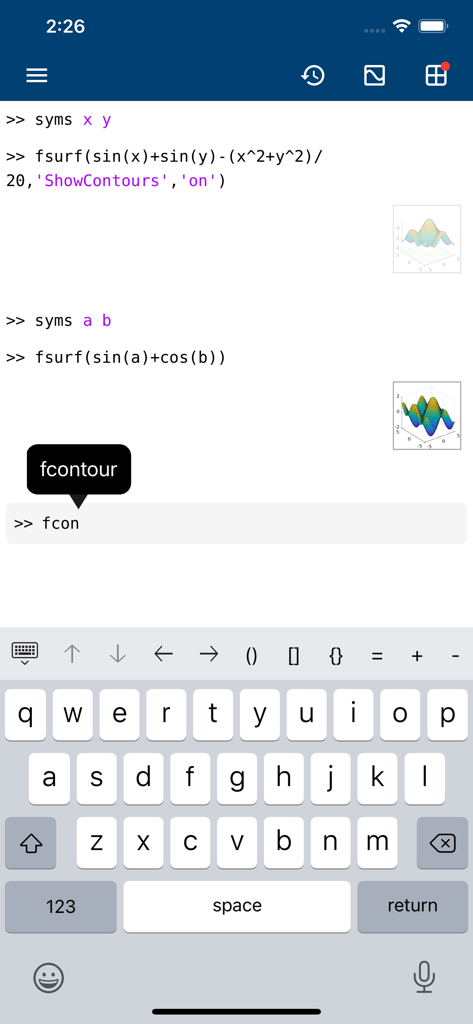
MATLAB Mobile 명령줄 인터페이스에 수학 코드, 3D 플롯 미리 보기 및 특수 키보드가 표시됩니다.

MATLAB Mobile 명령줄 인터페이스에 수학 코드, 3D 플롯 미리 보기 및 특수 키보드가 표시됩니다.

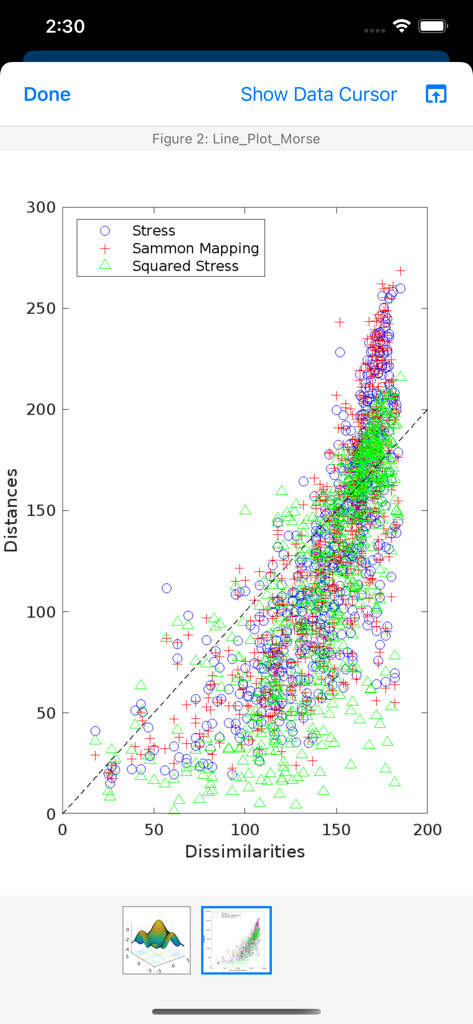
MATLAB Mobile의 산점도에 응력과 Sammon 매핑 데이터 포인트가 좌표 평면에 표시됩니다.

MATLAB Mobile의 산점도에 응력과 Sammon 매핑 데이터 포인트가 좌표 평면에 표시됩니다.

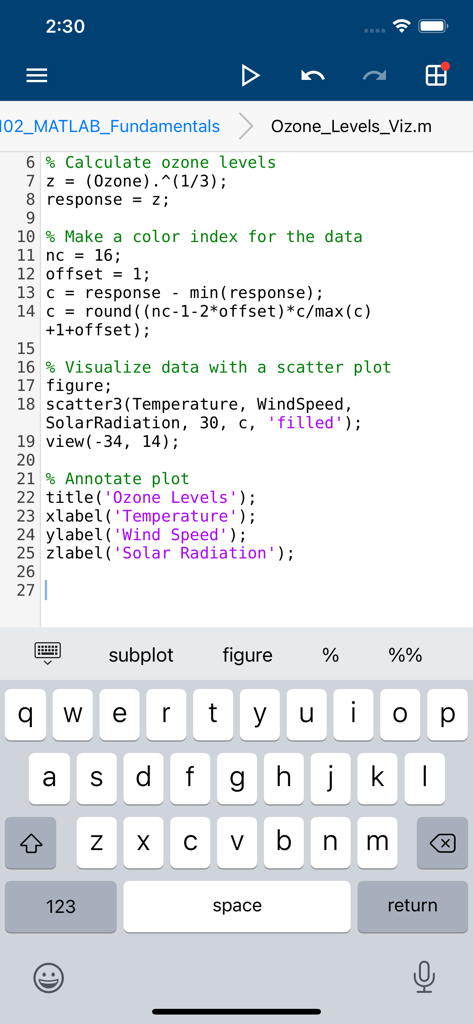
MATLAB Mobile 앱 인터페이스에 사용자 지정 코딩 키보드가 있는 스크립트 편집기가 표시됩니다.

MATLAB Mobile 앱 인터페이스에 사용자 지정 코딩 키보드가 있는 스크립트 편집기가 표시됩니다.

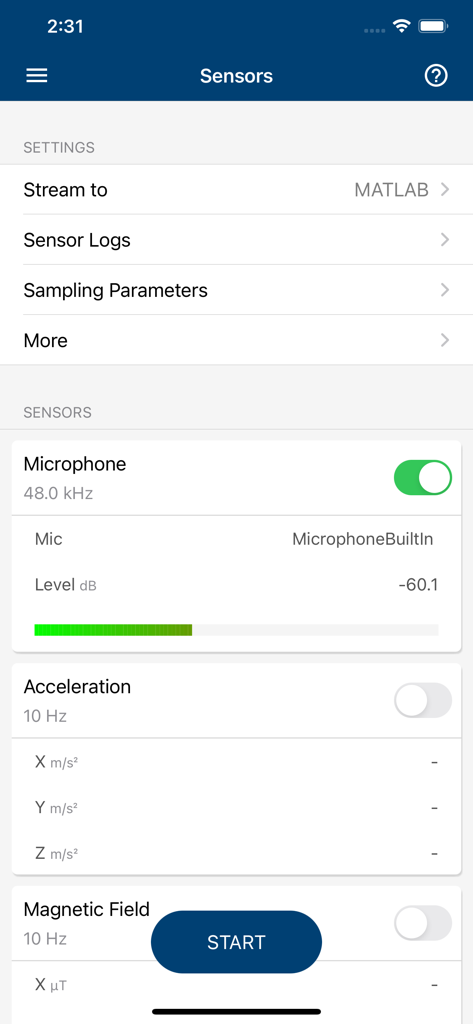
MATLAB Mobile 센서 화면에 마이크 데이터 수집 및 설정이 표시됩니다.

MATLAB Mobile 센서 화면에 마이크 데이터 수집 및 설정이 표시됩니다.

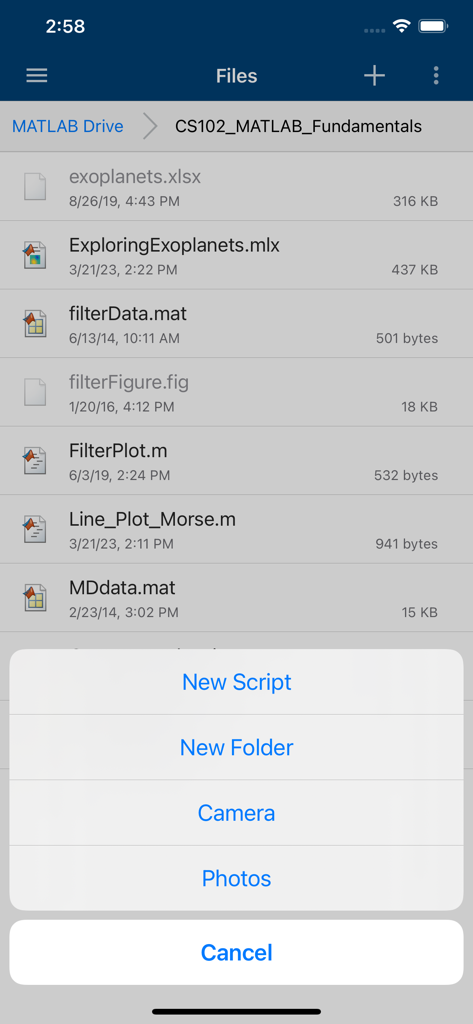
MATLAB Mobile 앱 인터페이스에 MATLAB Drive의 프로젝트 파일 목록과 새 스크립트를 만들거나 카메라에 액세스하는 옵션 메뉴가 표시됩니다.

MATLAB Mobile 앱 인터페이스에 MATLAB Drive의 프로젝트 파일 목록과 새 스크립트를 만들거나 카메라에 액세스하는 옵션 메뉴가 표시됩니다.

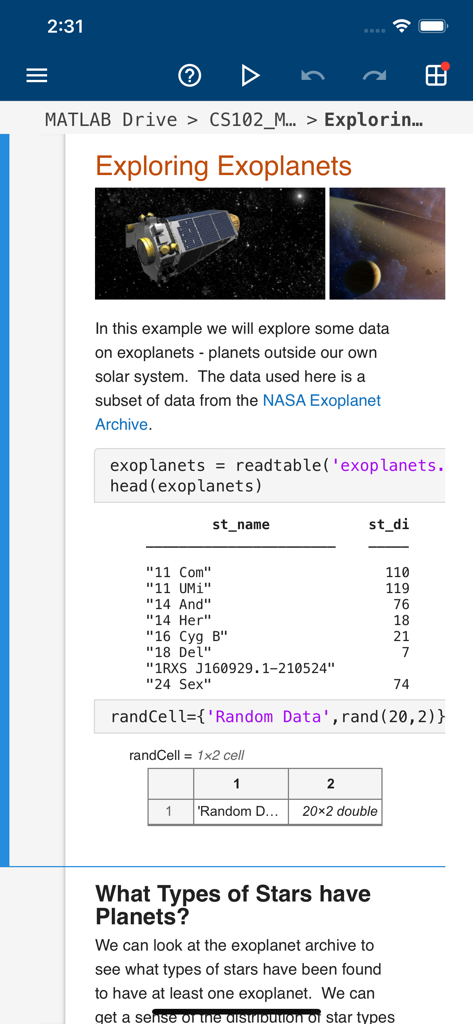
MATLAB Mobile에 외계 행성에 대한 데이터 분석 스크립트가 코드와 결과와 함께 표시됩니다.

MATLAB Mobile에 외계 행성에 대한 데이터 분석 스크립트가 코드와 결과와 함께 표시됩니다.

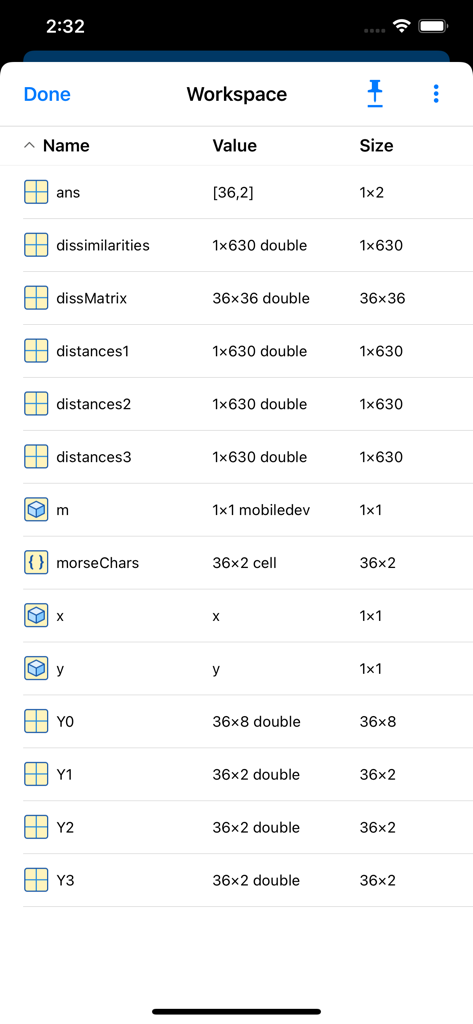
MATLAB Mobile 워크스페이스의 변수 목록에 이름, 값, 크기가 표시됩니다.

MATLAB Mobile 워크스페이스의 변수 목록에 이름, 값, 크기가 표시됩니다.

이동 중에도 뛰어난 엔지니어링

이 앱을 돋보이게 하는 도구, 1M+ 명의 사용자가 선택.

📍

즉각적인 센서 통합

iPhone 또는 iPad를 모바일 연구실로 변환하세요. GPS, 가속도계, 카메라와 같은 내장 센서에서 데이터를 스트리밍하고 기록하여 워크스페이스로 직접 가져오세요.

⌨️

완벽한 명령 액세스

MATLAB 구문에 최적화된 사용자 지정 키보드를 사용하여 스크립트를 실행하고 명령을 평가하세요. 책상을 떠났다고 해서 생산성이 멈추는 것은 아닙니다.

📊

동적인 데이터 시각화

복잡한 데이터 세트를 즉시 시각화하기 위한 멋진 2D 및 3D 플롯을 생성하세요. 최대 20GB의 클라우드 스토리지를 사용하여 프로젝트를 동기화 상태로 유지하세요.

앱 소개

에 대해 알아야 할 모든 것 MATLAB Mobile.

설명

Connect to MATLAB® from your iPhone or iPad. Evaluate MATLAB commands, create and edit files, view results, acquire data from sensors, and visualize data – from the convenience of your mobile device. CONNECT TO THE CLOUD Use your MathWorks Account to connect to MathWorks Cloud from MATLAB Mobile™. Linking a license that is current on MathWorks Software Maintenance Service to your MathWorks Account increases your storage quota and unlocks access to other add-on products on the license. With your MathWorks Account, you can: • Access MATLAB from the command-line • View, run, edit and create files from the Editor • Acquire data from device sensors • Store your files and data on MATLAB Drive (you receive 5 GB of cloud storage) Link a license that is current on MathWorks Software Maintenance Service to your MathWorks Account to unlock the following features: • Access to other add-on products on your license • 20 GB of cloud storage on MATLAB Drive FEATURES • Command-line access to MATLAB and add-on products • 2D and 3D plots to visualize data • Editor to view, run, edit and create MATLAB files • Data acquisition from device sensors • Image and video acquisition from the camera • Cloud storage and synchronization with MATLAB Drive • Custom keyboard to enter typical MATLAB syntax LIMITATIONS The following features are not supported: • Using MATLAB Apps, such as Curve Fitting • Creating apps with App Designer • Interacting with 3D figures • Opening or creating models using the Simulink graphical environment Note: Continued use of GPS running in the background can dramatically decrease battery life. ABOUT MATLAB  MATLAB is the leading technical computing software for algorithm development, data visualization, data analysis, and numeric computation. MATLAB is used in a wide range of applications, including signal and image processing, communications, control design, test and measurement, financial modeling and analysis, and computational biology.

최신 버전

9.10

크기

25.5 MB

출시일

2010년 5월 22일

MATLAB의 강력한 기능을 어디든 휴대하세요

1백만 명 이상의 엔지니어, 과학자, 학생들과 함께하세요. iPhone 또는 iPad에서 직접 명령을 실행하고, 센서 데이터를 캡처하고, 결과를 시각화하세요.

다운로드: App Store다운로드: Google Play
FAQ

자주 묻는 질문

에 대해 알아야 할 모든 것 MATLAB Mobile

MATLAB Mobile이란 무엇인가요?

MATLAB Mobile은 iPhone 또는 iPad에서 MATLAB에 연결합니다. 명령을 평가하고, 파일을 생성/편집하고, 결과를 보고, 센서 데이터를 수집하고, 데이터를 시각화합니다.

MATLAB Mobile을 사용하여 MATLAB 명령을 실행할 수 있나요?

예, MATLAB Mobile을 사용하면 명령줄에서 MATLAB에 액세스할 수 있습니다. 모바일 장치에서 직접 MATLAB 명령을 평가할 수 있습니다.

MATLAB Mobile은 2D 및 3D 플롯을 표시하나요?

예, MATLAB Mobile은 2D 및 3D 플롯으로 데이터를 시각화합니다. 사용자는 장치에서 복잡한 데이터 표현을 직접 볼 수 있습니다.

MATLAB Mobile에서 파일을 어떻게 관리하나요?

MATLAB Mobile은 MATLAB 파일을 보고, 실행하고, 편집하고, 생성하는 편집기를 제공합니다. 또한 MATLAB Drive를 통한 클라우드 저장 및 동기화를 제공합니다.

MATLAB Mobile은 데이터 수집을 위해 내 장치의 센서를 사용할 수 있나요?

예, MATLAB Mobile은 마이크, 가속도, 자기장 등 장치 센서에서 데이터를 수집합니다. 이 기능을 통해 실시간 데이터 수집이 가능합니다.

MATLAB Mobile 사용자의 클라우드 저장 용량은 얼마인가요?

MATLAB Mobile은 MathWorks 계정으로 MATLAB Drive에서 5GB의 클라우드 저장 공간을 제공합니다. 현재 라이선스를 연결하면 이 용량이 20GB로 증가합니다.

MATLAB Mobile에서 지원되지 않는 기능은 무엇인가요?

MATLAB Mobile은 MATLAB 앱, App Designer, 3D 그림과의 상호 작용 또는 Simulink 그래픽 환경을 사용한 모델 열기/생성을 지원하지 않습니다.

MATLAB Mobile에는 MATLAB 구문을 위한 특수 키보드가 있나요?

예, MATLAB Mobile에는 사용자 지정 키보드가 포함되어 있습니다. 이 키보드는 명령줄 작업 및 스크립트 편집 중에 일반적인 MATLAB 구문을 효율적으로 입력하는 데 도움이 됩니다.

MATLAB Mobile 내에서 새 스크립트나 폴더를 만들 수 있나요?

예, MATLAB Mobile을 사용하면 앱 내에서 직접 새 스크립트와 새 폴더를 만들 수 있습니다. 이를 통해 프로젝트 파일을 구성하는 데 도움이 됩니다.

MATLAB Mobile은 이미지 및 비디오 수집을 어떻게 처리하나요?

MATLAB Mobile은 장치 카메라에서 직접 이미지와 비디오를 수집합니다. 이를 통해 시각 데이터를 MATLAB 프로젝트에 통합할 수 있습니다.

App information, icons, screenshots, and descriptions displayed on this page are sourced from the Apple App Store and are the property of their respective developers. Download estimates and rankings are based on MWM's proprietary models and may not reflect actual figures. This page is provided for informational and analytical purposes only.

Believe this page infringes your intellectual property? File a dispute