
이 페이지는 앱이나 개발자의 공식 페이지가 아니며, 정보 제공 및 논평을 목적으로 작성된 독립 편집 간행물입니다. 명시적으로 달리 언급되지 않는 한, 해당 앱이나 개발자는 MWM, Apple, Google Play, 앱 퍼블리셔 또는 앱 개발자와 제휴, 보증, 후원, 승인 또는 공식적으로 연결되어 있지 않으며, 이 페이지의 어떤 내용도 해당 앱이 MWM의 서비스를 사용하여 개발되었음을 의미하지 않습니다. 모든 상표, 로고, 스크린샷 및 기타 콘텐츠는 해당 소유자의 자산입니다.


다운로드
1M+사용자 평점
총 평가 수
977개발사
카테고리
Graphics & Design지원 언어
33최신 버전
1.0.33크기
73.5 MB출시일
2024년 6월 11일Microsoft Designer는 AI를 활용하여 누구나 쉽게 시각 콘텐츠를 생성하고 편집할 수 있도록 지원하는 직관적인 디자인 도구입니다.
Microsoft Designer 주요 기능 분석
AI 기반 이미지 생성
이 도구는 사용자가 상상하는 모든 이미지를 AI의 힘으로 만들어낼 수 있도록 지원합니다. 공상 과학 예술, 초현실적인 장면, 재미있는 이미지를 말로 묘사하여 시각화할 수 있게 해줍니다.
AI 기반 사진 편집
이 앱은 AI 기능을 활용하여 사진을 완벽하게 편집할 수 있도록 합니다. 배경 제거, 불필요한 요소 지우기, 배경 흐리게 처리 등의 기능으로 사용자의 사진을 개선합니다.
개인화된 디자인 템플릿
이 도구는 사용자가 생일 카드, 청첩장, 소셜 미디어 게시물, 배경화면 등 다양한 개인화된 디자인을 손쉽게 만들 수 있도록 여러 템플릿과 사용자 정의 옵션을 제공합니다.
텍스트 기반 스티커 및 이모티콘 생성
사용자는 메시징 앱이나 소셜 미디어에서 돋보일 수 있는 독특한 맞춤 스티커와 이모티콘을 텍스트 설명을 통해 만들 수 있습니다.
이미지 스타일 변환
이 앱은 사용자의 사진을 예술 작품으로 변환할 수 있는 기능을 제공합니다. 인물 사진, 풍경 사진, 반려동물 사진 등을 다양한 예술적인 스타일로 바꿀 수 있게 해줍니다.
커스텀 모노그램 및 아이콘 제작
이 도구는 사용자가 개인적인 흔적을 남기거나 특별한 행사를 위해 맞춤 모노그램과 아이콘을 제작할 수 있도록 지원하여 디자인에 개성을 더합니다.
자주 묻는 질문
에 대해 알아야 할 모든 것 Microsoft Designer
What is Microsoft Designer?
Microsoft Designer is an AI-powered app that enables users to visually create, design, and edit images, designs, and photos. It uses generative AI to produce personalized content such as cards, wallpapers, and social posts.
Is Microsoft Designer free to use?
Yes, Microsoft Designer is available for free. Users access its features with a Microsoft account, which includes 5 GB of free cloud storage for saving designs, files, and photos across devices.
How do I create AI images with Microsoft Designer?
Microsoft Designer allows users to create unique images using generative AI. Users describe their desired image with words, and the AI then generates the visual content based on the text prompt.
Can Microsoft Designer remove backgrounds from photos?
Yes, Microsoft Designer includes an AI-powered feature called 'Remove background' that easily removes unwanted image backgrounds in one step. This helps users highlight subjects in their photos.
Does Microsoft Designer have a feature to erase objects from photos?
Microsoft Designer offers a 'Generative erase' feature that utilizes AI to remove distractions from photos. Users can make unwanted objects disappear from their images with precision.
What types of greeting cards can be made with Microsoft Designer?
Users can craft custom greeting cards in Microsoft Designer for various occasions, including birthdays and holidays. The app allows for personalized messages and images to be integrated into the designs.
Can I make custom stickers with Microsoft Designer?
Yes, Microsoft Designer enables users to create custom stickers. These personalized stickers can be used to stand out on messaging apps, social media, and other digital platforms.
다음 스크린샷과 설명은 앱의 공식 스토어 목록에서 직접 가져온 것이며 앱 개발자의 자산입니다.
앱 스토어
스크린샷
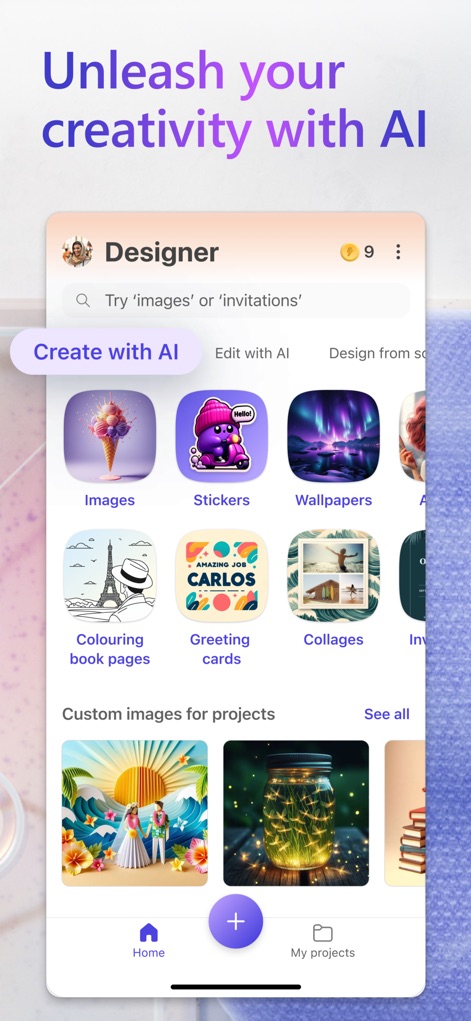
이 앱의 홈 화면에서 다양한 AI 기반 생성 옵션을 탐색할 수 있으며, '이미지' 및 '스티커'와 같은 주요 기능을 바로 시작할 수 있습니다.
AI로 창의력 발휘
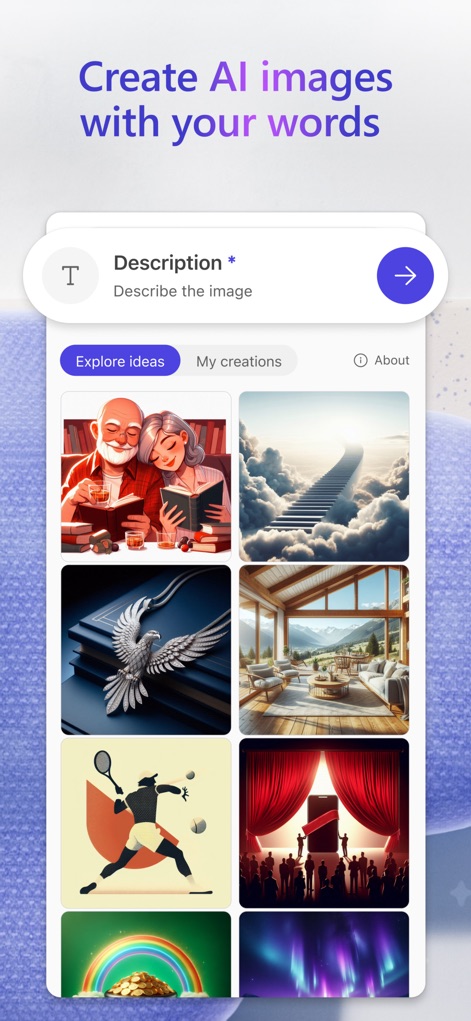
사용자는 텍스트 설명을 입력하여 AI 이미지를 생성할 수 있으며, 다양한 스타일의 'AI 생성 이미지'와 '탐색 아이디어'를 볼 수 있습니다.
상상력을 현실로
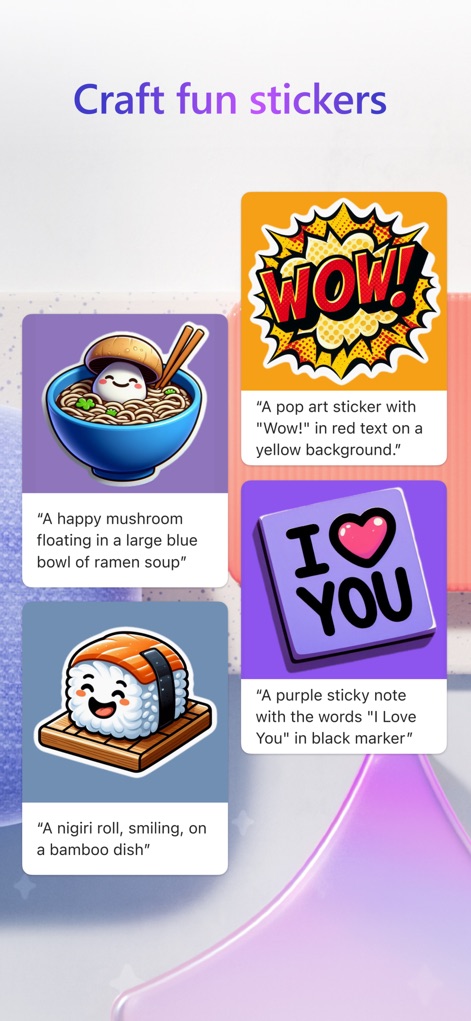
이 도구는 사용자가 '라면 이미지' 및 '팝아트 스타일 텍스트'와 같은 다양한 테마로 맞춤 스티커를 만들 수 있게 돕습니다.
개성 있는 스티커 제작
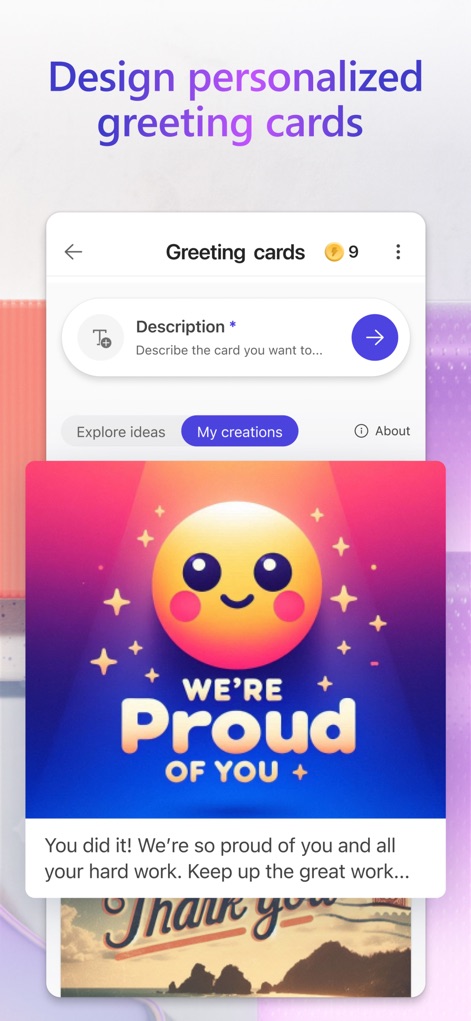
사용자는 AI에 카드 설명을 입력하여 맞춤 인사말 카드를 생성할 수 있으며, '행복한 이모지'와 '격려 메시지'가 담긴 카드를 미리 볼 수 있습니다.
맞춤형 카드 디자인
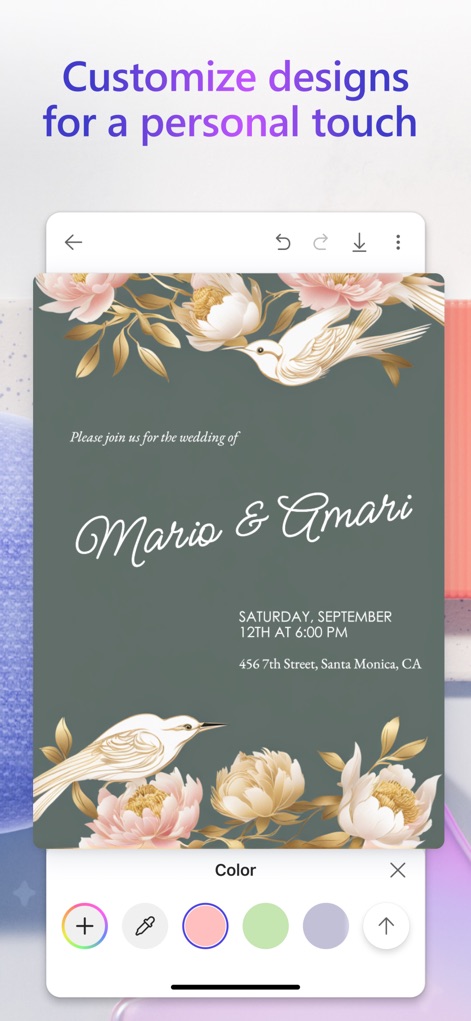
이 앱은 사용자가 '결혼식 초대장'과 같은 디자인 요소를 '다양한 색상 팔레트'로 개인화할 수 있도록 지원합니다.
디자인에 개성을 더하다
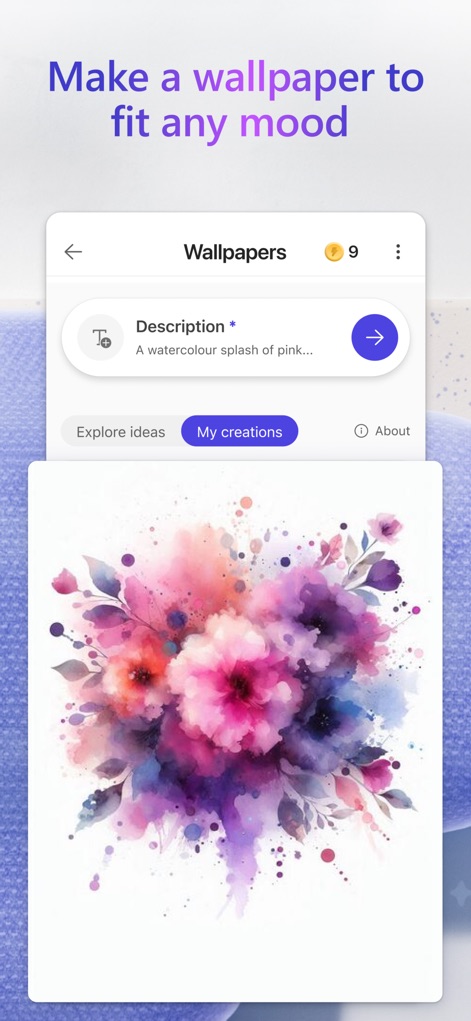
사용자는 텍스트 프롬프트를 사용하여 '수채화 꽃'과 같은 맞춤형 배경화면을 생성할 수 있으며, '나의 창작물' 섹션에서 이를 관리할 수 있습니다.
분위기 맞춤 배경화면
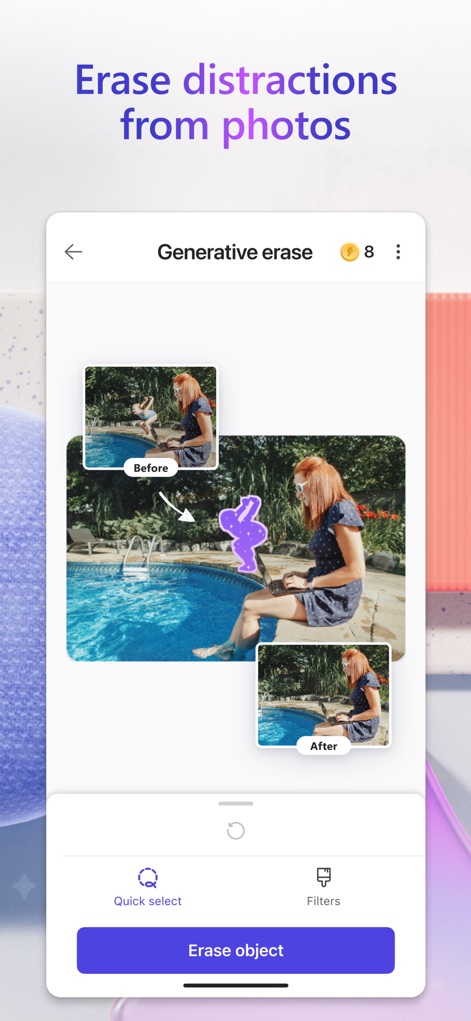
이 도구의 생성형 지우개 기능으로 사진에서 '불필요한 인물'을 쉽게 제거하고 '개체 지우기' 옵션으로 완벽한 이미지를 만들 수 있습니다.
불필요한 요소 제거
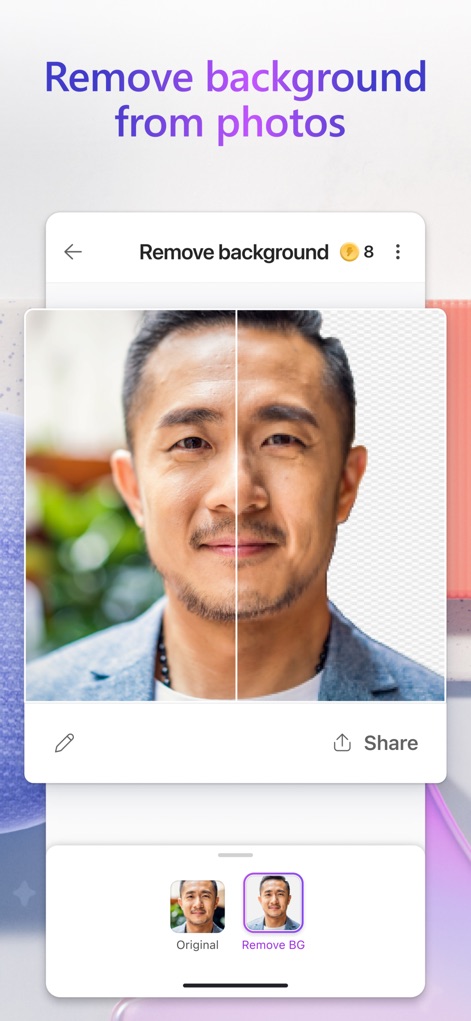
사용자는 '배경 제거' 기능으로 사진 속 '인물의 배경'을 단 한 번의 탭으로 투명하게 만들어 피사체를 돋보이게 할 수 있습니다.
배경을 한 번에 제거
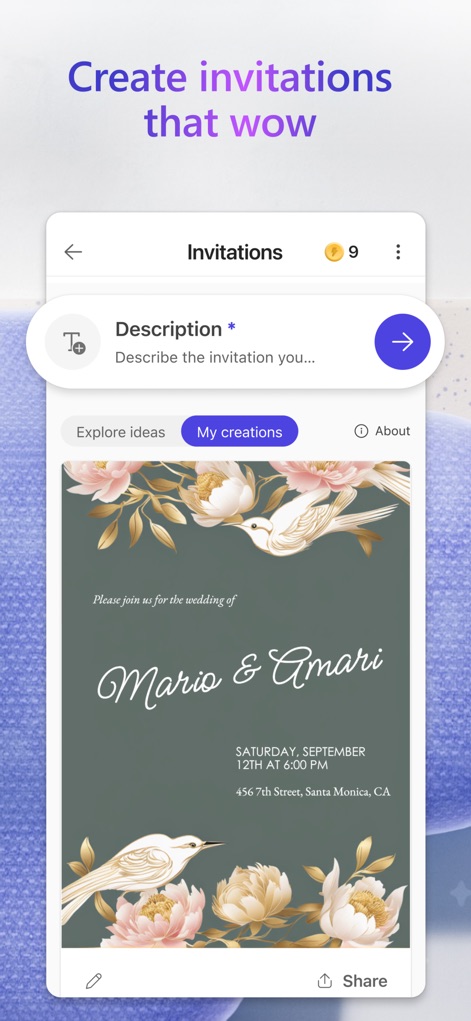
이 앱은 사용자가 '결혼식 날짜' 및 '장소 정보'를 포함한 매력적인 초대장을 쉽게 디자인하여 특별한 순간을 기념할 수 있도록 돕습니다.
멋진 초대장 만들기
설명
Download
비슷한 앱
유사한 기능과 사용자 경험을 가진 앱
17V28: Creative Carousel
17V28 LTD

Vivisticker: Story Maker
Printage inc.

简篇创作-AI智能排版
Beijing Jianpian Intelligent Technology Co., Ltd.

Text Art: Typography & Word
Appostrophe AB
Flyer AI. Poster design maker
Dmitry Marchenkov
Word Swag - Cool Fonts
Oringe Inc.

Storyluxe: Templates & Filters
Luxe Studio Apps LLC

IG: Story Maker & Insta Editor
APPSLAB.IO - FZCO

UniStory -Story Maker, Collage
SHANTANU PTE. LTD.
이 페이지는 앱이나 개발자의 공식 페이지가 아니며, 정보 제공 및 논평을 목적으로 작성된 독립 편집 간행물입니다. 명시적으로 달리 언급되지 않는 한, 해당 앱이나 개발자는 MWM, Apple, Google Play, 앱 퍼블리셔 또는 앱 개발자와 제휴, 보증, 후원, 승인 또는 공식적으로 연결되어 있지 않으며, 이 페이지의 어떤 내용도 해당 앱이 MWM의 서비스를 사용하여 개발되었음을 의미하지 않습니다. 모든 상표, 로고, 스크린샷 및 기타 콘텐츠는 해당 소유자의 자산입니다.