
이 페이지는 앱이나 개발자의 공식 페이지가 아니며, 정보 제공 및 논평을 목적으로 작성된 독립 편집 간행물입니다. 명시적으로 달리 언급되지 않는 한, 해당 앱이나 개발자는 MWM, Apple, Google Play, 앱 퍼블리셔 또는 앱 개발자와 제휴, 보증, 후원, 승인 또는 공식적으로 연결되어 있지 않으며, 이 페이지의 어떤 내용도 해당 앱이 MWM의 서비스를 사용하여 개발되었음을 의미하지 않습니다. 모든 상표, 로고, 스크린샷 및 기타 콘텐츠는 해당 소유자의 자산입니다.

Microsoft OneNote
생각의 조각들이 흩어지는가? 이 앱은 혼돈 속에서 질서를 부여하는 개인의 절대 권력이다.
다운로드
50M+사용자 평점
총 평가 수
4.5M개발사
카테고리
Productivity지원 언어
33최신 버전
16.107.3크기
350.1 MB출시일
2011년 1월 18일Microsoft OneNote: 주요 기능 분석
다양한 사용자층을 위한 다기능 디지털 노트 솔루션
장치 간 원활한 동기화
이 앱은 OneDrive를 통해 노트를 동기화하여 사용자가 모든 장치에서 언제 어디서든 자신의 노트에 접근할 수 있도록 해줍니다.
다재다능한 디지털 노트패드
이 도구는 사용자가 생각, 발견, 아이디어를 기록하고, 큰 이벤트를 계획하며, 할 일 목록을 추적하는 데 필요한 디지털 노트패드 기능을 제공합니다.
강력한 정리 및 검색 기능
이 앱은 강력한 정리 도구를 통해 사용자가 노트를 효율적으로 분류하고, 최근 노트를 빠르게 찾으며, 자주 사용하는 페이지를 고정할 수 있도록 돕습니다.
실시간 협업 기능
이 도구는 공유된 노트북에서 다른 사람들과 함께 작업하고 아이디어를 교환하여 효율적인 팀 프로젝트를 가능하게 합니다.
이미지 및 문서 캡처
이 앱은 Office Lens를 사용하여 화이트보드, 사진 또는 인쇄된 문서를 노트에 바로 저장하고, 자동으로 자르고 삽입하는 기능을 제공합니다.
필기 및 그리기 도구
이 앱은 다양한 펜 색상과 설정을 제공하며, 손으로 그린 도형을 완벽한 형태로 자동 변환하여 사용자가 필기 노트와 스케치를 정교하게 만들 수 있도록 지원합니다.
노트 보안 강화
이 도구는 사용자가 비밀번호로 노트를 보호하고, Touch ID를 사용하여 빠르게 접근할 수 있도록 하여 개인 정보의 안전을 보장합니다.
스티커 메모 동기화
이 앱은 다채로운 스티커 메모를 통해 사용자가 이동 중에도 빠르게 아이디어를 저장하고, 모든 장치에서 스티커 메모에 접근할 수 있도록 동기화 기능을 제공합니다.
자주 묻는 질문
에 대해 알아야 할 모든 것 Microsoft OneNote
Is Microsoft OneNote available for free?
Yes, Microsoft OneNote is free on iPhone and many other devices. Users can get started by downloading the app and signing in with a Microsoft or work/school account.
How does Microsoft OneNote allow me to access notes across devices?
Microsoft OneNote syncs your notes via OneDrive, allowing access to them anytime, anywhere, and across all your devices. This ensures your notes are always available whether at home or on the go.
Can I secure my notes in Microsoft OneNote with a password?
Yes, Microsoft OneNote allows users to secure their notes with a password. Additionally, it supports using Touch ID for quick and secure access to protected notes.
What organizational features does Microsoft OneNote offer for my notes?
Microsoft OneNote provides powerful organizational tools, allowing users to quickly arrange notes in a personalized way. It also helps find recent notes fast and pin frequently used pages.
Does Microsoft OneNote support drawing and handwriting?
Yes, Microsoft OneNote supports drawing and handwriting, particularly on iPad. It offers various pen colors and settings, and a 'Convert to Shapes' mode for automatically perfecting hand-drawn shapes.
Can I use sticky notes with Microsoft OneNote?
Yes, Microsoft OneNote allows users to quickly save thoughts and ideas using colorful sticky notes. These sticky notes sync across devices, providing access from anywhere, anytime.
How can I collaborate with others using Microsoft OneNote?
Microsoft OneNote facilitates collaboration by allowing users to work together in a shared notepad. Notes are saved to the cloud (OneDrive, SharePoint) and can be accessed and shared on any device.
Does Microsoft OneNote allow capturing images from documents or whiteboards?
Yes, Microsoft OneNote integrates with Office Lens. This feature enables users to save pictures of whiteboards, photos, or printed documents directly into their notes, with automatic cropping.
Are there subscriptions available within the Microsoft OneNote app?
Yes, monthly Microsoft 365 subscriptions are available for purchase within the Microsoft OneNote app. These are charged to your App Store account and renew automatically.
What is the data privacy policy for Microsoft OneNote?
Microsoft OneNote is subject to a separate privacy statement and terms. Data used with the app may be accessible to Microsoft or third-party publishers, and processed in the United States or other countries.
다음 스크린샷과 설명은 앱의 공식 스토어 목록에서 직접 가져온 것이며 앱 개발자의 자산입니다.
앱 스토어
스크린샷
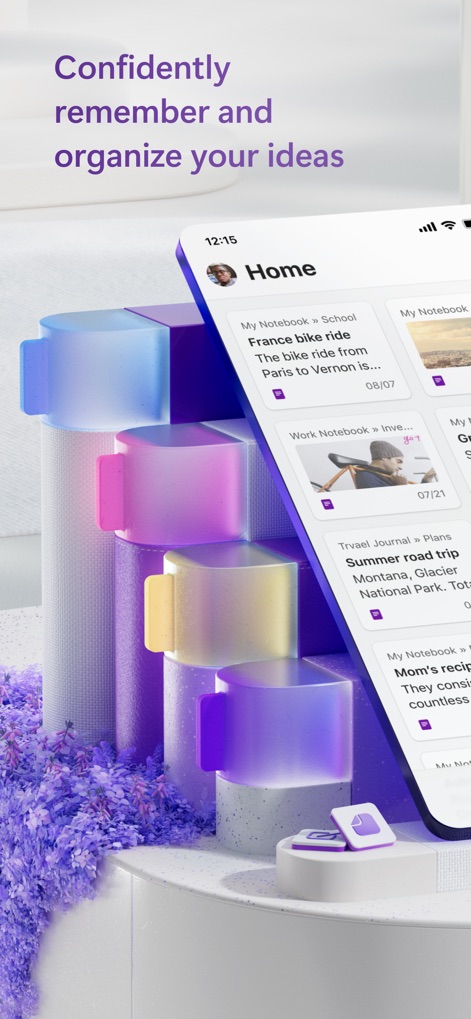
아이디어 정리 및 홈
이 앱의 홈 화면은 다양한 노트북 카드들을 한눈에 보여주어 사용자가 아이디어를 효율적으로 정리하고 쉽게 접근할 수 있도록 돕습니다.

간편한 탐색과 생성
하단 내비게이션 바를 통해 홈, 검색, 노트북 메뉴로 손쉽게 이동할 수 있으며, 큰 '+' 버튼으로 언제든지 빠르게 새 노트를 추가할 수 있습니다.

모든 노트 한눈에
사용자는 홈 화면에서 다양한 노트와 노트북 목록을 스크롤하여 확인할 수 있으며, 상단의 검색 바를 통해 원하는 정보를 빠르게 찾을 수 있습니다.

모든 기기에서 동기화
이 앱은 데스크톱과 모바일 인터페이스를 통해 모든 기기에서 노트에 접근할 수 있게 하며, 사용자는 풍부한 편집 도구를 활용하여 노트를 상세하게 작성할 수 있습니다.

체계적인 섹션 분류
사용자는 노트북 내에서 다양한 섹션으로 노트를 세분화하여 체계적으로 관리할 수 있으며, 각 섹션은 색상으로 구분되어 시각적으로 쉽게 인지할 수 있습니다.

시각적 정보 기록
이 앱을 통해 사용자는 'Summer road trip'과 같은 노트에 풍경 이미지를 쉽게 삽입할 수 있으며, 그 아래에 여행 세부 정보와 같은 상세한 설명을 추가하여 정보를 보강할 수 있습니다.

목표 달성 체크리스트
사용자는 'Yearly health goals'와 같은 개인 목표를 체크리스트 형태로 작성할 수 있으며, 중요한 항목에는 별 아이콘을 표시하여 우선순위를 시각적으로 강조할 수 있습니다.

여행 계획 및 지도
이 앱은 'France bike ride'와 같은 여행 계획 노트에 지도를 삽입하고, 사용자가 직접 손글씨로 경로와 주요 지점(Winery, Lunch)을 표시할 수 있게 하며, 하단에는 준비물 체크리스트를 포함할 수 있습니다.
설명
Download
비슷한 앱
유사한 기능과 사용자 경험을 가진 앱

Notion: Notes, Tasks, AI
Notion Labs, Incorporated

Freenotes®: AI Notes Taking
Hangzhou Free Notes Technology Co., Ltd

Structured - Daily Planner
unorderly GmbH

Google Tasks: Get Things Done
Google LLC

TickTick:To-Do List & Calendar
Appest Limited

Noteful: Notes & PDF Markup
Noteful Technologies Ltd

Todoist: To Do List & Calendar
Doist Inc.

To do list MinimaList & Widget
Inner Grow Limited

monday.com - Work Platform
monday.com Ltd.
이 페이지는 앱이나 개발자의 공식 페이지가 아니며, 정보 제공 및 논평을 목적으로 작성된 독립 편집 간행물입니다. 명시적으로 달리 언급되지 않는 한, 해당 앱이나 개발자는 MWM, Apple, Google Play, 앱 퍼블리셔 또는 앱 개발자와 제휴, 보증, 후원, 승인 또는 공식적으로 연결되어 있지 않으며, 이 페이지의 어떤 내용도 해당 앱이 MWM의 서비스를 사용하여 개발되었음을 의미하지 않습니다. 모든 상표, 로고, 스크린샷 및 기타 콘텐츠는 해당 소유자의 자산입니다.