Millennium bim Smart IZI
다운로드: App Store

이 페이지는 앱이나 개발자의 공식 페이지가 아니며, 정보 제공 및 논평을 목적으로 작성된 독립 편집 간행물입니다. 명시적으로 달리 언급되지 않는 한, 해당 앱이나 개발자는 MWM, Apple, Google Play, 앱 퍼블리셔 또는 앱 개발자와 제휴, 보증, 후원, 승인 또는 공식적으로 연결되어 있지 않으며, 이 페이지의 어떤 내용도 해당 앱이 MWM의 서비스를 사용하여 개발되었음을 의미하지 않습니다. 모든 상표, 로고, 스크린샷 및 기타 콘텐츠는 해당 소유자의 자산입니다.


로고: Millennium bim Smart IZI
다운로드: App Store

Millennium bim Smart IZI

미국에서 계좌를 관리하고, M-Pesa 송금을 보내고, Credelec과 같은 현지 요금을 즉시 납부하세요. 안전하고 직관적이며 국경을 넘나드는 당신의 삶을 위해 설계되었습니다.

주요 수치

다운로드

193K+

사용자 평점

4.4/5

총 평가 수

500

개발사

Banco Comercial Portugues, SA

카테고리

Finance

지원 언어

2

최신 버전

4.12.0

크기

42.0 MB

출시일

2013년 1월 30일
기능

모잠비크와의 금융 연결

미국에서 모잠비크 거주민을 위해 설계된 금융 앱으로 거리의 간극을 좁히고 고국의 재정을 관리하세요.

즉각적인 가족 지원

M-Pesa 및 E-Mola 모바일 지갑으로 즉시 송금하여 기존 전신 송금보다 빠르고 저렴하게 송금을 처리하세요.

원격 요금 관리

앱을 통해 Credelec, TV 패키지 및 공과금을 직접 납부하여 해외에서 부동산과 가족을 돌보세요.

다음 스크린샷과 설명은 앱의 공식 스토어 목록에서 직접 가져온 것이며 앱 개발자의 자산입니다.

앱 스토어

스크린샷
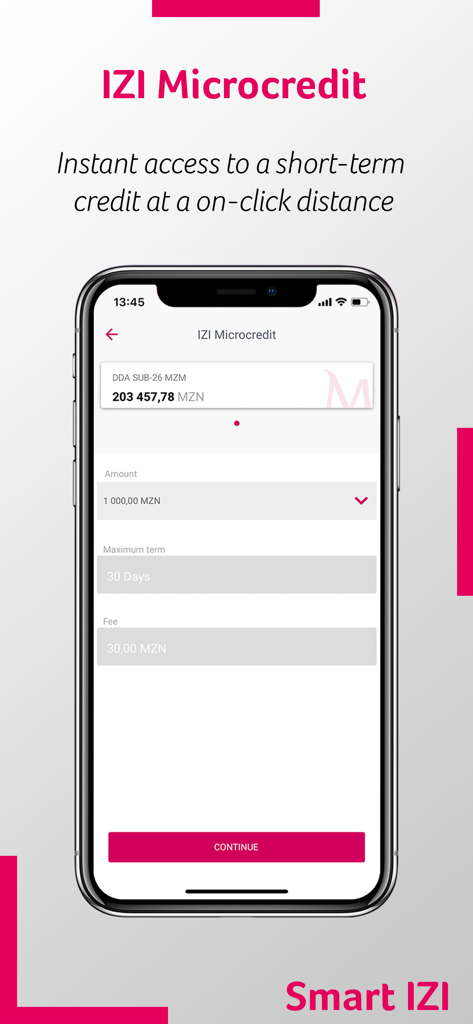
Millennium bim Smart IZI - 소액 대출 신청 화면과 대출 금액 및 기간 선택이 표시된 Millennium bim Smart IZI 앱
소액 대출 신청 화면과 대출 금액 및 기간 선택이 표시된 Millennium bim Smart IZI 앱

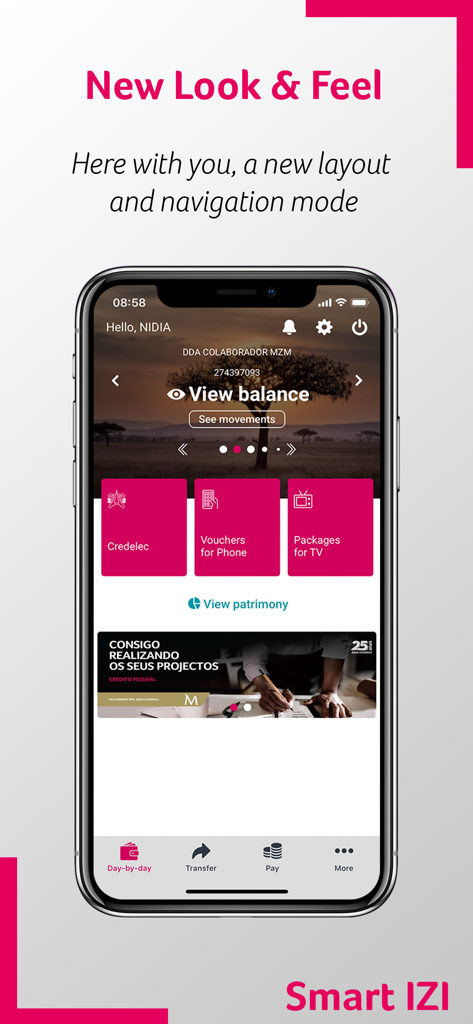
Millennium bim Smart IZI - 계좌 잔액 보기 및 공과금 납부 옵션이 표시된 Millennium bim Smart IZI 모바일 뱅킹 대시보드
계좌 잔액 보기 및 공과금 납부 옵션이 표시된 Millennium bim Smart IZI 모바일 뱅킹 대시보드

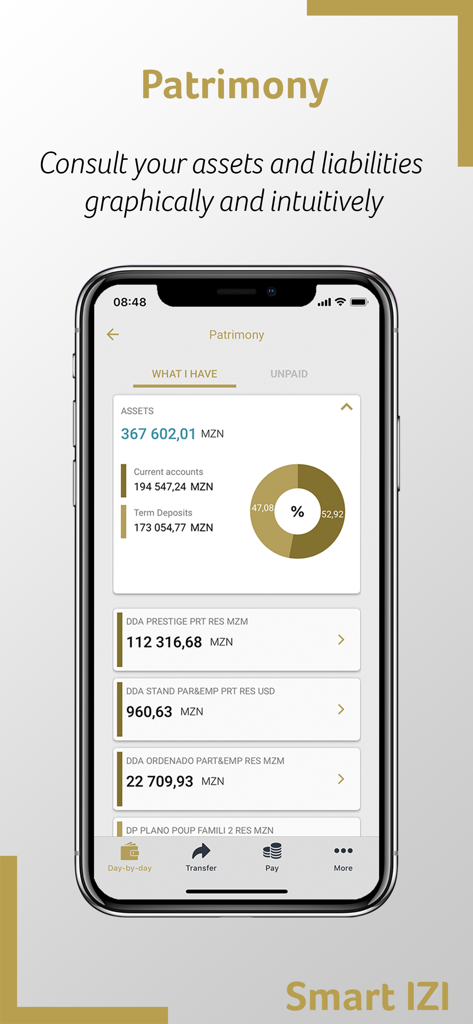
Millennium bim Smart IZI - Patrimony 기능에서 자산과 부채를 보여주는 Millennium bim Smart IZI 앱
Patrimony 기능에서 자산과 부채를 보여주는 Millennium bim Smart IZI 앱

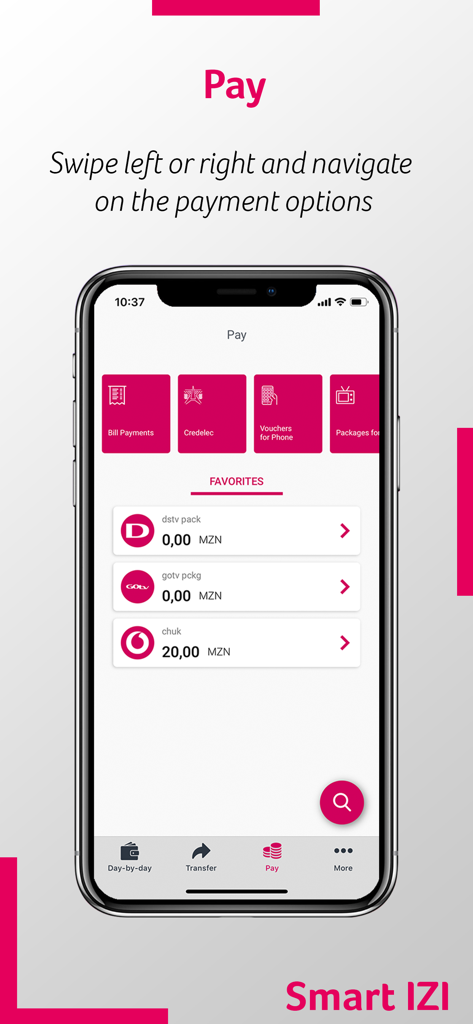
Millennium bim Smart IZI - 청구서 및 공과금 납부 옵션이 포함된 결제 메뉴를 보여주는 Millennium bim Smart IZI 모바일 앱
청구서 및 공과금 납부 옵션이 포함된 결제 메뉴를 보여주는 Millennium bim Smart IZI 모바일 앱

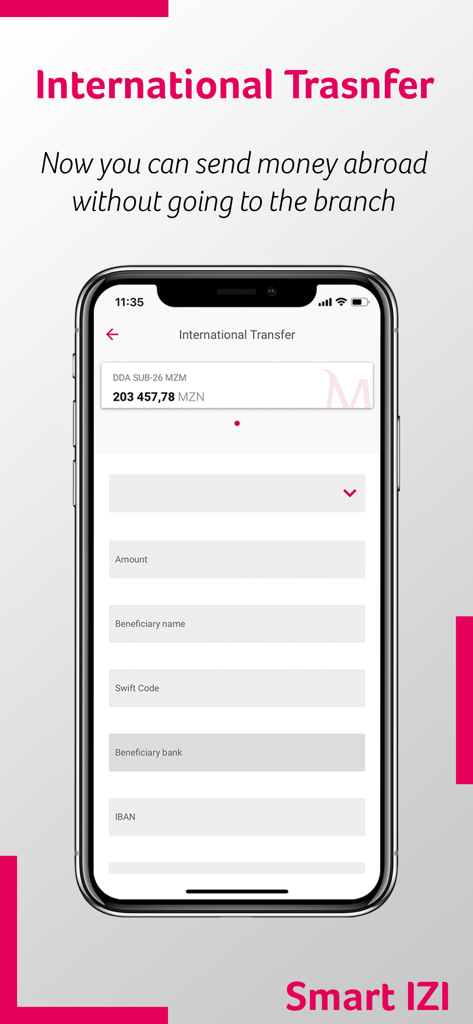
Millennium bim Smart IZI - 금액 및 수혜자 필드가 표시된 국제 은행 송금용 Smart IZI 모바일 앱 화면
금액 및 수혜자 필드가 표시된 국제 은행 송금용 Smart IZI 모바일 앱 화면

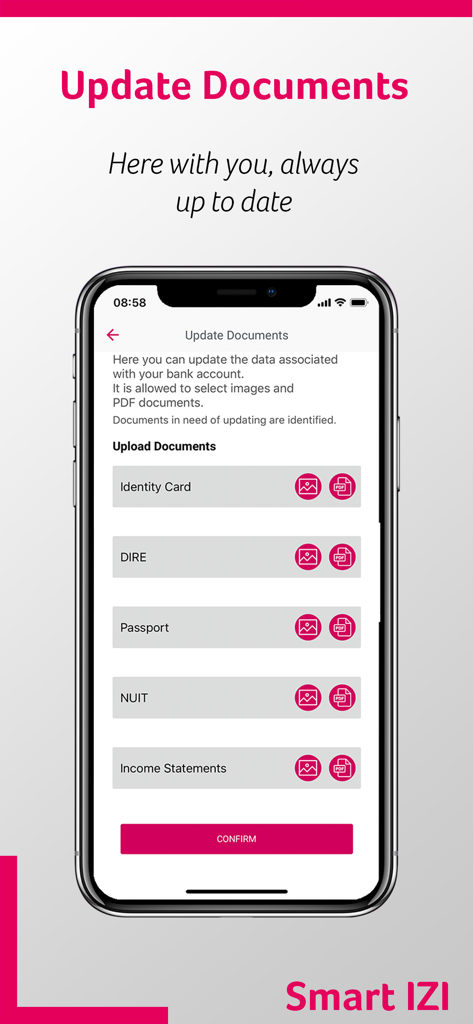
Millennium bim Smart IZI - Millennium bim Smart IZI 뱅킹 앱에서 여권 및 신분증과 같은 신분증 업로드 인터페이스.

Millennium bim Smart IZI 뱅킹 앱에서 여권 및 신분증과 같은 신분증 업로드 인터페이스.

설명

Navigation mode The first great feature of this new version is the Look and Feel, which comes along with new colours, layouts, as well as new menus and buttons. The new Smart IZI layout offers you a different navigation mode from the previous one. Now, after logging in, you can slide to the left or right on the products carousel and have an overview of all your products: accounts, cards, savings and loans. To make it even easier to navigate through the App, the new version of Smart IZI has a fixed navigation bar at the bottom of the screen where you can quickly access to "day-by-day", "transfer", " pay" and "more". Privacy mode The new version of Smart IZI brings with it the Privacy mode. Designed to ensure a higher confidentiality level of your financial information. With this new mode, you can always choose whether to hide or not your account balances after authentication. Quick Access Because simplifying is "making it more IZI", the new app has quick navigation options in the top right corner of the "day-by-day" feature: Alerts, Settings and Exit button. Segment Theme/Colors Now your App can distinguish your segment and define the colours of the visual components according to the Segment to which you belong. Alerts / Push Notifications Getting useful information about your assets and news about your Bank has become easier! Simply select the alert icon on the main page. Make sure to access settings first and enable the reception of Push-Notifications. Settings In this private area, you can easily: View and delete favourites; View authorization codes; Change the IZI PIN; Register / Update e-mail; Reset your Internet Banking password * (new); Enable / Disable the biometric configuration Enable / Disable the reception of Push-Notifications (Alerts) Products Carousel Navigating left or right, you will be able to view all your products (accounts, cards, savings, savings and loans) and also perform some specific operations for each product. You can also check movements, balances or details of the specific product by selecting the “More details” option. Transfer Performing transfer operations has never been easier, this option is also in the navigation bar. See here the type of transfers available for you: Intrabank Transfers Interbank Transfers Transfer for Phone Mobile Transfers M-Pesa E-Mola * (new); Schedules Pay Whenever you want to pay for a service, just click on “Pay” on the navigation bar. Here you can make the following payments: Credelec; Vouchers for Phone; Packages for TV; Bill Payments; INSS payment * (new); Cash Directo. More Here we have other no less important operations available to you, such as: Read QR  Code; Generate QR  Code; Savings IZI Withdrawal Request Check Book Send Invitations (only available to Prestige Customers) You can also view our Contacts, Branches and the current exchange rate. Patrimony You will be able to view your assets and liabilities in a graphic and intuitive way, just by clicking on the Patrimony button right below the product carousel. Favourites Paying and transferring can be even faster! Save your favourite transactions and re-use them whenever you want to make a next transaction. To do this, just select the option "Add as Favourite", at the end of the transaction, and that's it! Access requirements You can access Smart IZI through any device with the application installed. Use your mobile banking credentials to access the application, namely, cell phone number associated with the channel and the 4-digit access PIN, known as IZI PIN.   Millennium bim. Aqui Consigo.

Download

다운로드: App Store

이 페이지는 앱이나 개발자의 공식 페이지가 아니며, 정보 제공 및 논평을 목적으로 작성된 독립 편집 간행물입니다. 명시적으로 달리 언급되지 않는 한, 해당 앱이나 개발자는 MWM, Apple, Google Play, 앱 퍼블리셔 또는 앱 개발자와 제휴, 보증, 후원, 승인 또는 공식적으로 연결되어 있지 않으며, 이 페이지의 어떤 내용도 해당 앱이 MWM의 서비스를 사용하여 개발되었음을 의미하지 않습니다. 모든 상표, 로고, 스크린샷 및 기타 콘텐츠는 해당 소유자의 자산입니다.








