
이 페이지는 앱이나 개발자의 공식 페이지가 아니며, 정보 제공 및 논평을 목적으로 작성된 독립 편집 간행물입니다. 명시적으로 달리 언급되지 않는 한, 해당 앱이나 개발자는 MWM, Apple, Google Play, 앱 퍼블리셔 또는 앱 개발자와 제휴, 보증, 후원, 승인 또는 공식적으로 연결되어 있지 않으며, 이 페이지의 어떤 내용도 해당 앱이 MWM의 서비스를 사용하여 개발되었음을 의미하지 않습니다. 모든 상표, 로고, 스크린샷 및 기타 콘텐츠는 해당 소유자의 자산입니다.


MoneyTrack: Expense Tracker
이것은 데이터 입력 도구가 아니라, 재정적 운명을 통제하는 도구이다. MoneyTrack은 사용자가 삶을 명확하게 파악하고 모든 지출을 자신의 의지에 종속시키도록 만든다.
다운로드
1M+사용자 평점
총 평가 수
16.5K개발사
카테고리
Finance지원 언어
4최신 버전
4.4.3크기
58.3 MB출시일
2019년 9월 8일재정 관리에 적극적인 성인을 위한 종합 지출 추적 솔루션 평가
MoneyTrack: Expense Tracker 앱 분석
광고 없는 순수함
이 앱은 광고, 푸시 알림, 금융 상품 추천 없이 순수하고 방해받지 않는 가계부 경험을 제공합니다.
데이터 보안 및 개인정보 보호
이 도구는 무료 클라우드 백업과 함께 엄격한 개인 정보 보호 정책을 준수하며, 사용자의 데이터를 오용하지 않고 iPhone, iPad, Mac 및 PC 전반에 걸쳐 데이터를 안전하게 동기화할 수 있게 해줍니다.
예산 관리
이 도구는 월별 및 카테고리별 예산을 설정할 수 있게 해주며, 사용자는 일일 가용 자금을 동적으로 모니터링하여 지출을 통제하고 더 많이 저축할 수 있습니다.
진정한 크로스 플랫폼 동기화
이 도구는 iPhone, iPad뿐만 아니라 다른 모바일 플랫폼과 전용 데스크톱 버전(Mac 및 PC)에서 실시간 클라우드 동기화를 지원하여 사용자가 언제 어디서나 지출을 추적할 수 있게 해줍니다.
AI 자동 추적
이 앱은 iOS 단축어와 AI 알고리즘을 통해 지출을 높은 정확도로 자동 분류하며, 사용자는 앱을 열지 않고도 한 번의 탭으로 지출을 추적할 수 있어 효율성을 높입니다.
다중 통화 지원
이 도구는 실시간 환율과 함께 전 세계 통화를 지원하여 해외 여행, 유학 및 국경 간 쇼핑 등 다양한 상황에서 유용하게 사용자가 재정을 관리할 수 있도록 돕습니다.
자산 관리
이 앱은 현금, 은행 계좌, 신용 카드, 전자 지갑 및 투자를 통합하여 자산을 관리하고, 사용자는 순자산을 한눈에 파악할 수 있습니다.
저축 목표 설정
이 앱은 자동차 구매나 여행과 같은 목표를 설정하고 진행 상황을 추적하여, 사용자가 재정 목표를 달성하기 위한 동기를 유지할 수 있도록 돕습니다.
공유 원장
이 앱은 가족 구성원이나 파트너를 원장에 초대하여 가계 재정을 투명하게 함께 관리할 수 있는 기능을 제공합니다.
환급 처리
이 앱은 지출을 "환급 가능"으로 표시하는 기능을 제공하여 개인 지출과 업무 관련 지출을 분리할 수 있게 함으로써, 사용자가 비즈니스 경비를 효율적으로 추적할 수 있도록 돕습니다.
자주 묻는 질문
에 대해 알아야 할 모든 것 MoneyTrack: Expense Tracker
Does MoneyTrack display advertisements or financial promotions?
No, MoneyTrack strictly adheres to a "Three NOs" principle: no ads, no splash screens, and no financial promotions. It provides a pure, ad-free bookkeeping experience for expense tracking.
Can MoneyTrack automatically categorize my expenses?
Yes, MoneyTrack utilizes Smart AI Algorithms and iOS Shortcuts for AI auto-tracking. It categorizes spending with high precision, allowing for single-tap expense tracking without fully opening the app.
Is MoneyTrack compatible with multiple devices and platforms?
Yes, MoneyTrack offers true cross-platform sync. It supports iPhone, iPad, other mobile platforms, and a dedicated Pro Desktop Version for Mac and PC, ensuring real-time cloud ledger synchronization.
Does MoneyTrack allow users to set budgets and track their spending?
Yes, MoneyTrack supports comprehensive budget control. Users can set monthly and category-based budgets and dynamically monitor available funds to effectively manage spending and save more.
What kind of financial reports does MoneyTrack provide?
MoneyTrack generates professional-grade financial reports and provides a balance sheet feature. Users gain clear insights into personal or family financial health in real-time, including detailed category statistics.
Does MoneyTrack support managing multiple types of assets and liabilities?
Yes, MoneyTrack offers comprehensive asset management. It provides a unified view of cash, bank accounts, credit cards, e-wallets, investments, debts, and liabilities, showing your net worth at a glance.
Can I customize expense categories in MoneyTrack?
Yes, MoneyTrack provides custom categories with 2-level support and unlimited customization. Users can tailor their expense tracking system precisely to fit their specific financial needs.
Is my financial data secure with MoneyTrack?
Yes, MoneyTrack ensures data security with free cloud backup and sync across all devices. The app strictly follows privacy policies and guarantees that user data is never misused.
Can MoneyTrack track recurring expenses and installment payments?
Yes, MoneyTrack allows setting up recurring expenses like rent or subscriptions for automatic recording. It also tracks credit card installments and loans, auto-calculating monthly repayments for better cash flow planning.
Does MoneyTrack offer widgets for quick access on my phone?
Yes, MoneyTrack provides various Home Screen widgets. These widgets allow users to check daily spending or quick-add expenses directly from their device's home screen for convenience.
다음 스크린샷과 설명은 앱의 공식 스토어 목록에서 직접 가져온 것이며 앱 개발자의 자산입니다.
앱 스토어
스크린샷
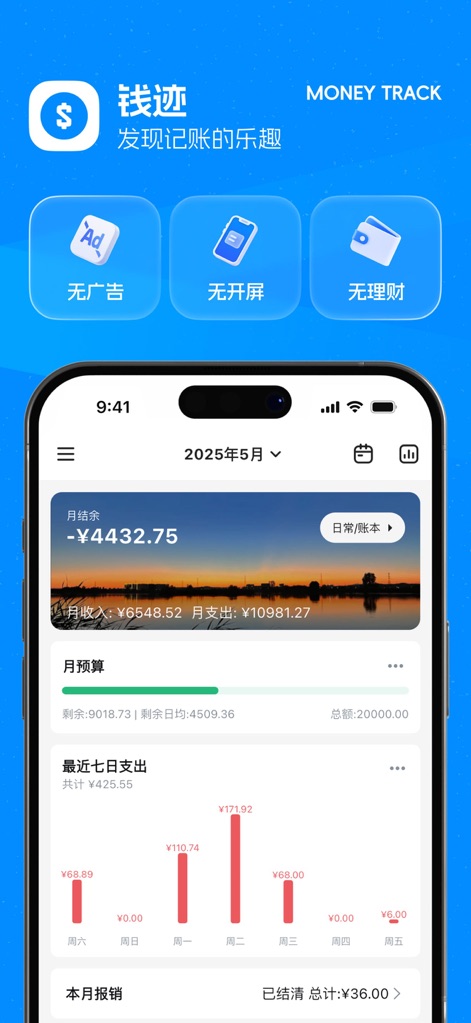
이 앱의 홈 화면에서 사용자는 월별 예산 현황과 최근 7일간의 지출 추이 차트를 한눈에 확인할 수 있습니다.
종합적인 재정 관리
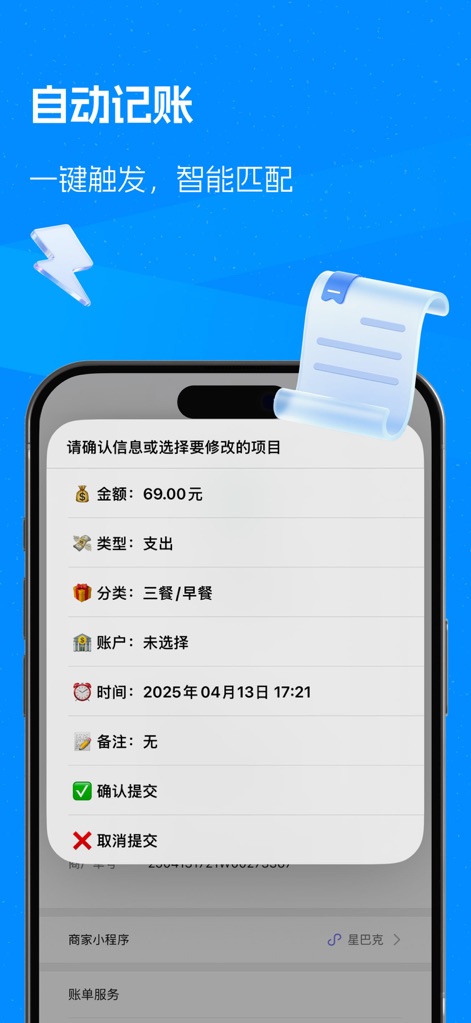
이 화면은 AI가 자동으로 분류한 지출 상세 내용을 보여주며, 사용자는 금액과 카테고리를 확인하고 제출 또는 취소할 수 있습니다.
스마트 자동 기록

사용자는 직관적인 카테고리 목록에서 지출 유형을 선택하고, 하단의 금액 입력 필드를 통해 빠르게 거래를 기록할 수 있습니다.
간편한 지출 추가

이 도구는 사용자의 지출 패턴을 카테고리별 원형 차트로 시각화하고, 상세 지출 목록으로 각 항목의 금액과 비율을 제공합니다.
명확한 지출 분석
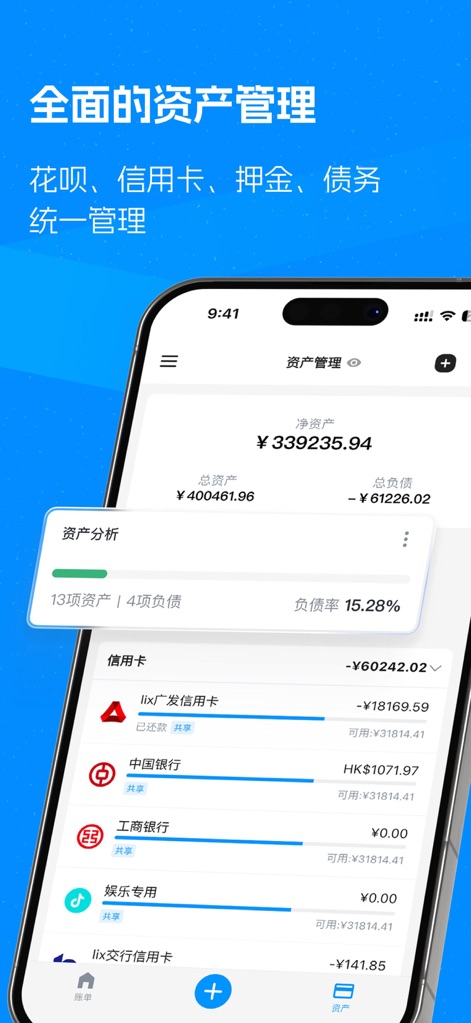
사용자는 이 화면에서 총자산과 순자산을 한눈에 파악하고, 신용카드 및 은행 계좌를 포함한 개별 자산의 잔액을 관리할 수 있습니다.
통합 자산 관리
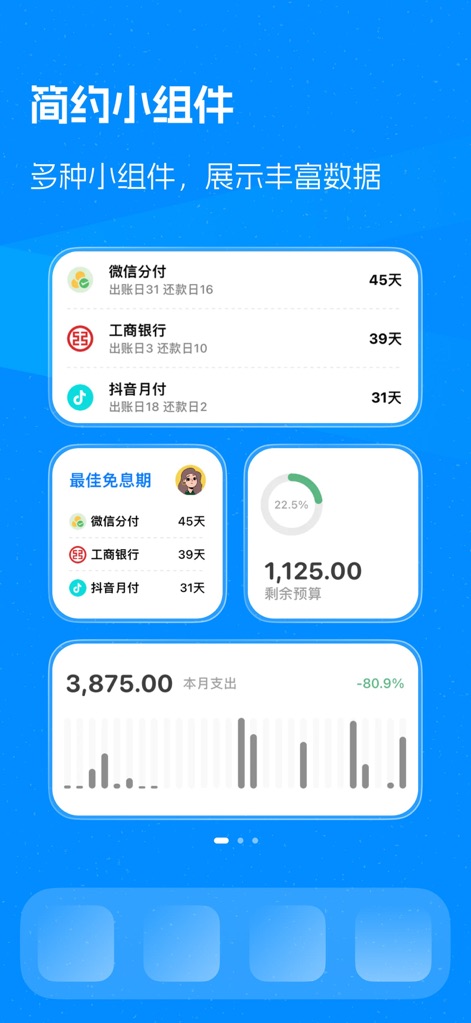
이 앱은 사용자가 홈 화면에서 신용카드 청구일과 월별 예산 잔액과 같은 중요한 금융 정보를 위젯을 통해 편리하게 확인할 수 있도록 지원합니다.
유용한 위젯 기능

이 앱은 어두운 배경의 대시보드와 지출 입력 화면을 제공하여, 야간에도 눈의 피로를 줄이고 데이터를 편안하게 관리할 수 있도록 돕습니다.
세련된 야간 모드
설명
Download
비슷한 앱
유사한 기능과 사용자 경험을 가진 앱

鲨鱼记账本-城市理财圈子必备工具软件
Beijing Shark Pioneer Network Technology Co.,Ltd

咔皮记账 -自动记账 AI记账 预算 多账本 资产管理 存钱
Shanghai Yuhuan Technology Co., Ltd.

Money manager, expense tracker
Orange dog d.o.o.

Money Manager Expense & Budget
Realbyte Inc.

Budget Planner App - Fleur
Akash Jain

iCost记账-快速简洁好用的记账理财助手&记账软件
Guangzhou Quji Technology Co., Ltd.

YNAB
You Need A Budget LLC

Copilot: Track & Budget Money
Copilot Money, Inc.

小青账记账-存钱记账本理财购物清单
YouQian
이 페이지는 앱이나 개발자의 공식 페이지가 아니며, 정보 제공 및 논평을 목적으로 작성된 독립 편집 간행물입니다. 명시적으로 달리 언급되지 않는 한, 해당 앱이나 개발자는 MWM, Apple, Google Play, 앱 퍼블리셔 또는 앱 개발자와 제휴, 보증, 후원, 승인 또는 공식적으로 연결되어 있지 않으며, 이 페이지의 어떤 내용도 해당 앱이 MWM의 서비스를 사용하여 개발되었음을 의미하지 않습니다. 모든 상표, 로고, 스크린샷 및 기타 콘텐츠는 해당 소유자의 자산입니다.