
이 페이지는 앱이나 개발자의 공식 페이지가 아니며, 정보 제공 및 논평을 목적으로 작성된 독립 편집 간행물입니다. 명시적으로 달리 언급되지 않는 한, 해당 앱이나 개발자는 MWM, Apple, Google Play, 앱 퍼블리셔 또는 앱 개발자와 제휴, 보증, 후원, 승인 또는 공식적으로 연결되어 있지 않으며, 이 페이지의 어떤 내용도 해당 앱이 MWM의 서비스를 사용하여 개발되었음을 의미하지 않습니다. 모든 상표, 로고, 스크린샷 및 기타 콘텐츠는 해당 소유자의 자산입니다.

mood.camera
진정한 아날로그 경험으로 사진의 즐거움을 되찾으세요. 아이폰에서 바로 시네마틱 색감과 사실적인 필름 그레인을 경험하세요. 과도한 편집 없이, 순수한 감성 그대로.
다운로드
196K+사용자 평점
총 평가 수
100개발사
카테고리
Photo & Video지원 언어
1최신 버전
1.11.2크기
49.5 MB출시일
2024년 4월 12일감성이 담긴 사진
과도하게 편집된 스마트폰 사진에서 벗어나세요. mood.camera는 필름의 유기적인 따뜻함과 우연성을 재현하여 더욱 진정성 있고 자연스러운 미학을 선사합니다.
의도된 단순함
창의적인 집중력을 되찾으세요. 라이브 미리보기나 촬영 후 편집 없이, 순간에 집중하고 카메라가 분위기를 잡아주도록 하세요.
시네마틱 색감 과학
풍부한 색감과 사실적인 할레이션을 특징으로 하는 14가지의 세심하게 제작된 에뮬레이션을 선택하여 사진에 즉각적인 인디 영화 감성을 더하세요.
자주 묻는 질문
에 대해 알아야 할 모든 것 mood.camera
What is mood.camera?
mood.camera는 편집 도구 없이도 자연스럽고 개성 있는 사진을 담아내는 아이폰 카메라 앱입니다. 사실적인 필름 그레인과 시네마틱 할레이션을 특징으로 합니다.
Does mood.camera offer a free trial?
네, mood.camera는 신규 사용자를 위해 7일간 제한 없이 사용할 수 있는 무료 체험 기간을 제공합니다. 구독이 필요 없으며, 체험 기간 종료 후에는 제한적인 무료 버전이 제공되거나 구독을 선택할 수 있습니다.
Does mood.camera have editing tools?
아니요, mood.camera는 앱 내에서 라이브 "필터" 미리보기 또는 편집 도구를 제공하지 않습니다. 지속적인 조정을 하지 않고 순간을 포착하는 데 집중하도록 권장합니다.
What photo effects does mood.camera provide?
mood.camera는 표현력 있는 색감 에뮬레이션, 사실적인 필름 그레인, 시네마틱 할레이션을 제공합니다. 카메라에서 바로 나온 듯한 개성과 풍부한 색감을 사진에 담는 것을 목표로 합니다.
Can I create custom presets in mood.camera?
네, mood.camera는 사용자 정의 프리셋을 만들 수 있습니다. 좋아하는 프리셋에 따뜻한 느낌을 더하거나 처음부터 시작하여 독창적인 스타일을 개발할 수 있습니다.
Which iPhone models support cinematic halation in mood.camera?
mood.camera의 시네마틱 할레이션 기능은 iPhone 12 이상 모델에서 사용할 수 있습니다. 이 기능은 아이폰의 동적 범위 게인 맵을 사용하여 사실적인 할레이션 효과를 만듭니다.
How many color emulations does mood.camera offer?
mood.camera는 14가지의 정교하게 제작된 색감 에뮬레이션을 제공합니다. 이러한 에뮬레이션은 모든 사진에 개성과 풍부한 색감을 더하여 전반적인 미학을 향상시킵니다.
Does mood.camera support custom frames?
네, mood.camera는 사용자 정의 프레임을 지원합니다. 사용자는 사진을 찍을 때 앱이 자동으로 추가하는 사용자 정의 프레임으로 사진을 더욱 돋보이게 할 수 있습니다.
Can I adjust the exposure in mood.camera?
네, mood.camera에는 화면에 노출 다이얼이 포함되어 있습니다. 이 기능을 통해 과소 노출 또는 과다 노출된 이미지를 통해 다양한 스타일을 쉽게 연출하고 창의력을 발휘할 수 있습니다.
What are the pricing options for mood.camera after the free trial?
7일 무료 체험 기간 후, mood.camera 사용자는 제한적인 무료 버전을 계속 사용하거나, 전체 액세스를 위해 평생 멤버십 또는 월간 구독을 구매할 수 있습니다.
Does mood.camera have a live filter preview?
아니요, mood.camera에는 라이브 "필터" 미리보기가 없습니다. 이러한 디자인 선택은 클래식 필름 카메라를 모방하여 사용자가 방해 없이 순간을 포착하는 데 집중하도록 합니다.
Does mood.camera offer portrait mode features?
네, mood.camera는 "Next Level Portraits" 모드를 제공합니다. iPhone 11 이상 모델에서 더 부드러운 객체 분리 및 자연스러운 보케 효과를 가진 사진을 제공합니다.
What resolution photos does mood.camera capture?
mood.camera는 호환되는 장치에서 고해상도 24MP 사진을 촬영합니다. 이 기능은 iPhone 14 Pro, 15 Pro 및 16 Pro 모델에서 사용할 수 있습니다.
How does mood.camera achieve realistic film grain?
mood.camera는 실제 현상 과정을 모델로 한 필름 그레인 알고리즘을 사용합니다. 이 접근 방식은 디테일을 유지하면서 사진에 진정한 질감과 물리적인 느낌을 더합니다.
Where can I find the privacy policy for mood.camera?
mood.camera의 개인정보처리방침은 다음 링크에서 확인할 수 있습니다: https://mood.camera/privacy. 이 링크는 앱 설명 끝에 있습니다.
다음 스크린샷과 설명은 앱의 공식 스토어 목록에서 직접 가져온 것이며 앱 개발자의 자산입니다.
앱 스토어
스크린샷
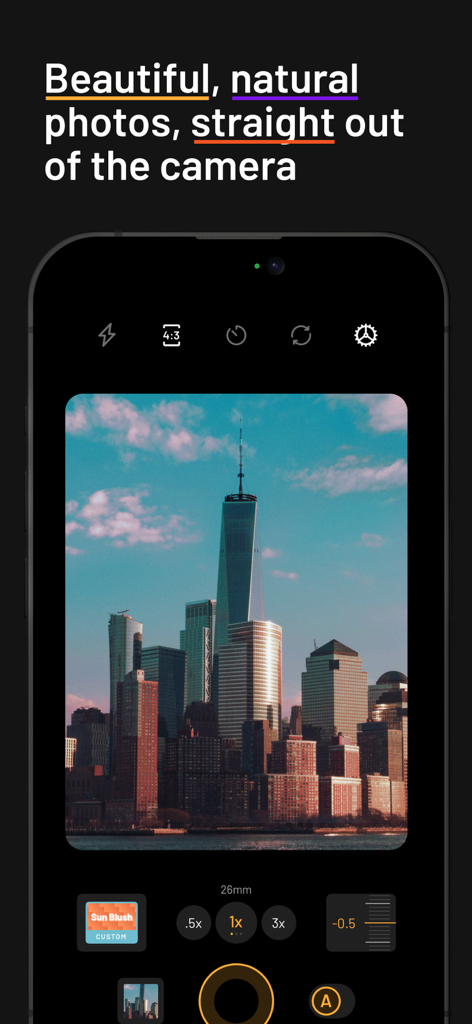
원 월드 트레이드 센터를 포함한 도시 풍경을 필름 스타일로 촬영하는 mood.camera 앱을 보여주는 스마트폰 인터페이스.
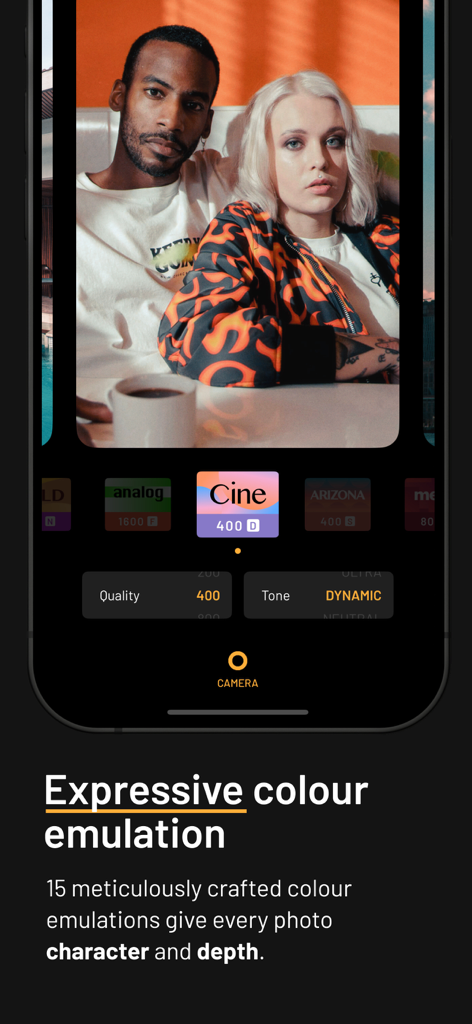
mood 카메라 앱에서 표현적인 필름 색상 에뮬레이션으로 편집된 인물 사진을 보여주는 스마트폰 인터페이스.
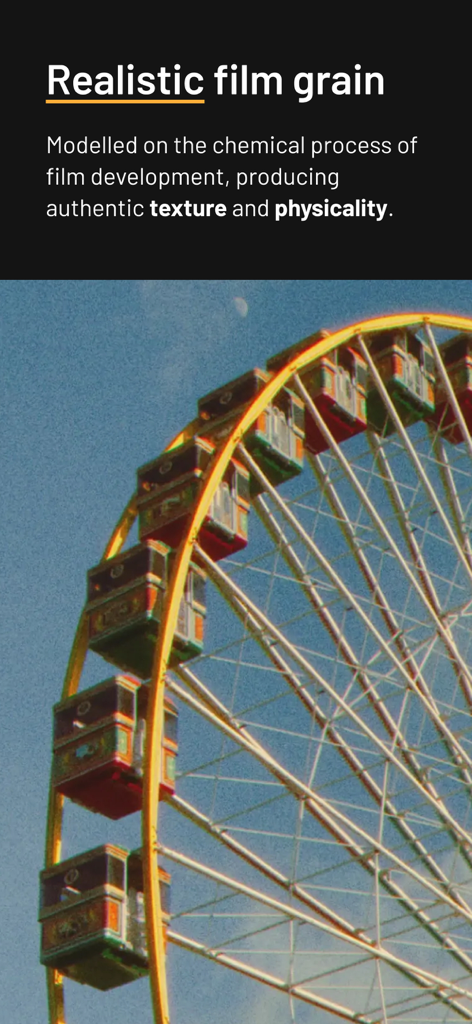
사실적인 필름 그레인 질감과 아날로그 미학을 가진 관람차
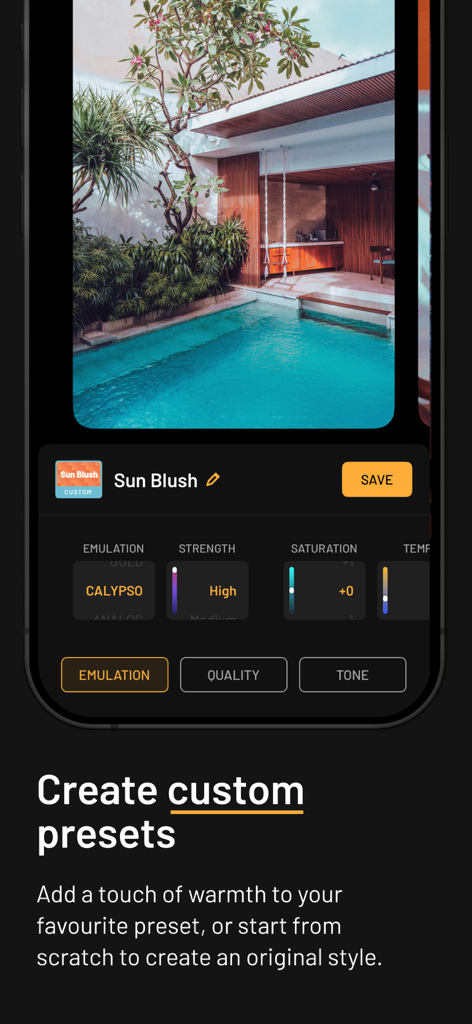
열대 풀 사진과 함께 사용자 정의 사전 설정 옵션을 보여주는 mood.camera 앱 인터페이스
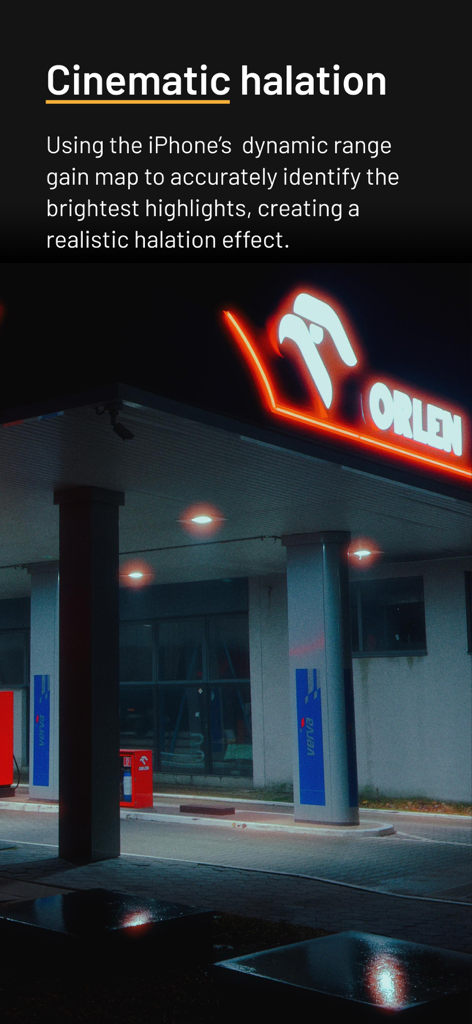
밤의 네온사인에 시네마틱 할레이션 광선 효과
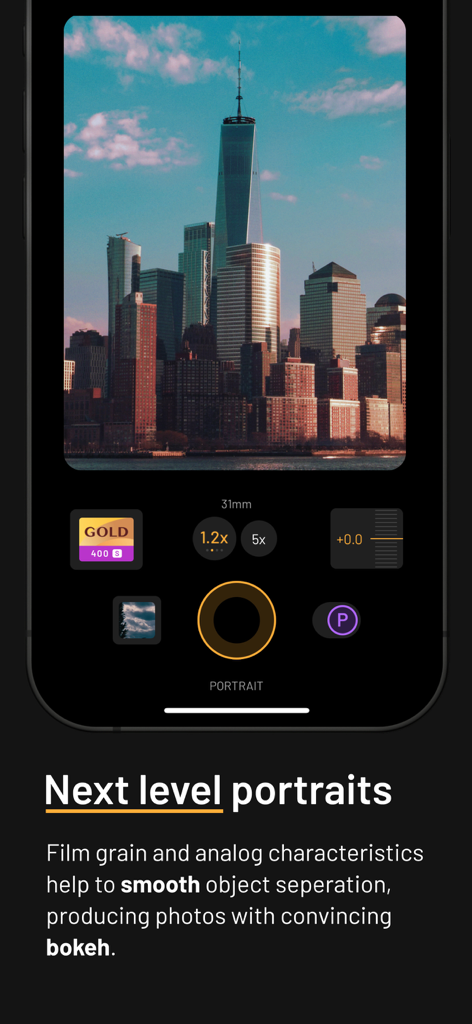
마천루의 필름 스타일 사진과 함께 인물 모드를 보여주는 mood.camera 앱 인터페이스
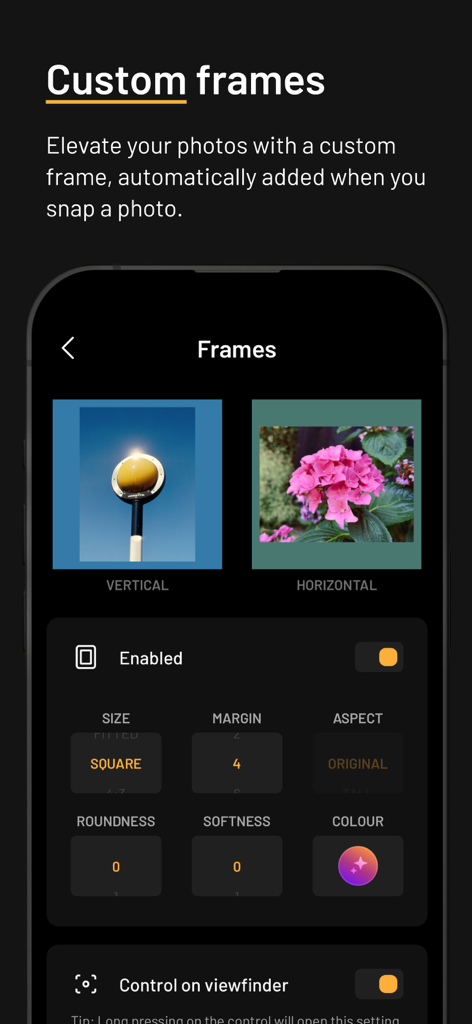
크기와 색상 옵션으로 사진에 사용자 정의 프레임을 추가하는 설정을 보여주는 mood.camera 앱 인터페이스
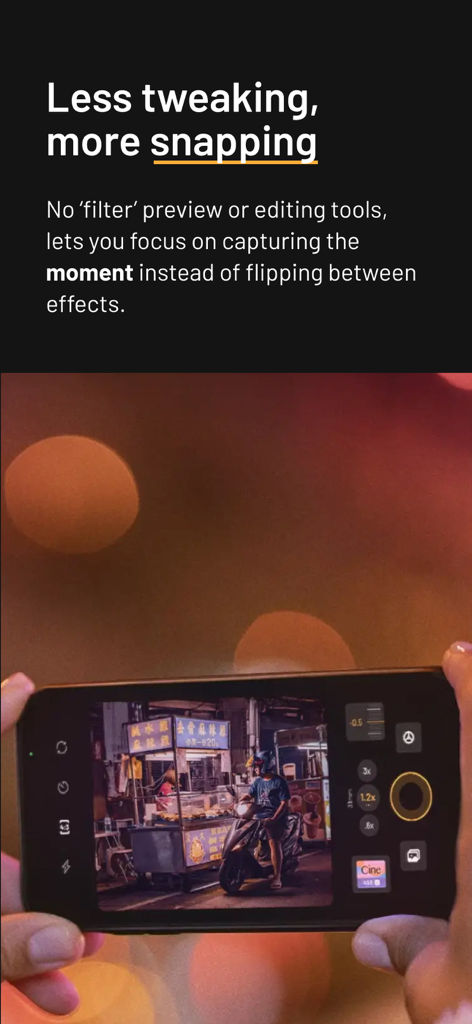
필터를 사용하지 않고 밤의 길거리 음식 가판대를 촬영하기 위해 아이폰에서 mood.camera 앱을 사용하는 사람.
설명
Download
비슷한 앱
유사한 기능과 사용자 경험을 가진 앱
Dazz Cam - Vintage Camera
DAZZ PTE. LTD.

Kapi - Vintage Film Camera
Shanghai Yuhuan Technology Co., Ltd.
ProCCD - Digital Film Camera
秉妍 蔡
Fomz - Vintage Analog Camera
Guangzhou Mengdong Information Technology Co., Ltd.

Liit - Photo & Video Editor
DAZZ PTE. LTD.
1998 Cam - Vintage Camera
Huu Nguyen Chi
y2k: 2000s photo editor
Abel Thomas Noble

Uplens: Photo & Video Editor
MPGAMES LTD

Buttercam
Beijing Muke Technology Co., Ltd.
이 페이지는 앱이나 개발자의 공식 페이지가 아니며, 정보 제공 및 논평을 목적으로 작성된 독립 편집 간행물입니다. 명시적으로 달리 언급되지 않는 한, 해당 앱이나 개발자는 MWM, Apple, Google Play, 앱 퍼블리셔 또는 앱 개발자와 제휴, 보증, 후원, 승인 또는 공식적으로 연결되어 있지 않으며, 이 페이지의 어떤 내용도 해당 앱이 MWM의 서비스를 사용하여 개발되었음을 의미하지 않습니다. 모든 상표, 로고, 스크린샷 및 기타 콘텐츠는 해당 소유자의 자산입니다.