Music X - Full Music Player Fm
다운로드: App Store

이 페이지는 앱이나 개발자의 공식 페이지가 아니며, 정보 제공 및 논평을 목적으로 작성된 독립 편집 간행물입니다. 명시적으로 달리 언급되지 않는 한, 해당 앱이나 개발자는 MWM, Apple, Google Play, 앱 퍼블리셔 또는 앱 개발자와 제휴, 보증, 후원, 승인 또는 공식적으로 연결되어 있지 않으며, 이 페이지의 어떤 내용도 해당 앱이 MWM의 서비스를 사용하여 개발되었음을 의미하지 않습니다. 모든 상표, 로고, 스크린샷 및 기타 콘텐츠는 해당 소유자의 자산입니다.


로고: Music X - Full Music Player Fm
다운로드: App Store

Music X - Full Music Player Fm

매달 지불하는 구독료는 이제 그만. iCloud, Dropbox 또는 Google Drive에서 개인 컬렉션을 쉽게 동기화하여 언제 어디서나 데이터 걱정 없이 고음질로 감상하세요.

주요 수치

다운로드

244K+

사용자 평점

3.5/5

총 평가 수

0

개발사

国文 李

카테고리

Music

지원 언어

1

최신 버전

2.6

크기

29.3 MB

출시일

2015년 9월 10일
기능

음악 라이브러리를 완벽하게 관리하세요

기능 중심의 큐레이터를 위해 설계되었습니다. 모든 클라우드 서비스에서 개인 컬렉션을 동기화하고 구독이나 데이터 걱정 없이 고음질 재생을 즐겨보세요.

원활한 클라우드 통합

Google Drive, Dropbox 또는 iCloud에 연결하여 케이블이나 iTunes 동기화의 번거로움 없이 PC 라이브러리를 iPhone으로 즉시 연결하세요.

끊김 없는 오프라인 접속

데이터와 배터리를 절약하세요. Wi-Fi를 통해 트랙을 다운로드하고 지하철, 비행기 또는 서비스가 되지 않는 지역에서도 음악을 감상하세요.

다음 스크린샷과 설명은 앱의 공식 스토어 목록에서 직접 가져온 것이며 앱 개발자의 자산입니다.

앱 스토어

스크린샷
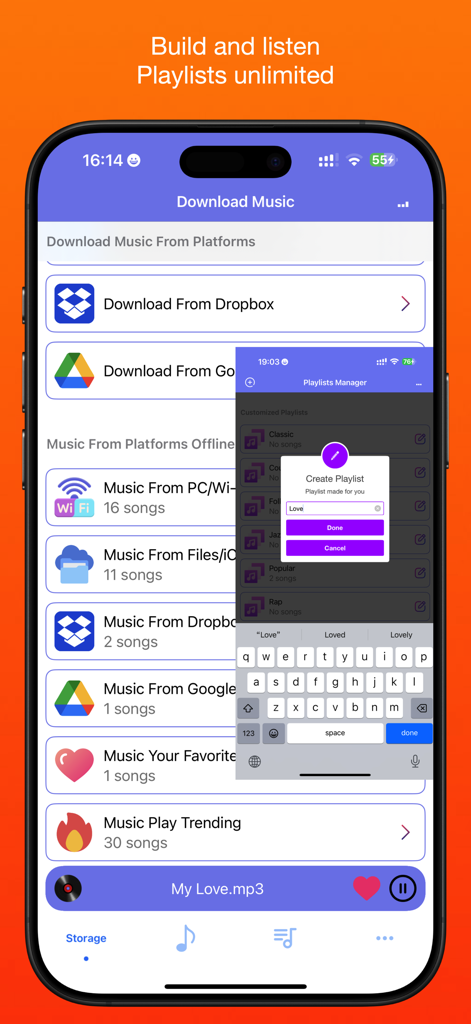
Music X - Full Music Player Fm - Dropbox 및 Google Drive에서 음악을 다운로드하는 옵션과 재생 목록 생성 팝업이 표시된 Music X 앱 인터페이스
Dropbox 및 Google Drive에서 음악을 다운로드하는 옵션과 재생 목록 생성 팝업이 표시된 Music X 앱 인터페이스

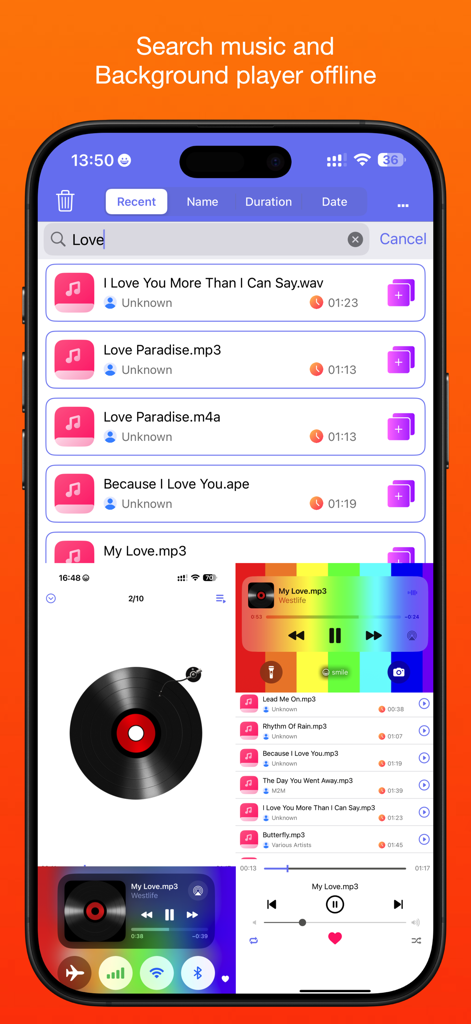
Music X - Full Music Player Fm - 백그라운드 플레이어가 있는 오프라인 음악 파일용 Music X 앱 검색 화면
백그라운드 플레이어가 있는 오프라인 음악 파일용 Music X 앱 검색 화면

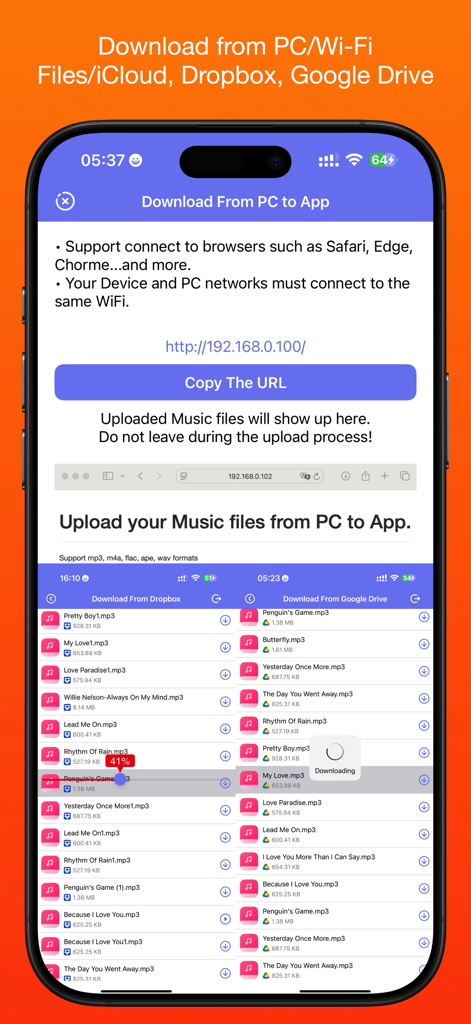
Music X - Full Music Player Fm - Music X 앱에서 PC 및 클라우드 서비스의 음악 다운로드 옵션을 보여주는 인터페이스

Music X 앱에서 PC 및 클라우드 서비스의 음악 다운로드 옵션을 보여주는 인터페이스

설명

Our simple goal is just to make easy to use it for everyone who like listening to the offline music songs. We will go on to improve it with your reviews, feedbacks, supports. We will be so happy if you and someone you know who both enjoy it. Allow you to download songs from your storages, support PC/Wi-Fi, Files/iCloud, Dropbox®/Google Drive®. Easy to use and you can enjoy it for listening to downloaded songs without wifi. Main Features: √ Download songs from your storages: PC/Wi-Fi, Files/iCloud, Dropbox®/Google Drive®. √ Play downloaded songs with powerful Music player. √ Provide multiple play modes: normal, multi loop, single loop, shuffle. √ Manage your customized and favorite playlists. √ Search songs what you like with keywords. √ Support background playback mode. √ Provide music playback rankings. √ Playback bar can help you switch and control playback more quickly. How to use: 1. On the tab Storage choose the device, app, cloud platform such as: PC/Wi-Fi, Files/iCloud, Dropbox®/Google Drive®. 2. Connect to PC(Your Device and PC/Wi-Fi, networks must connect to the same WiFi), Files/iCloud or Dropbox®/Google Drive® with your account (If you have no account, you should register one). 3. Download songs from your storage platform(You should upload your favorite songs to your cloud storages by yourself). 4. You can create and edit your music playlists name. 5. Add the songs to your created music playlists. 6. Choose the songs to play and enjoy it. • Please rate this app to support me to do better and for so more people can find, download, use and enjoy it. • Please share it with your friends and family members to help for getting the word out. • Please send us email and let's know how you to use it, also send us your questions, concerns and feedbacks.

Download

다운로드: App Store

이 페이지는 앱이나 개발자의 공식 페이지가 아니며, 정보 제공 및 논평을 목적으로 작성된 독립 편집 간행물입니다. 명시적으로 달리 언급되지 않는 한, 해당 앱이나 개발자는 MWM, Apple, Google Play, 앱 퍼블리셔 또는 앱 개발자와 제휴, 보증, 후원, 승인 또는 공식적으로 연결되어 있지 않으며, 이 페이지의 어떤 내용도 해당 앱이 MWM의 서비스를 사용하여 개발되었음을 의미하지 않습니다. 모든 상표, 로고, 스크린샷 및 기타 콘텐츠는 해당 소유자의 자산입니다.







