MusicBee Remote
MusicBee Remote
다운로드: App Store

이 페이지는 앱이나 개발자의 공식 페이지가 아니며, 정보 제공 및 논평을 목적으로 작성된 독립 편집 간행물입니다. 명시적으로 달리 언급되지 않는 한, 해당 앱이나 개발자는 MWM, Apple, Google Play, 앱 퍼블리셔 또는 앱 개발자와 제휴, 보증, 후원, 승인 또는 공식적으로 연결되어 있지 않으며, 이 페이지의 어떤 내용도 해당 앱이 MWM의 서비스를 사용하여 개발되었음을 의미하지 않습니다. 모든 상표, 로고, 스크린샷 및 기타 콘텐츠는 해당 소유자의 자산입니다.


로고: MusicBee Remote
다운로드: App Store

MusicBee Remote

진지한 음악 수집가를 위한 최고의 동반자입니다. iPhone 또는 iPad에서 원활하게 라이브러리를 탐색하고, 평점을 관리하고, 메타데이터를 편집하세요.

주요 수치

다운로드

1K+

사용자 평점

1.6/5

총 평가 수

0

개발사

Daniil Zubach

카테고리

Music

지원 언어

1

최신 버전

2.2.2

크기

19.0 MB

출시일

2019년 8월 22일
기능

고음질 라이브러리를 완벽하게 제어하세요

MusicBee Remote는 데스크톱 플레이어의 모든 기능을 여러분의 주머니 속에 넣어줍니다. 집안 어디에서든 정밀하고 쉽게 큐레이션된 컬렉션을 관리하세요.

구속 없는 재생

재생 대기열, 볼륨, 셔플 설정을 완벽하게 제어하세요. 책상에 앉지 않고도 전체 라이브러리를 탐색하세요.

능동적인 라이브러리 큐레이션

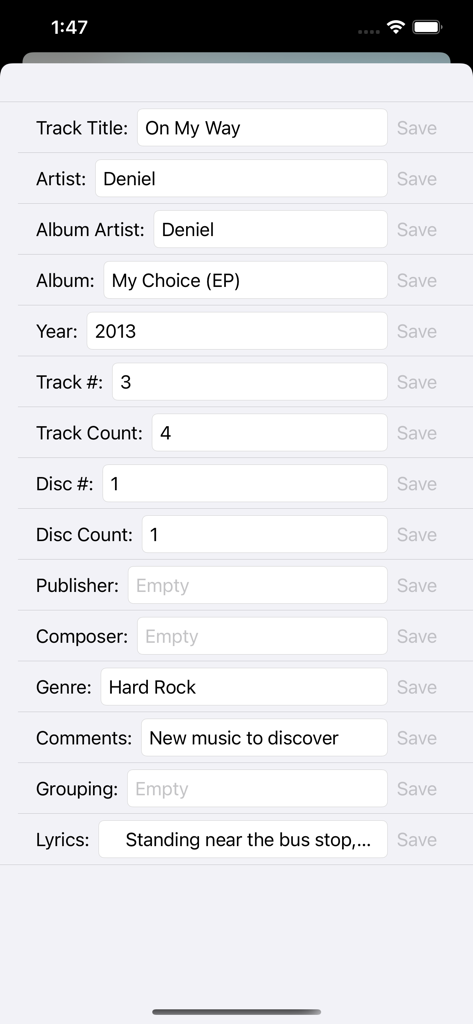
트랙에 별점을 매기고, Last.fm 좋아요를 동기화하고, 메타데이터 태그를 실시간으로 편집하세요. 소파에 편안히 앉아 세심하게 정리된 컬렉션을 그대로 유지하세요.

다음 스크린샷과 설명은 앱의 공식 스토어 목록에서 직접 가져온 것이며 앱 개발자의 자산입니다.

앱 스토어

스크린샷
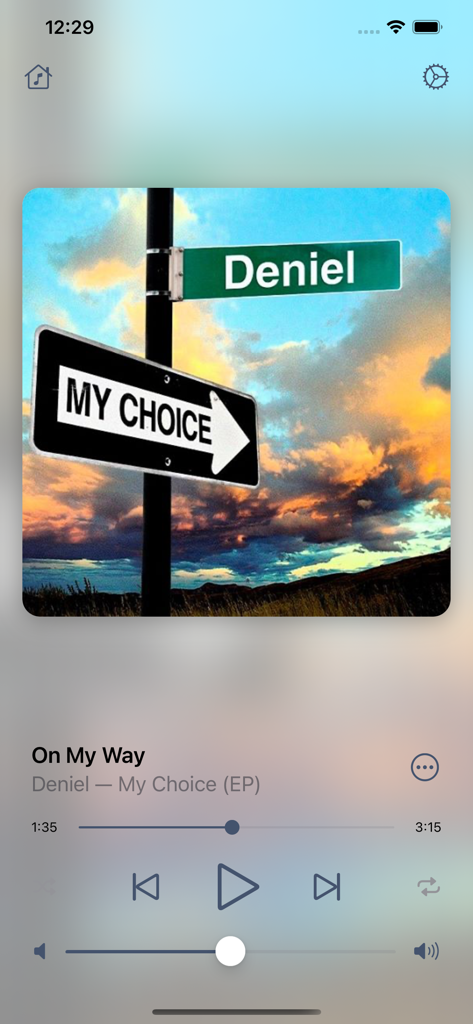
MusicBee Remote - MusicBee Remote 앱 재생 화면, 앨범 아트와 음악 컨트롤 표시
MusicBee Remote 앱 재생 화면, 앨범 아트와 음악 컨트롤 표시

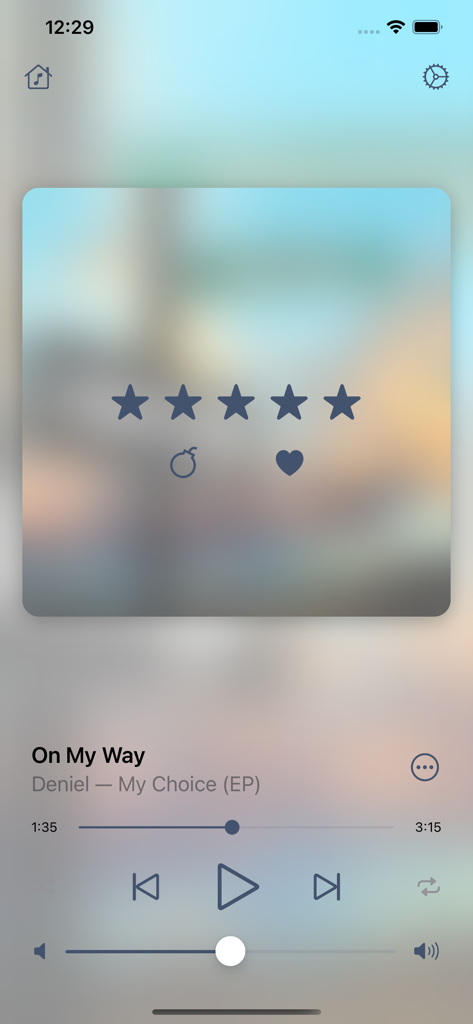
MusicBee Remote - MusicBee Remote 재생 화면, 노래 정보와 별점 5개 시스템 표시
MusicBee Remote 재생 화면, 노래 정보와 별점 5개 시스템 표시

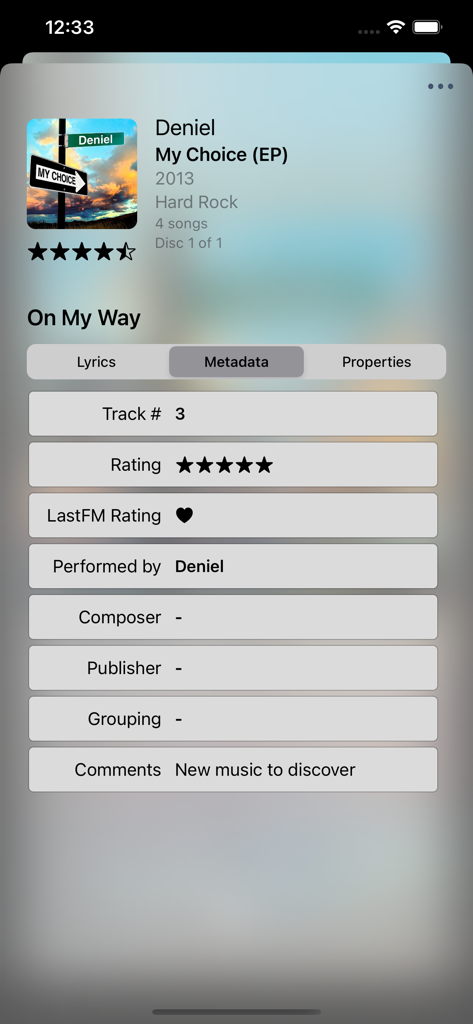
MusicBee Remote - MusicBee Remote 화면, 노래 메타데이터 및 평점 옵션 표시
MusicBee Remote 화면, 노래 메타데이터 및 평점 옵션 표시

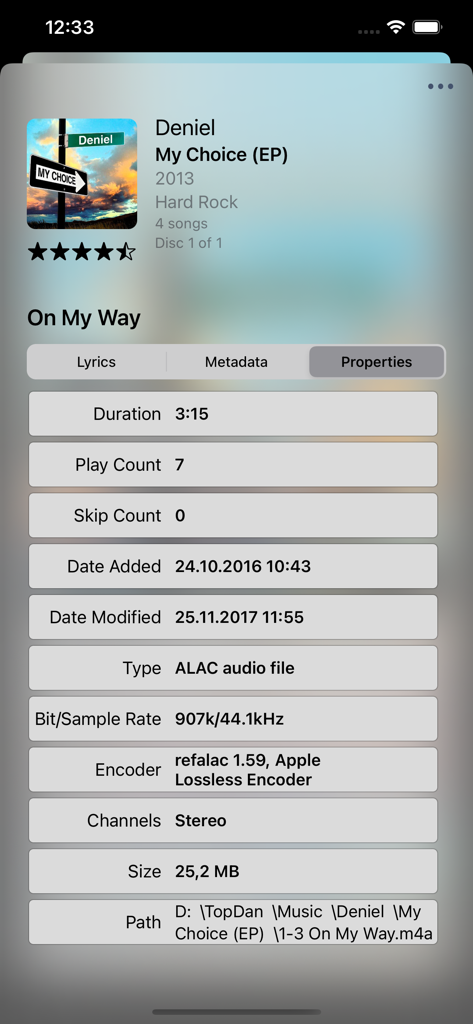
MusicBee Remote - MusicBee Remote의 상세 트랙 속성 보기, 오디오 파일 기술 데이터 표시
MusicBee Remote의 상세 트랙 속성 보기, 오디오 파일 기술 데이터 표시

MusicBee Remote - MusicBee Remote 앱 화면, 음악 메타데이터 및 태그 편집
MusicBee Remote 앱 화면, 음악 메타데이터 및 태그 편집

MusicBee Remote - MusicBee Remote 앱 라이브러리 화면, 아티스트, 앨범, 노래, 장르, 재생 목록별 카테고리 표시

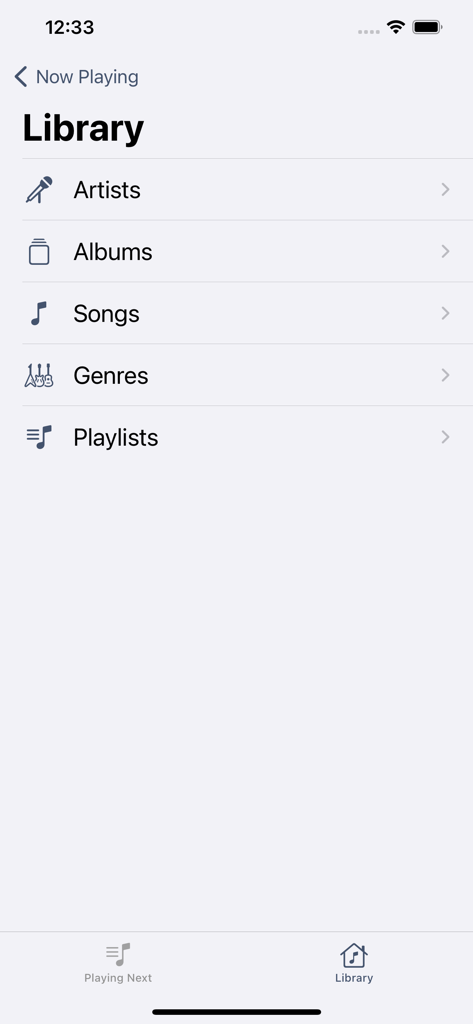
MusicBee Remote 앱 라이브러리 화면, 아티스트, 앨범, 노래, 장르, 재생 목록별 카테고리 표시

설명

MusicBee Remote application allows you to control MusicBee player using your iOS device. Application requires MusicBee Remote plugin to be installed on PC. You can download latest version for free at https://getmusicbee.com/addons/plugins/199/musicbee-remote-for-ios/ Plugin requires MusicBee v.3.0 or higher. Player can be downloaded at https://getmusicbee.com/downloads/ MAIN FEATURES: ◉ Playback controls (play, pause, next, previous, volume change, shuffle, repeat, playback progress) ◉ Now Playing track artwork and info ◉ Lyrics support ◉ Rate song with stars or Last.fm love ◉ View and edit Upcoming Tracks list ◉ Browse Artists, Albums, Genres or Songs from library ◉ Enqueue or play the tracks from library ◉ Browse and play existing playlists PREMIUM FEATURES: ◉ Control playback from device lock screen ◉ View detailed information about Now Playing track ◉ Edit metadata tags for current track ◉ Customize app accent colors ◉ No ads ◉ Premium support LEGAL: Terms of Use: http://topdan.iblogger.org/legal/terms-of-use/ Privacy Policy: http://topdan.iblogger.org/legal/privacy-policy/ SUBSCRIPTION DETAILS: • Premium subscription provides additional in-app functionality and benefits. • Once the subscription with a trial, if offered, is activated, you can use it for 7 days for free and cancel at any time. • Subscription automatically renews unless auto-renew is turned off at least 24-hours before the end of the current period. • Account will be charged for renewal within 24-hours prior to the end of the current period. • Subscriptions may be managed by the user and auto-renewal may be turned off by going to the user's Account Settings after purchase. • Any unused portion of a free trial period, if offered, will be forfeited when the user purchases a subscription.

Download

다운로드: App Store

이 페이지는 앱이나 개발자의 공식 페이지가 아니며, 정보 제공 및 논평을 목적으로 작성된 독립 편집 간행물입니다. 명시적으로 달리 언급되지 않는 한, 해당 앱이나 개발자는 MWM, Apple, Google Play, 앱 퍼블리셔 또는 앱 개발자와 제휴, 보증, 후원, 승인 또는 공식적으로 연결되어 있지 않으며, 이 페이지의 어떤 내용도 해당 앱이 MWM의 서비스를 사용하여 개발되었음을 의미하지 않습니다. 모든 상표, 로고, 스크린샷 및 기타 콘텐츠는 해당 소유자의 자산입니다.







