
이 페이지는 앱이나 개발자의 공식 페이지가 아니며, 정보 제공 및 논평을 목적으로 작성된 독립 편집 간행물입니다. 명시적으로 달리 언급되지 않는 한, 해당 앱이나 개발자는 MWM, Apple, Google Play, 앱 퍼블리셔 또는 앱 개발자와 제휴, 보증, 후원, 승인 또는 공식적으로 연결되어 있지 않으며, 이 페이지의 어떤 내용도 해당 앱이 MWM의 서비스를 사용하여 개발되었음을 의미하지 않습니다. 모든 상표, 로고, 스크린샷 및 기타 콘텐츠는 해당 소유자의 자산입니다.


No Crop Photo Video Resize
이 앱은 소셜 미디어의 지루한 프레임을 박살내고, 당신의 콘텐츠를 돋보이게 만드는 도구다. 단순한 편집을 넘어, 창작자에게 디지털 캔버스 위에서 무한한 자유를 부여하는 것이 확인된다. 더 이상 잘리거나 왜곡된 이미지에 좌절할 필요가 없다.
다운로드
2.5M+사용자 평점
총 평가 수
16.9K개발사
카테고리
Photo & Video지원 언어
14최신 버전
1.57.0크기
87.7 MB출시일
2014년 11월 15일소셜 미디어 콘텐츠 제작자를 위한 필수 도구의 핵심 역량 평가
No Crop Photo Video Resize 앱 주요 기능 분석
크롭 없는 사진/동영상 게시
이 앱은 사용자가 사진과 동영상을 자르지 않고도 인스타그램과 같은 소셜 미디어에 전체 크기로 게시할 수 있도록 지원하여, 원본 콘텐츠의 손상 없이 공유할 수 있는 핵심 기능을 제공합니다.
동영상 음악 추가 및 동기화
이 도구는 사용자가 자신의 음악을 추가하거나 제공된 라이브러리에서 선택하여 동영상에 삽입하고, 사운드와 영상을 정확하게 동기화할 수 있도록 하여 동영상 콘텐츠의 매력을 크게 향상시킵니다.
전문 필터 적용
이 앱은 다양한 전문 필터를 제공하여 사용자가 단 한 번의 탭으로 사진과 동영상의 분위기와 스타일을 손쉽게 변경하고 시각적 매력을 높일 수 있게 해줍니다.
스티커 및 텍스트 맞춤 설정
이 도구는 다양한 스티커와 아름다운 글꼴 및 스타일의 텍스트 캡션을 추가할 수 있는 기능을 갖추고 있어, 사용자가 자신의 개성을 표현하고 메시지를 효과적으로 전달할 수 있도록 돕습니다.
다양한 꾸미기 요소
이 앱은 테두리, 프레임, 흐림 배경, 도형, 둥근 모서리, 그림자, 패턴 및 단색 배경과 같은 다채로운 요소를 제공하여 사용자가 창의적인 감각을 더하고 콘텐츠를 독특하게 만들 수 있습니다.
소셜 미디어 최적화된 크기
이 도구는 페이스북 및 인스타그램 게시물과 스토리를 포함한 다양한 소셜 미디어 플랫폼에 최적화된 크기 옵션을 제공하여, 사용자가 각 플랫폼에 맞는 콘텐츠를 쉽게 제작할 수 있도록 합니다.
고해상도 내보내기 및 직접 공유
이 앱은 고해상도 및 인쇄 품질의 결과물을 내보낼 수 있으며, 사용자가 편집한 콘텐츠를 카메라 롤에 저장하거나 인스타그램, 페이스북, 트위터 등 다양한 소셜 미디어 플랫폼으로 직접 공유할 수 있게 해줍니다.
간편한 사진/동영상 변형
이 도구는 사용자가 사진과 동영상을 쉽게 이동, 회전, 크기 조정 및 뒤집을 수 있도록 하여, 기본적인 편집 요구 사항을 충족시키고 콘텐츠를 원하는 대로 정렬할 수 있게 합니다.
자주 묻는 질문
에 대해 알아야 할 모든 것 No Crop Photo Video Resize
What is the No Crop Photo Video Resize app?
The No Crop Photo Video Resize app allows users to post full-size photos and videos to Instagram without cropping. It offers editing tools, music, filters, stickers, text, and various backgrounds for social media sharing.
Does the No Crop Photo Video Resize app allow users to add music to videos?
Yes, the No Crop Photo Video Resize app allows users to add their own music or choose from over 100 songs across various genres. It provides functionality to sync sound and video.
Can I add filters to my photos using the No Crop Photo Video Resize app?
Yes, the No Crop Photo Video Resize app includes over 30 free professional filters. Users apply these filters to enhance their media, making it stand out.
How can I post non-square photos on Instagram using the No Crop Photo Video Resize app?
The No Crop Photo Video Resize app automatically fits non-square images to the square Instagram canvas. Users can move, rotate, scale, and flip photos and videos easily before posting.
What social media platforms does No Crop Photo Video Resize support for sharing?
The No Crop Photo Video Resize app supports sharing to Instagram, Facebook, Twitter, Whatsapp, and email. Users can also save their edited media directly to their device's camera roll.
What is included in the Square Edit Premium Subscription?
The Square Edit Premium Subscription provides unlimited access to all stickers & overlays, over 50 Pro Patterns, Pro Fonts, Custom Photo Backgrounds, and removes all ads for an enhanced experience.
Is there a free trial for the Square Edit Premium Subscription?
Yes, the Square Edit Premium Subscription offers a 3-day free trial. This allows users to access and evaluate premium content before committing to a monthly subscription.
Does the No Crop Photo Video Resize app offer custom text options for photos?
Yes, the No Crop Photo Video Resize app allows users to add beautiful text captions to their photos. It provides numerous fonts and styles for comprehensive text customization.
Where can I find the privacy policy for No Crop Photo Video Resize?
The privacy policy for the No Crop Photo Video Resize app is accessible at http://cushwayapps.com/app-privacy/squareedit/privacy.html. This document details how user data is handled.
다음 스크린샷과 설명은 앱의 공식 스토어 목록에서 직접 가져온 것이며 앱 개발자의 자산입니다.
앱 스토어
스크린샷
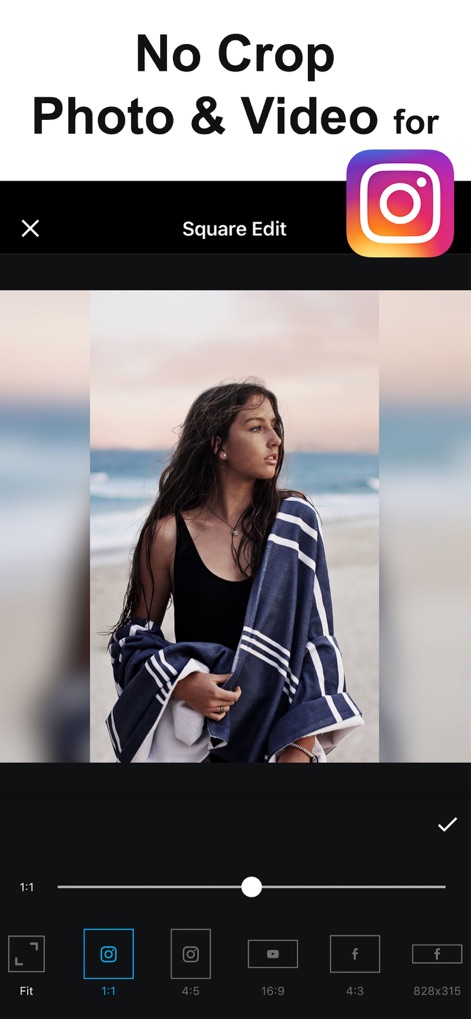
이 앱은 사용자가 원본 비율을 유지하거나 다양한 소셜 미디어 플랫폼에 맞춰 사진을 자르지 않고 게시할 수 있도록 다양한 화면 비율 옵션과 자동 정사각형 맞춤 기능을 제공합니다.
자르기 없는 편집
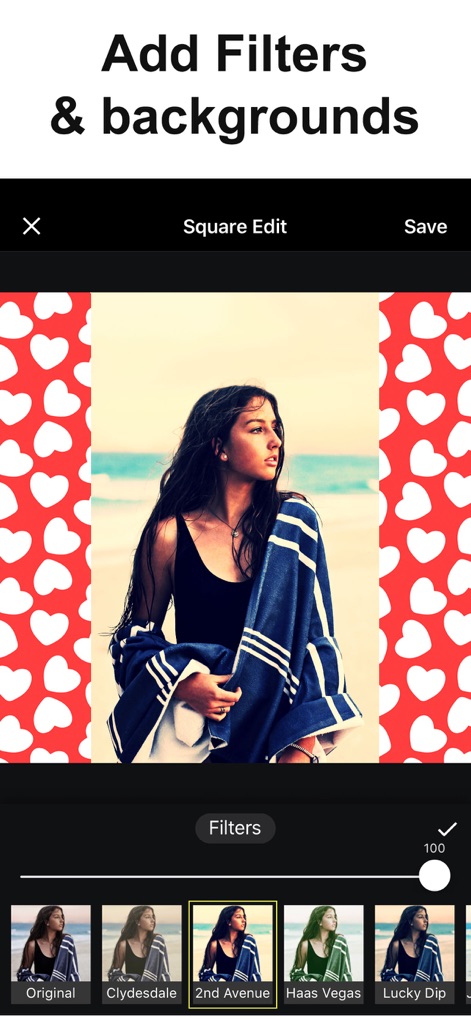
이 도구는 사용자가 사진에 전문적인 필터를 적용하여 분위기를 바꾸고, 다양한 패턴 배경으로 시각적인 매력을 더할 수 있게 돕습니다.
스타일 변신 필터
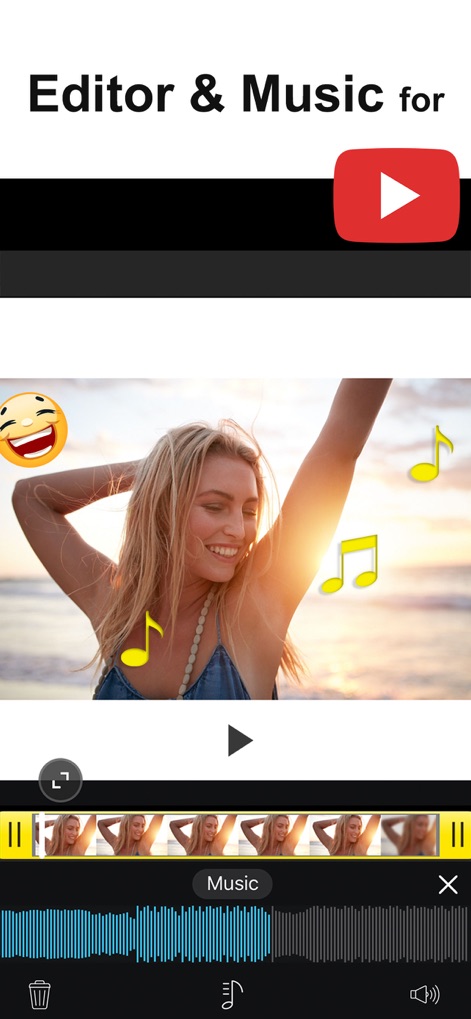
사용자는 이 앱을 통해 비디오에 음악을 추가하고 사운드를 동기화할 수 있으며, 재미있는 이모티콘 오버레이로 영상에 생동감을 더할 수 있습니다.
음악과 비디오 편집
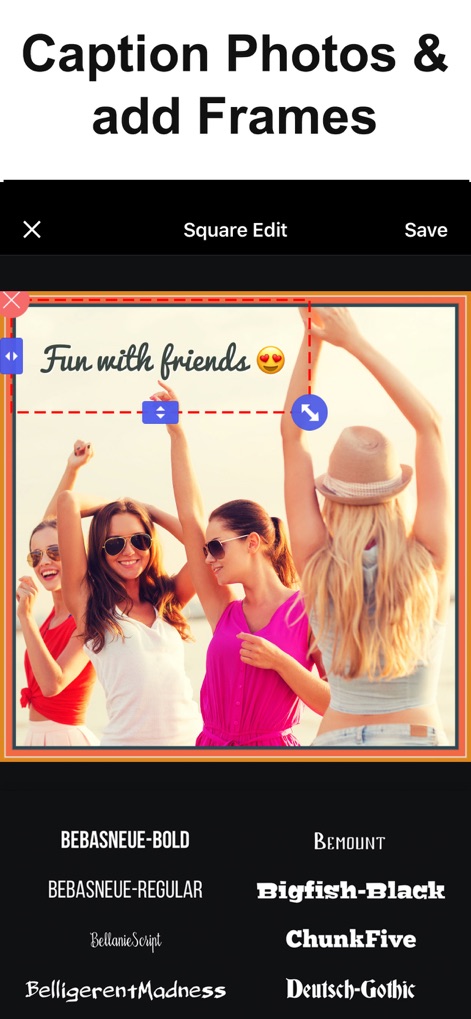
이 앱은 사진에 맞춤형 텍스트 캡션을 추가하여 스토리를 전달하고, 다양한 폰트 스타일과 프레임으로 콘텐츠를 더욱 돋보이게 만듭니다.
캡션 및 프레임 추가
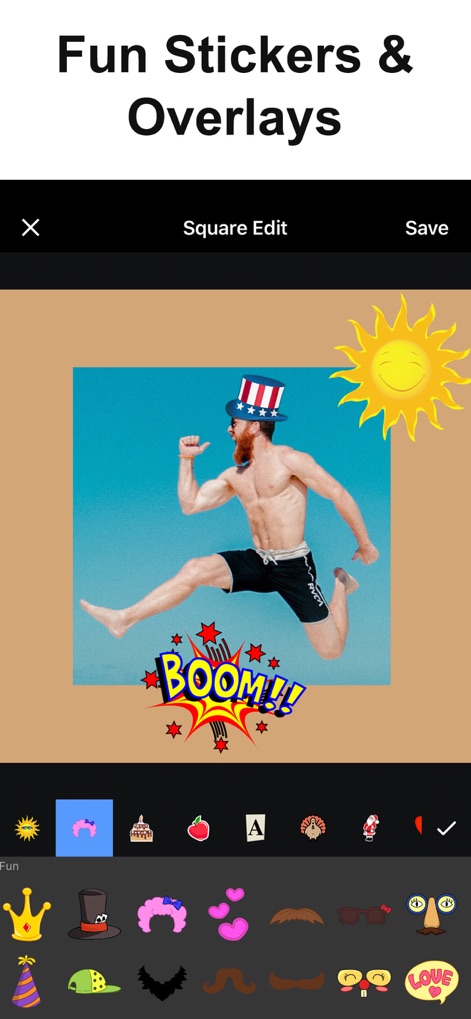
사용자는 이 도구에서 제공하는 방대한 스티커 컬렉션을 활용하여 사진에 개성을 더하고, 재미있는 오버레이로 시각적인 재미를 창출할 수 있습니다.
재미있는 스티커 효과
설명
Download
비슷한 앱
유사한 기능과 사용자 경험을 가진 앱
Blackhole Lite - Black Hole
Parth Talpara

CutStory: AI Reels Editor
LLC Sport Star Management

No Crop - Square quick sized
HOANG PHAM

TikEdit-国际版国外热门短视频编辑器
琼 周

Quick Edit: Video,Photo Editor
Monjur Morshed

Edit Up: AI Photo Video Editor
Debotosh Dey

BlackSave Video Spliter
Milinda Dsouza
Ai Photo Retouch -Video Editor
SKYNES LAB LIMITED
Video Plus - Music Editor Crop
pixel force private limited
이 페이지는 앱이나 개발자의 공식 페이지가 아니며, 정보 제공 및 논평을 목적으로 작성된 독립 편집 간행물입니다. 명시적으로 달리 언급되지 않는 한, 해당 앱이나 개발자는 MWM, Apple, Google Play, 앱 퍼블리셔 또는 앱 개발자와 제휴, 보증, 후원, 승인 또는 공식적으로 연결되어 있지 않으며, 이 페이지의 어떤 내용도 해당 앱이 MWM의 서비스를 사용하여 개발되었음을 의미하지 않습니다. 모든 상표, 로고, 스크린샷 및 기타 콘텐츠는 해당 소유자의 자산입니다.