Noise Monitor and Analysis
다운로드: App Store

이 페이지는 앱이나 개발자의 공식 페이지가 아니며, 정보 제공 및 논평을 목적으로 작성된 독립 편집 간행물입니다. 명시적으로 달리 언급되지 않는 한, 해당 앱이나 개발자는 MWM, Apple, Google Play, 앱 퍼블리셔 또는 앱 개발자와 제휴, 보증, 후원, 승인 또는 공식적으로 연결되어 있지 않으며, 이 페이지의 어떤 내용도 해당 앱이 MWM의 서비스를 사용하여 개발되었음을 의미하지 않습니다. 모든 상표, 로고, 스크린샷 및 기타 콘텐츠는 해당 소유자의 자산입니다.

로고: Noise Monitor and Analysis
다운로드: App Store

Noise Monitor and Analysis

막연한 추측은 그만두고 기록을 시작하세요. 12시간 이상 소음을 손쉽게 녹음하고, 시각적 색상 코딩으로 반복되는 패턴을 식별하며, 위치가 확인된 보고서를 생성하여 이웃 분쟁이나 관리사무소 민원을 해결하세요.

주요 수치

다운로드

20K+

사용자 평점

1.0/5

총 평가 수

0

개발사

John Hall

카테고리

Lifestyle

지원 언어

1

최신 버전

3.8.3

크기

68.6 MB

출시일

2015년 11월 6일
기능

모든 데시벨을 정밀하게 기록하세요

주관적인 불편함을 객관적인 데이터로 변환하세요. 당사의 고급 모니터링 도구는 소음 방해를 쉽게 캡처하고 분석하며 증명할 수 있도록 도와줍니다.

12시간 이상 연속 녹음

밤새도록 또는 근무 시간 내내 모니터링하세요. 최적화된 백그라운드 녹음은 배터리 소모 없이 장기적인 증거를 캡처합니다.

시각적 사운드 매핑

색상으로 구분된 주파수 분석을 통해 패턴을 즉시 식별하세요. 무음 구간을 건너뛰고 빠른 검토 기능을 사용하여 몇 초 만에 주요 이벤트를 찾을 수 있습니다.

다음 스크린샷과 설명은 앱의 공식 스토어 목록에서 직접 가져온 것이며 앱 개발자의 자산입니다.

앱 스토어

스크린샷
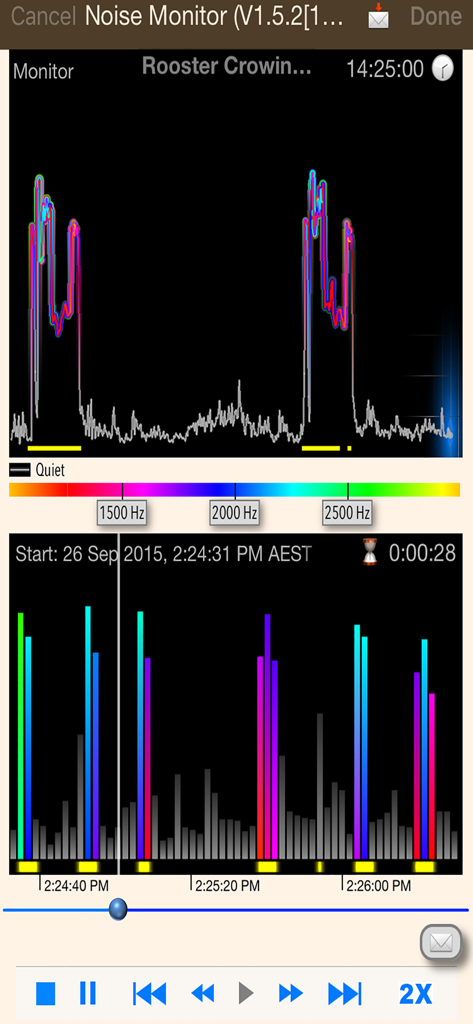
Noise Monitor and Analysis - 소음 증거 녹음을 위한 소음 모니터링 및 분석 앱의 인터페이스

소음 증거 녹음을 위한 소음 모니터링 및 분석 앱의 인터페이스

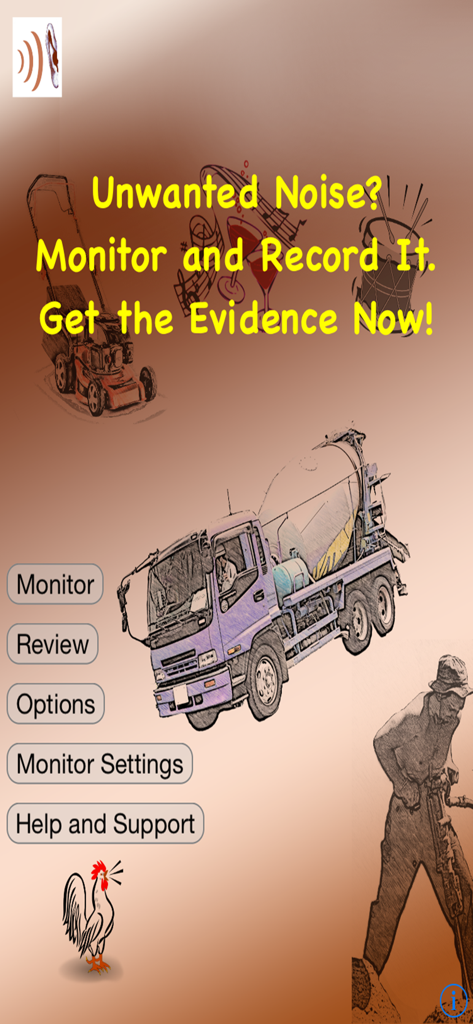
Noise Monitor and Analysis - 소음 증거 수집을 위한 색상 코딩된 오디오 주파수 그래프를 보여주는 소음 모니터링 및 분석 앱 인터페이스
소음 증거 수집을 위한 색상 코딩된 오디오 주파수 그래프를 보여주는 소음 모니터링 및 분석 앱 인터페이스

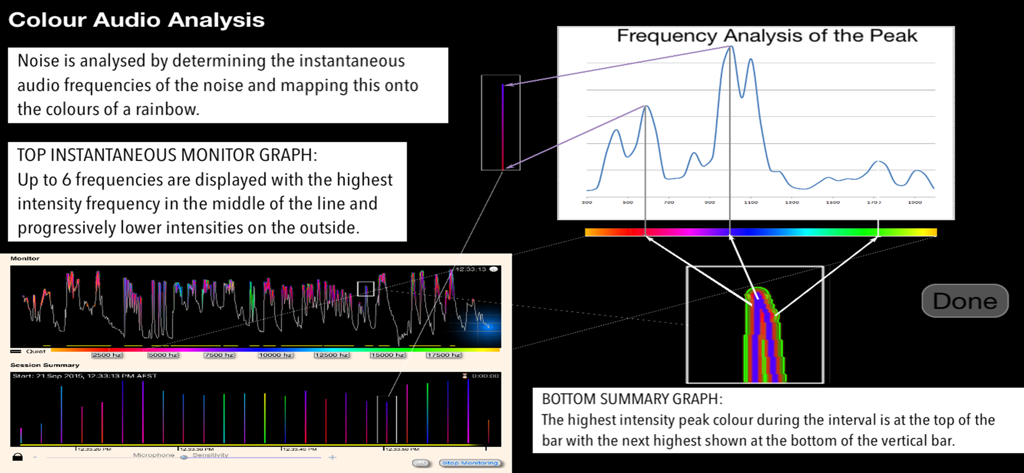
Noise Monitor and Analysis - 주파수 분석 및 색상 코딩된 데이터가 포함된 세션 요약 그래프를 보여주는 소음 모니터 앱의 시각적 인터페이스
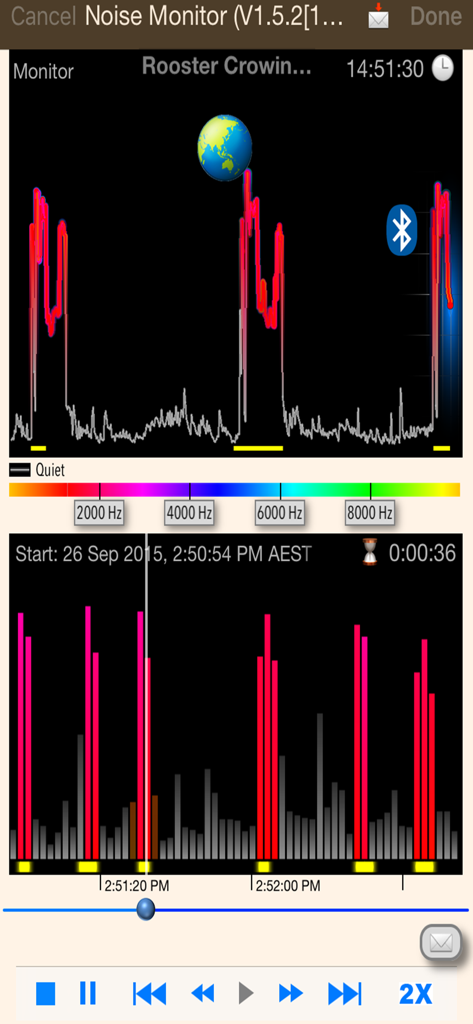
주파수 분석 및 색상 코딩된 데이터가 포함된 세션 요약 그래프를 보여주는 소음 모니터 앱의 시각적 인터페이스

Noise Monitor and Analysis - 실시간 소리 주파수 분석 및 시각적 세션 요약을 보여주는 소음 모니터 앱 인터페이스
실시간 소리 주파수 분석 및 시각적 세션 요약을 보여주는 소음 모니터 앱 인터페이스

Noise Monitor and Analysis - iCloud를 통한 원격 모니터링 및 이메일 알림 설정을 보여주는 소음 관리 옵션 화면

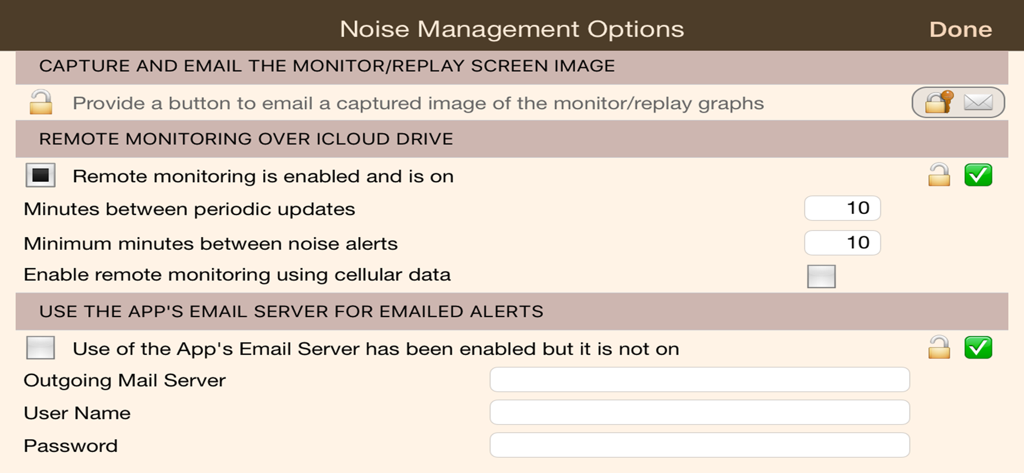
iCloud를 통한 원격 모니터링 및 이메일 알림 설정을 보여주는 소음 관리 옵션 화면

설명

Are you subjected to unwanted noise? Quickly set up a monitoring session to record noise. ‘Noise Monitor' has low disk and battery usage with background and screen-locked recording enabling you to monitor well in excess of 12 hours. Noise is color encoded so that you can visually identify similar noises throughout the monitoring session. Noise is analysed for you by determining the instantaneous audio frequencies of the noise and mapping it onto the colors of a rainbow. On the top instantaneous graph up to 6 frequencies are displayed with the highest intensity frequency in the middle of the line and progressively lower intensities on the outside. The bottom graph shows you a summary of the entire monitoring session. The vertical bars here summarise an interval with the highest intensity peak colour during the interval at the top of the bar and the next highest shown at the bottom of the bar. Similar noises show you similar color patterns though louder noises will show in brighter colors. The yellow bars at the bottom of each graph show where the app has detected a noise peak. Fast review features save you time: Visually review noise, selectively replay noisy sections, skip and play noisy intervals, double speed playback. You have at your disposal further optional features as required: ・ Change the audio frequency range to analyse ・ Capture and email of the monitoring and playback screen ・ Remote monitoring over iCloud drive ・ Emailed periodic updates and noise alerts ・ Alter the conditions that trigger a noise alert ・ Export 48000Hz copies of monitor recordings to Documents or iCloud Drive ・ Email download links to recording copies in iCloud Drive using iOS mail ・ Email of download links to guaranteed unaltered copies ・ Use of location services to prove where the monitoring took place (with the unlimited version) Note: If the noise you are wishing to monitor is barking dogs then please have a look at our premium dog related app "Bark'n Mad".

Download

다운로드: App Store

이 페이지는 앱이나 개발자의 공식 페이지가 아니며, 정보 제공 및 논평을 목적으로 작성된 독립 편집 간행물입니다. 명시적으로 달리 언급되지 않는 한, 해당 앱이나 개발자는 MWM, Apple, Google Play, 앱 퍼블리셔 또는 앱 개발자와 제휴, 보증, 후원, 승인 또는 공식적으로 연결되어 있지 않으며, 이 페이지의 어떤 내용도 해당 앱이 MWM의 서비스를 사용하여 개발되었음을 의미하지 않습니다. 모든 상표, 로고, 스크린샷 및 기타 콘텐츠는 해당 소유자의 자산입니다.