Notate + Play = music notebook
다운로드: App Store

이 페이지는 앱이나 개발자의 공식 페이지가 아니며, 정보 제공 및 논평을 목적으로 작성된 독립 편집 간행물입니다. 명시적으로 달리 언급되지 않는 한, 해당 앱이나 개발자는 MWM, Apple, Google Play, 앱 퍼블리셔 또는 앱 개발자와 제휴, 보증, 후원, 승인 또는 공식적으로 연결되어 있지 않으며, 이 페이지의 어떤 내용도 해당 앱이 MWM의 서비스를 사용하여 개발되었음을 의미하지 않습니다. 모든 상표, 로고, 스크린샷 및 기타 콘텐츠는 해당 소유자의 자산입니다.

로고: Notate + Play = music notebook
다운로드: App Store

Notate + Play = music notebook

앱 전환은 이제 그만. Apple Music 또는 녹음 파일을 악보와 직접 동기화하고, 재생 속도를 늦추고, 별도의 리듬 및 음 높이 입력을 사용하여 정밀하게 채보하세요.

주요 수치

다운로드

3K+

사용자 평점

1.0/5

총 평가 수

0

개발사

Kunio Arai

카테고리

Music

지원 언어

2

최신 버전

3.50

크기

12.7 MB

출시일

2023년 7월 7일
기능

채보 워크플로우 마스터하기

귀와 악보 사이의 격차를 해소하세요. Notate + Play는 iPad에서 녹음 파일을 채보하고, 연습 세션을 녹음하고, 디지털 악보 라이브러리를 구축할 수 있는 전문적인 작업 공간을 제공합니다.

통합 오디오 및 악보

앱 전환을 제거하세요. 단일 동기화 화면에서 Apple Music 또는 실시간 녹음의 악보와 참조 오디오를 보세요.

이론 우선 입력 방식

리듬과 음 높이를 별도로 입력하여 전문 음악원 교육 방식을 반영하고, 오류를 줄이며, 복잡한 솔로를 쉽게 채보할 수 있도록 도와줍니다.

다음 스크린샷과 설명은 앱의 공식 스토어 목록에서 직접 가져온 것이며 앱 개발자의 자산입니다.

앱 스토어

스크린샷
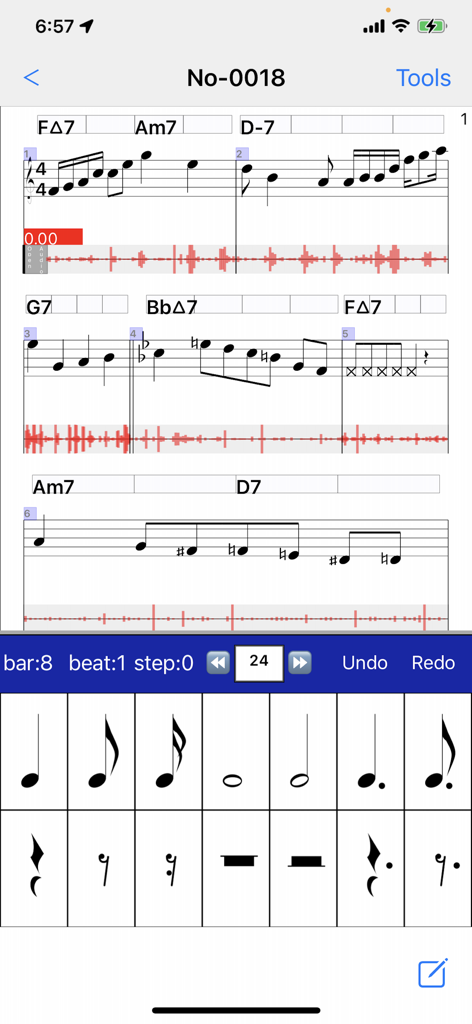
Notate + Play = music notebook - 오디오 파형과 리듬 입력 키보드와 동기화된 악보를 보여주는 음악 노트 앱 인터페이스.
오디오 파형과 리듬 입력 키보드와 동기화된 악보를 보여주는 음악 노트 앱 인터페이스.

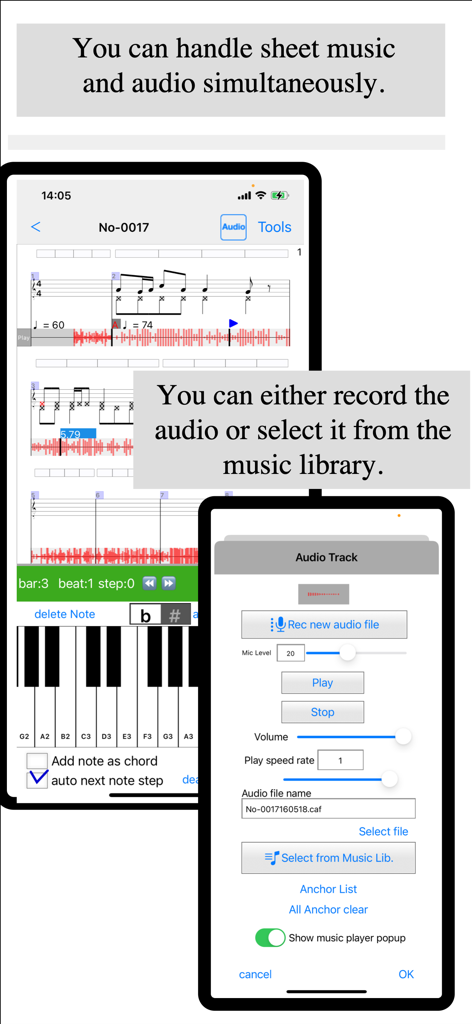
Notate + Play = music notebook - 오디오 파형과 동기화된 악보 및 트랙 녹음 메뉴를 보여주는 악보 인터페이스
오디오 파형과 동기화된 악보 및 트랙 녹음 메뉴를 보여주는 악보 인터페이스

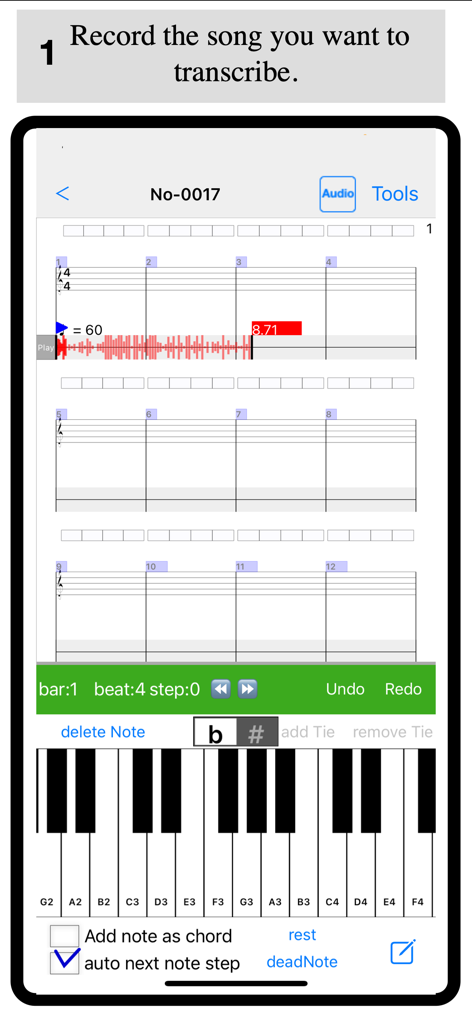
Notate + Play = music notebook - 빈 악보 위에 녹음된 오디오 파형과 가상 피아노 키보드를 보여주는 음악 채보 인터페이스.
빈 악보 위에 녹음된 오디오 파형과 가상 피아노 키보드를 보여주는 음악 채보 인터페이스.

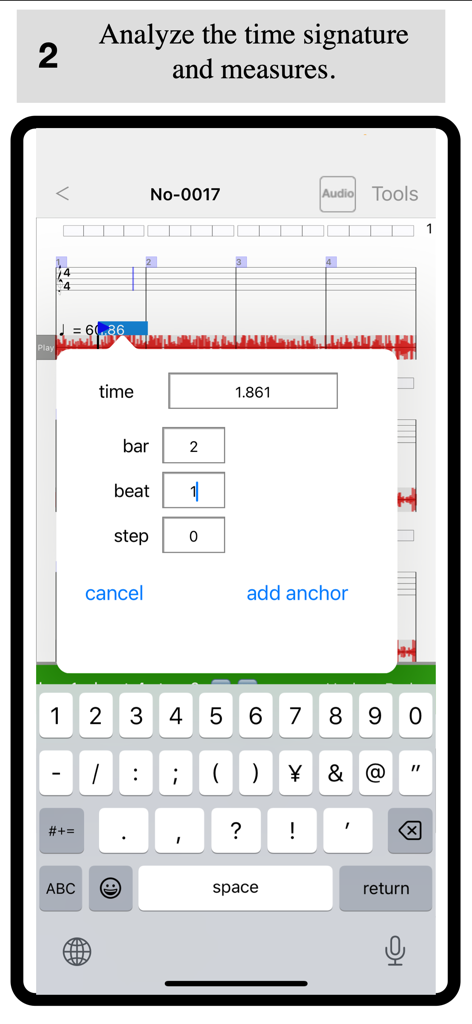
Notate + Play = music notebook - Notate Play 앱에서 오디오를 악보와 동기화하기 위해 비트 앵커를 추가하는 인터페이스.
Notate Play 앱에서 오디오를 악보와 동기화하기 위해 비트 앵커를 추가하는 인터페이스.

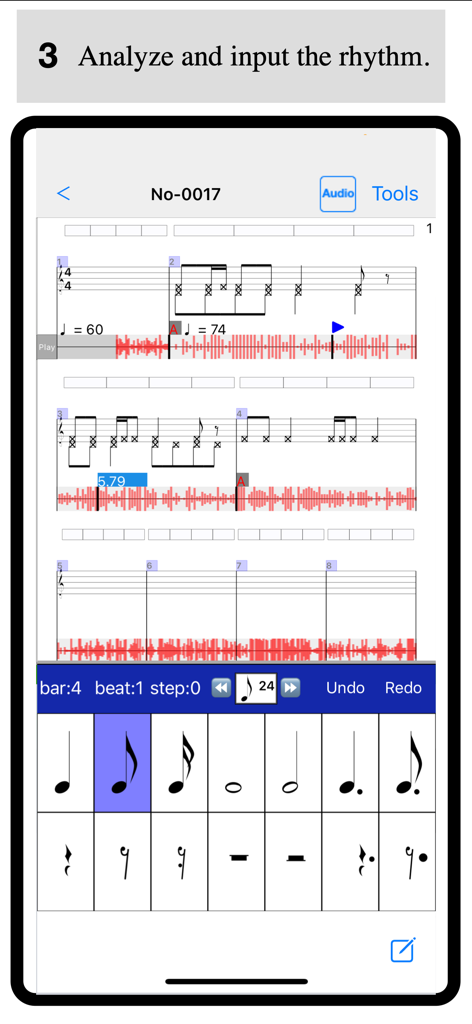
Notate + Play = music notebook - 오디오 파형과 악보를 사용하여 음악 리듬을 분석하고 입력하기 위한 Notate 및 Play 앱 인터페이스
오디오 파형과 악보를 사용하여 음악 리듬을 분석하고 입력하기 위한 Notate 및 Play 앱 인터페이스

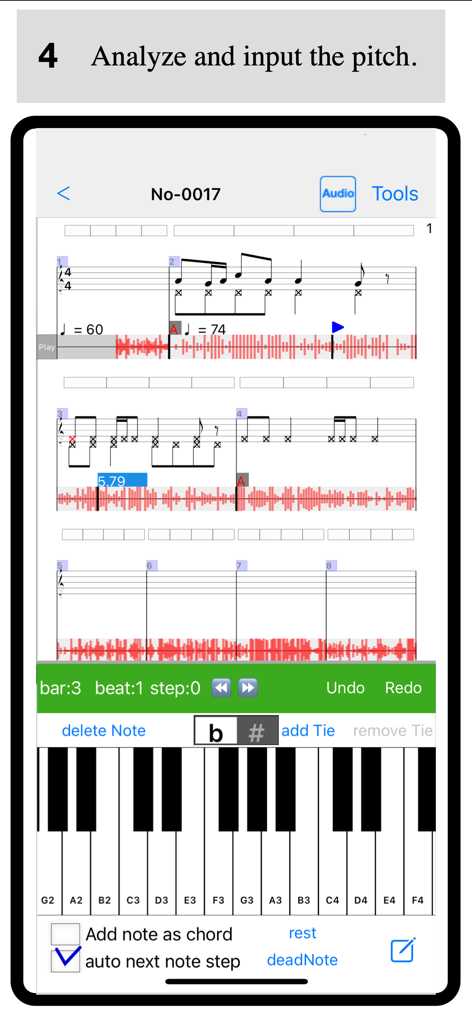
Notate + Play = music notebook - 피아노 건반이 있는 음악 채보 앱 인터페이스, 음 높이 입력 및 오디오 파형이 있는 악보
피아노 건반이 있는 음악 채보 앱 인터페이스, 음 높이 입력 및 오디오 파형이 있는 악보

Notate + Play = music notebook - 오디오 파형 및 채보를 위한 가상 피아노 키보드와 동기화된 악보를 표시하는 악보 앱 인터페이스
오디오 파형 및 채보를 위한 가상 피아노 키보드와 동기화된 악보를 표시하는 악보 앱 인터페이스

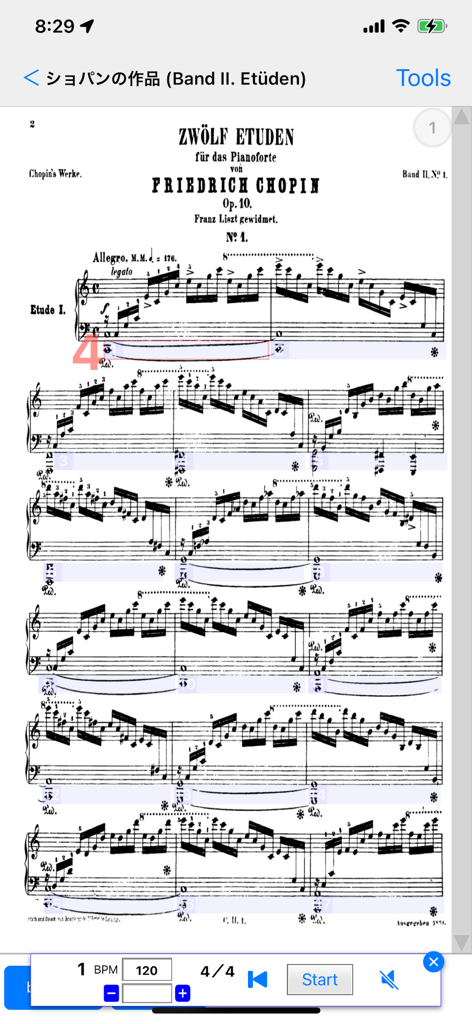
Notate + Play = music notebook - 통합 메트로놈 및 재생 설정을 갖춘 Notate 및 Play 앱에서 표시되는 쇼팽 피아노 악보

통합 메트로놈 및 재생 설정을 갖춘 Notate 및 Play 앱에서 표시되는 쇼팽 피아노 악보

설명

About This App This app is designed to support musical instrument practice.
It allows you to view and listen to both a reference audio file (such as a recording or a track from your music library) and sheet music on the same screen. By listening to the reference performance while writing or reviewing sheet music, you can strengthen the connection between the music and the notation, helping you achieve a more ideal performance.
Ultimately, you may even be able to reproduce the music in your head through your instrument. Selecting Audio There are two ways to choose a reference audio file: 1 Selecting from the Music Library
You can select a song from your Apple Music library. 2 Recording with a Microphone
You can record using the microphone on your iPad or iPhone. If no audio track is selected, tapping the track will open the recording screen. Press "Rec new audio file" to start recording.
To stop recording, tap the audio track and select "Stop Recording" from the dialog. The audio track functions as a player. You can tap any position on the track to start playback from that point. The player controls appear above the sheet music input dialog at the bottom of the screen, allowing you to play, stop, and adjust playback speed. Creating Sheet Music While using pre-existing sheet music is convenient, transcribing it yourself is a great way to improve your skills. 1 Setting the Time Signature and Tempo
First, determine the time signature and tempo of the piece. Since many popular songs use a 4/4 time signature, this is set as the default. The default tempo is 60 BPM, but you can adjust it using the "Tempo Change Dialog." 2 Synchronizing Sheet Music and Audio
While playing the audio, identify the starting points of measures. If the measure positions and the audio are misaligned, use the "Beat Anchor" feature to adjust them. By adding anchors, you can link playback time with measure positions, creating a more precise score.
Adding multiple anchors will allow the app to calculate the tempo automatically. If the time signature changes during the piece, you can add a time signature mark to any measure. Main Features 1 Linking Audio and Sheet Music
You can select a song from your music library or use a recorded audio file and link it to your sheet music. Setting anchors helps streamline the transcription process. 2 Separate Input for Rhythm and Pitch
The app supports a training-based approach by allowing users to input rhythm and pitch separately. Entering rhythm first and then pitch ensures more accurate transcription. 3 Vertical Scrolling for Sheet Music
The sheet music can be scrolled vertically for easier viewing. This option can be enabled in the settings. 4 Adding and Editing Tracks
You can freely add and edit tracks, including chords, notes, text, and audio. 5 Audio Playback Speed Adjustment
Adjust the playback speed to make transcription and practice easier. 6 Sheet Music Viewer
Import sheet music from PDF or images and view them easily within the app. 7 Metronome Feature
The built-in metronome automatically scrolls the sheet music according to the tempo and time signature set in the score. 8 Second Voice Part Notation
The app now supports second voice parts in sheet music. To enable this, go to "Edit Track(s)" and select an individual Note Track, then check "Second Voice Part." This allows you to enter a second voice part for that track.
To enter second voice notes, tap the lower area of the staff. You can also prioritize second voice selection by enabling the "2nd Voice" option in the note input view. 9 Adding Slurs and Text to Sheet Music
You can now input slurs and text onto the sheet music. Simply select a range of notes and use the popup menu to add them.

Download

다운로드: App Store

이 페이지는 앱이나 개발자의 공식 페이지가 아니며, 정보 제공 및 논평을 목적으로 작성된 독립 편집 간행물입니다. 명시적으로 달리 언급되지 않는 한, 해당 앱이나 개발자는 MWM, Apple, Google Play, 앱 퍼블리셔 또는 앱 개발자와 제휴, 보증, 후원, 승인 또는 공식적으로 연결되어 있지 않으며, 이 페이지의 어떤 내용도 해당 앱이 MWM의 서비스를 사용하여 개발되었음을 의미하지 않습니다. 모든 상표, 로고, 스크린샷 및 기타 콘텐츠는 해당 소유자의 자산입니다.







