
이 페이지는 앱이나 개발자의 공식 페이지가 아니며, 정보 제공 및 논평을 목적으로 작성된 독립 편집 간행물입니다. 명시적으로 달리 언급되지 않는 한, 해당 앱이나 개발자는 MWM, Apple, Google Play, 앱 퍼블리셔 또는 앱 개발자와 제휴, 보증, 후원, 승인 또는 공식적으로 연결되어 있지 않으며, 이 페이지의 어떤 내용도 해당 앱이 MWM의 서비스를 사용하여 개발되었음을 의미하지 않습니다. 모든 상표, 로고, 스크린샷 및 기타 콘텐츠는 해당 소유자의 자산입니다.

Noteshelf 3: AI Digital Notes
당신의 디지털 노트에 AI를 주입합니다. 단순히 메모하는 것을 넘어, 지능적인 보조자가 당신의 생각을 가속화합니다.
다운로드
1M+사용자 평점
총 평가 수
13.7K개발사
카테고리
Productivity지원 언어
9최신 버전
6.11크기
400.9 MB출시일
2023년 8월 18일첨단 기능을 통한 생산성 및 창의성 향상
Noteshelf 3: AI 디지털 노트 분석
AI 기반 디지털 노트 기능
이 앱은 AI를 활용하여 손글씨 메모를 생성하고, 페이지를 요약하며, 텍스트를 번역하고, 복잡한 용어를 설명하는 등 다양한 기능을 제공하여 생산성을 극대화합니다.
멀티 플랫폼 동기화 및 클라우드 백업
사용자는 iCloud 동기화를 통해 여러 Apple 기기에서 메모에 접근할 수 있으며, Google Drive, OneDrive 등 주요 클라우드 서비스로 자동 백업하여 데이터 안전성을 확보할 수 있습니다.
고급 필기 및 PDF 주석 기능
사용자는 실제와 같은 펜과 하이라이터를 사용하여 아름다운 손글씨 메모를 작성하고 PDF 문서에 정밀하게 주석을 달 수 있습니다.
오디오 녹음 및 손글씨 인식
사용자는 필기와 동시에 오디오를 녹음할 수 있으며, 65개 언어로 손글씨를 텍스트로 변환하여 메모를 쉽게 검색하고 관리할 수 있습니다.
체계적인 노트 정리 및 관리
이 도구는 폴더, 하위 폴더, 태그 및 스마트 폴더를 사용하여 메모를 체계적으로 정리할 수 있는 기능을 제공하며, 노트 간의 링크 생성도 지원합니다.
멀티태스킹 및 프레젠테이션 모드
사용자는 멀티 윈도우 지원을 통해 두 개의 노트를 동시에 작업할 수 있으며, 프레젠테이션 모드를 활용하여 외부 디스플레이로 노트를 공유하고 레이저 포인터로 강조할 수 있습니다.
고도의 개인화 및 템플릿 지원
사용자는 다양한 용지 스타일, 맞춤형 표지, 재배치 가능한 도구 모음을 통해 노트 필기 환경을 개인화할 수 있으며, 200개 이상의 독점 템플릿을 활용할 수 있습니다.
문서 스캔 및 다양한 형식 지원
이 앱은 내장된 문서 스캐너를 통해 실제 문서를 디지털화하고, PDF, DOC, PPT 파일 등을 가져와 정밀하게 주석을 달 수 있도록 합니다.
자주 묻는 질문
에 대해 알아야 할 모든 것 Noteshelf 3: AI Digital Notes
What is Noteshelf 3?
Noteshelf 3 is a digital note-taking app that allows users to create handwritten notes, annotate PDFs, record audio, and utilize AI features for an enhanced note-taking experience.
Does Noteshelf 3 support AI features?
Yes, Noteshelf 3 incorporates Noteshelf AI to enhance note-taking, summarizing, translating, and explaining complex terms.
Can users personalize handwriting tools in Noteshelf 3?
Yes, Noteshelf 3 offers a range of lifelike pens and highlighters, including a fountain pen, to customize handwriting and enhance the aesthetic of digital notes.
Does Noteshelf 3 offer different paper types for notes?
Yes, Noteshelf 3 provides options for lined, dotted, or grid papers, allowing users to customize color and line spacing for their notes.
Can Noteshelf 3 users customize notebook covers?
Yes, Noteshelf 3 allows users to personalize digital notebooks with multiple cover options, including classic designs or custom images and artwork.
Is the toolbar in Noteshelf 3 customizable?
Yes, Noteshelf 3 features a fully customizable toolbar where users can add, remove, or rearrange tools to match their unique workflow preferences.
Does Noteshelf 3 provide note-taking templates?
Yes, Noteshelf 3 offers a vast library of over 200 exclusive templates for various purposes, such as study planners, class notes, and bullet journals.
Does Noteshelf 3 include digital diaries and journals?
Yes, Noteshelf 3 allows users to plan and organize daily tasks with configurable digital diaries and journals.
Can Noteshelf 3 automatically convert strokes into shapes?
Yes, Noteshelf 3 can transform handwritten strokes into flawless shapes and allows users to choose geometric shapes for creating flowcharts and diagrams.
What typing and formatting options are available in Noteshelf 3?
Noteshelf 3 offers various typing styles, formatting options, bulleted/numbered lists, and checklists to enhance text-based note-taking.
Does Noteshelf 3 allow audio recording during note-taking?
Yes, Noteshelf 3 enables users to record audio simultaneously while taking notes, which is beneficial for lectures and meetings.
Does Noteshelf 3 support handwriting recognition?
Yes, Noteshelf 3 converts handwriting into text and allows searching of handwritten notes using recognition technology across 65 supported languages.
How can users organize notes in Noteshelf 3?
Noteshelf 3 allows users to organize notebooks into folders and subfolders, and sort them in their preferred order for efficient paperless management.
Does Noteshelf 3 support multi-tasking with multiple notebooks?
Yes, Noteshelf 3 supports multi-tasking, allowing users to work on two notebooks simultaneously with its multiple windows feature.
What file types can Noteshelf 3 annotate?
Noteshelf 3 allows users to import and precisely highlight, underline, or annotate PDFs, DOCs, PPTs, and images.
Does Noteshelf 3 include a document scanner?
Yes, Noteshelf 3 features a built-in document scanner to quickly digitize physical documents.
How can users export notes from Noteshelf 3?
Users can export and share their notes from Noteshelf 3 as images and PDFs.
Can Noteshelf AI generate handwritten notes?
Yes, Noteshelf AI can effortlessly generate handwritten notes on any given topic.
What capabilities does Noteshelf AI offer?
Noteshelf AI can summarize pages, translate text into various languages, and explain complex terms, among other features.
How does Noteshelf 3 secure user notes?
Noteshelf 3 secures notes using passwords, Face ID, or Touch ID to protect user information.
Does Noteshelf 3 sync notes across devices?
Yes, Noteshelf 3 syncs notes across iPad, iPhone, and Mac devices using iCloud, ensuring accessibility from anywhere.
Can Noteshelf 3 automatically back up notes to cloud storage?
Yes, Noteshelf 3 supports auto-backup of notes to popular cloud storage services including Google Drive, OneDrive, Dropbox, and WebDAV.
Does Noteshelf 3 integrate with Evernote?
Yes, Noteshelf 3 can auto-publish notes to Evernote, allowing users to access them from any location.
Does Noteshelf 3 have a presentation mode?
Yes, Noteshelf 3 includes a presentation mode that allows users to project notes and slides via an external display, utilizing a laser pointer and markers.
Is Noteshelf 3 a free app?
Yes, Noteshelf 3 is free to use with some limits. A premium subscription unlocks features like unlimited notebooks, handwriting recognition, and advanced backup options.
What features are included with Noteshelf 3 Premium?
Noteshelf 3 Premium provides unlimited notebooks, handwriting recognition and search, auto-backup to cloud services, access to templates and digital diaries, and 100 monthly AI credits.
Can Noteshelf 3 help organize daily tasks?
Yes, Noteshelf 3 allows users to create priority lists, to-do lists with checkboxes, and notes for organizing daily tasks, as shown in the interface.
Does Noteshelf 3 support checklists in notes?
Yes, Noteshelf 3 supports checklists within notes, as indicated by the "To Do" section with selectable checkboxes visible in the interface.
Can Noteshelf AI explain complex topics?
Yes, Noteshelf AI can explain complex topics, as demonstrated by its ability to generate text explaining "The Form and Function of Comets" in response to a user prompt.
How many templates are available in Noteshelf 3?
Noteshelf 3 offers over 1000 templates, planners, and diaries, categorized into sections like Goal Planners, Mind Maps, Trackers, and Lists, for diverse note-taking needs.
Are tools on the Noteshelf 3 toolbar adjustable?
Yes, the toolbar in Noteshelf 3 is fully customizable, allowing users to add, remove, or re-arrange tools to suit their workflow, as shown by the various visible icons.
Can users highlight text within PDFs in Noteshelf 3?
Yes, Noteshelf 3 allows users to highlight text within imported PDFs, as indicated by the "Highlight" option in the context menu when interacting with a document.
Does Noteshelf 3 record audio?
Yes, Noteshelf 3 supports seamless audio recordings directly within notes, as evidenced by the visible recording interface showing "REC 00:05" in the screenshot.
Is Noteshelf 3 compatible with multiple Apple devices?
Yes, Noteshelf 3 syncs across multiple Apple devices, including iPad, iPhone, and Apple Watch, as visually confirmed by the app running on all three.
다음 스크린샷과 설명은 앱의 공식 스토어 목록에서 직접 가져온 것이며 앱 개발자의 자산입니다.
앱 스토어
스크린샷
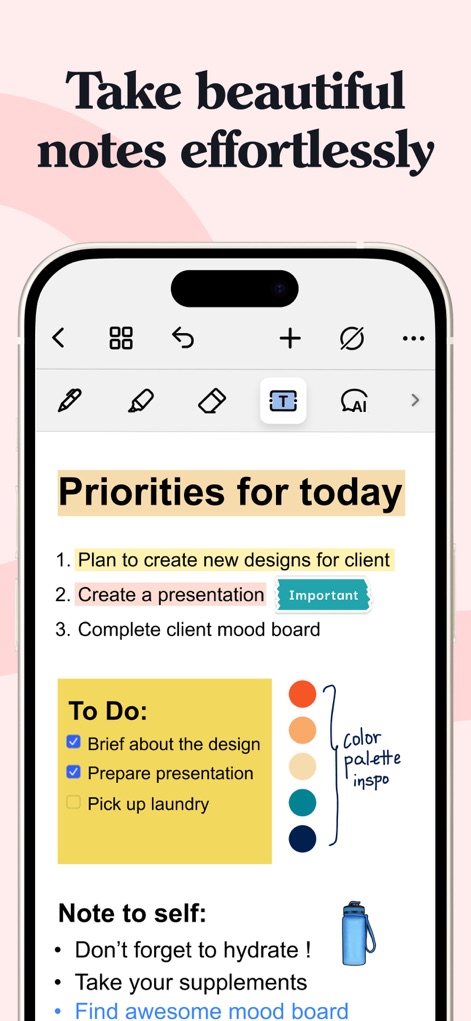
이 앱은 사용자 친화적인 인터페이스와 다양한 필기 도구를 제공하여, 매일의 우선순위 목록과 할 일 목록을 쉽게 작성할 수 있습니다.
아름다운 필기
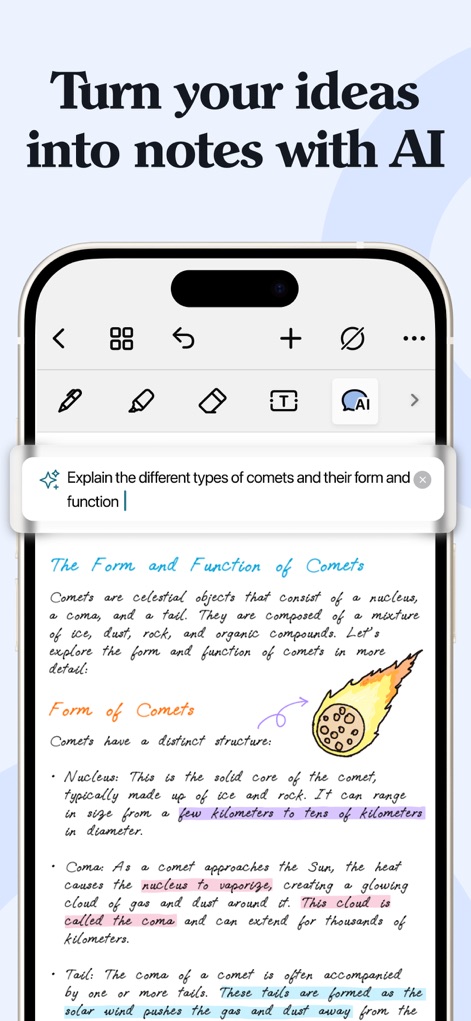
이 도구의 AI 기능은 사용자가 혜성의 형태와 기능에 대한 설명을 요청하는 모습과 그 결과로 생성된 상세한 내용을 보여주며 복잡한 주제를 쉽게 탐색하도록 돕습니다.
AI로 아이디어를 노트로
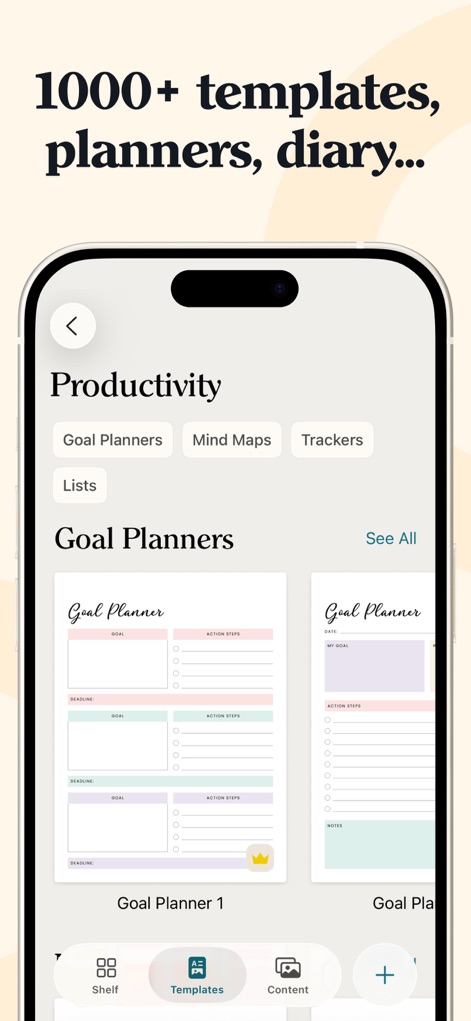
이 앱은 1,000개 이상의 템플릿 라이브러리를 제공하며, 생산성 섹션에서 목표 플래너와 마인드맵 템플릿을 포함한 다양한 옵션을 확인할 수 있습니다.
다양한 템플릿 탐색
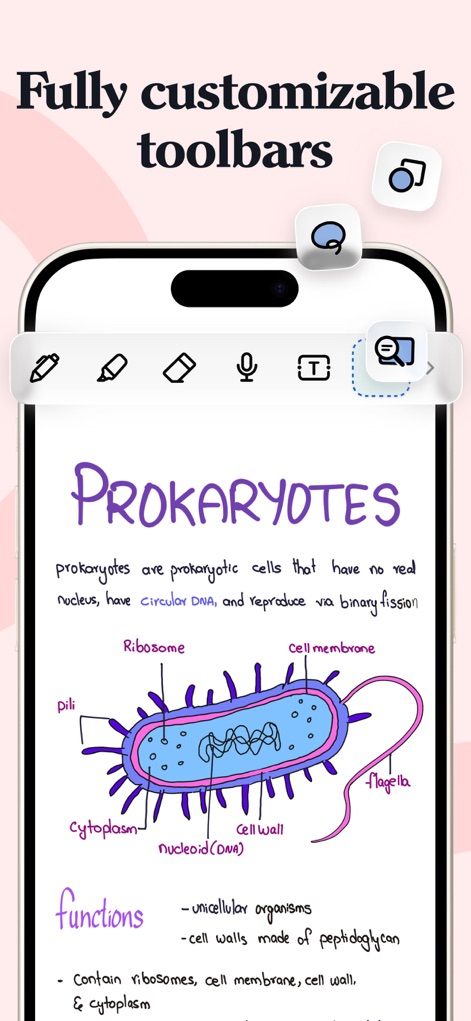
사용자는 개인의 작업 흐름에 맞춰 툴바를 자유롭게 추가, 제거, 재배치할 수 있으며, 이 스크린샷은 다양한 그리기 도구와 마이크 아이콘을 보여줍니다.
맞춤형 툴바 설정
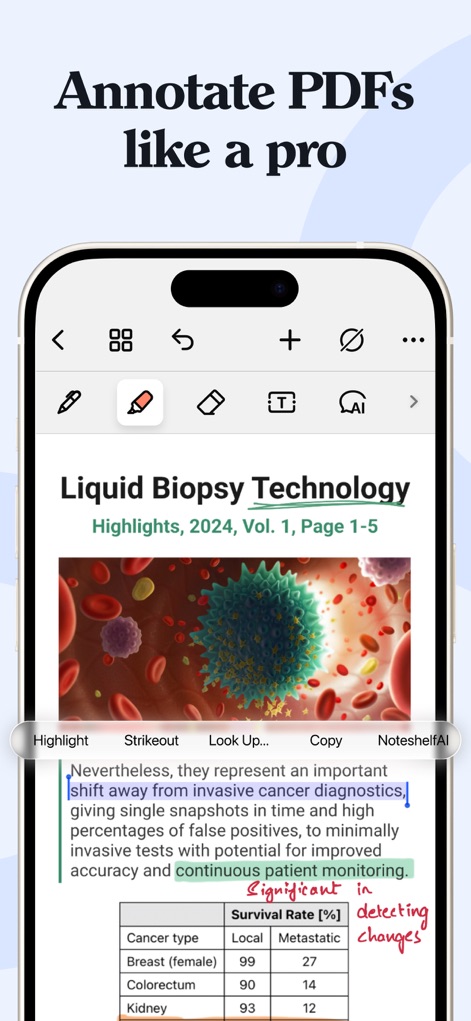
이 앱은 사용자가 PDF 문서에 하이라이트를 추가하고 특정 텍스트를 강조할 수 있도록 하여, 액체 생검 기술 문서와 같은 전문 자료를 효율적으로 검토하고 주석을 달 수 있습니다.
전문가처럼 PDF 주석 달기
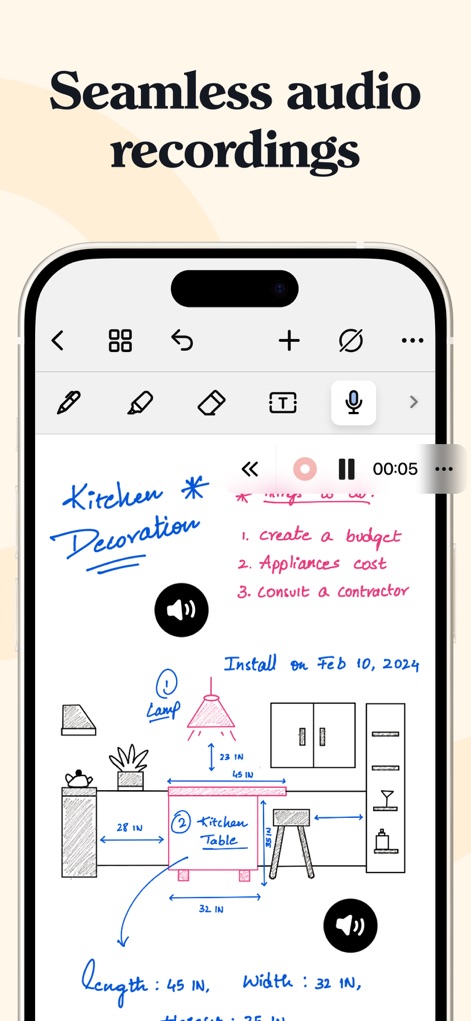
이 도구는 사용자가 노트를 작성하면서 오디오를 동시에 녹음할 수 있게 하여, 회의 내용을 기록하는 동안 키친 데코레이션 아이디어와 같은 정보를 시각적으로 표현할 수 있도록 합니다.
끊김 없는 오디오 녹음
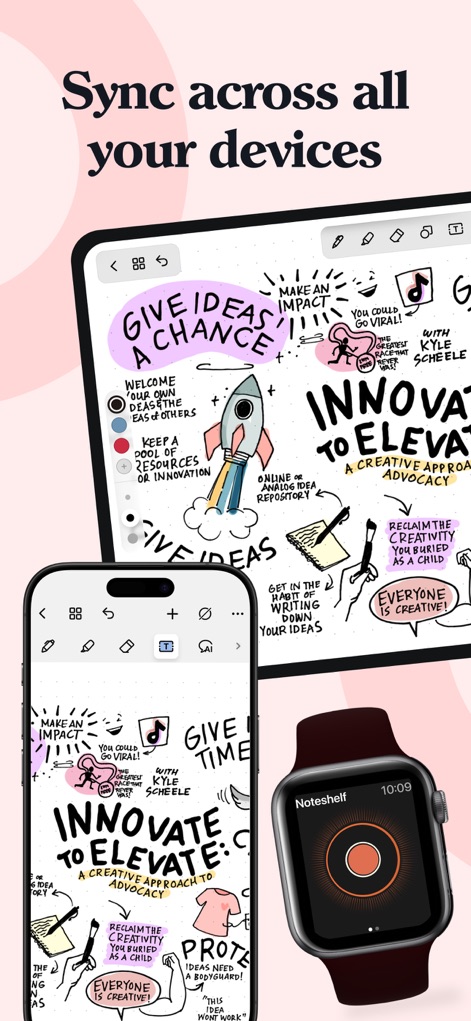
이 앱은 iPad, iPhone, Apple Watch 등 여러 Apple 기기에서 노트를 원활하게 동기화하여, 사용자가 어디서든 아이디어를 기록하고 검토할 수 있도록 합니다.
모든 기기에서 동기화
설명
Download
비슷한 앱
유사한 기능과 사용자 경험을 가진 앱

Notion: Notes, Tasks, AI
Notion Labs, Incorporated

Freenotes®: AI Notes Taking
Hangzhou Free Notes Technology Co., Ltd

Structured - Daily Planner
unorderly GmbH

Google Tasks: Get Things Done
Google LLC

TickTick:To-Do List & Calendar
Appest Limited

Noteful: Notes & PDF Markup
Noteful Technologies Ltd

Todoist: To Do List & Calendar
Doist Inc.

To do list MinimaList & Widget
Inner Grow Limited

monday.com - Work Platform
monday.com Ltd.
이 페이지는 앱이나 개발자의 공식 페이지가 아니며, 정보 제공 및 논평을 목적으로 작성된 독립 편집 간행물입니다. 명시적으로 달리 언급되지 않는 한, 해당 앱이나 개발자는 MWM, Apple, Google Play, 앱 퍼블리셔 또는 앱 개발자와 제휴, 보증, 후원, 승인 또는 공식적으로 연결되어 있지 않으며, 이 페이지의 어떤 내용도 해당 앱이 MWM의 서비스를 사용하여 개발되었음을 의미하지 않습니다. 모든 상표, 로고, 스크린샷 및 기타 콘텐츠는 해당 소유자의 자산입니다.