이 페이지는 앱이나 개발자의 공식 페이지가 아니며, 정보 제공 및 논평을 목적으로 작성된 독립 편집 간행물입니다. 명시적으로 달리 언급되지 않는 한, 해당 앱이나 개발자는 MWM, Apple, Google Play, 앱 퍼블리셔 또는 앱 개발자와 제휴, 보증, 후원, 승인 또는 공식적으로 연결되어 있지 않으며, 이 페이지의 어떤 내용도 해당 앱이 MWM의 서비스를 사용하여 개발되었음을 의미하지 않습니다. 모든 상표, 로고, 스크린샷 및 기타 콘텐츠는 해당 소유자의 자산입니다.
NuRack Auv3 FX Processor
80개 이상의 빌딩 블록으로 사용자 지정 신호 체인을 디자인하고, 나만의 전문 인터페이스를 만들고, iPad에서 완전한 창의적 자유를 경험하세요.
주요 수치
다운로드
14K+
사용자 평점
4.7/5
총 평가 수
100
개발사
Limelight Software
카테고리
Music
지원 언어
1
최신 버전
1.51
크기
27.7 MB
출시일
2020년 6월 26일
기능
궁극의 모듈형 사운드 실험실
80개 이상의 모듈형 빌딩 블록으로 사용자 지정 신호 체인을 디자인하고, 창의적인 워크플로우에 맞춰 전문적인 인터페이스를 만드세요.
80개 이상의 모듈형 빌딩 블록
변조, 스펙트럼 및 MIDI 효과를 연결하여 일반 플러그인으로는 불가능한 독특한 사운드를 만드세요.
배선은 숨기고 사용자 지정 레이블과 로고를 사용하여 집중된 성능을 위한 아름답고 깔끔한 대시보드를 디자인하세요.
FAQ
자주 묻는 질문
에 대해 알아야 할 모든 것 NuRack Auv3 FX Processor
NuRack Auv3 FX Processor란 무엇인가요?
NuRack Auv3 FX Processor는 AUv3 기반의 다중 채널 오디오 및 MIDI 이펙트 프로세서입니다. 사용자는 80개 이상의 제공되는 빌딩 블록을 사용하여 사용자 정의 이펙트를 설계하고 복잡한 오디오 경로에 대한 라우팅을 제어할 수 있습니다.
NuRack은 사용자 정의 이펙트를 위해 몇 개의 빌딩 블록을 제공하나요?
NuRack은 12가지 다른 카테고리의 이펙트에 걸쳐 80개 이상의 오디오 및 MIDI 빌딩 블록을 제공합니다. 사용자는 이러한 모듈을 사용하여 사용자 정의 이펙트를 설계할 수 있습니다.
NuRack은 다른 모드에서 작동할 수 있나요?
예, NuRack은 두 가지 모드로 작동합니다. 하나는 3개의 사용자 정의 가능한 이펙트 랙을 완벽하게 전환할 수 있도록 하고, 다른 하나는 3개의 독립적인 오디오 랙을 통해 오디오를 라우팅합니다.
NuRack Auv3 FX Processor는 사용자 정의 인터페이스를 지원하나요?
예, NuRack을 사용하면 사용자가 내장된 인터페이스 빌더를 사용하여 사용자 정의 인터페이스를 만들 수 있습니다. 이 기능을 통해 오디오 구성 요소를 사용자 정의 레이블 및 배경을 가진 단일 사용자 정의 이펙트로 결합할 수 있습니다.
NuRack에는 어떤 종류의 이펙트가 포함되어 있나요?
NuRack에는 변조, 시간 기반, 스펙트럼, 다이내믹, 필터, MIDI 및 생성기 이펙트가 포함됩니다. 예로는 코러스, 테이프 딜레이, 파라메트릭 EQ, 컴프레서, 멀티필터, MIDI 하모니 및 가상 브라스가 있습니다.
NuRack은 오디오 라우팅을 어떻게 지원하나요?
NuRack은 라우팅에 대한 완전한 제어를 제공하여 사용자가 직렬 또는 병렬로 복잡한 오디오 경로를 만들 수 있도록 합니다. 모듈은 일반적으로 자동으로 연결되지만 연결은 수동으로 라우팅할 수 있습니다.
NuRack Auv3 FX Processor 내에서 파라미터를 자동화할 수 있나요?
예, NuRack은 광범위한 자동화 옵션을 제공합니다. TouchPad, AutoMate, Pattern Automation 및 Visual LFO와 같은 모듈을 통해 직접 터치, MIDI 입력 또는 레벨 감지를 통해 노브와 슬라이더를 원격으로 제어할 수 있습니다.
NuRack은 다크 모드와 라이트 모드를 제공하나요?
예, NuRack Auv3 FX Processor는 다크 모드와 라이트 모드를 모두 지원하므로 사용자가 애플리케이션 인터페이스에 대한 선호하는 시각적 테마를 선택할 수 있습니다.
NuRack의 인터페이스 빌더의 목적은 무엇인가요?
NuRack의 인터페이스 빌더를 사용하면 사용자가 모든 모듈을 단일 사용자 정의 인터페이스로 결합할 수 있습니다. 요소를 드래그, 크기 조정, 색상 지정하고 레이블, 로고 및 배경으로 사용자 정의할 수 있습니다.
NuRack은 몇 개의 입력/출력 버스를 지원하나요?
NuRack Auv3 FX Processor는 3개의 입력/출력 버스를 지원합니다. 이를 통해 애플리케이션 내에서 다중 채널 오디오 처리 및 유연한 라우팅이 가능합니다.
다음 스크린샷과 설명은 앱의 공식 스토어 목록에서 직접 가져온 것이며 앱 개발자의 자산입니다.
앱 스토어
스크린샷
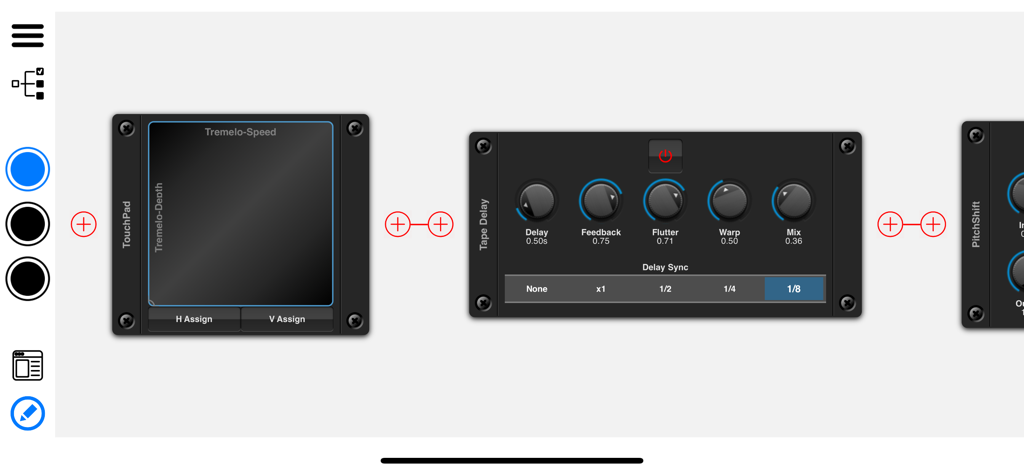
NuRack 앱 인터페이스, Tape Delay 및 TouchPad를 포함한 모듈식 오디오 효과 표시
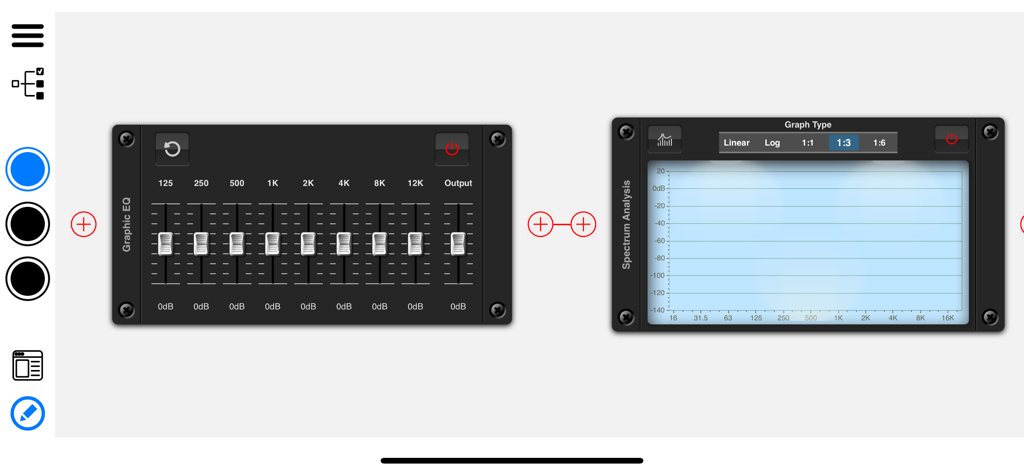
NuRack AUv3 인터페이스, 모듈식 그래픽 EQ 및 스펙트럼 분석 신호 체인 표시
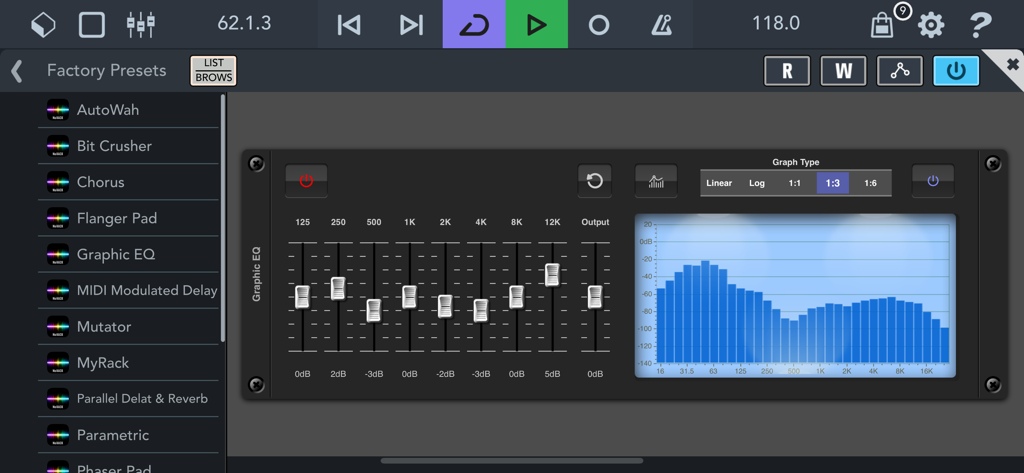
NuRack AUv3 FX Processor 인터페이스, 주파수 페이더와 스펙트럼 시각화 그래프가 있는 그래픽 이퀄라이저 모듈 표시
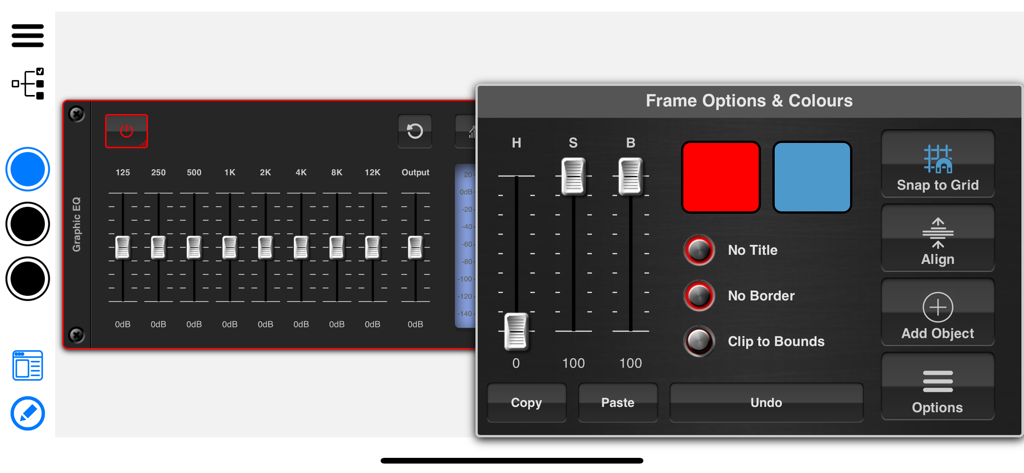
NuRack 인터페이스 빌더, 그래픽 EQ 모듈에 대한 색상 및 프레임 옵션 표시
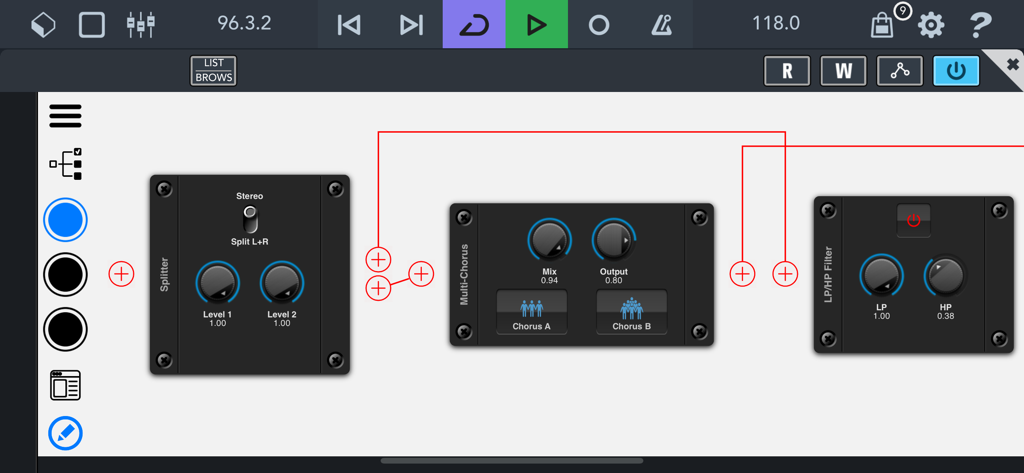
NuRack 모듈형 인터페이스, 오디오 효과 블록 및 사용자 지정 신호 라우팅 표시
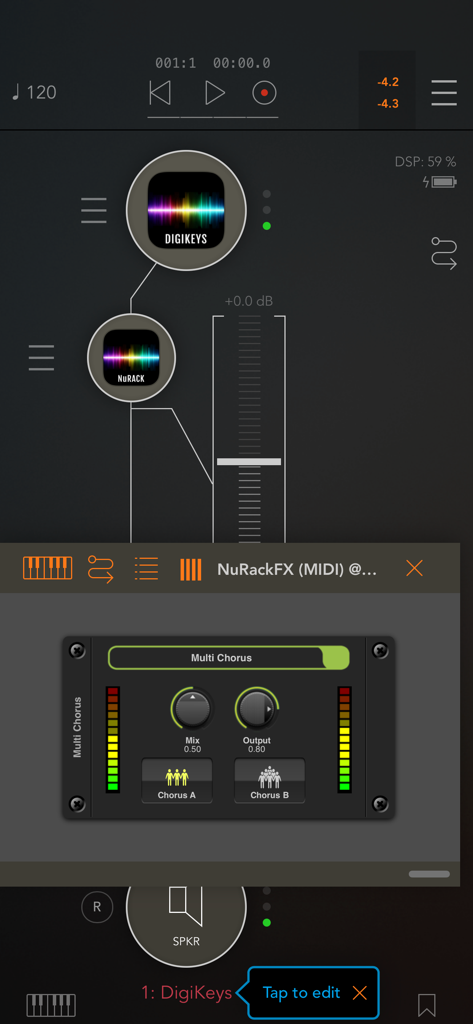
NuRack AUv3 FX Processor 인터페이스, 오디오 신호 라우팅 및 Multi Chorus 효과 모듈 표시
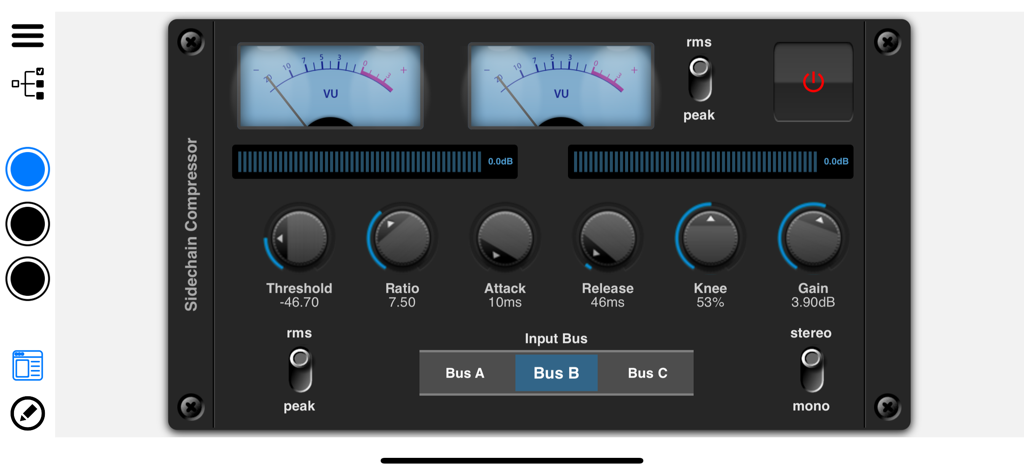
NuRack AUv3 FX Processor의 Sidechain Compressor 인터페이스, VU 미터 및 오디오 제어 노브 표시
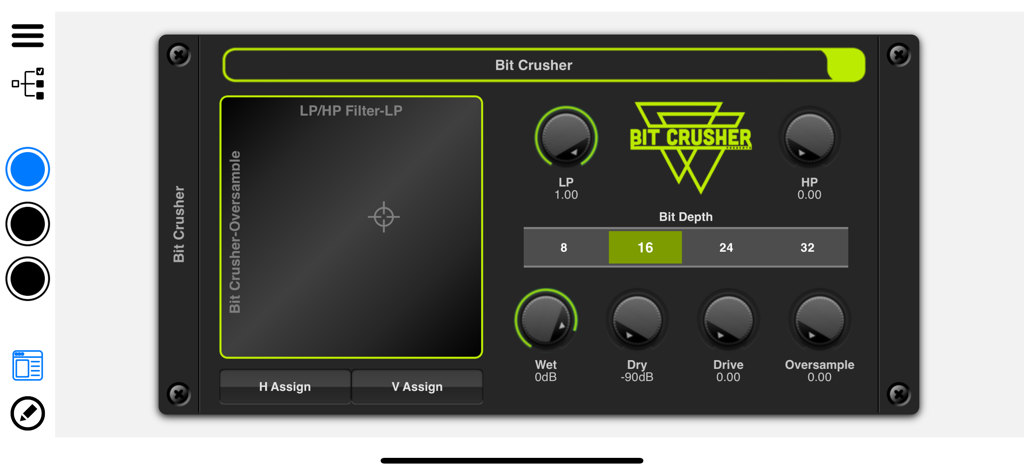
NuRack Bit Crusher 오디오 효과 모듈 인터페이스
설명
NuRack is an AUv3 based multi-channel audio and MIDI effects processor with a difference, it actually allows you to design your own custom effects using the 80+ building blocks provided. You have full control over routing which allows you to create complex audio paths in series or parallel. You can choose whether to use the stock interface or create your own custom interface using the built in Interface Builder which allows you to concentrate your audio components into a single customized effect.
NuRack can run in one of two modes. The first providing 3 customizable effects racks which can be switched (manually or via MIDI), providing seemless switching (i.e. delay trails linger whilst another set of effects are faded in). The second mode allows you to route audio through 3 independent audio racks.
A generaous number of over 80 audio and midi building blocks are provided covering 12 different categories of effects. Here are just some of those included in NuRack:
Modulation Effects: Chorus, Flanger, Phaser, Tremolo, Vocal Doubler, TalkBox, UniVibe, Leslie & Vocoder.
Time Based Effects: Stereo Delay, Tape Delay, Reverb and Reverse Delay.
Spectral Effects: Parametric EQ, Graphic EQ, PitchShift, Auto-Pan, Bit-Crusher, Tube Overdrive, Distortion, Harmony, Harmonic Exciter and SlowMo.
Dynamic Effects: VelocityControl, Compressor, Multi-Band Compressor, Noise Gate, Gate, and Limiter.
Filter Effects: MultiFilter, LP/HP Filter, Frequency Splitter, MultiBand Splitter, Classic Filters, Formant Filter, Ring Modulation and Shelf Filter.
MIDI Effects: MIDI Harmony, MIDI Velocity, MIDI Randomizer, MIDI Monitor, MIDI Mixer, MIDI Pads, MIDI Control, Strummer, MIDI Recorder, MIDI Modulation, MIDI Remap, CC Monitor, CC Generator, PitchBend, MIDI Time Clock, and ChordToMidi.
Generator Modules: Noise, Audio Clip Launcher, SoundFont Player, Virtual Flute, Virtual Clarinet, Virtual Brass, FM Organ, FM Rhodes and Analog Sawtooth Synth.
Automation: TouchPad, AutoMate, Pattern Automation, and Visual LFO.
You also provide the ability to split and combine audio signal using splitters and mixer modules as well as a number of visual elements such as VU Meters, LED Meters, Scopes, Graphs etc.
Some effects such as phaser and flanger are usually controlled by an LFO, but this can be detached and automated remotely. There are a number of modules that allow auomation based on direct touch (X/Y Pads), Visual LFO, Pattern Automation, MIDI input (CC data), or peak/rms level detection. These automation modules can remotely control knobs and sliders throughout your rack.
Simply create a new rack and start adding modules to it. These modules are generally wired up automatically but these connections can be manually routed. Once you have your sound as you wish you can use it 'as is', or switch to Interface Builder mode where you can combine all your modules into a single interface. Elements can be dragged, dropped, resized and coloured as required. Add your own labels, image logos and custom backgrounds before saving your custom component.
Use the X/Y Pad to control your modulation effects by detaching their LFO's. Use MIDI CC data to automate knobs. Use the velocity of an incoming signal to control the cutoff/resonance of a filter (wah) or volume level of a gain control (swell), as NuRack expands, so do the possibilities.
Features:
○ Over 80 categorised modules.
○ 3 Input / Output busses supported.
○ Audio & MIDI effect.
○ Lots of audio & MIDI automation options.
○ Seemless transition between racks.
○ Manual audio path routing.
○ Open in presentation mode (auto hides controls).
○ Interface Builder to customize your rack.
○ AUv3 plugin runs in MIDI and none MIDI mode.
○ Add your own Text/Heading and Image/Logos and backgrounds to your design.
○ Compatibility options for DAW's not supporting multi-channels.
○ Dark/Light Modes
Checkout the YouTube channel 'Paul the MusicMan' for demos and tutorials of NuRack.
이 페이지는 앱이나 개발자의 공식 페이지가 아니며, 정보 제공 및 논평을 목적으로 작성된 독립 편집 간행물입니다. 명시적으로 달리 언급되지 않는 한, 해당 앱이나 개발자는 MWM, Apple, Google Play, 앱 퍼블리셔 또는 앱 개발자와 제휴, 보증, 후원, 승인 또는 공식적으로 연결되어 있지 않으며, 이 페이지의 어떤 내용도 해당 앱이 MWM의 서비스를 사용하여 개발되었음을 의미하지 않습니다. 모든 상표, 로고, 스크린샷 및 기타 콘텐츠는 해당 소유자의 자산입니다.








