Off Remote Pro
Off Remote Pro
다운로드: App Store

이 페이지는 앱이나 개발자의 공식 페이지가 아니며, 정보 제공 및 논평을 목적으로 작성된 독립 편집 간행물입니다. 명시적으로 달리 언급되지 않는 한, 해당 앱이나 개발자는 MWM, Apple, Google Play, 앱 퍼블리셔 또는 앱 개발자와 제휴, 보증, 후원, 승인 또는 공식적으로 연결되어 있지 않으며, 이 페이지의 어떤 내용도 해당 앱이 MWM의 서비스를 사용하여 개발되었음을 의미하지 않습니다. 모든 상표, 로고, 스크린샷 및 기타 콘텐츠는 해당 소유자의 자산입니다.

로고: Off Remote Pro
다운로드: App Store

Off Remote Pro

iPhone 또는 iPad에서 직접 컴퓨터를 종료, 잠금 또는 다시 시작하세요. 소파에서 일어나지 않고도 에너지를 절약하고, 화면 시간을 관리하고, 궁극의 편리함을 누리세요.

주요 수치

다운로드

328K+

사용자 평점

4.0/5

총 평가 수

1K+

개발사

Hobbyist Software Limited

카테고리

Lifestyle

지원 언어

32

최신 버전

5.07

크기

28.6 MB

출시일

2009년 4월 22일
기능

손가락 끝으로 완벽하게 제어

집 안 어디에서든 PC 및 Mac 전원 설정을 관리하세요. 에너지를 절약하고, 디지털 경계를 설정하고, 단 한 번의 탭으로 궁극의 편리함을 누리세요.

스마트한 부모의 경계 설정

자녀의 화면 시간을 관리하기 위해 컴퓨터를 원격으로 잠그거나 맞춤 '취침 시간' 메시지를 보내세요. 밤마다 벌어지는 말다툼 없이 가능합니다.

소파에서 편안하게 제어

영화를 다 보셨나요? 몸을 전혀 움직이지 않고 침대에서 편안하게 미디어 센터 또는 사무실 Mac을 종료하세요.

다음 스크린샷과 설명은 앱의 공식 스토어 목록에서 직접 가져온 것이며 앱 개발자의 자산입니다.

앱 스토어

스크린샷
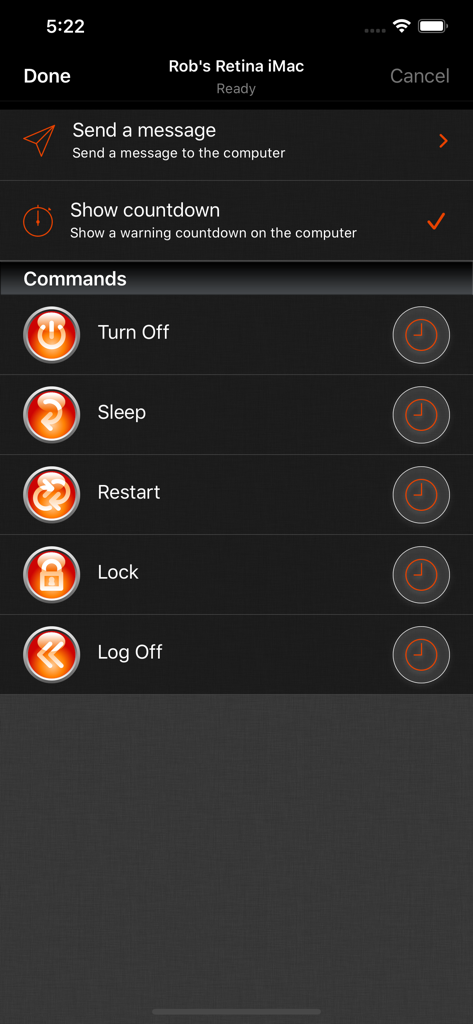
Off Remote Pro - Off Remote Pro 모바일 앱 화면에 종료, 절전, 다시 시작과 같은 원격 컴퓨터 제어 옵션 표시
Off Remote Pro 모바일 앱 화면에 종료, 절전, 다시 시작과 같은 원격 컴퓨터 제어 옵션 표시

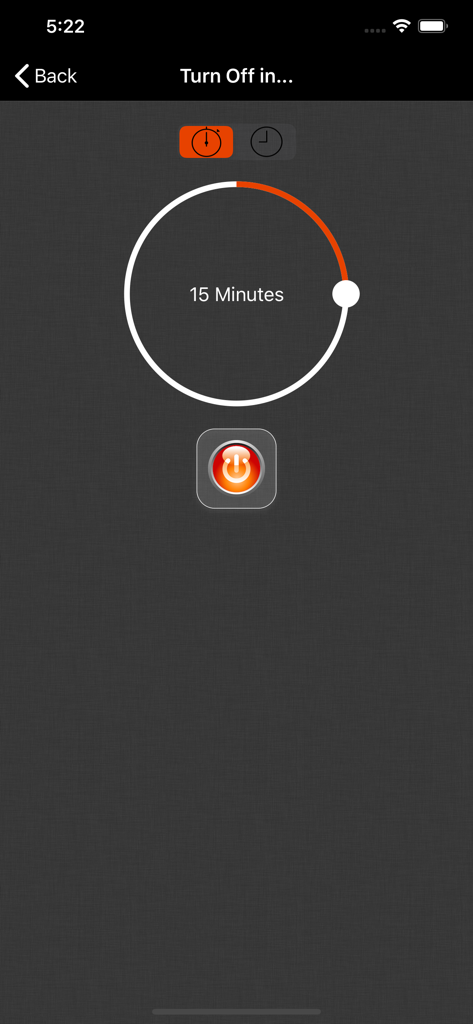
Off Remote Pro - 15분 종료 타이머와 전원 버튼이 표시된 Off Remote Pro 앱 인터페이스
15분 종료 타이머와 전원 버튼이 표시된 Off Remote Pro 앱 인터페이스

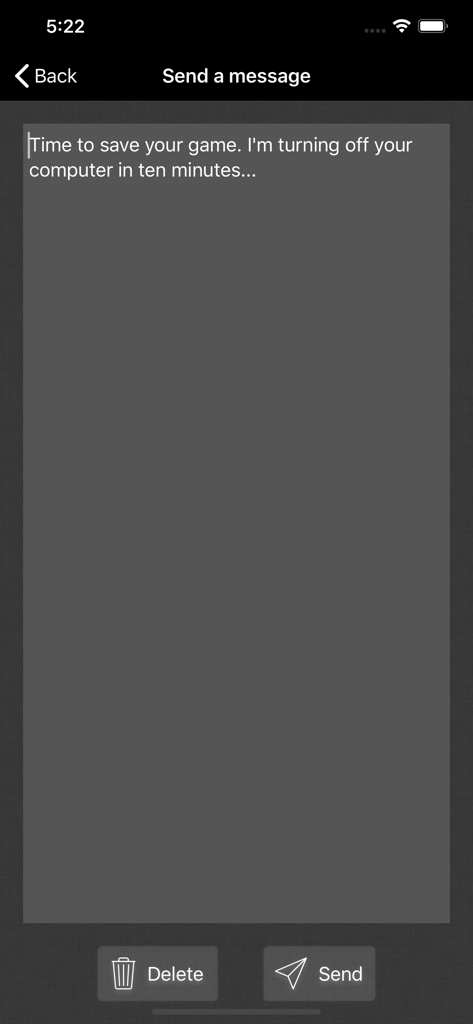
Off Remote Pro - Off Remote Pro를 통해 컴퓨터로 원격 메시지를 보내기 위한 인터페이스
Off Remote Pro를 통해 컴퓨터로 원격 메시지를 보내기 위한 인터페이스

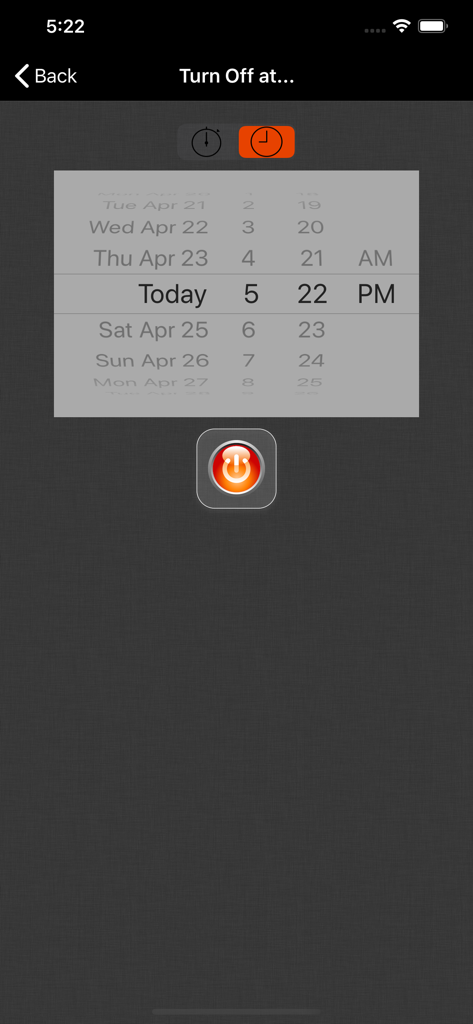
Off Remote Pro - 날짜 및 시간 선택기로 컴퓨터 종료 예약을 위한 Off Remote Pro 인터페이스
날짜 및 시간 선택기로 컴퓨터 종료 예약을 위한 Off Remote Pro 인터페이스

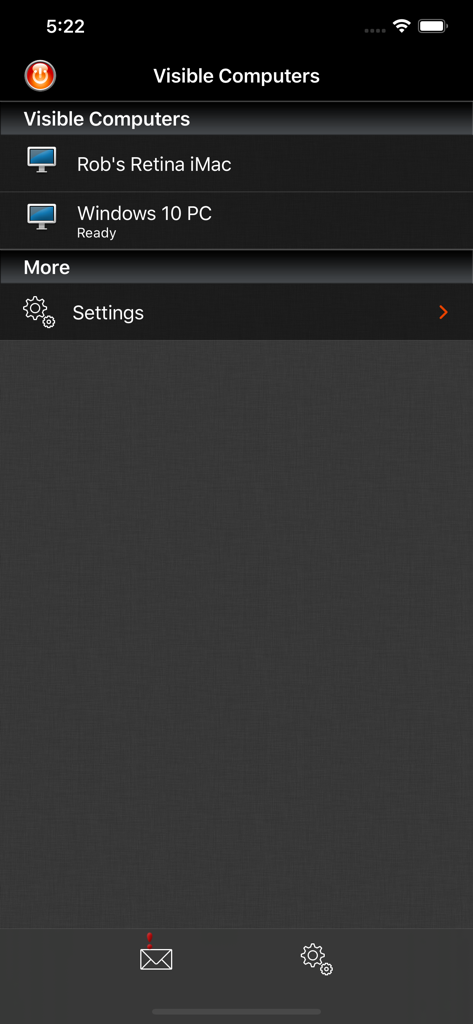
Off Remote Pro - 원격 관리를 위해 연결된 컴퓨터 목록을 표시하는 Off Remote Pro 앱 스크린샷

원격 관리를 위해 연결된 컴퓨터 목록을 표시하는 Off Remote Pro 앱 스크린샷

설명

Off Remote lets you turn off, lock, sleep, log off and restart a PC or Mac directly from your iDevice. Forgot to turn off the office computer? No need to get up. Want to stop the kid's marathon computer sessions? Do it remotely. The timer function lets you set Off to trigger up to 24 hours in the future so you can set a computer to automatically turn off after a task such as completing a download or upload or to automatically lock at a certain time to limit a child's screen time. If you want to know whether the computers in your house are turned off - you can check from your iDevice. If you use a computer to stream videos or audio to your living room, then you can turn it off when you are finished without getting out of the sofa. If you forget to turn things off at night then you can turn them off from wherever you are in the house. It's simple to use. It's very handy. It saves you the effort of walking to your computer! • Features • - Turn Off, Lock, Restart, Log off, Sleep and Hibernate (not all computers can hibernate). - Easily turn off your computer from anywhere in your house. - Send a message before you turn the computer off 'Go to bed - it's past your bedtime!' - Control any number of computers on your home network. - Simple set up - Off Remote uses the same technology as the iTunes remote to connect over your local network to the helper on your computer. - Automatically discovers your computers in your local network. - Password protection makes sure that only you can turn off your computers! • Reviews • “Off is a brilliant yet simple app that allows me to easily control the power state of all the PCs in my house. It also lets me check to make sure that when my daughter assures me she turned her computer off, that she really did.” “Very simple and easy to setup. When I say simple I didn't have to set anything up. Just install the server and the app picked up my laptop straight away. All the buttons worked, it's amazing. No more having to get out if bed to turn the laptop off for the night.” '..it's the least you can do for the environment.' App Of My Eye. “such a simple program yet it's so handy at work and home I use It every day! and it's cool to be able to turn ur pc/mac off from your iPhone or iPod :D” “We often end up PC's being left on overnight and this app has helped us manage this ... We have several wireless music senders dotted around the house also which feed off the desktop PC in the dining room. I've added iTunes to the startup menu on that PC and can restart the PC using this app ... once restarted I can then switch to my iTunes remote and start listening to my music without having to tramp downstairs.” • System Requirements • - Supports Windows 7 to 10 - Supports Mac OS 10.7 and above • Response to feedback • -If you do have any problems using Off, then please just check the help instructions in the app. Feel free to drop me an email (my personal mail is in the app) if you need help. Enjoy! • Languages • Off Remote is currently translated to 8 languages. If you are willing to translate it to your language, or would like to improve the translations, please head over to hobbyistsoftware.com and follow the links

Download

다운로드: App Store

이 페이지는 앱이나 개발자의 공식 페이지가 아니며, 정보 제공 및 논평을 목적으로 작성된 독립 편집 간행물입니다. 명시적으로 달리 언급되지 않는 한, 해당 앱이나 개발자는 MWM, Apple, Google Play, 앱 퍼블리셔 또는 앱 개발자와 제휴, 보증, 후원, 승인 또는 공식적으로 연결되어 있지 않으며, 이 페이지의 어떤 내용도 해당 앱이 MWM의 서비스를 사용하여 개발되었음을 의미하지 않습니다. 모든 상표, 로고, 스크린샷 및 기타 콘텐츠는 해당 소유자의 자산입니다.








