
이 페이지는 앱이나 개발자의 공식 페이지가 아니며, 정보 제공 및 논평을 목적으로 작성된 독립 편집 간행물입니다. 명시적으로 달리 언급되지 않는 한, 해당 앱이나 개발자는 MWM, Apple, Google Play, 앱 퍼블리셔 또는 앱 개발자와 제휴, 보증, 후원, 승인 또는 공식적으로 연결되어 있지 않으며, 이 페이지의 어떤 내용도 해당 앱이 MWM의 서비스를 사용하여 개발되었음을 의미하지 않습니다. 모든 상표, 로고, 스크린샷 및 기타 콘텐츠는 해당 소유자의 자산입니다.
다운로드
853K+사용자 평점
총 평가 수
63K+개발사
카테고리
Food & Drink지원 언어
16최신 버전
3.8.4크기
34.2 MB출시일
2017년 11월 15일당신의 요리 제어 센터
정리하는 가정 요리사를 위해 만들어진 올인원 레시피 관리기. 번거로운 북마크는 잊고 모든 기기에서 원활하고 광고 없는 요리 경험을 누리세요.
원탭 레시피 클립
광고와 블로그 내용을 제거하세요. 단 한 번의 탭으로 웹사이트에서 깨끗하고 형식화된 레시피를 개인 디지털 레시피 북에 직접 추출하세요.
자동 식료품 목록
스마트 목록이 재료를 자동으로 결합하고 통로별로 정렬하여 매주 장보기가 그 어느 때보다 빠르고 효율적이게 됩니다.
자주 묻는 질문
에 대해 알아야 할 모든 것 Paprika Recipe Manager 3
Paprika Recipe Manager 3란 무엇인가요?
Paprika Recipe Manager 3는 레시피를 정리하고, 식료품 목록을 만들고, 식사를 계획하며, 웹사이트에서 레시피를 다운로드합니다. 모든 기기에서 데이터를 동기화하고 식료품 저장실 관리 시스템을 포함합니다.
Paprika Recipe Manager 3에서 레시피를 어떻게 관리하나요?
Paprika Recipe Manager 3는 웹사이트에서 레시피를 다운로드하고, 사용자가 직접 추가할 수 있으며, 범주별로 정리합니다. 사용자는 이름이나 재료별로 검색하고 각 레시피에 여러 사진을 추가할 수 있습니다.
Paprika Recipe Manager 3로 식료품 목록을 만들 수 있나요?
네, Paprika Recipe Manager 3는 스마트 식료품 목록을 만듭니다. 재료를 자동으로 결합하고, 통로별로 정렬하며, 사용자 지정 통로를 허용하고, 사용자를 위해 여러 식료품 목록을 지원합니다.
Paprika Recipe Manager 3에서 식사 계획 기능을 제공하나요?
네, Paprika Recipe Manager 3는 일별, 주별 또는 월별 캘린더를 사용하여 식사를 계획합니다. 사용자는 좋아하는 식사 계획을 재사용 가능한 메뉴로 저장하고 유연한 계획을 위해 사용자 지정 식사 유형을 만듭니다.
Paprika Recipe Manager 3는 기기 간에 데이터를 동기화하나요?
네, Paprika Recipe Manager 3는 모든 기기에서 레시피, 식료품 목록 및 식사 계획을 원활하게 동기화합니다. 이를 통해 정리된 요리 데이터에 일관되게 액세스할 수 있습니다.
Paprika Recipe Manager 3에서 레시피 재료 양을 조절할 수 있나요?
네, Paprika Recipe Manager 3는 원하는 분량에 맞게 재료 양을 조절합니다. 또한 표준 및 미터법 단위 간의 측정값을 변환하여 레시피 조절을 단순화합니다.
Paprika Recipe Manager 3를 오프라인으로 사용할 수 있나요?
네, Paprika Recipe Manager 3는 오프라인 액세스를 제공합니다. 모든 사용자 데이터는 기기에 로컬로 저장됩니다. 레시피를 보려면 인터넷 연결이 필요하지 않습니다.
Paprika Recipe Manager 3의 식료품 저장실에는 어떤 기능이 포함되어 있나요?
Paprika Recipe Manager 3의 식료품 저장실은 재료, 수량, 구매 날짜 및 유효 날짜를 추적합니다. 사용자는 사용자 지정 재료를 추가하고 식료품 저장실과 식료품 목록 간에 항목을 이동할 수 있습니다.
다른 앱의 레시피를 Paprika Recipe Manager 3로 가져올 수 있나요?
네, Paprika Recipe Manager 3는 기존 애플리케이션의 레시피를 가져옵니다. 지원되는 앱으로는 MacGourmet, YummySoup!, MasterCook 및 Living Cookbook가 있으며 마이그레이션을 용이하게 합니다.
Paprika Recipe Manager 3에서 레시피를 공유하고 인쇄할 수 있나요?
네, Paprika Recipe Manager 3는 AirDrop 또는 이메일을 통해 레시피를 공유합니다. 레시피, 식료품 목록, 메뉴 및 식사 계획을 인쇄하며 레시피에 대한 여러 인쇄 형식을 제공합니다.
다음 스크린샷과 설명은 앱의 공식 스토어 목록에서 직접 가져온 것이며 앱 개발자의 자산입니다.
앱 스토어
스크린샷
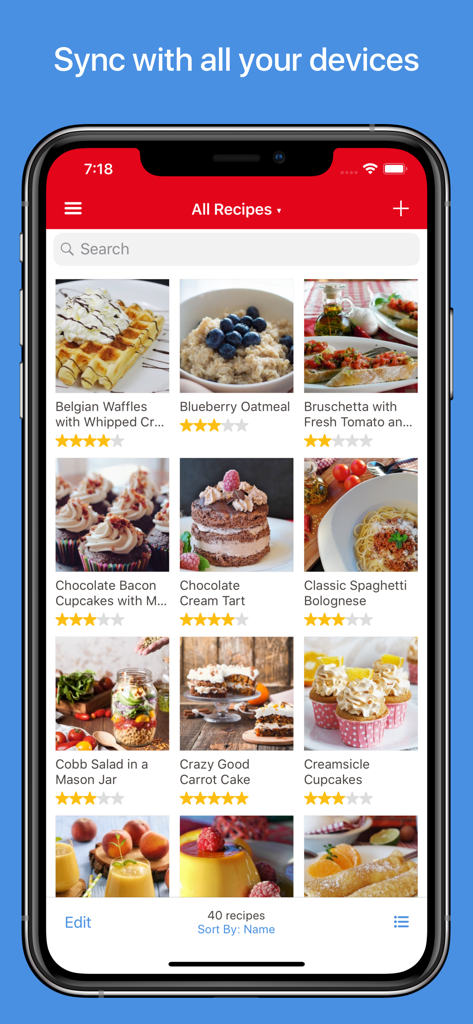
아이폰에서 사진과 평점이 표시된 레시피 그리드를 보여주는 Paprika Recipe Manager 3 앱 스크린샷.
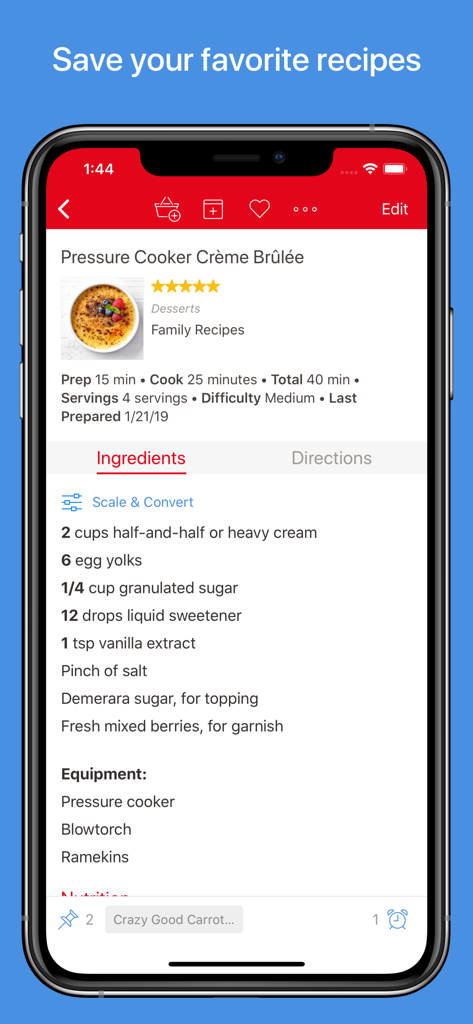
아이폰에서 크렘 브륄레 레시피와 재료 목록을 보여주는 Paprika Recipe Manager 3 스크린샷
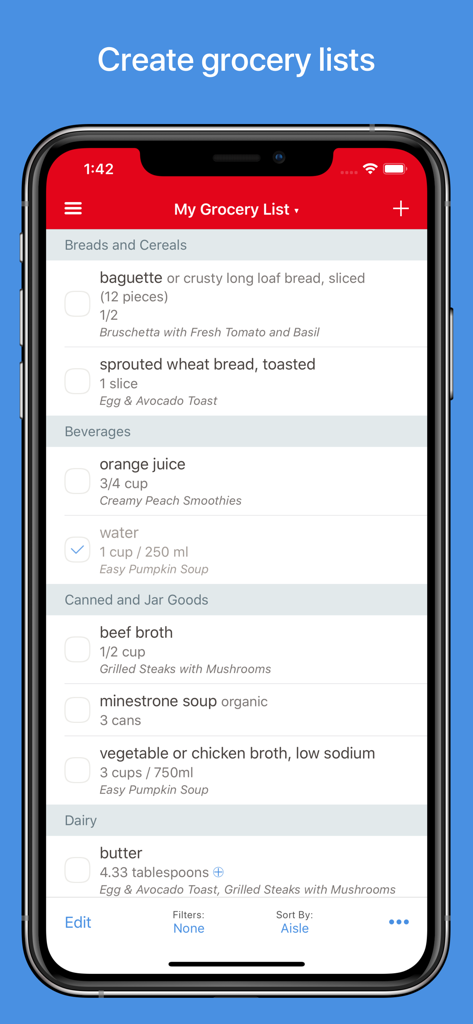
스마트폰에서 통로별로 정리된 Paprika Recipe Manager 3 식료품 목록
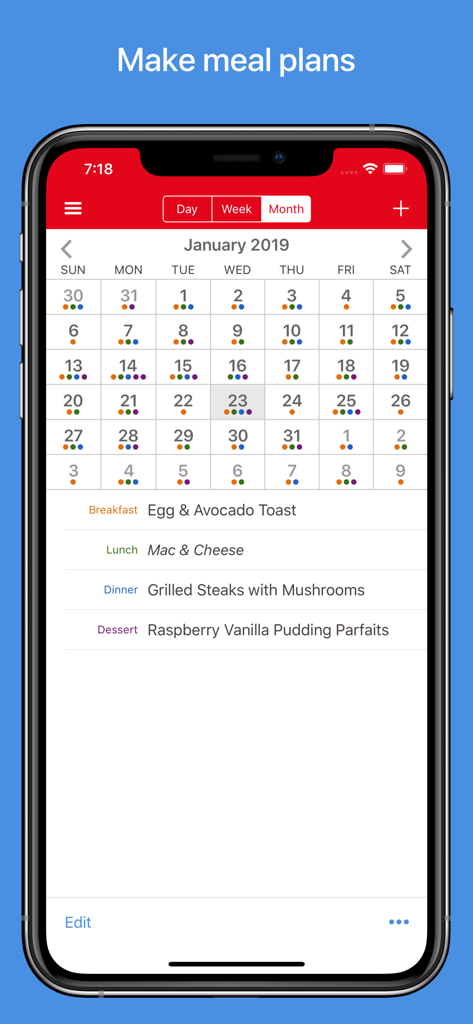
아이폰에서 월별 식사 계획 달력을 표시하는 Paprika Recipe Manager 3 앱 인터페이스
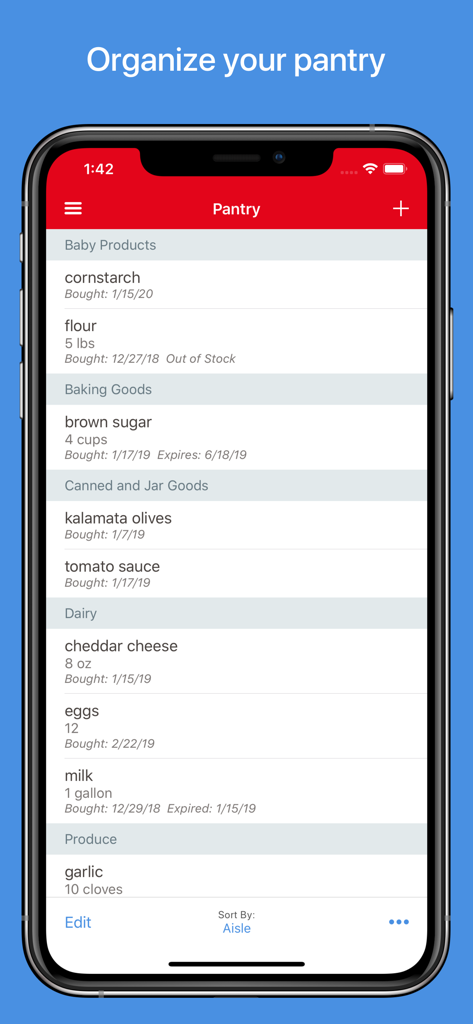
정리된 재료 목록과 추적 날짜를 보여주는 식료품 저장실 기능의 Paprika Recipe Manager 3 앱
설명
Download

비슷한 앱
유사한 기능과 사용자 경험을 가진 앱

ReciMe: Recipes & Meal Planner
ReciMe Pty Ltd

NYT Cooking: Quick Tasty Meals
The New York Times Company

Jow - easy recipes & groceries
Jow

Tasty: Recipes, Cooking Videos
BuzzFeed

Recipe Keeper
Tudorspan Limited

Cookpad Recipes, homemade food
COOKPAD INC. (CA)

Pepper - Recipe Organizer
Pepper App Inc.

AnyList: Grocery Shopping List
Purple Cover, Inc.

Kitchen Stories Easy Recipes
AJNS New Media GmbH
이 페이지는 앱이나 개발자의 공식 페이지가 아니며, 정보 제공 및 논평을 목적으로 작성된 독립 편집 간행물입니다. 명시적으로 달리 언급되지 않는 한, 해당 앱이나 개발자는 MWM, Apple, Google Play, 앱 퍼블리셔 또는 앱 개발자와 제휴, 보증, 후원, 승인 또는 공식적으로 연결되어 있지 않으며, 이 페이지의 어떤 내용도 해당 앱이 MWM의 서비스를 사용하여 개발되었음을 의미하지 않습니다. 모든 상표, 로고, 스크린샷 및 기타 콘텐츠는 해당 소유자의 자산입니다.