
이 페이지는 앱이나 개발자의 공식 페이지가 아니며, 정보 제공 및 논평을 목적으로 작성된 독립 편집 간행물입니다. 명시적으로 달리 언급되지 않는 한, 해당 앱이나 개발자는 MWM, Apple, Google Play, 앱 퍼블리셔 또는 앱 개발자와 제휴, 보증, 후원, 승인 또는 공식적으로 연결되어 있지 않으며, 이 페이지의 어떤 내용도 해당 앱이 MWM의 서비스를 사용하여 개발되었음을 의미하지 않습니다. 모든 상표, 로고, 스크린샷 및 기타 콘텐츠는 해당 소유자의 자산입니다.


Parcel - Delivery Tracking
300개 이상의 캐리어에서 주문을 추적하는 3백만 명 이상의 사용자와 함께하세요. 자동 Amazon 통합 및 스마트 알림을 통해 iPhone, Mac 및 Apple Watch 전반에 걸쳐 원활하고 개인 정보 보호를 우선시하는 자동화를 경험하세요.
다운로드
3M+사용자 평점
총 평가 수
73K+개발사
카테고리
Shopping지원 언어
15최신 버전
8.2.7크기
30.6 MB출시일
2010년 6월 11일모든 배송을 관리하세요
Parcel은 iPhone, Mac 및 Apple Watch 전반에 걸쳐 모든 추적 번호를 강력하고 개인 정보 보호에 중점을 둔 대시보드로 통합합니다.
노력 없는 Amazon 동기화
Amazon 계정을 안전하게 연결하여 배송되는 순간 자동으로 주문이 추가되도록 하세요.
네이티브 생태계 파워
iPhone, Mac 및 Apple Watch용 사용자 지정 위젯 및 네이티브 앱으로 원활한 추적을 경험하세요.
자주 묻는 질문
에 대해 알아야 할 모든 것 Parcel - Delivery Tracking
Parcel - Delivery Tracking이란 무엇인가요?
Parcel - Delivery Tracking은 iPhone, iPad, Mac 및 Apple Watch용으로 설계된 애플리케이션입니다. 300개 이상의 서비스에서 배송을 추적할 수 있도록 하여 실시간 업데이트와 패키지 위치를 제공합니다.
Parcel 앱은 어떤 배송 서비스를 지원하나요?
Parcel 앱은 UPS, USPS, FedEx, DHL, Amazon Logistics를 포함한 300개 이상의 배송 서비스를 지원합니다. Parcel 앱 웹사이트에서 전체 목록을 확인할 수 있습니다.
Parcel - Delivery Tracking에 새 배송을 추가하려면 어떻게 해야 하나요?
사용자는 고유한 운송업체 인식 기능, 바코드 스캐너 또는 추적 번호를 수동으로 입력하여 Parcel에 새 배송을 추가할 수 있습니다. Amazon 주문은 보안 통합을 통해 자동으로 표시됩니다.
Parcel 앱으로 Amazon 패키지를 자동으로 추적할 수 있나요?
예, Parcel 앱은 Amazon 계정에서 패키지를 자동으로 추가하기 위한 Amazon 통합 기능을 제공합니다. 이 프로세스는 안전하며 자격 증명이 기기에 유지되도록 합니다.
Parcel - Delivery Tracking용 macOS 애플리케이션이 있나요?
예, Parcel에는 Mac App Store에서 무료로 다운로드할 수 있는 네이티브 macOS 애플리케이션이 있습니다. 사용자는 Mac 장치에서 배송을 추적하기 위해 직접 다운로드할 수 있습니다.
Parcel - Delivery Tracking은 푸시 알림을 제공하나요?
예, Parcel 앱은 배송 업데이트에 대한 푸시 알림을 제공합니다. 이러한 알림은 시간대에 따라 오전 8시에서 오후 10시 사이에 전송되며 설정에서 비활성화할 수 있습니다.
Parcel - Delivery Tracking에서 프리미엄 구독이 필요한 기능은 무엇인가요?
Parcel - Delivery Tracking의 프리미엄 구독은 푸시 알림 및 세 개 이상의 배송 추적에 필요합니다. 이러한 기능은 구독을 통해 잠금 해제됩니다.
Parcel - Delivery Tracking의 프리미엄 구독 비용은 얼마인가요?
Parcel - Delivery Tracking의 프리미엄 구독 현재 가격은 연간 $4.99입니다. 이 가격은 사용자의 국가에 따라 다를 수 있습니다.
Parcel - Delivery Tracking으로 지도를 사용하여 배송을 볼 수 있나요?
예, Parcel 앱을 사용하면 사용자는 지도를 통해 배송 위치를 확인할 수 있습니다. 이 기능은 패키지의 현재 여정과 상태를 시각적으로 보여줍니다.
Parcel - Delivery Tracking은 iOS용 위젯을 제공하나요?
예, Parcel은 위젯을 제공하기 위해 iOS 기능을 활용합니다. 이러한 위젯을 통해 사용자는 홈 화면이나 위젯 보기에서 바로 예정된 배송을 볼 수 있습니다.
Parcel - Delivery Tracking은 사용자 개인 정보를 어떻게 처리하나요?
Parcel은 사용자 개인 정보를 안전하게 처리하며, 특히 자격 증명이 기기를 벗어나지 않는 Amazon 통합 기능을 제공합니다. 개인 정보 보호 정책 및 구독 약관은 웹사이트에서 확인할 수 있습니다.
다음 스크린샷과 설명은 앱의 공식 스토어 목록에서 직접 가져온 것이며 앱 개발자의 자산입니다.
앱 스토어
스크린샷
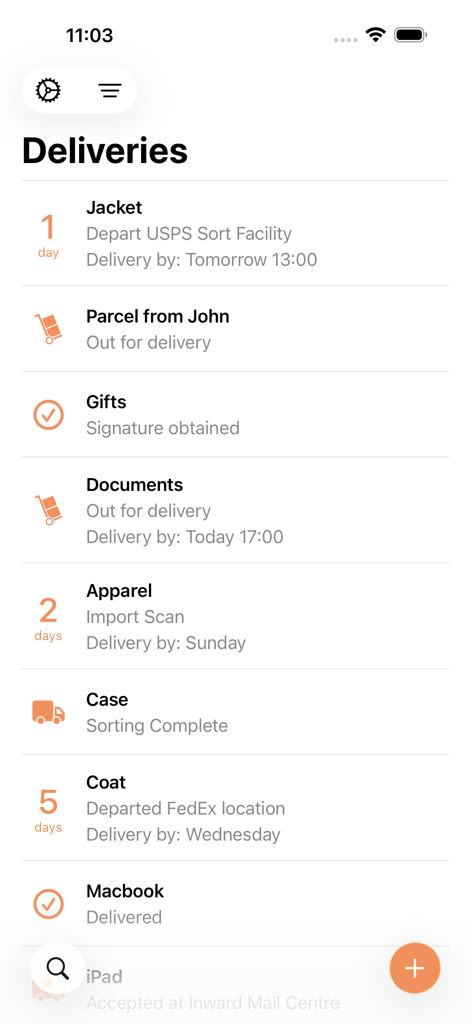
현재 상태 및 예상 배송 날짜가 있는 패키지 목록을 보여주는 Parcel 배송 추적 앱 인터페이스
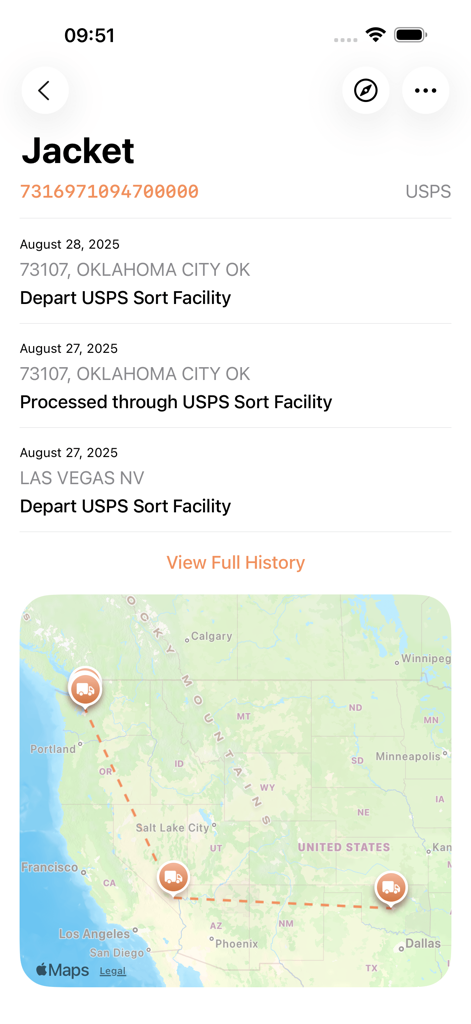
미국 전역의 배송 경로 및 추적 이정표를 보여주는 USPS 배송 상태 업데이트를 표시하는 Parcel 앱 인터페이스
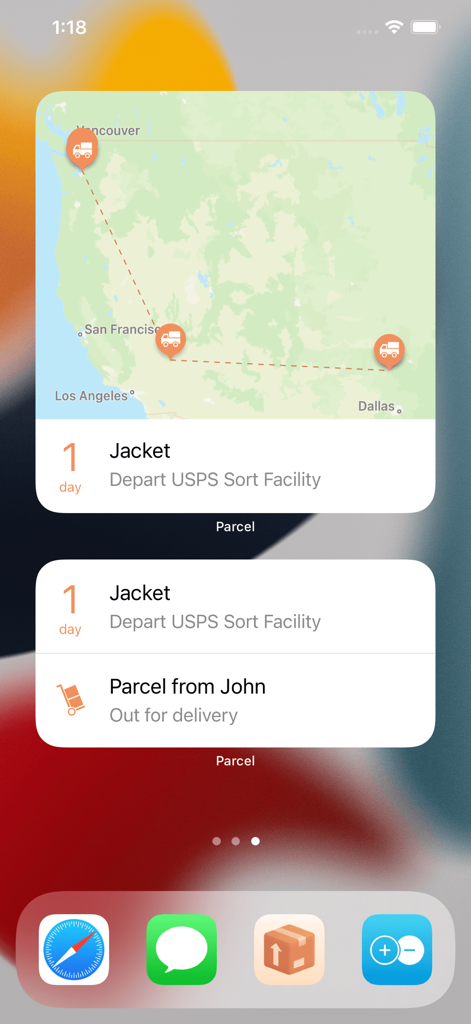
배송 지도 및 실시간 배송 상태를 표시하는 Parcel 앱 위젯이 포함된 iOS 홈 화면
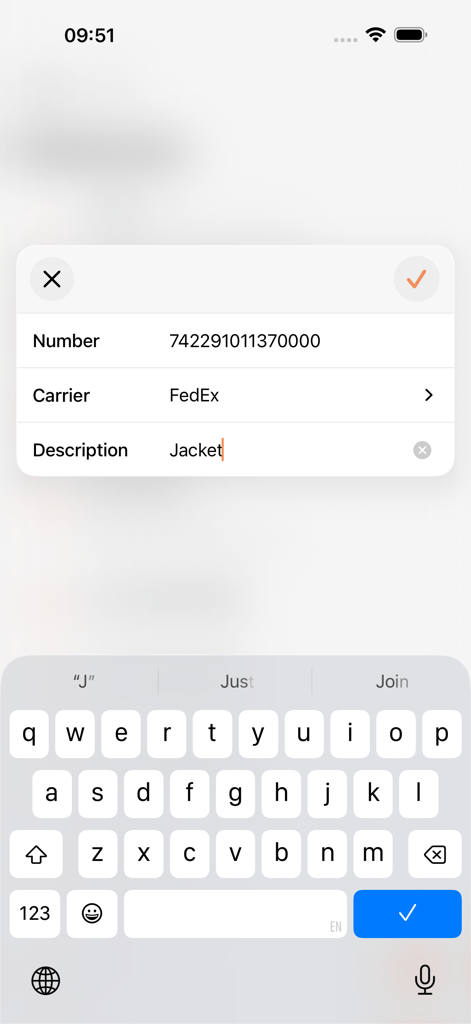
Parcel 앱에서 FedEx의 새 배송 추적 번호를 추가하는 인터페이스
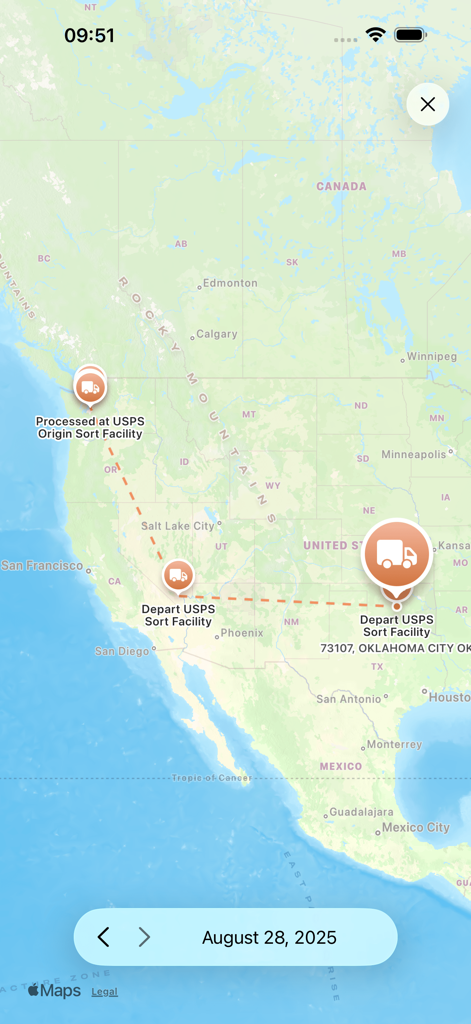
미국 전역의 패키지 배송 경로 및 추적 이정표를 보여주는 Parcel 앱의 지도 보기
설명
Download
비슷한 앱
유사한 기능과 사용자 경험을 가진 앱

Shop: All your favorite brands
Shopify Inc.

17TRACK Package Tracker
Demon Network Tech Co., Ltd.

Route: Package Tracker
Route App LLC
Rastreio Fácil
Decio Junior
Deliveries Package Tracker
Carlos Silva

Package Tracker - pkge Mobile
DARADDO APPS LTD

AfterShip Package Tracker
AfterShip Limited

Jańa Post
Aitan Qamet

Packages - Track Your Parcels
BRIGHT STRIPE COMPUTER SYSTEMS & COMMUNICATION EQUIPMENT SOFTWARE DESIGN L.L.C
이 페이지는 앱이나 개발자의 공식 페이지가 아니며, 정보 제공 및 논평을 목적으로 작성된 독립 편집 간행물입니다. 명시적으로 달리 언급되지 않는 한, 해당 앱이나 개발자는 MWM, Apple, Google Play, 앱 퍼블리셔 또는 앱 개발자와 제휴, 보증, 후원, 승인 또는 공식적으로 연결되어 있지 않으며, 이 페이지의 어떤 내용도 해당 앱이 MWM의 서비스를 사용하여 개발되었음을 의미하지 않습니다. 모든 상표, 로고, 스크린샷 및 기타 콘텐츠는 해당 소유자의 자산입니다.