
이 페이지는 앱이나 개발자의 공식 페이지가 아니며, 정보 제공 및 논평을 목적으로 작성된 독립 편집 간행물입니다. 명시적으로 달리 언급되지 않는 한, 해당 앱이나 개발자는 MWM, Apple, Google Play, 앱 퍼블리셔 또는 앱 개발자와 제휴, 보증, 후원, 승인 또는 공식적으로 연결되어 있지 않으며, 이 페이지의 어떤 내용도 해당 앱이 MWM의 서비스를 사용하여 개발되었음을 의미하지 않습니다. 모든 상표, 로고, 스크린샷 및 기타 콘텐츠는 해당 소유자의 자산입니다.


다운로드
12.5M+사용자 평점
총 평가 수
384.2K개발사
카테고리
Lifestyle지원 언어
19최신 버전
5.64.2크기
246.4 MB출시일
2016년 4월 28일스마트 조명 시스템의 핵심 제어 및 맞춤화 솔루션
Philips Hue 앱 기능 분석
스마트 홈 보안 통합
이 앱은 사용자가 어디서든 조명을 제어할 수 있게 해주며, 보안 카메라, 접촉 센서 및 실내 모션 센서를 프로그래밍하여 활동 감지 시 알림을 보내고, 조명 및 소리 알람을 트리거하며, 당국이나 신뢰할 수 있는 연락처로 연락하고, 집을 실시간으로 모니터링할 수 있도록 지원합니다.
미디어 콘텐츠와 조명 동기화
이 앱은 사용자가 TV, 음악, 게임에 맞춰 조명을 깜빡이게 하고, 춤추게 하며, 어둡게 하고, 밝게 하고, 색상을 변경할 수 있도록 합니다. Philips Hue Play HDMI 동기화 상자, Philips Hue Sync TV 또는 데스크톱 앱, Spotify를 통해 몰입형 경험을 만들 수 있습니다.
음성 제어 지원
이 앱은 사용자가 Apple Home, Amazon Alexa 또는 Google Assistant를 통해 음성 명령으로 스마트 조명을 제어할 수 있도록 합니다. 조명을 켜고 끄고, 밝기를 조절하고, 색상을 변경하는 등 완전히 핸즈프리로 조작할 수 있습니다.
조명 자동화 설정
이 앱은 사용자가 일상 루틴에 맞춰 스마트 조명이 작동하도록 자동화할 수 있게 해줍니다. 아침에 부드럽게 깨워주거나 집에 돌아왔을 때 맞아주는 등 맞춤형 자동화를 쉽게 설정할 수 있습니다.
장면 갤러리 및 사용자 정의
이 도구는 전문 조명 디자이너가 만든 다양한 장면 갤러리를 제공하여 어떤 상황에도 맞는 분위기를 연출할 수 있도록 합니다. 또한, 사용자가 사진이나 좋아하는 색상을 기반으로 자신만의 장면을 만들 수 있게 해줍니다.
자연광 시뮬레이션
이 앱은 '자연광' 장면을 통해 하루 종일 자동으로 조명이 변화하도록 설정할 수 있도록 합니다. 이를 통해 사용자는 적절한 시간에 더욱 활기차고, 집중하며, 편안하거나 휴식을 취하는 느낌을 받을 수 있습니다.
원격 제어 및 조명 구성
이 앱은 사용자가 인터넷 연결만 있으면 어디서든 조명을 제어할 수 있게 해주며, 조명을 방이나 구역으로 그룹화하여 집안의 실제 공간을 반영하도록 구성할 수 있도록 합니다.
Siri 단축어를 통한 빠른 제어
이 앱은 Siri 단축어 앱을 사용하여 홈 화면 위젯에 단축어를 배치하여 조명을 더 빠르게 제어할 수 있도록 합니다. 앱을 열지 않고도 조명을 켜고 끄고, 밝기와 온도를 조절하거나 장면을 설정할 수 있습니다.
자주 묻는 질문
에 대해 알아야 할 모든 것 Philips Hue
What is the Philips Hue app?
The Philips Hue app is the official application for organizing, controlling, and customizing Philips Hue smart lights and accessories. It provides comprehensive management for your smart lighting system.
How does the Philips Hue app organize smart lights?
The Philips Hue app organizes smart lights by grouping them into Rooms or Zones. Users can group lights into areas like an entire downstairs floor or specific rooms, such as a living room or bedroom.
Can I control my Philips Hue lights remotely with the app?
Yes, you can control your Philips Hue lights remotely using the app. The Philips Hue app allows control from anywhere with an active internet connection, providing convenient management for your lighting system.
Does the Philips Hue app offer pre-designed lighting scenes?
Yes, the Philips Hue app offers pre-designed lighting scenes. The scene gallery, created by professional lighting designers, helps set the mood for various occasions. Users can also create custom scenes.
Can the Philips Hue app enhance home security?
Yes, the Philips Hue app enhances home security through its Security Center. It allows programming Secure cameras and sensors to send alerts, trigger alarms, and monitor your home in real-time for safety.
Does the Philips Hue app support automated lighting schedules?
Yes, the Philips Hue app supports automated lighting schedules. Users can effortlessly set up customizable automations to make smart lights work around their daily routines, including gentle wake-ups or greetings upon arrival.
Can Philips Hue lights sync with entertainment content?
Yes, Philips Hue lights can sync with TV, music, and games. This feature creates immersive experiences by making lights flash, dance, dim, brighten, and change color in sync via devices like the Hue Play HDMI sync box or Spotify.
Does the Philips Hue app support voice control for smart lights?
Yes, the Philips Hue app supports voice control for smart lights. Users can control lights hands-free using voice commands through integrations with Apple Home, Amazon Alexa, or Google Assistant.
Is a Philips Hue Bridge required to use the Philips Hue app?
No, a Philips Hue Bridge is not always required for the app. While some advanced features necessitate a Bridge, the app can control one room with Bluetooth without it. A Bridge is needed for whole-home control.
What is the Natural light scene in the Philips Hue app?
The Natural light scene in the Philips Hue app automatically changes your lights throughout the day. It transitions from cool blue tones in the morning to warmer hues for sunset, aiming to optimize energy, focus, relaxation, or rest.
Can the Philips Hue app integrate with other smart home systems?
Yes, the Philips Hue app integrates with other smart home systems. It connects Philips Hue lights to Amazon Alexa, Google Assistant, Siri & Apple Home, and other Matter-compatible smart apps or devices.
How can I quickly control Philips Hue lights without opening the app?
You can quickly control Philips Hue lights without opening the app by using Siri Shortcuts. Create shortcuts and place them into widgets on your Home Screen to adjust brightness, temperature, or set scenes.
다음 스크린샷과 설명은 앱의 공식 스토어 목록에서 직접 가져온 것이며 앱 개발자의 자산입니다.
앱 스토어
스크린샷

이 앱의 시작 화면은 'PHILIPS hue' 로고와 보라색 조명으로 연출된 아늑한 실내 분위기를 보여줍니다.
필립스 휴 경험
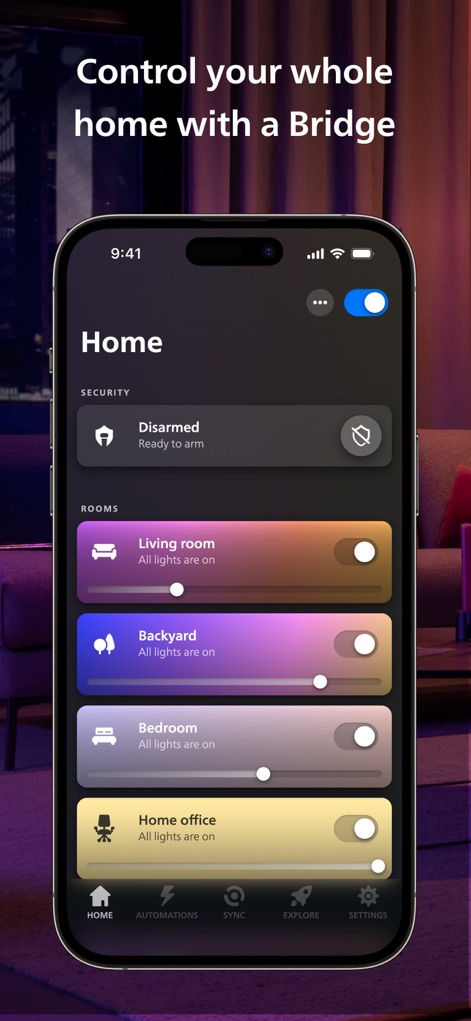
이 화면은 '거실', '뒷마당'과 같은 공간별 조명 목록과 '보안' 섹션의 활성화 상태를 한눈에 보여줍니다.
전체 조명 제어

'MY SCENES'에서 다양한 분위기 장면을 선택하고 'TABLE', 'CEILING'과 같은 개별 조명의 온/오프 스위치를 직관적으로 제어할 수 있습니다.
블루투스 개별 제어

'Tropical twilight' 장면 미리 보기를 통해 전문가가 디자인한 분위기를 확인하고, 하단에 표시된 여러 가지 색상 원을 통해 장면의 색상 구성을 조절할 수 있습니다.
전문가 장면 활용

사용자는 넓은 색상환을 이용해 조명 색상을 미세하게 조정하고, 'Festive lights', 'Terrace lantern'과 같은 특정 조명 그룹의 밝기를 조절할 수 있습니다.
나만의 조명 연출

이 화면은 'Armed: Home' 상태와 함께 'Front yard'에 설치된 카메라의 실시간 피드를 보여주어, 사용자가 집의 보안 상태를 모니터링할 수 있습니다.
스마트 홈 보안

'Mimic presence'와 'Wake up'과 같은 다양한 자동화 목록을 통해 사용자는 특정 시간에 조명을 켜고 끄도록 스케줄을 설정할 수 있습니다.
조명 자동화 설정

Spotify 음악 재생 화면에 조명 동기화 옵션이 표시되며, 사용자는 'STYLE'과 'INTENSITY' 컨트롤을 통해 음악과 조명의 완벽한 조화를 경험할 수 있습니다.
몰입형 조명 동기화

이 앱은 Amazon Alexa, Google Assistant와 같은 스마트 비서와의 연동을 지원하며, Matter 호환 기기 연결을 위한 'Get started' 버튼을 제공합니다.
스마트 기기 연결
설명
Download
비슷한 앱
유사한 기능과 사용자 경험을 가진 앱

TP-Link Tapo
TP-Link Systems Inc.

Дом с Алисой
DIRECT CURSUS COMPUTER SYSTEMS TRADING LLC

VeSync
Vesync Technology Corporation

Kasa Smart
TP-Link Systems Inc.

ecobee
ecobee Ltd.

Hubspace
Afero, Inc.

ADT Control ®
ADT LLC

First Alert by Resideo
Resideo Technologies, Inc.

Mibo Smart: Casa Inteligente
Intelbras S.A. Ind. de Telecom. Elet. Brasileira
이 페이지는 앱이나 개발자의 공식 페이지가 아니며, 정보 제공 및 논평을 목적으로 작성된 독립 편집 간행물입니다. 명시적으로 달리 언급되지 않는 한, 해당 앱이나 개발자는 MWM, Apple, Google Play, 앱 퍼블리셔 또는 앱 개발자와 제휴, 보증, 후원, 승인 또는 공식적으로 연결되어 있지 않으며, 이 페이지의 어떤 내용도 해당 앱이 MWM의 서비스를 사용하여 개발되었음을 의미하지 않습니다. 모든 상표, 로고, 스크린샷 및 기타 콘텐츠는 해당 소유자의 자산입니다.