
이 페이지는 앱이나 개발자의 공식 페이지가 아니며, 정보 제공 및 논평을 목적으로 작성된 독립 편집 간행물입니다. 명시적으로 달리 언급되지 않는 한, 해당 앱이나 개발자는 MWM, Apple, Google Play, 앱 퍼블리셔 또는 앱 개발자와 제휴, 보증, 후원, 승인 또는 공식적으로 연결되어 있지 않으며, 이 페이지의 어떤 내용도 해당 앱이 MWM의 서비스를 사용하여 개발되었음을 의미하지 않습니다. 모든 상표, 로고, 스크린샷 및 기타 콘텐츠는 해당 소유자의 자산입니다.


다운로드
250k+사용자 평점
총 평가 수
25.6K개발사
카테고리
Utilities지원 언어
33최신 버전
2.7크기
4.9 MB출시일
2021년 10월 25일이 분석은 Apple 생태계 사용자를 위한 'Phone' 앱의 핵심 기능과 그들이 효율성, 개인 정보 보호, 보안 및 원활한 연결성을 중시하는 방식에 미치는 영향을 평가합니다.
Phone 앱 분석: 주요 기능과 사용자 경험 가치
실시간 음성 메시지
이 앱은 수신자가 메시지를 남기는 동안 실시간으로 음성 메시지를 텍스트로 변환하여 보여주어, 사용자가 중요한 통화를 즉시 선별하고 응답할 수 있게 해줍니다.
발신자 알 수 없는 통화 차단 및 스크리닝
이 앱은 알 수 없는 번호의 통화를 자동으로 음성 사서함으로 보내거나, 전화가 울리기 전에 발신자의 이름과 통화 목적을 물어봄으로써 원치 않는 통화로부터 사용자를 보호하고 시간을 절약해 줍니다.
음성 분리 마이크 모드
이 기능은 사용자의 목소리만 강조하고 주변 소음을 차단하여, 시끄러운 환경에서도 선명하고 집중된 통화 품질을 제공합니다.
투명한 통화 녹음
이 도구는 전화 또는 FaceTime 오디오 통화를 녹음하고 노트를 통해 스크립트를 검토할 수 있도록 하며, 녹음 시작 시 상대방에게 자동 고지하여 투명성을 보장합니다.
Wi-Fi 통화
이 기능은 셀룰러 커버리지가 약하거나 없는 지역에서도 Wi-Fi 연결을 통해 전화 통화를 하고 받을 수 있도록 하여, 끊김 없는 연결성을 보장합니다.
통합 커뮤니케이션 플랫폼
이 앱은 일반 전화 통화, FaceTime 오디오 및 FaceTime 영상 통화를 한곳에 통합하여 사용자에게 효율적이고 편리한 커뮤니케이션 경험을 제공합니다.
연락처 포스터
사용자는 통화 시 자신의 모습을 사용자 지정할 수 있어, 사진, 미모티콘 및 이름에 대한 다양한 스타일을 선택하여 발신자 아이덴티티를 개인화할 수 있습니다.
통화 대기 지원
이 기능은 사용자를 대신하여 통화 대기 상태를 유지하고, 상담원 연결 시 사용자에게 알림을 제공하여 귀중한 시간을 절약할 수 있게 해줍니다.
자주 묻는 질문
에 대해 알아야 할 모든 것 Phone
Does the Phone app support FaceTime audio and video calls?
Yes, the Phone app unifies phone calls, FaceTime audio, and FaceTime video calls into a single, convenient application.
How does the Phone app manage recent calls?
The Phone app displays recent conversations and missed calls in its Recents section. Users can also search for previous calls, transcribed voicemails, and contacts there.
Can I search for contacts using the keypad in the Phone app?
Yes, the Phone app features Keypad search. This allows users to quickly find and call existing contacts by typing their name or number directly on the alphanumeric keypad.
Can the Phone app record calls?
Yes, the Phone app allows users to record live calls or FaceTime audio calls. Transcripts of these recordings are then available for review within the Notes app.
What is Live Voicemail in the Phone app?
Live Voicemail in the Phone app provides a real-time transcription of messages as they are being left. This enables users to pick up the call immediately if desired.
What microphone modes are available in the Phone app?
The Phone app offers Automatic Mic Mode, Voice Isolation to block ambient noise, and Wide Spectrum to capture all surrounding sounds during a call.
Can the Phone app silence unknown callers automatically?
Yes, the Phone app's "Silence Unknown Callers" feature automatically sends calls from unknown numbers to voicemail, ensuring the phone only rings for known contacts.
Does the Phone app support making calls over Wi-Fi?
Yes, the Phone app enables Wi-Fi Calling, allowing users to make or receive phone calls over a Wi-Fi connection. This is useful in areas with limited or no cellular coverage.
다음 스크린샷과 설명은 앱의 공식 스토어 목록에서 직접 가져온 것이며 앱 개발자의 자산입니다.
앱 스토어
스크린샷
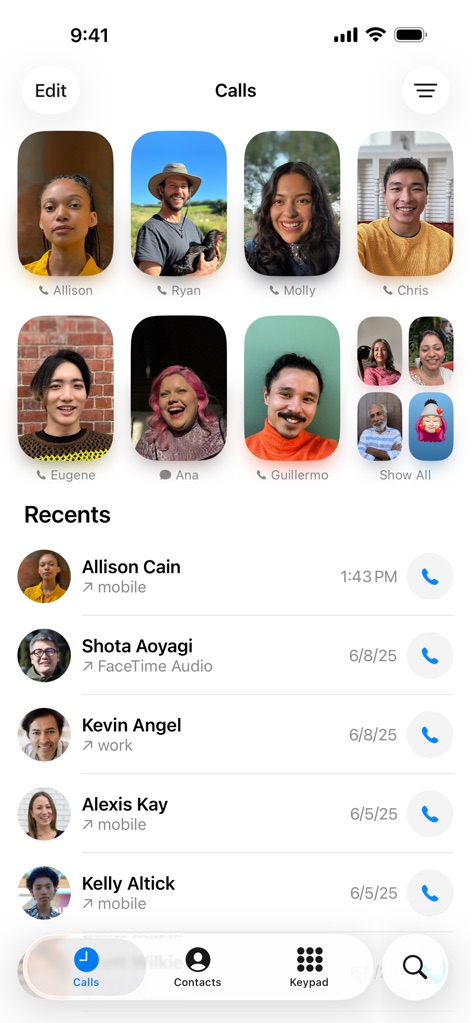
이 앱은 사용자 친화적인 인터페이스로 즐겨찾는 연락처를 시각적으로 강조하며, 최근 통화 목록을 시간 정보와 함께 명확하게 표시합니다.
즐겨찾기 및 최근 통화
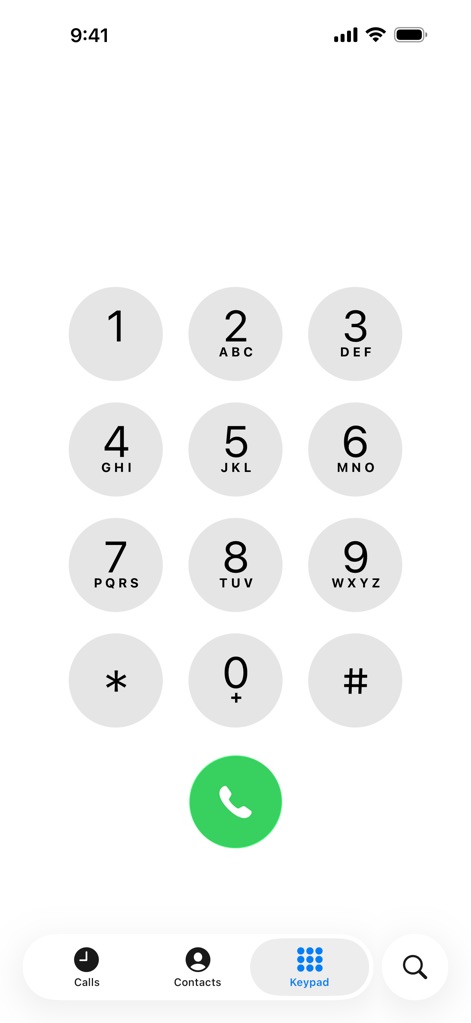
이 앱의 키패드 화면은 크고 명확한 숫자 버튼과 알파벳 배열을 제공하여, 사용자가 빠르고 정확하게 번호를 입력하고 통화할 수 있도록 지원합니다.
간편한 통화 다이얼
설명
Download




이 페이지는 앱이나 개발자의 공식 페이지가 아니며, 정보 제공 및 논평을 목적으로 작성된 독립 편집 간행물입니다. 명시적으로 달리 언급되지 않는 한, 해당 앱이나 개발자는 MWM, Apple, Google Play, 앱 퍼블리셔 또는 앱 개발자와 제휴, 보증, 후원, 승인 또는 공식적으로 연결되어 있지 않으며, 이 페이지의 어떤 내용도 해당 앱이 MWM의 서비스를 사용하여 개발되었음을 의미하지 않습니다. 모든 상표, 로고, 스크린샷 및 기타 콘텐츠는 해당 소유자의 자산입니다.