Photo Splash photo editor app
다운로드: App Store

이 페이지는 앱이나 개발자의 공식 페이지가 아니며, 정보 제공 및 논평을 목적으로 작성된 독립 편집 간행물입니다. 명시적으로 달리 언급되지 않는 한, 해당 앱이나 개발자는 MWM, Apple, Google Play, 앱 퍼블리셔 또는 앱 개발자와 제휴, 보증, 후원, 승인 또는 공식적으로 연결되어 있지 않으며, 이 페이지의 어떤 내용도 해당 앱이 MWM의 서비스를 사용하여 개발되었음을 의미하지 않습니다. 모든 상표, 로고, 스크린샷 및 기타 콘텐츠는 해당 소유자의 자산입니다.


로고: Photo Splash photo editor app
다운로드: App Store

Photo Splash photo editor app

이 앱은 지루한 이미지를 순식간에 시각적 폭탄으로 변환시키는 마법을 부립니다. AI가 당신의 창의력을 대신하죠. 당신은 그저 터치 한 번으로 디지털 예술가가 되는 겁니다.

주요 수치

다운로드

2.5M+

사용자 평점

4.3/5

총 평가 수

11.5K

개발사

pixel force private limited

카테고리

Photo & Video

지원 언어

31

최신 버전

3.21.44

크기

102.8 MB

출시일

2011년 2월 5일
기능

주요 기능 분석 및 타겟 사용자 영향 평가

Photo Splash photo editor 앱 기술 분석

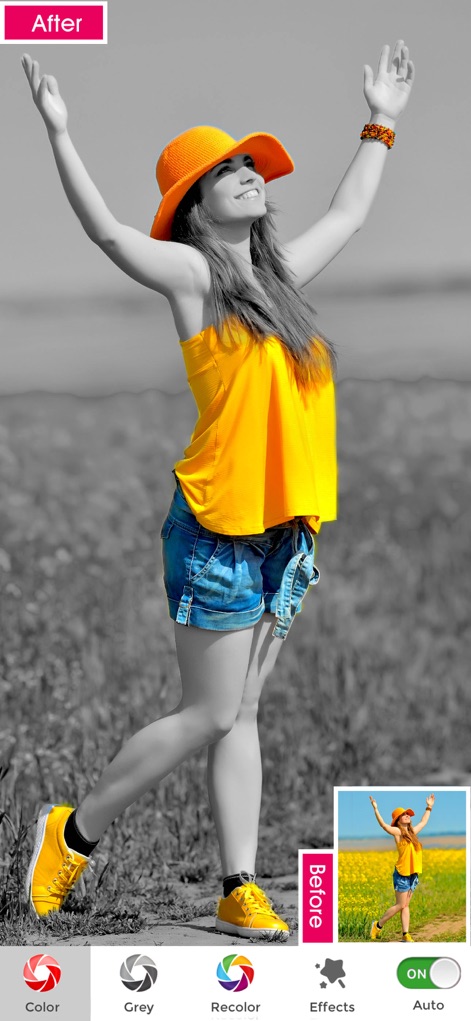
AI 자동 스플래시 스타일 적용

앱은 고급 AI 기술을 사용하여 인물을 자동으로 감지하고 다양한 스플래시 스타일을 원클릭으로 적용하여 빠르고 손쉬운 편집을 가능하게 합니다.

선택적 색상 강조

사용자는 사진에서 특정 색상을 강조하여 드라마틱하고 예술적인 '포토 스플래시' 효과를 만들 수 있습니다.

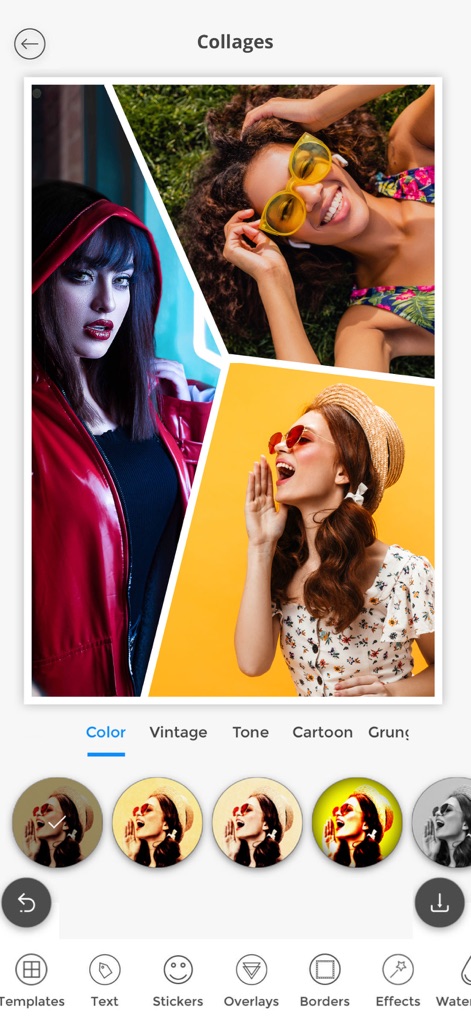
다양한 콜라주 및 소셜 템플릿

이 도구는 5000개 이상의 창의적인 콜라주와 소셜 미디어 템플릿을 제공하여 사용자가 시각적으로 매력적인 콘텐츠를 쉽게 만들고 공유할 수 있도록 돕습니다.

다음 스크린샷과 설명은 앱의 공식 스토어 목록에서 직접 가져온 것이며 앱 개발자의 자산입니다.

앱 스토어

스크린샷

Photo Splash photo editor app - null

Photo Splash photo editor app - null

Photo Splash photo editor app - null

Photo Splash photo editor app - null

Photo Splash photo editor app - null

Photo Splash photo editor app - null

Photo Splash photo editor app - null

Photo Splash photo editor app - null

Photo Splash photo editor app - null

설명

Photo splash , is a free application that lets users to make very nice photos with selective colorization effects popularly known as Photo Splash. Features: 1. Gesture detection, pinch - you can zoom the image to do detailed splash work pan - you can freely move the image across the screen 2. Advance AI(Artificial Intelligence) Technology detects the person and auto apply the different Splash styles,which can be used in one click. 3. Both gray to color and color to gray support 4. email, alubm, facebbook, twitter, clipboard and global wall support 5. No need to pay for, its absolutely free application 6. Has 5000+ creative collages. 7. Has 5000+ Social Templates. 8.Preview window support, helps you in finding what is happening behind your finger RESTORE: You can restore your paid in app purchases without paying again. Follow these steps 1. Open the app 2. Click on Top Right to open the Premium window 3. Click on RESTORE to re-activate your in app purchases again 4. DONE Photo Splash Premium Subscription ========================== 1. Auto Splash tool with AI technology which shows 40+ splash styles to apply in 1 second. 2. Get unlimited access to 5000+ premium collages and Social templates 3. Get unlimited access to all premium filters and tools 4. Recolor tool, Stickers and Fonts 5. Get rid of ads and watermark 6.Can create Free Style Cards 7.Can do Photo editing and apply many movie effects like smoke,Styles like Beard, Hairstyles etc • Subscriptions may be managed by the user and auto-renewal may be turned off by going to the user's Account Settings after purchase • Any unused portion of a free trial period, if offered, will be forfeited when the user purchases a subscription to that publication, where applicable Subscription plans: 1. USD $20.99/6 Months 2. USD $6.99/Month 3. USD $30.99/Year with 3Days Free Trial 4. USD $2.99/week Subscriptions automatically renew unless they are turned off at least 24 hours before the end of the current period in account settings. Renewals are charged within 24-hours preceding the end of the current period. Payment is charged to iTunes Account at confirmation of purchase. Subscriptions are managed by the user. Terms of Service: http://206.189.130.170/ps_tc.html Privacy: http://206.189.130.170/ps_privacy.html

Download

다운로드: App Store

이 페이지는 앱이나 개발자의 공식 페이지가 아니며, 정보 제공 및 논평을 목적으로 작성된 독립 편집 간행물입니다. 명시적으로 달리 언급되지 않는 한, 해당 앱이나 개발자는 MWM, Apple, Google Play, 앱 퍼블리셔 또는 앱 개발자와 제휴, 보증, 후원, 승인 또는 공식적으로 연결되어 있지 않으며, 이 페이지의 어떤 내용도 해당 앱이 MWM의 서비스를 사용하여 개발되었음을 의미하지 않습니다. 모든 상표, 로고, 스크린샷 및 기타 콘텐츠는 해당 소유자의 자산입니다.