
이 페이지는 앱이나 개발자의 공식 페이지가 아니며, 정보 제공 및 논평을 목적으로 작성된 독립 편집 간행물입니다. 명시적으로 달리 언급되지 않는 한, 해당 앱이나 개발자는 MWM, Apple, Google Play, 앱 퍼블리셔 또는 앱 개발자와 제휴, 보증, 후원, 승인 또는 공식적으로 연결되어 있지 않으며, 이 페이지의 어떤 내용도 해당 앱이 MWM의 서비스를 사용하여 개발되었음을 의미하지 않습니다. 모든 상표, 로고, 스크린샷 및 기타 콘텐츠는 해당 소유자의 자산입니다.


다운로드
2.5M+사용자 평점
총 평가 수
34.5K개발사
카테고리
Finance지원 언어
1최신 버전
5.27크기
315.9 MB출시일
2019년 1월 3일테크 분석가가 평가한 PNB ONE의 핵심 서비스
PNB ONE 앱 주요 기능 분석
강력한 보안 및 간편 로그인
이 앱은 지문 로그인, 2단계 인증 및 암호화를 통해 안전하고 신속한 접근을 제공합니다.
간편한 자금 이체
사용자는 국내외로 쉽고 빠르게 자금을 이체할 수 있습니다.
UPI 및 QR 결제
사용자는 UPI를 통해 돈을 보내거나 받을 수 있으며, QR 코드를 스캔하여 간편하게 결제할 수 있습니다.
통합 계좌 관리
이 앱은 사용자가 모든 계좌 정보를 한눈에 확인하고 잔액 및 상세 내역을 조회할 수 있도록 지원합니다.
카드 관리 및 보안
사용자는 직불카드 및 신용카드의 한도를 조정하고, 새 카드를 신청하거나 카드를 분실했을 때 즉시 정지시킬 수 있습니다.
다양한 투자 상품
이 도구는 사용자가 정기예금, 뮤추얼 펀드, 보험 상품에 투자하여 자산을 관리할 수 있도록 돕습니다.
디지털 통장 및 명세서
이 앱은 사용자가 계좌 명세서를 디지털 방식으로 조회하고 PDF 형식으로 다운로드할 수 있게 하여 종이 없는 거래를 지원합니다.
편리한 청구서 납부 및 충전
이 서비스는 사용자가 다양한 청구서(뮤추얼 펀드, 보험, 통신, 전기 등)를 등록하고 직접 납부할 수 있도록 합니다.
거래 내역 조회 및 스케줄링
이 앱은 사용자의 모든 거래 내역을 보여주며, 정기적이거나 예약된 거래를 설정하여 재정 관리를 돕습니다.
수표 서비스
이 도구는 사용자가 수표 상태를 조회하고, 수표를 정지시키며, 수표책을 요청할 수 있는 기능을 제공합니다.
자주 묻는 질문
에 대해 알아야 할 모든 것 PNB ONE
What is PNB ONE?
PNB ONE is an all-in-one mobile banking application that unifies various banking processes, allowing users to manage accounts, transfer funds, invest, and access other services from a single platform.
Can I transfer funds using the PNB ONE app?
Yes, PNB ONE allows fund transfers including 'Self', 'Within PNB', and 'Other Bank' transfers using NEFT/IMPS/UPI. It also supports instant transfers and Indo-Nepal Remittance.
How do I view my account statement in PNB ONE?
Yes, you can view detailed statements for various accounts like Savings, Deposits, Loans, Overdraft, and Current accounts within PNB ONE. The M-Passbook feature also allows statement viewing and PDF download.
Does PNB ONE offer options for investing funds?
Yes, PNB ONE provides options to invest funds. Users can open a term deposit account and invest in mutual funds and insurance products directly through the application.
Is PNB ONE a secure application?
Yes, PNB ONE ensures security with features like fingerprint sign-in, 2-factor authentication, and encryption to protect user data and transactions.
What debit card services are available in PNB ONE?
PNB ONE allows users to manage their debit cards by applying for a new card, updating ATM withdrawal and POS/Ecomm transaction limits, and hotlisting a lost or stolen debit card.
Can I pay bills and recharge through PNB ONE?
Yes, PNB ONE supports bill payments and recharges. Users can register billers for services like telecom, electricity, DTH, and credit cards, and pay bills directly.
What languages does the PNB ONE app support?
The PNB ONE application is available in two languages: English and Hindi, providing linguistic flexibility for its users.
Can I manage my credit card using the PNB ONE app?
Yes, PNB ONE offers credit card management. Users can link/delink cards, register/deregister auto payments, change card limits, request statements via email, and order damaged card replacements.
Does PNB ONE support UPI transactions?
Yes, PNB ONE fully supports Unified Payment Interface (UPI) transactions. Users can send and collect money, view transaction history, manage complaints, and deregister from UPI services.
How can I open a new Fixed Deposit or Recurring Deposit in PNB ONE?
Yes, you can open a new Fixed Deposit or Recurring Deposit directly within the PNB ONE app. This option is available from the deposit accounts section or the side menu.
다음 스크린샷과 설명은 앱의 공식 스토어 목록에서 직접 가져온 것이며 앱 개발자의 자산입니다.
앱 스토어
스크린샷
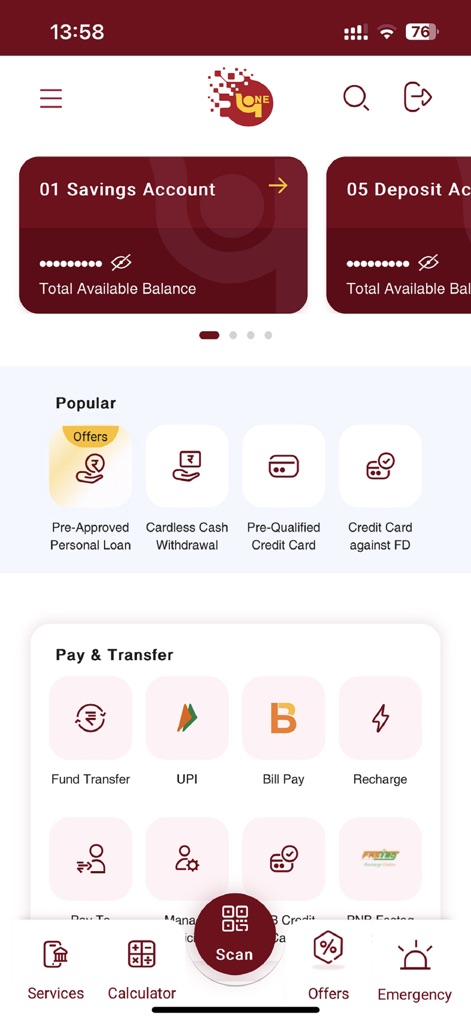
이 앱의 통합 대시보드는 '저축 계좌'와 같은 주요 계좌 개요를 제공하며, '결제 및 이체'와 같은 필수 은행 업무 기능을 한눈에 보여줍니다.
통합 금융 대시보드
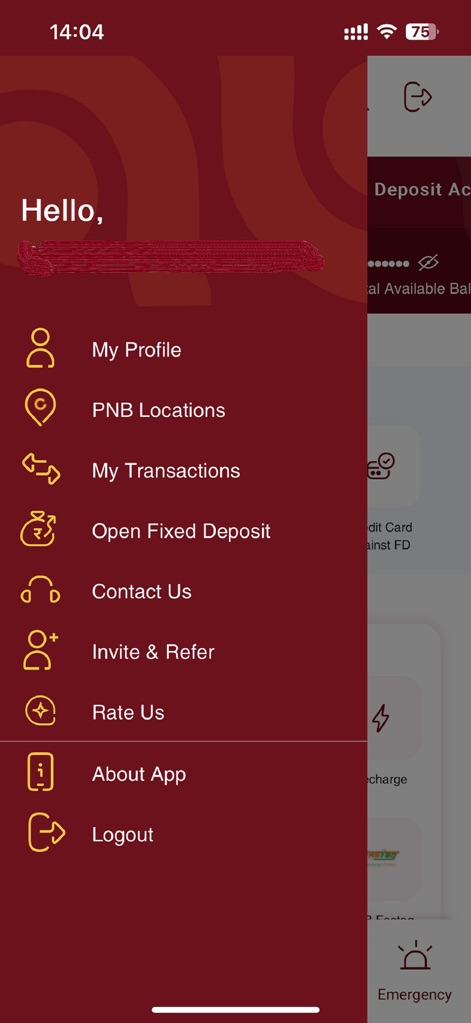
사용자는 왼쪽 사이드 메뉴를 통해 '내 프로필'과 같은 개인 정보를 관리하고, '정기 예금 개설'과 같은 다양한 핵심 서비스에 쉽고 빠르게 접근할 수 있습니다.
직관적인 사이드 메뉴
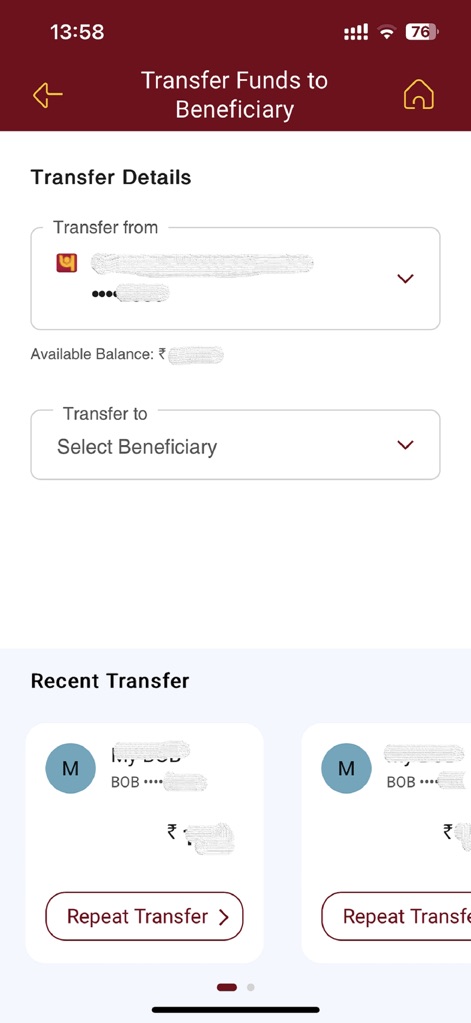
이 화면에서 사용자는 '이체할 계좌'를 선택하고 '수혜자'를 지정하여 안전하게 자금을 이체할 수 있으며, 최근 이체 내역도 확인할 수 있습니다.
간편한 자금 이체
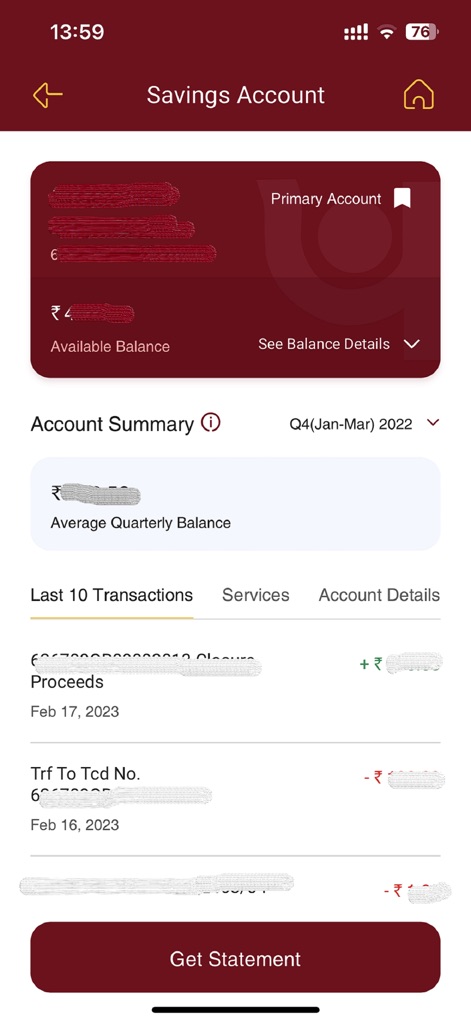
사용자는 이 화면에서 '사용 가능한 잔액'을 포함한 저축 계좌의 상세 정보를 확인하고, '최근 10개 거래' 내역을 조회하며 계좌 명세서를 요청할 수 있습니다.
상세 계좌 내역
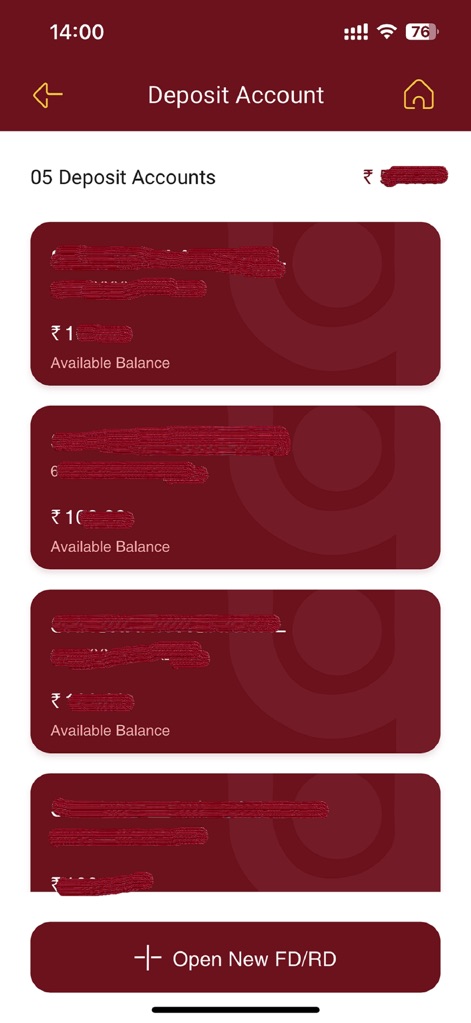
이 화면은 사용자의 여러 '예금 계좌' 목록과 각 계좌의 '사용 가능한 잔액'을 명확하게 보여주며, 새로운 정기 예금 또는 반복 예금을 개설할 수 있는 옵션을 제공합니다.
예금 계좌 관리
설명
Download
비슷한 앱
유사한 기능과 사용자 경험을 가진 앱

PayPal - Pay, Send, Save
PayPal, Inc.

中国农业银行
AGRICULTURAL BANK OF CHINA LIMITED

Mercado Pago: cuenta digital
MercadoLibre S.A.

中国工商银行
Industrial and Commercial Bank of China

Revolut: Send, spend and save
Revolut Ltd

HDFC Bank App (Early Access)
HDFC Bank Ltd

Zalopay - Quét Mọi QR
ZION JOINT STOCK COMPANY

Cash App
Block, Inc.

招商银行
CHINA MERCHANTS BANK CO.,LTD.
이 페이지는 앱이나 개발자의 공식 페이지가 아니며, 정보 제공 및 논평을 목적으로 작성된 독립 편집 간행물입니다. 명시적으로 달리 언급되지 않는 한, 해당 앱이나 개발자는 MWM, Apple, Google Play, 앱 퍼블리셔 또는 앱 개발자와 제휴, 보증, 후원, 승인 또는 공식적으로 연결되어 있지 않으며, 이 페이지의 어떤 내용도 해당 앱이 MWM의 서비스를 사용하여 개발되었음을 의미하지 않습니다. 모든 상표, 로고, 스크린샷 및 기타 콘텐츠는 해당 소유자의 자산입니다.