POS S Pro

POS S Pro

다운로드: App Store
로고: POS S Pro

POS S Pro: 소상공인 판매를 간편하게

카페, 부티크, 온라인 판매자를 위한 올인원 iPad POS. 복잡한 설정 없이 손쉽게 거래를 기록하고, 영수증을 인쇄하고, 보고서를 관리할 수 있습니다.

다운로드: App Store

개발사

CenHo Co., Ltd.

카테고리

Business

다운로드

7K+

사용자 평점

4.9/5

총 평가 수

0

지원 언어

4

손끝에서 펼쳐지는 정밀함

이 인터페이스를 사용하는 7K+ 명의 사용자.

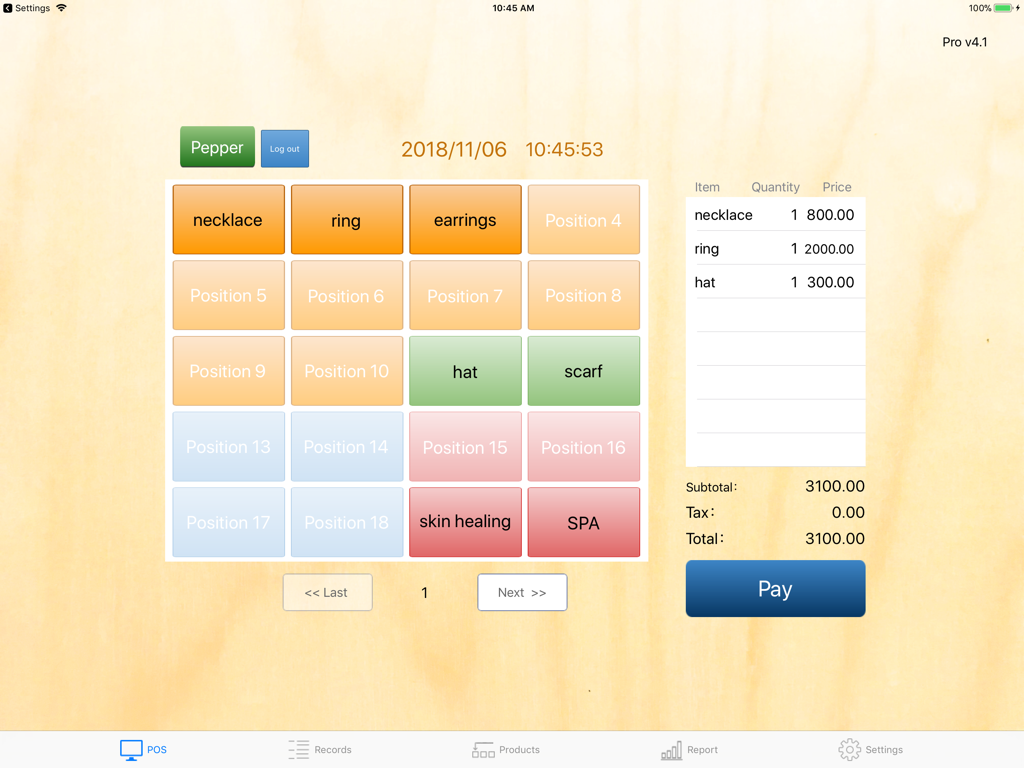
POS S Pro iPad 앱의 결제 인터페이스. 상품 버튼과 거래 요약이 표시됩니다.

POS S Pro iPad 앱의 결제 인터페이스. 상품 버튼과 거래 요약이 표시됩니다.

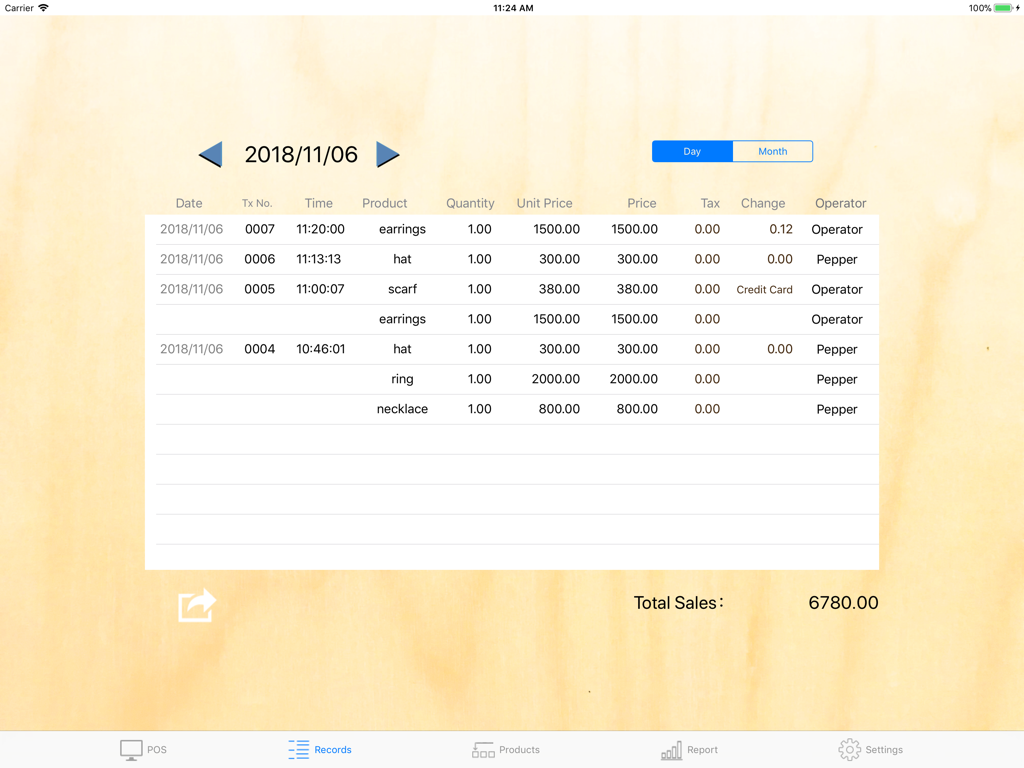
POS S Pro 앱의 판매 거래 기록 화면. 부티크 상품의 일별 판매 내역을 보여줍니다.

POS S Pro 앱의 판매 거래 기록 화면. 부티크 상품의 일별 판매 내역을 보여줍니다.

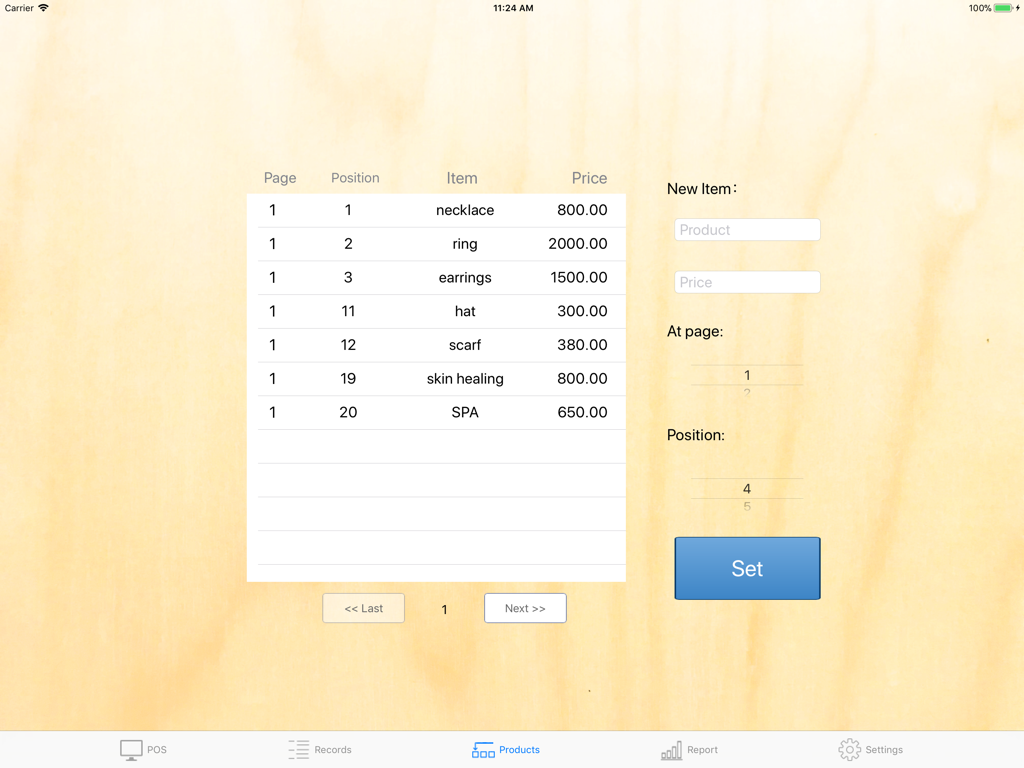
POS S Pro의 인터페이스. iPad에서 상품 목록과 품목 설정을 보여줍니다.

POS S Pro의 인터페이스. iPad에서 상품 목록과 품목 설정을 보여줍니다.

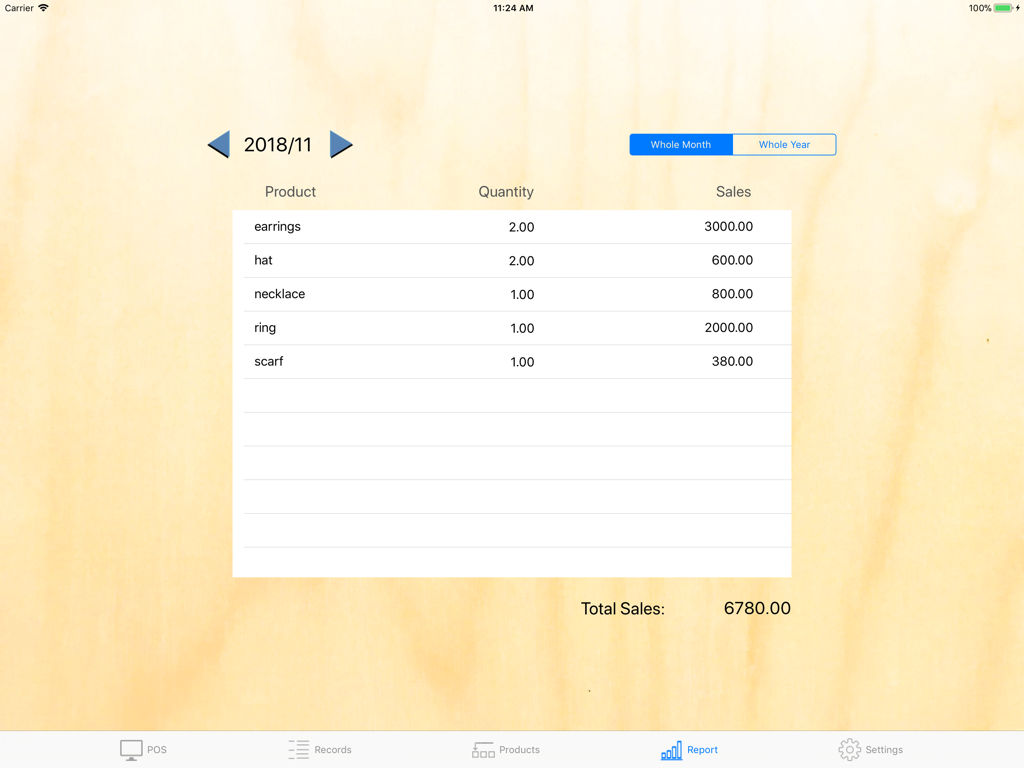
POS S Pro 앱의 월별 판매 보고서 화면. 주얼리 및 액세서리와 같은 소매 상품의 수량과 총 판매액을 보여줍니다.

POS S Pro 앱의 월별 판매 보고서 화면. 주얼리 및 액세서리와 같은 소매 상품의 수량과 총 판매액을 보여줍니다.

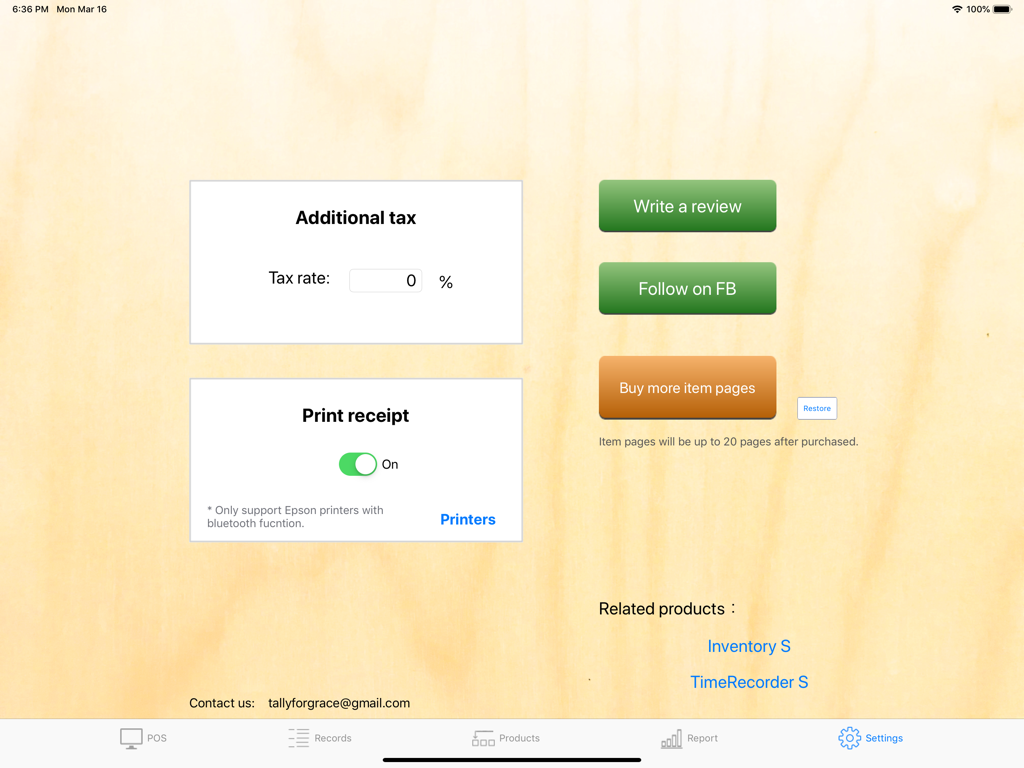
iPad의 POS S Pro 앱 설정 화면. 세금율 및 블루투스 영수증 인쇄 옵션이 표시됩니다.

iPad의 POS S Pro 앱 설정 화면. 세금율 및 블루투스 영수증 인쇄 옵션이 표시됩니다.

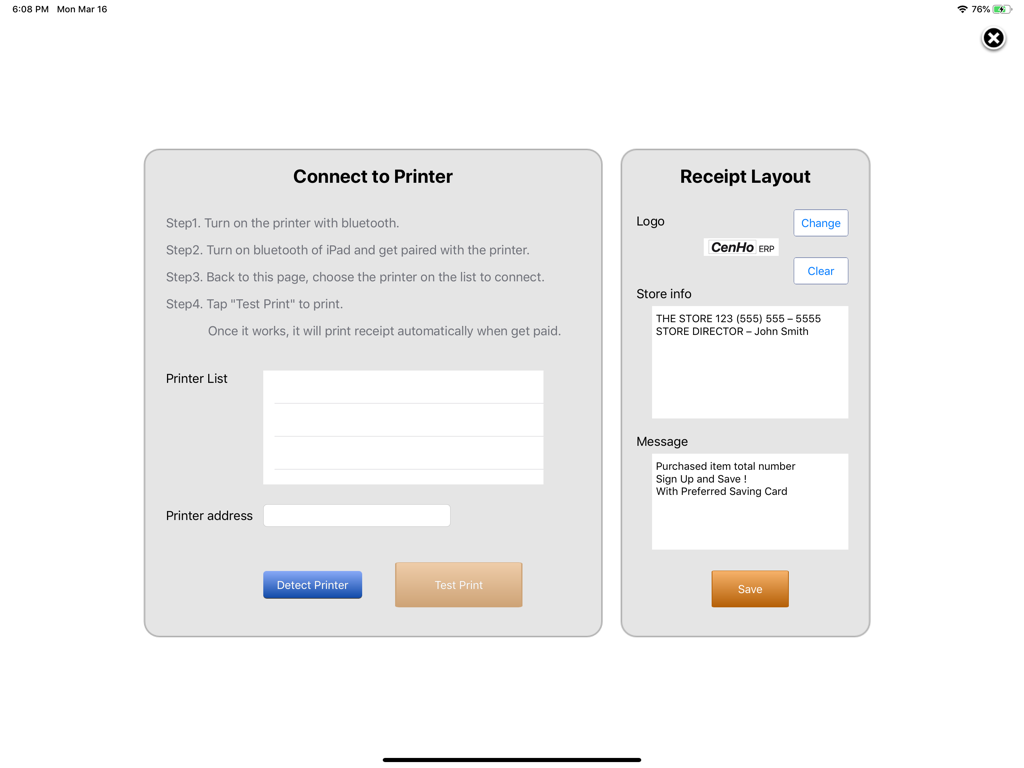
POS S Pro 앱 화면. 프린터 연결 지침 및 영수증 레이아웃 옵션을 보여줍니다.

POS S Pro 앱 화면. 프린터 연결 지침 및 영수증 레이아웃 옵션을 보여줍니다.

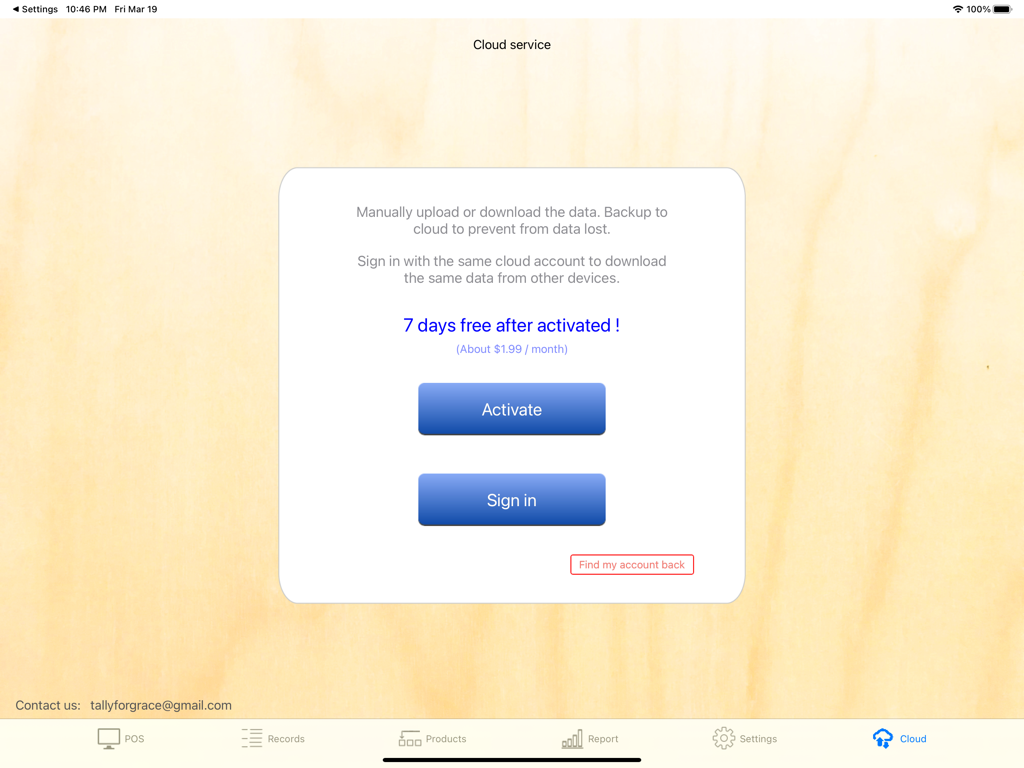
iPad의 POS S Pro 클라우드 서비스 인터페이스. 데이터 백업 활성화 및 로그인 옵션을 보여줍니다.

iPad의 POS S Pro 클라우드 서비스 인터페이스. 데이터 백업 활성화 및 로그인 옵션을 보여줍니다.

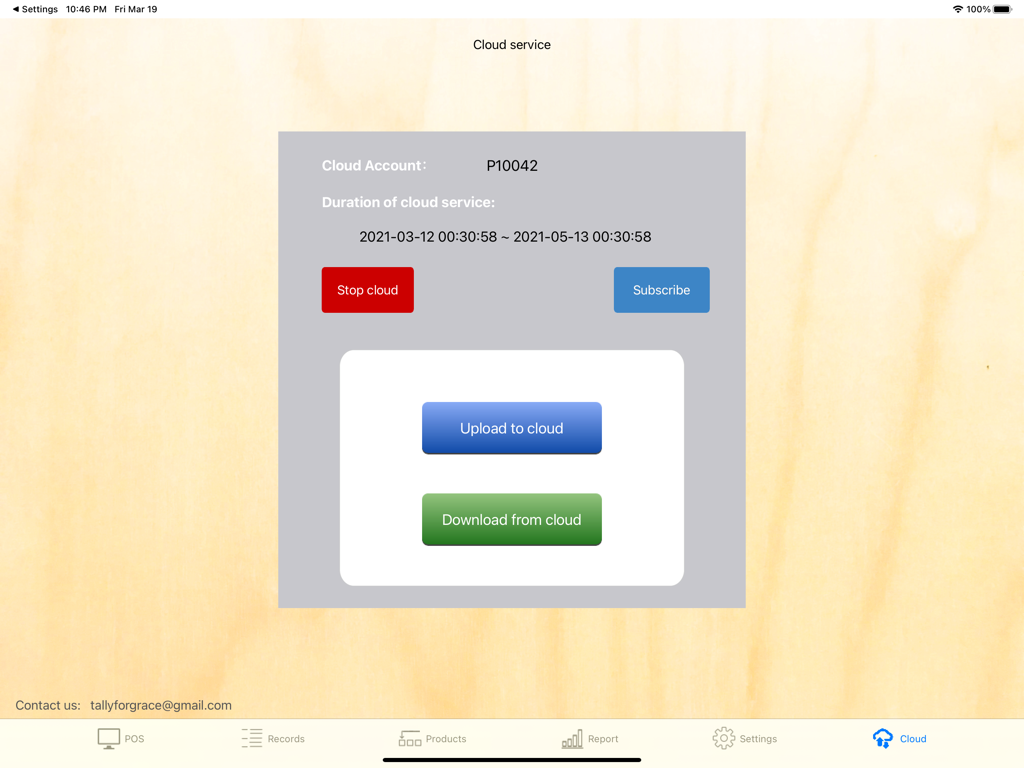
POS S Pro 클라우드 서비스 화면. iPad에서 데이터 업로드 및 다운로드 옵션을 보여줍니다.

POS S Pro 클라우드 서비스 화면. iPad에서 데이터 업로드 및 다운로드 옵션을 보여줍니다.

소상공인을 위한 강력한 기능

이 앱을 돋보이게 하는 도구, 7K+ 명의 사용자가 선택.

🚀

번개처럼 빠른 결제

최대 60개의 인기 상품을 깔끔한 인터페이스에 정리하여 속도를 높였습니다. 피크 시간대에 고객을 기다리게 하지 마세요.

📈

스마트 판매 분석

일별, 월별, 연별 성과를 검토하고 데이터를 CSV로 내보내 세금 신고 및 회계 처리를 간편하게 하세요.

☁️

안전한 클라우드 동기화

자동 클라우드 백업으로 비즈니스 데이터를 보호하고 여러 iPad 간에 거래 기록을 쉽게 공유하세요.

앱 소개

에 대해 알아야 할 모든 것 POS S Pro.

설명

"POS S Pro" is suit for retailers, cafes, restaurants, internet sellers, eBayers....etc.. It helps you to record the selling-transactions easily. Features: -"POS" screen: 。20 items per page and 3 pages total. So maximum 60 items can be assigned. 。Operators: Transaction is recorded with the operator. It is clear to see whom the responsibility belongs to. 。Cash or Credit card: The payment can be chosen. 。Tax: The rate of additional tax is assignable. -"Records" screen: To review all transactions of the day or month. Also, it shows the total sales. 。Export to csv file by Mail of iPad. -"Products" screen: To allocate products to buttons as you wish. -"Report" screen: To show total sales whole day / month / year by product. - Receipt printing: It will print receipt automatically after a transaction. (This function requires only EPSON printers with Bluetooth interface.) PS. Choose to print the transaction number more obvious is possible. It is convenient for those who take the receipt for a wait number. -Cloud service (in-app purchase): User may upload data to cloud to prevent from data lost. Also, share the data by cloud is possible. Any suggestion, please contact us: tallyforgrace@gmail.com CenHo ERP

최신 버전

6.10

크기

10.7 MB

출시일

2018년 11월 7일

오늘 바로 판매를 전문적으로 관리하세요!

복잡한 시스템을 POS S Pro로 바꾼 7,000명 이상의 사업가와 함께하세요. 지금 다운로드하고 iPad를 가장 강력한 비즈니스 도구로 만드세요.

다운로드: App Store

App information, icons, screenshots, and descriptions displayed on this page are sourced from the Apple App Store and are the property of their respective developers. Download estimates and rankings are based on MWM's proprietary models and may not reflect actual figures. This page is provided for informational and analytical purposes only.

Believe this page infringes your intellectual property? File a dispute