
이 페이지는 앱이나 개발자의 공식 페이지가 아니며, 정보 제공 및 논평을 목적으로 작성된 독립 편집 간행물입니다. 명시적으로 달리 언급되지 않는 한, 해당 앱이나 개발자는 MWM, Apple, Google Play, 앱 퍼블리셔 또는 앱 개발자와 제휴, 보증, 후원, 승인 또는 공식적으로 연결되어 있지 않으며, 이 페이지의 어떤 내용도 해당 앱이 MWM의 서비스를 사용하여 개발되었음을 의미하지 않습니다. 모든 상표, 로고, 스크린샷 및 기타 콘텐츠는 해당 소유자의 자산입니다.


다운로드
2.5M+사용자 평점
총 평가 수
426개발사
카테고리
Entertainment지원 언어
1최신 버전
6.32크기
265.2 MB출시일
2013년 5월 30일증강 현실을 활용한 교육 및 창의적 놀이 경험 제공
Quiver - 3D 컬러링 앱 기술 분석
증강 현실 컬러링 경험
이 앱은 사용자가 직접 색칠한 그림을 스마트 기기 화면에서 살아 움직이는 3D 증강 현실(AR) 콘텐츠로 변환하여 몰입감 있는 시각적 경험을 제공합니다. 이를 통해 아이들은 자신들의 창작물이 현실로 나타나는 것을 보며 놀라움과 성취감을 느낄 수 있습니다.
교육용 콘텐츠 및 수업 계획
이 도구는 ABC, 우주, 수학, 과학, 지리 등 다양한 교육 주제를 다루는 컬러링 페이지와 함께 교사 및 교육자들이 제작한 무료 수업 및 활동 계획을 제공합니다. 이는 학습을 재미있게 만들고 학생들이 다양한 과목을 시각화하고 이해하는 데 도움을 줍니다.
상호작용 가능한 AR 창작물
사용자는 살아 움직이는 자신들의 AR 창작물과 상호작용하고 게임을 즐길 수 있습니다. 이는 단순히 보는 것을 넘어 능동적인 참여를 유도하여 아이들의 흥미와 몰입도를 높입니다.
맞춤형 창작물 구현
각 색칠 페이지는 아이가 색칠한 방식 그대로 독특하게 생명력을 얻습니다. 이 앱은 사용자에게 즉각적인 소유감과 자부심을 부여하며, 아이들의 창의성과 상상력을 마음껏 발휘할 수 있도록 돕습니다.
퀴즈 및 학습 도구
이 앱은 퀴즈 및 기타 교육 도구를 통해 사용자가 특정 주제를 배우고 발견할 수 있도록 지원합니다. 이는 단순한 색칠 활동을 넘어 지식 습득과 이해를 촉진하는 추가적인 학습 기회를 제공합니다.
다중 기기 교실 배포
Quiver Education 대시보드를 통해 학교나 교육 기관은 단 하나의 구독으로 교실 내 여러 기기에 앱을 배포할 수 있습니다. 이는 교사가 모든 학생에게 AR 콘텐츠를 쉽게 제공하고 수업에 활용할 수 있도록 돕는 실용적인 기능입니다.
창작물 공유 기능
이 도구는 사용자가 자신의 AR 창작물의 사진과 비디오를 캡처하여 친구 및 가족과 공유할 수 있도록 해줍니다. 이는 아이들이 자신의 성취를 자랑하고 다른 사람들과 경험을 나눌 수 있는 기회를 제공합니다.
몰입형 사운드 효과
각 페이지마다 다른 사운드 효과가 연동되어 증강 현실 경험의 몰입도를 높입니다. 이 앱은 시각적인 즐거움에 청각적인 요소를 더하여 더욱 풍부하고 생동감 있는 상호작용을 제공합니다.
자주 묻는 질문
에 대해 알아야 할 모든 것 Quiver - 3D Coloring App
What is the Quiver - 3D Coloring App?
The Quiver app combines physical coloring with augmented reality technology. It creates an engaging, educational, and magical experience by bringing colored pages to life as 3D animations on smart devices.
How does the Quiver app work?
Users download the Quiver app, print pages from the website, color them, then scan the QR code and the colored page with their device's camera. The Quiver app then makes the creation leap from the page with augmented reality.
Does the Quiver - 3D Coloring App offer free content?
Yes, the Quiver app offers free pages available for download from its website. These free pages allow users to test the augmented reality coloring experience before considering a subscription.
What kind of educational content does Quiver provide?
Quiver provides a wide range of educational content including subjects like ABCs, space, math, science, and geography. It also offers lesson and activity plans created by educators to help students visualize and understand various topics.
Do I need a subscription for the Quiver app?
A subscription for the Quiver app unlocks all paid premium augmented reality content and lesson plans. While free pages are available, in-app purchases and subscriptions give access to additional content.
Can multiple devices use one Quiver app subscription in a classroom?
Yes, the Quiver Education dashboard allows deployment of the Quiver app across multiple classroom devices using a single subscription. All these devices can then access and use the available Quiver app content during the subscription term.
Does the Quiver - 3D Coloring App collect personal data?
No, the Quiver app does not collect any personally identifiable data. It collects only anonymous, aggregated analytics data to improve the app experience, adhering to its privacy policy.
What are the technical requirements for using the Quiver app?
The Quiver app requires physically printed coloring pages to enjoy the full experience, an Internet connection to download new content, and it only works with QuiverVision pages, identifiable by the Quiver Butterfly logo.
Where can I find Quiver coloring pages to print?
Users can find and download Quiver coloring pages from the Quiver app's website, specifically at quivervision.com/coloring-packs. These pages are then printed to be colored and used with the app.
다음 스크린샷과 설명은 앱의 공식 스토어 목록에서 직접 가져온 것이며 앱 개발자의 자산입니다.
앱 스토어
스크린샷

이 앱은 사용자가 색칠한 페이지를 스마트폰으로 스캔하여 3D 우주 장면을 생생하게 구현하고, 인터랙티브한 3D 세포 모델을 통해 학습 경험을 제공합니다.
증강 현실 학습
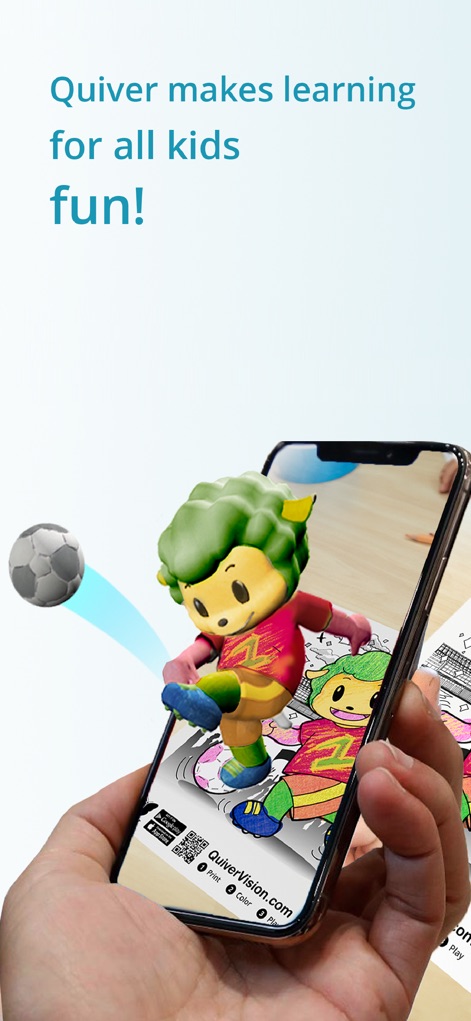
이 앱은 사용자의 색칠 작품을 스마트폰 화면에서 3D 애니메이션 캐릭터로 생생하게 구현하며, 떠오르는 축구공과 같은 상호작용 요소로 즐거움을 더합니다.
생동감 넘치는 창작물

이 도구는 증강 현실 색칠 경험을 교사용 활동지 및 교육 전문가가 설계한 글로벌 목표 학습 자료와 같은 다양한 교육 콘텐츠와 연결하여 학습 효과를 극대화합니다.
교육 콘텐츠 연계

이 앱은 'Quiver Ocean Animals'와 같은 다양한 주제 팩을 포함한 풍부한 AR 콘텐츠 라이브러리를 제공하며, 사용자는 구독을 통해 모든 유료 콘텐츠를 잠금 해제할 수 있습니다.
풍부한 콘텐츠 라이브러리
설명
Download
비슷한 앱
유사한 기능과 사용자 경험을 가진 앱
Project Aqua: Adobe for Kids
Adobe Labs, Inc.

The Magical Mix-Up AR
King Studio, LLC

Plugo by PlayShifu
MOBILIZAR TECHNOLOGIES PRIVATE LIMITED
Animopus: kids drawing 2+
Animopus Inc.

My Very Hungry Caterpillar AR
StoryToys Limited

Discover Dairy
Center for Dairy Excellence
Elf Studio
North Pole Command Centre Limited

Orboot Earth AR by PlayShifu
MOBILIZAR TECHNOLOGIES PRIVATE LIMITED
Kids Drawing, Doodle Painting
Hue Hoang Thi
이 페이지는 앱이나 개발자의 공식 페이지가 아니며, 정보 제공 및 논평을 목적으로 작성된 독립 편집 간행물입니다. 명시적으로 달리 언급되지 않는 한, 해당 앱이나 개발자는 MWM, Apple, Google Play, 앱 퍼블리셔 또는 앱 개발자와 제휴, 보증, 후원, 승인 또는 공식적으로 연결되어 있지 않으며, 이 페이지의 어떤 내용도 해당 앱이 MWM의 서비스를 사용하여 개발되었음을 의미하지 않습니다. 모든 상표, 로고, 스크린샷 및 기타 콘텐츠는 해당 소유자의 자산입니다.