RCF LiveRemote
RCF LiveRemote
다운로드: App Store

이 페이지는 앱이나 개발자의 공식 페이지가 아니며, 정보 제공 및 논평을 목적으로 작성된 독립 편집 간행물입니다. 명시적으로 달리 언급되지 않는 한, 해당 앱이나 개발자는 MWM, Apple, Google Play, 앱 퍼블리셔 또는 앱 개발자와 제휴, 보증, 후원, 승인 또는 공식적으로 연결되어 있지 않으며, 이 페이지의 어떤 내용도 해당 앱이 MWM의 서비스를 사용하여 개발되었음을 의미하지 않습니다. 모든 상표, 로고, 스크린샷 및 기타 콘텐츠는 해당 소유자의 자산입니다.

로고: RCF LiveRemote
다운로드: App Store

RCF LiveRemote

최적의 위치에서 ART 9-AX 및 SUB-AX 스피커를 완벽하게 제어하세요. 스마트폰이나 태블릿에서 직접 내부 믹서, 8밴드 EQ 및 딜레이 라인을 정밀하게 관리할 수 있습니다.

주요 수치

다운로드

3K+

사용자 평점

4.6/5

총 평가 수

0

개발사

RCF SPA

카테고리

Music

지원 언어

1

최신 버전

1.3.5

크기

32.5 MB

출시일

2022년 5월 12일
기능

손끝에서 펼쳐지는 프로페셔널 제어

귀하의 모바일 장치를 RCF 사운드 시스템을 위한 강력한 제어 센터로 바꿔보세요. 라이브 공연을 하는 음악가와 DJ가 믹스를 무선으로 완벽하게 제어할 수 있도록 설계되었습니다.

'최적의 위치'에서 무선 믹싱

스피커로 다시 걸어가는 일을 멈추세요. 댄스 플로어에서 레벨, 3밴드 EQ 및 내부 리버브를 조정하여 청중이 정확히 듣는 것을 들을 수 있도록 하세요.

설정 간소화

외부 믹서는 집에 두고 오세요. ART 9-AX에 직접 내장된 프로페셔널 더킹, 팬텀 파워 및 Bluetooth 스트리밍 기능이 있는 6-in, 2-out 내부 디지털 믹서를 활용하세요.

다음 스크린샷과 설명은 앱의 공식 스토어 목록에서 직접 가져온 것이며 앱 개발자의 자산입니다.

앱 스토어

스크린샷
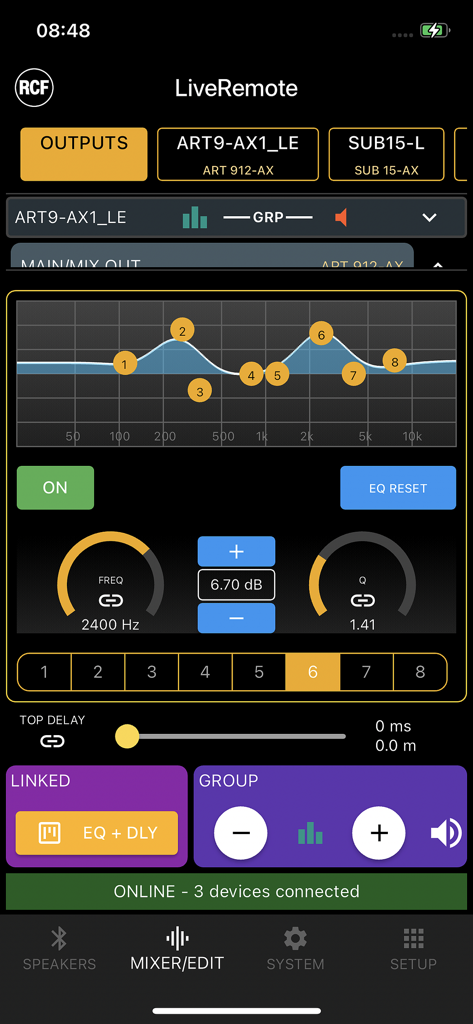
RCF LiveRemote - RCF LiveRemote 앱 인터페이스, 프로페셔널 스피커 제어를 위한 8밴드 파라메트릭 EQ 설정 표시
RCF LiveRemote 앱 인터페이스, 프로페셔널 스피커 제어를 위한 8밴드 파라메트릭 EQ 설정 표시

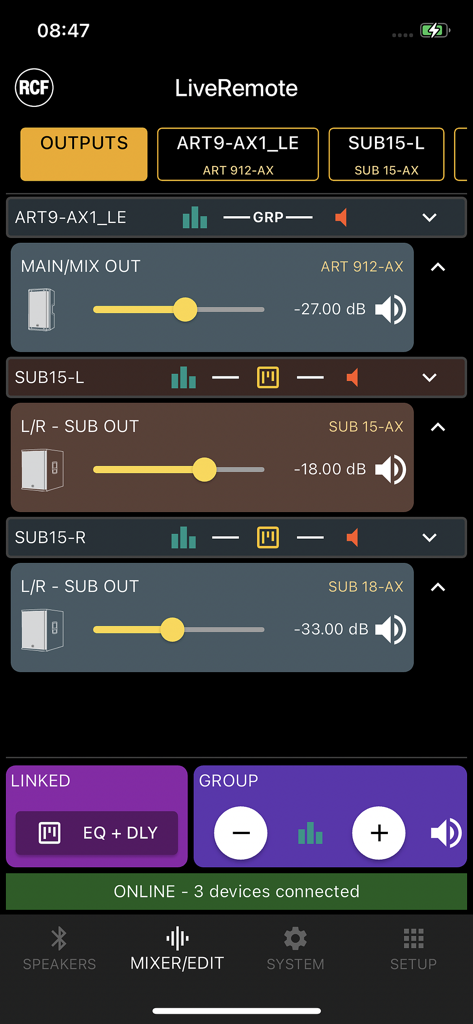
RCF LiveRemote - RCF LiveRemote 앱 인터페이스, ART 9-AX 및 SUB-AX 프로페셔널 스피커의 볼륨 컨트롤 표시
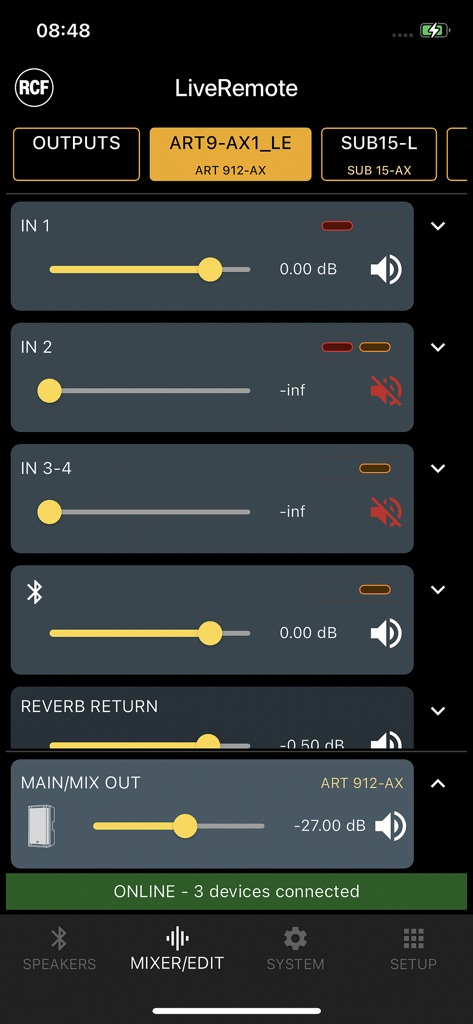
RCF LiveRemote 앱 인터페이스, ART 9-AX 및 SUB-AX 프로페셔널 스피커의 볼륨 컨트롤 표시

RCF LiveRemote - RCF LiveRemote 앱 인터페이스, 프로페셔널 스피커의 볼륨 슬라이더가 있는 디지털 믹서 제어 표시
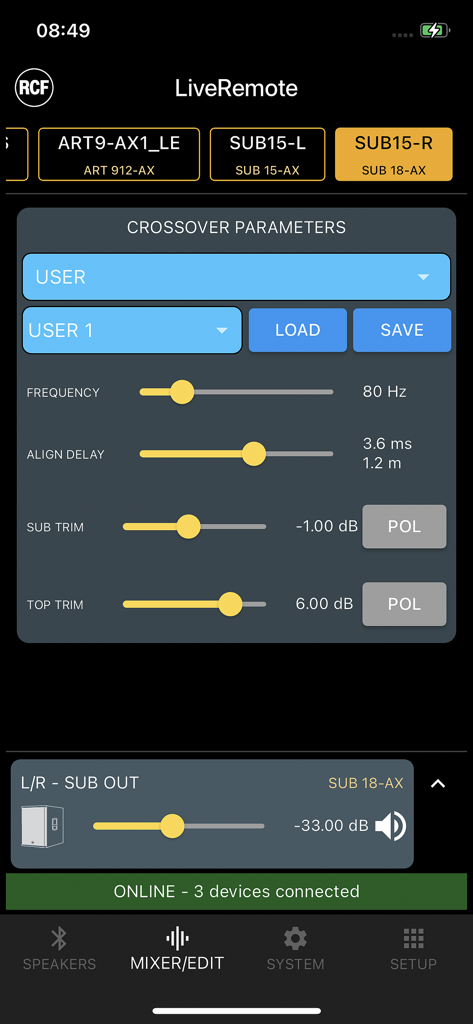
RCF LiveRemote 앱 인터페이스, 프로페셔널 스피커의 볼륨 슬라이더가 있는 디지털 믹서 제어 표시

RCF LiveRemote - RCF LiveRemote 앱의 크로스오버 파라미터 화면, 프로페셔널 오디오 장비의 주파수 및 정렬 지연 설정 표시
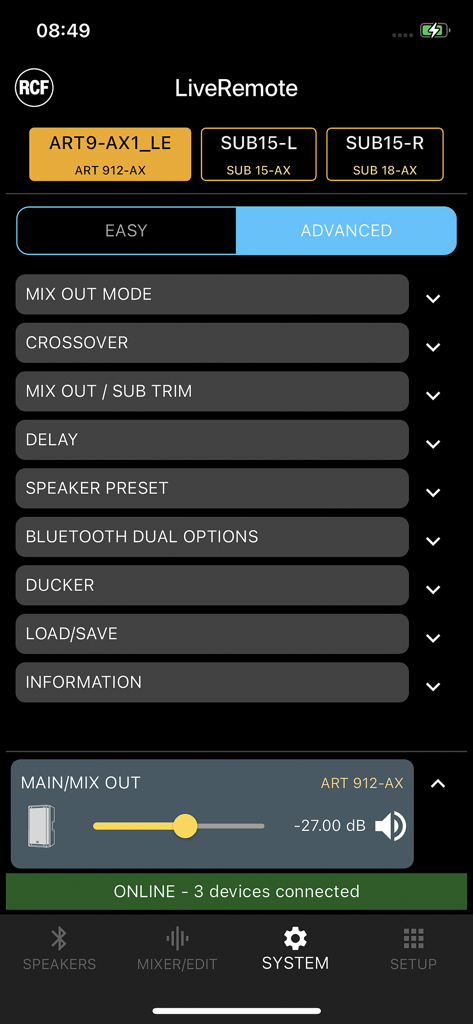
RCF LiveRemote 앱의 크로스오버 파라미터 화면, 프로페셔널 오디오 장비의 주파수 및 정렬 지연 설정 표시

RCF LiveRemote - RCF LiveRemote 앱 시스템 메뉴, ART 912-AX 스피커 및 서브우퍼 제어용
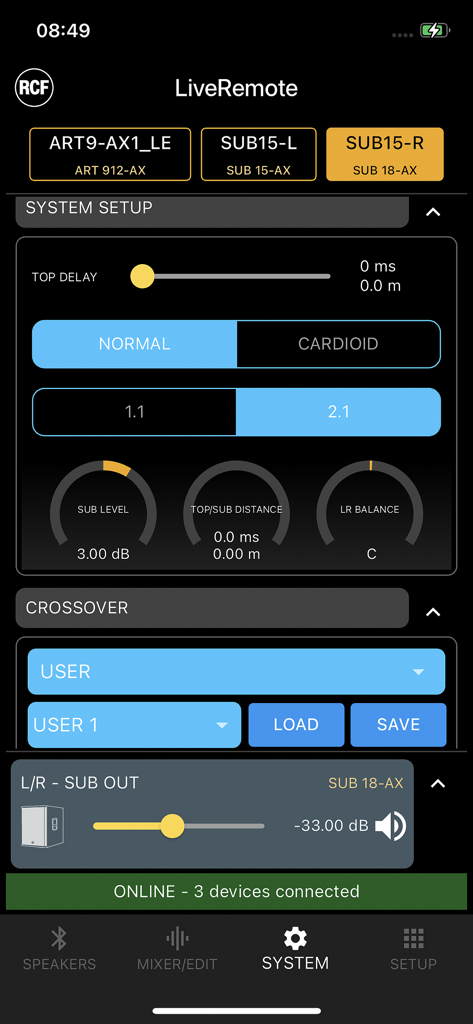
RCF LiveRemote 앱 시스템 메뉴, ART 912-AX 스피커 및 서브우퍼 제어용

RCF LiveRemote - RCF LiveRemote 앱 시스템 설정 화면, 스피커 지연 및 크로스오버 설정 표시
RCF LiveRemote 앱 시스템 설정 화면, 스피커 지연 및 크로스오버 설정 표시

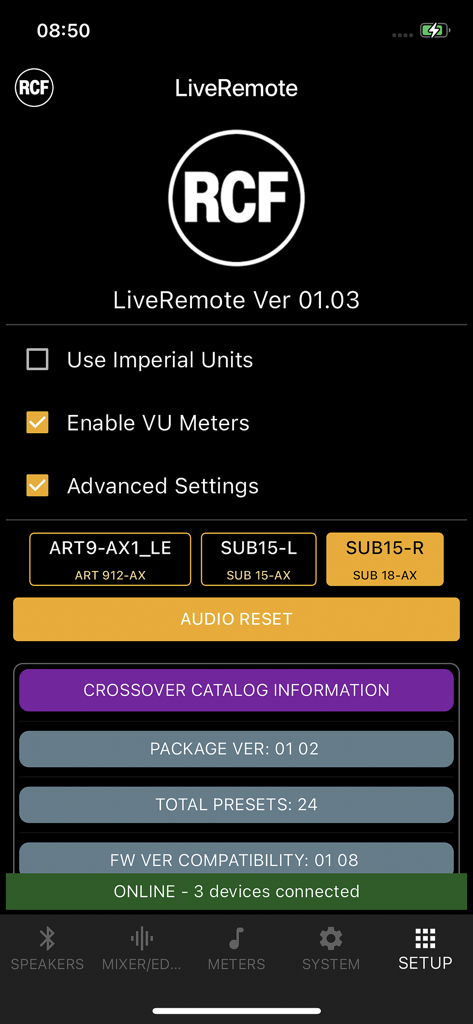
RCF LiveRemote - RCF LiveRemote 앱의 설정 페이지, 연결된 스피커 및 시스템 설정 표시

RCF LiveRemote 앱의 설정 페이지, 연결된 스피커 및 시스템 설정 표시

설명

The RCF LiveRemote App allows full control of several active speakers and subwoofers from your smartphone, via Bluetooth, and it has been updated to include the remote control of additional speaker models. If control-only is required, up to 8 speakers can be connected. When in Dual Mode (available for ART 91x-AX Models) only two speakers can be linked for both audio and control. The following RCF products are supported: ART 910-AX/912-AX/915-AX Single and Dual mode supported SUB 15-AX / SUB 18-AX Control-only Internal features are fully accessible via LiveRemote, and they vary depending on which unit is connected. For specific feature, please refer to the Product Reference Guide. FOR ART 9-AX SPEAKERS * 6-in, 2-out internal digital mixer, with STEREO or MONO setting * on all inputs: HPF, 3-band EQ is available * on channels 1 and 2: individual 48V on/off, dynamics block * Bluetooth audio streaming: on a dedicated input channel, in stereo or mono according to the selected mode * flexible ducker section * internal reverb REVERB with individual channel sends and 3 presets * internal crossover: with 4 USER locations and several presets to match the ART 9-AX with selected RCF subwoofer models * output system section: affects both speaker and SUB out; 5-band fully parametric EQ, up to 45 meters internal delay * Dual mode links both Bluetooth audio and control between two units, a Master and a Slave * when Dual mode is desired, it must must be enabled on the active speaker, in order to be visible from the app FOR SUB AX SUBWOOFERS * stereo input and outputs, to allow both 2.1 and 1.1 configurations * internal crossover: with 4 USER locations and several presets to match the SUB with several RCF speaker models * additional factory-tuned presets can be uploaded from the app to 4 USER APP locations; a full preset catalog update can be performed via firmware update with future upgrades * output system section: affects both SUB and crossover outputs; 8-band fully parametric EQ, up to 45 meters internal delay * grouping is possible for output levels (relative level control) and MUTEs * on more than one unit, output system sections can be linked from the app, so that delay and EQ are linked together. This option is ideal for 2.2 configurations * dual mode is not available on SUB models, as they do offer control via Bluetooth but not Bluetooth audio; SUB products can be linked for paired remote control COMMON FEATURES - On the SPEAKERS page, it is possible to view all available devices and select which one shall be connected; this operation needs to be restarted (DISCONNECT > SCAN > CONNECT) if the available devices change - Speaker name can be modified only on the physical display of the product itself - within the setup PAGE, it is possible to view delay lines values in feet by tapping on the Use Imperial Units Flag - VU Meters Enable (within the setup PAGE) creates a further tab on the lower bar, and shows the VU Meters of one unit only; it is intended for debugging audio connections

Download

다운로드: App Store

이 페이지는 앱이나 개발자의 공식 페이지가 아니며, 정보 제공 및 논평을 목적으로 작성된 독립 편집 간행물입니다. 명시적으로 달리 언급되지 않는 한, 해당 앱이나 개발자는 MWM, Apple, Google Play, 앱 퍼블리셔 또는 앱 개발자와 제휴, 보증, 후원, 승인 또는 공식적으로 연결되어 있지 않으며, 이 페이지의 어떤 내용도 해당 앱이 MWM의 서비스를 사용하여 개발되었음을 의미하지 않습니다. 모든 상표, 로고, 스크린샷 및 기타 콘텐츠는 해당 소유자의 자산입니다.