Realsee 3D virtual tour
다운로드: App Store

이 페이지는 앱이나 개발자의 공식 페이지가 아니며, 정보 제공 및 논평을 목적으로 작성된 독립 편집 간행물입니다. 명시적으로 달리 언급되지 않는 한, 해당 앱이나 개발자는 MWM, Apple, Google Play, 앱 퍼블리셔 또는 앱 개발자와 제휴, 보증, 후원, 승인 또는 공식적으로 연결되어 있지 않으며, 이 페이지의 어떤 내용도 해당 앱이 MWM의 서비스를 사용하여 개발되었음을 의미하지 않습니다. 모든 상표, 로고, 스크린샷 및 기타 콘텐츠는 해당 소유자의 자산입니다.


로고: Realsee 3D virtual tour
다운로드: App Store

Realsee 3D virtual tour

스마트폰으로 물리적인 공간을 몰입형 3D 워크스루로 변환하세요. 부동산, 건축 및 건설 전문가를 위한 올인원 솔루션으로 고해상도 공간 데이터를 캡처, 편집 및 공유할 수 있습니다.

주요 수치

다운로드

10K+

사용자 평점

4.4/5

총 평가 수

0

개발사

Beike-Realsee-Technology-HK-Limited

카테고리

Lifestyle

지원 언어

6

최신 버전

3.59.1

크기

603.6 MB

출시일

2022년 8월 4일
기능

전문가급 3D 디지털 트윈으로 비즈니스를 향상시키세요

몇 분 안에 몰입형 가상 투어를 캡처, 생성 및 공유하세요. 부동산 중개인이든 건축가든 Realsee는 비교할 수 없는 정밀도로 공간을 선보일 수 있는 도구를 제공합니다.

스마트폰 기반 3D 캡처

고가의 장비가 필요 없습니다. 스마트폰이나 360도 카메라를 사용하여 현장에서 즉시 고품질 VR 워크스루를 생성할 수 있습니다.

정밀 CAD 및 BIM 내보내기

다운로드 가능한 평면도, 포인트 클라우드(E57) 및 AutoCAD 및 Revit에서 사용할 수 있는 OBJ 모델로 기술 워크플로우를 간소화하세요.

다음 스크린샷과 설명은 앱의 공식 스토어 목록에서 직접 가져온 것이며 앱 개발자의 자산입니다.

앱 스토어

스크린샷
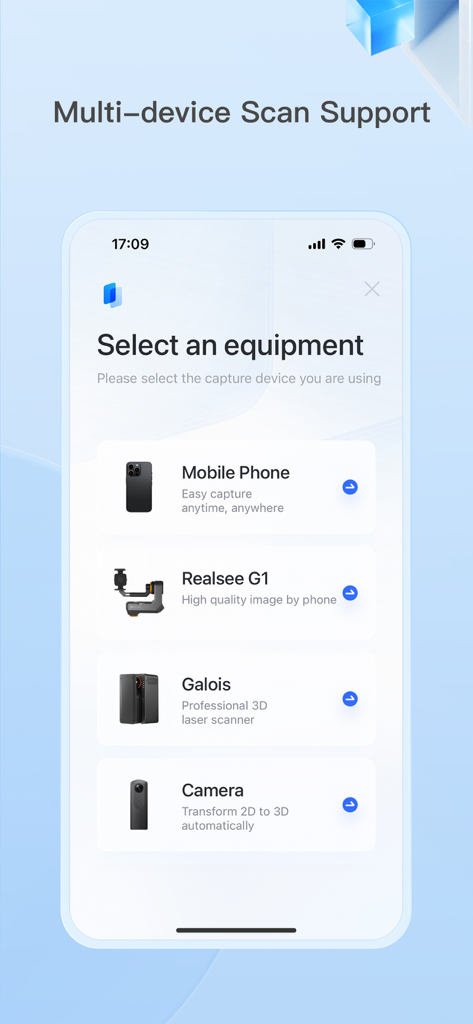
Realsee 3D virtual tour - 모바일 앱 인터페이스에 모바일폰, Realsee G1, Galois 레이저 스캐너 및 3D 카메라를 포함한 스캔 장비 선택 옵션이 표시됩니다.
모바일 앱 인터페이스에 모바일폰, Realsee G1, Galois 레이저 스캐너 및 3D 카메라를 포함한 스캔 장비 선택 옵션이 표시됩니다.

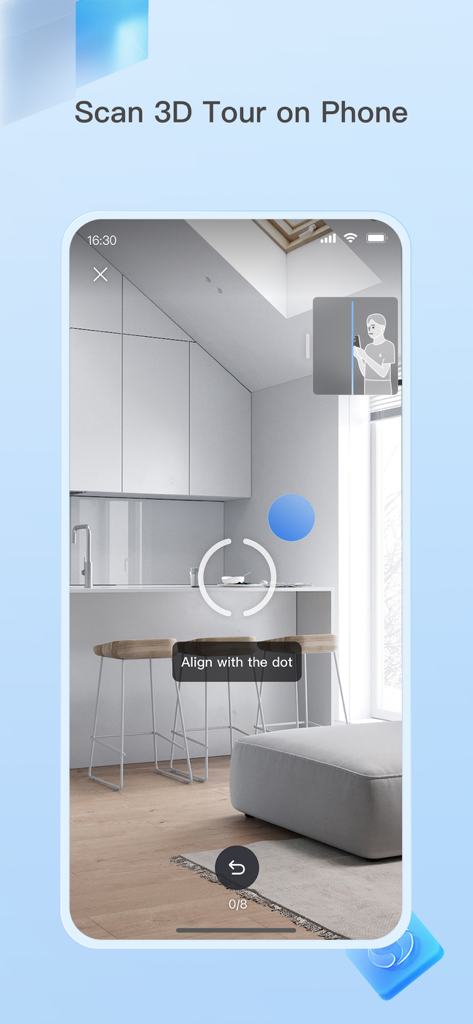
Realsee 3D virtual tour - Realsee 앱의 스마트폰 인터페이스에 점에 맞춰 정렬하라는 지침과 함께 방의 3D 스캔 프로세스가 표시됩니다.
Realsee 앱의 스마트폰 인터페이스에 점에 맞춰 정렬하라는 지침과 함께 방의 3D 스캔 프로세스가 표시됩니다.

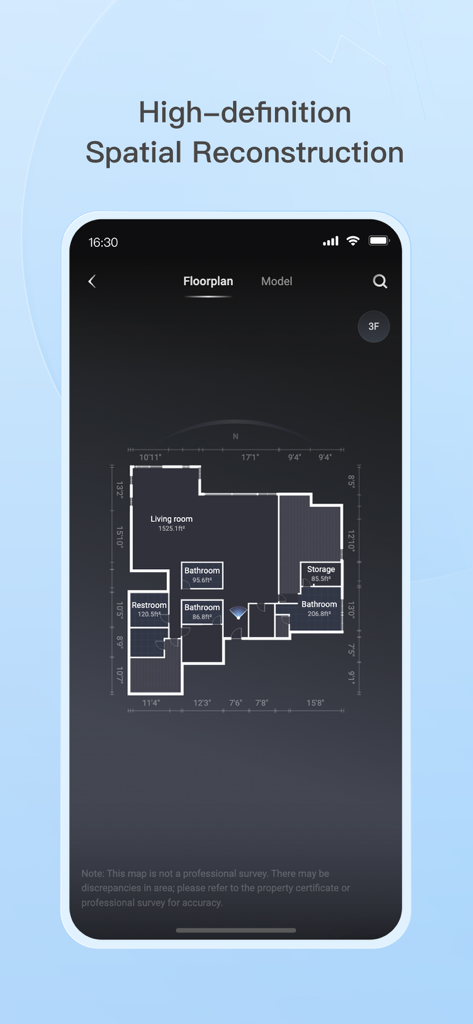
Realsee 3D virtual tour - Realsee 앱 인터페이스에 방 이름과 정밀한 측정값이 표시된 상세한 평면도가 표시되어 공간 재구성을 보여줍니다.
Realsee 앱 인터페이스에 방 이름과 정밀한 측정값이 표시된 상세한 평면도가 표시되어 공간 재구성을 보여줍니다.

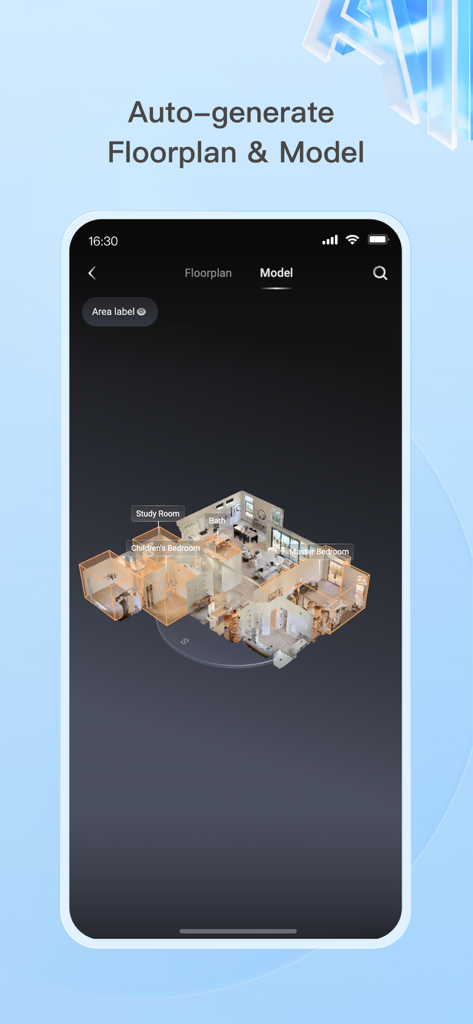
Realsee 3D virtual tour - 서재 및 침실과 같은 이름이 지정된 방이 있는 자동 생성된 3D 주택 모델 및 평면도를 표시하는 스마트폰 화면
서재 및 침실과 같은 이름이 지정된 방이 있는 자동 생성된 3D 주택 모델 및 평면도를 표시하는 스마트폰 화면

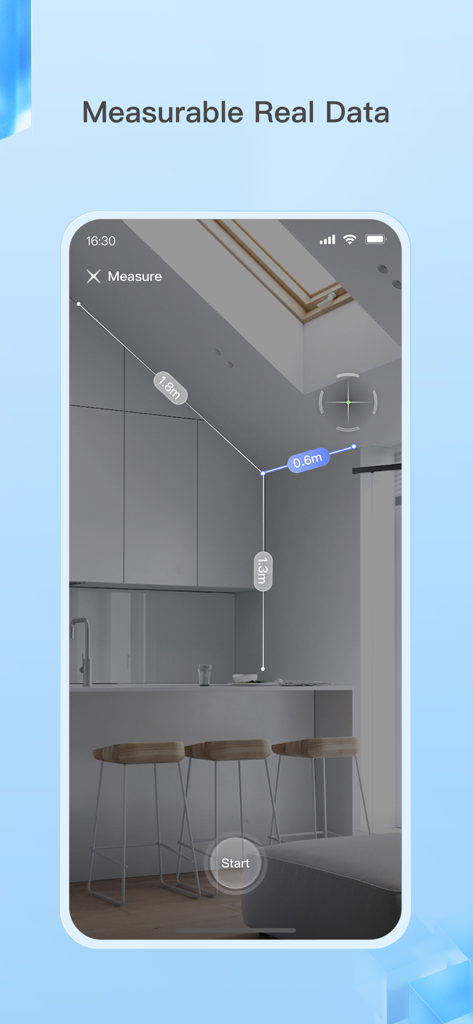
Realsee 3D virtual tour - Realsee 앱이 3D 가상 투어에서 주방 내부의 치수를 측정하는 스마트폰 인터페이스
Realsee 앱이 3D 가상 투어에서 주방 내부의 치수를 측정하는 스마트폰 인터페이스

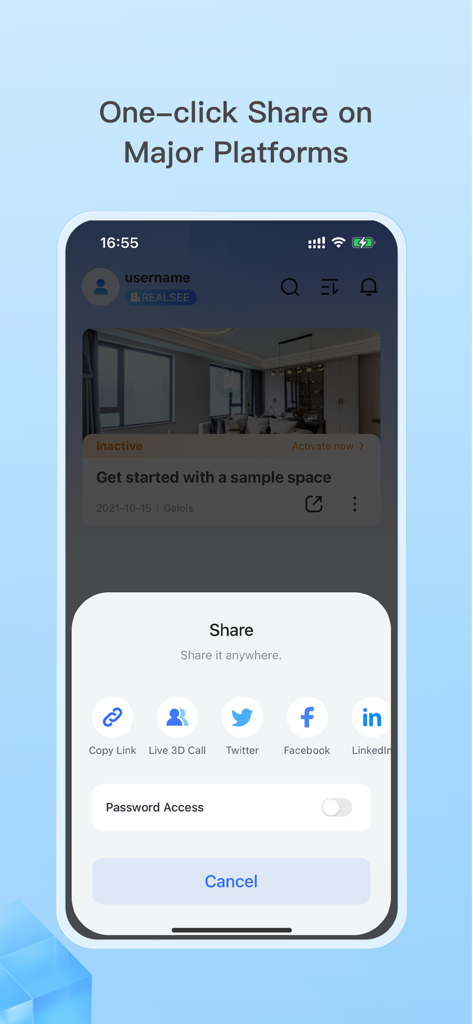
Realsee 3D virtual tour - 3D 가상 투어에 대한 원클릭 공유 옵션이 LinkedIn Facebook 및 Twitter에 표시되는 모바일 앱 인터페이스

3D 가상 투어에 대한 원클릭 공유 옵션이 LinkedIn Facebook 및 Twitter에 표시되는 모바일 앱 인터페이스

설명

The Realsee app lets you capture 3D virtual tours of real-world spaces using your smartphone, Insta360 camera, Ricoh Theta camera, or a compatible 3D lidar scanner. Here's what you can do: 1. Capture 3D Tours: Simply download the app and scan your space anytime with various device options. Realsee automatically creates a 3D walkthrough (VR tour) for you. 2. Edit and Manage Your Space: Realsee offers basic in-app editing tools like adding guided tours, hotspots, and labels. Additionally, the PC console unlocks powerful features like floor plan creator, custom branding options, route creation, high-resolution downloads (16K panoramas, videos) and point cloud E57 files, obj models, dwg CAD files which can be used in autocad or other 3D modeling softwares. 3. Share and Collaborate: Easily share your 3D virtual tour using a link on your own website, social media, or with clients. This is ideal for showcasing real estate properties, room design, marketing hotels and restaurants, or remotely inspecting facilities and construction sites. Additional Benefits: Realsee offers all in one function like capture, upload, preview, and storage. You can also create DIY floor plans, sync with Google Street View, and add your own marketing materials while clients explore the space. Who Can benefit from Realsee? Realsee's 3D digital twin technology empowers a wide range of professionals and individuals: - Photographers: Expand your services by offering 3D capture and virtual tours alongside traditional photography. Provide a more comprehensive solution by combining stunning visuals with immersive 3D experiences. - Real Estate Professionals: - Realtors and Brokers: Create virtual tours to showcase properties, allowing potential buyers to explore listings remotely, saving time and increasing engagement. - Property Managers: Showcase rental properties virtually, reducing the need for physical tours and attracting a wider audience. - Architects and Home builders: Share 3D models with clients for better visualization and collaboration on design projects. - Construction and Engineering Firms: - Document construction progress with 3D scans for remote monitoring and collaboration, or compare with BIM files. - Create 3D models of existing buildings for renovation or maintenance planning. - Facility Management: Create virtual tours of facilities for training, planning, and remote inspections. - Hospitality: Showcase hotels, resorts, or event spaces with immersive 3D tours, enhancing guest experiences. - Other Industries: - Retailers: Showcase product showrooms or store layouts with virtual tours for a more engaging online shopping experience. - Museums and Educational Institutions: Create virtual tours of exhibits or historical sites for remote access and education. - Insurance and Restoration Companies: Capture 3D scans of damaged properties for faster and more accurate assessments. Even individuals can benefit from Realsee by creating 3D models of their homes for personal documentation, sharing with family and friends far away. Ultimately, Realsee empowers anyone who needs to capture, share, and analyze spatial data for various purposes.

Download

다운로드: App Store

이 페이지는 앱이나 개발자의 공식 페이지가 아니며, 정보 제공 및 논평을 목적으로 작성된 독립 편집 간행물입니다. 명시적으로 달리 언급되지 않는 한, 해당 앱이나 개발자는 MWM, Apple, Google Play, 앱 퍼블리셔 또는 앱 개발자와 제휴, 보증, 후원, 승인 또는 공식적으로 연결되어 있지 않으며, 이 페이지의 어떤 내용도 해당 앱이 MWM의 서비스를 사용하여 개발되었음을 의미하지 않습니다. 모든 상표, 로고, 스크린샷 및 기타 콘텐츠는 해당 소유자의 자산입니다.