
이 페이지는 앱이나 개발자의 공식 페이지가 아니며, 정보 제공 및 논평을 목적으로 작성된 독립 편집 간행물입니다. 명시적으로 달리 언급되지 않는 한, 해당 앱이나 개발자는 MWM, Apple, Google Play, 앱 퍼블리셔 또는 앱 개발자와 제휴, 보증, 후원, 승인 또는 공식적으로 연결되어 있지 않으며, 이 페이지의 어떤 내용도 해당 앱이 MWM의 서비스를 사용하여 개발되었음을 의미하지 않습니다. 모든 상표, 로고, 스크린샷 및 기타 콘텐츠는 해당 소유자의 자산입니다.

Remove Objects
사진 폭파범을 사라지게 하고, 지평선을 확장하고, 생성 채우기로 현실을 재창조하세요. 몇 초 만에 완벽한 미학을 요구하는 크리에이터를 위한 궁극의 AI 툴킷입니다.
다운로드
7M+사용자 평점
총 평가 수
229K+개발사
카테고리
Graphics & Design지원 언어
8최신 버전
2.6.2크기
469.4 MB출시일
2020년 6월 3일즉시 전문가처럼 편집하세요
고급 AI의 힘을 활용하여 몇 초 만에 방해 요소를 제거하고, 지평선을 확장하고, 소셜 피드를 위한 완벽한 미학을 만드세요.
매직 개체 지우개
정밀하게 사진 폭파범과 혼란을 즉시 제거하여 완벽하고 자연스러운 배경을 남깁니다.
AI 이미지 확장
사진의 경계를 확장하여 모든 소셜 미디어 형식에 완벽하게 맞추어 사진에 새로운 생명을 불어넣으세요.
자주 묻는 질문
에 대해 알아야 할 모든 것 Remove Objects
How do I use the Remove Objects app to edit photos?
사진을 선택하고, 지우거나 바꿀 영역을 선택한 다음, AI replace 또는 generative fill로 리터칭하고, 필요한 경우 AI expand를 사용합니다. 완성된 이미지를 내보냅니다.
What are the main features of the Remove Objects app?
Remove Objects는 AI Remove Objects(마법 지우개), AI Generative Fill(AI 채우기 및 AI 대체), AI Expand Image 기능을 제공합니다. 이 도구들은 완벽한 사진을 만들고 창의성을 향상시키는 데 도움이 됩니다.
Can the Remove Objects app remove unwanted people from pictures?
예, Remove Objects 앱은 AI Remove Objects 기능, 즉 마법 지우개를 사용하여 사진에서 사람이나 원치 않는 개체를 정확하게 지워 자연스러운 배경을 남길 수 있습니다.
Does Remove Objects include an AI image expansion tool?
예, Remove Objects에는 AI Expand Image 도구가 포함되어 있습니다. 이미지 경계를 유지하면서 품질을 유지하며 확장하여 사용자가 사진을 모든 형식에 맞추거나 새로운 시각적 요소를 추가할 수 있습니다.
What is AI Generative Fill in the Remove Objects app?
Remove Objects의 AI Generative Fill은 사진과 완벽하게 어우러지는 콘텐츠를 지능적으로 예측하고 생성합니다. 여기에는 사진을 향상시키거나 창의적으로 수정하기 위한 AI 채우기 및 AI 대체 기능이 포함됩니다.
How do I subscribe to Smart Eraser in Remove Objects?
Remove Objects 앱 내에서 Smart Eraser를 잠금 해제하려면 구독할 수 있습니다. 현재 기간이 끝나기 24시간 전에 취소하지 않는 한 구독은 자동으로 갱신됩니다.
Is the Smart Eraser feature in Remove Objects free to use?
아니요, Remove Objects의 Smart Eraser 기능은 잠금 해제를 위해 구독이 필요합니다. 매우 사실적인 결과를 위해 AI 기반 개체 제거 기능을 제공합니다.
Where can I find the Privacy Policy for the Remove Objects app?
Remove Objects 앱의 개인정보 처리방침은 다음 URL에서 확인할 수 있습니다: "https://tapuniverse.com/privacy/". 이 문서는 데이터 처리 관행을 설명합니다.
Can the Remove Objects app replace clothing or accessories in a photo?
예, Remove Objects 앱은 앱 인터페이스에 표시된 대로 AI Generative Fill 기술의 일부인 AI 대체 기능을 사용하여 의류나 액세서리를 교체할 수 있습니다.
다음 스크린샷과 설명은 앱의 공식 스토어 목록에서 직접 가져온 것이며 앱 개발자의 자산입니다.
앱 스토어
스크린샷
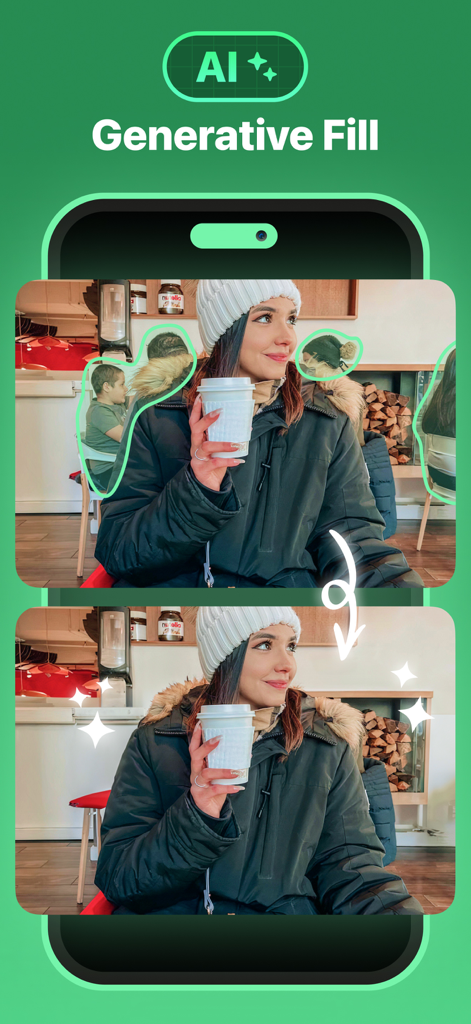
여성이 있는 카페 배경에서 사람들을 제거하는 AI 생성 채우기를 보여주는 이전 및 이후 비교
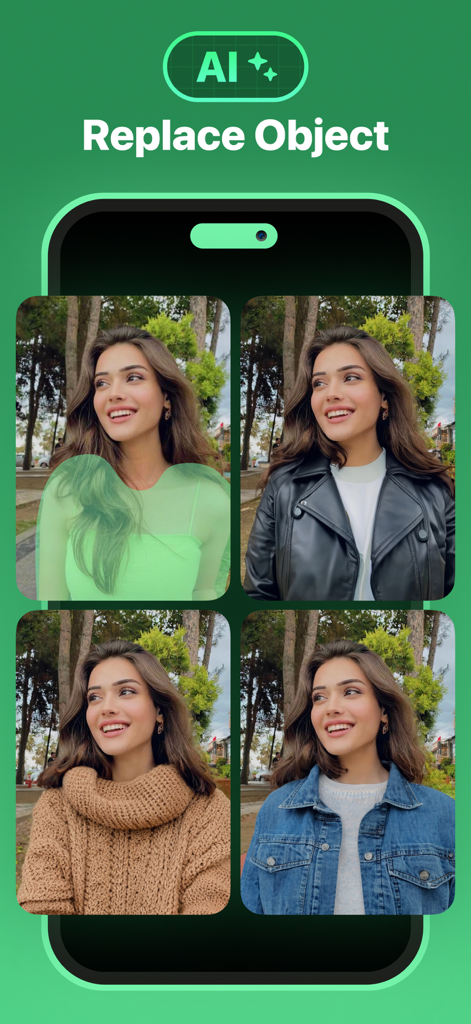
사진에서 사람의 의상을 변경하는 AI 생성 채우기 기능을 보여주는 모바일 앱 화면
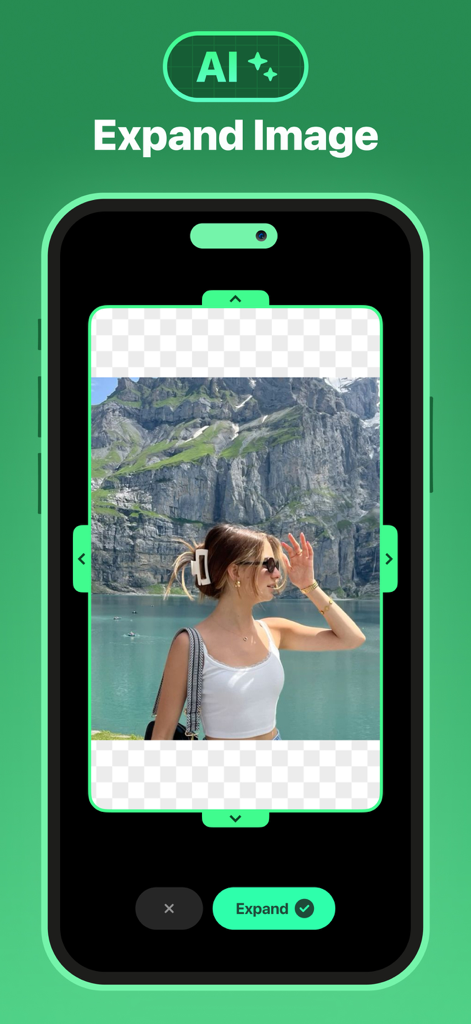
풍경 산악 사진에서 AI 확장 이미지 도구를 보여주는 개체 제거 앱 인터페이스
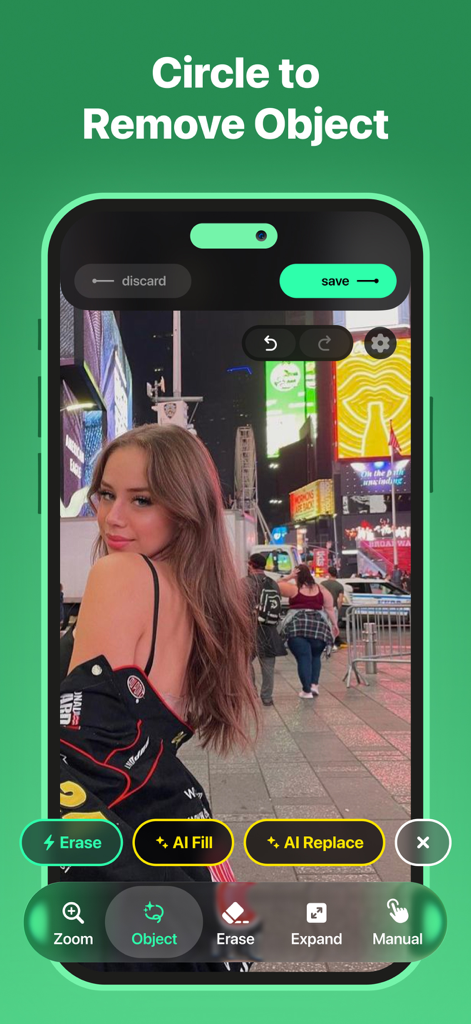
도시 배경 사진으로 개체 제거 기능을 위한 원을 표시하는 개체 제거 앱 인터페이스
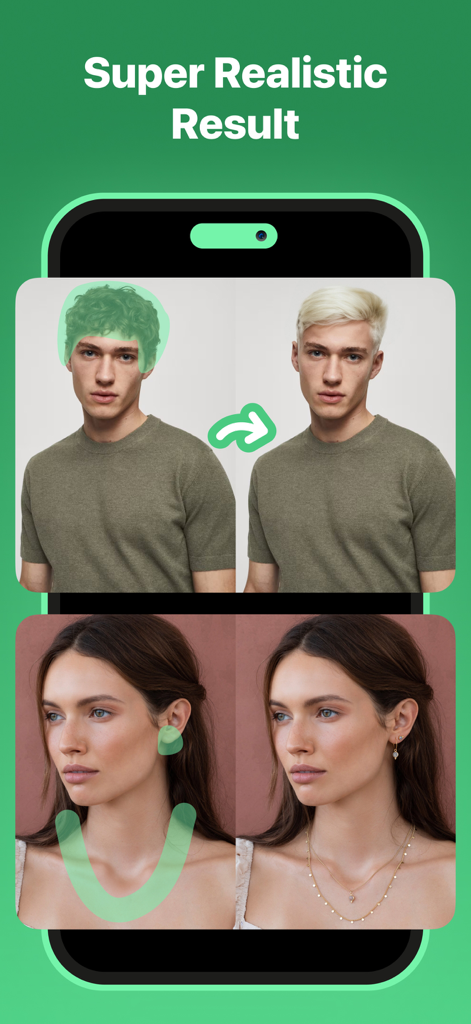
사진 편집 앱에서 AI 머리 색상 변경 및 보석 추가를 보여주는 이전 및 이후 비교
설명
Download
비슷한 앱
유사한 기능과 사용자 경험을 가진 앱

ElevenLabs: AI Voice Generator
Eleven Labs Inc.

Viggle AI: Meme Maker
WarpEngine Canada Inc.

可灵AI - AI图片&视频创作工具
Beijing Kwai Technology Co., Ltd.

Leonardo.Ai - Image Generator
Leonardo Interactive Pty Ltd

Reface: Face Swap AI Photo App
NEOCORTEXT, INC.

Shedevrum
DIRECT CURSUS COMPUTER SYSTEMS TRADING LLC

Zaps Collages
Turnip Media Private Limited

Carat - Create Anything
Paradot Corp.

集梦Ai - 智能图像制作工具
嘉俊 陈
이 페이지는 앱이나 개발자의 공식 페이지가 아니며, 정보 제공 및 논평을 목적으로 작성된 독립 편집 간행물입니다. 명시적으로 달리 언급되지 않는 한, 해당 앱이나 개발자는 MWM, Apple, Google Play, 앱 퍼블리셔 또는 앱 개발자와 제휴, 보증, 후원, 승인 또는 공식적으로 연결되어 있지 않으며, 이 페이지의 어떤 내용도 해당 앱이 MWM의 서비스를 사용하여 개발되었음을 의미하지 않습니다. 모든 상표, 로고, 스크린샷 및 기타 콘텐츠는 해당 소유자의 자산입니다.