
이 페이지는 앱이나 개발자의 공식 페이지가 아니며, 정보 제공 및 논평을 목적으로 작성된 독립 편집 간행물입니다. 명시적으로 달리 언급되지 않는 한, 해당 앱이나 개발자는 MWM, Apple, Google Play, 앱 퍼블리셔 또는 앱 개발자와 제휴, 보증, 후원, 승인 또는 공식적으로 연결되어 있지 않으며, 이 페이지의 어떤 내용도 해당 앱이 MWM의 서비스를 사용하여 개발되었음을 의미하지 않습니다. 모든 상표, 로고, 스크린샷 및 기타 콘텐츠는 해당 소유자의 자산입니다.


다운로드
7.5M+사용자 평점
총 평가 수
132.2K개발사
카테고리
Music지원 언어
3최신 버전
3.6.0크기
33.3 MB출시일
2017년 7월 5일창의적인 오디오 탐색을 위한 핵심 도구 평가
Reverse Audio 앱 주요 기능 분석
오디오 녹음 및 역재생
이 앱은 사용자가 마이크를 통해 오디오를 녹음하고 즉시 순방향 또는 역방향으로 재생하여 독특한 사운드 효과를 만들 수 있게 합니다.
피치(음높이) 조절
이 도구는 사용자가 오디오의 피치(음높이)를 반음 단위로 최대 2옥타브까지 조절하여 새로운 음향 질감을 탐색할 수 있도록 합니다.
재생 속도 조절
사용자가 녹음된 오디오의 재생 속도를 0.5배에서 2.0배까지 조절하여 다양한 사운드 변형을 시도할 수 있도록 지원합니다.
외부 오디오 파일 가져오기
사용자가 다른 앱이나 파일 앱에서 WAV, MP3, M4A 등 다양한 형식의 오디오 파일을 쉽게 가져와 앱 내에서 편집하고 조작할 수 있게 합니다.
다양한 오디오 형식 지원
이 도구는 WAV, MP3, MP4, M4A, AIFC, AIFF, CAF, FLAC 등 광범위한 오디오 파일 형식을 지원하여 사용자에게 높은 호환성과 유연성을 제공합니다.
저장된 파일 접근성
녹음되고 편집된 오디오 파일은 iOS 파일 앱을 통해 쉽게 접근하고 관리할 수 있어, 사용자의 워크플로우 효율성을 높여줍니다.
자주 묻는 질문
에 대해 알아야 할 모든 것 Reverse Audio
What is the Reverse Audio app?
The Reverse Audio app records sound from your device's microphone. It plays recorded audio normally or in reverse and allows modifications to playback rate and pitch.
How do I record audio using the Reverse Audio app?
To record audio with the Reverse Audio app, tap the microphone icon or 'Start Recording' button on the main screen. The app utilizes your device's microphone for sound capture.
Can I play audio in reverse with the Reverse Audio app?
Yes, the Reverse Audio app plays recorded audio in reverse. After recording, tap the 'Play Reverse' button to listen to the sound in reverse.
What audio file types does Reverse Audio support for import?
The Reverse Audio app supports importing wav, mp3, mp4, m4a, aifc, aiff, caf, and flac audio files. Users can import files via the share action or directly from the Files app.
Can I adjust playback speed and pitch in the Reverse Audio app?
Yes, the Reverse Audio app allows users to change the playback rate from x0.5 to x2.0. It also offers pitch adjustment, ranging from -2 octave to +2 octave.
Where does the Reverse Audio app save recorded files?
The Reverse Audio app saves recorded audio files in the Files app. Users access them by navigating to 'Files app -> On My iPhone/iPad -> Reverse Play -> Audio'.
Does Reverse Audio offer loop playback?
Yes, the Reverse Audio app features a loop playback option. Users can toggle this setting in the 'Playback Effects' menu within the app.
다음 스크린샷과 설명은 앱의 공식 스토어 목록에서 직접 가져온 것이며 앱 개발자의 자산입니다.
앱 스토어
스크린샷
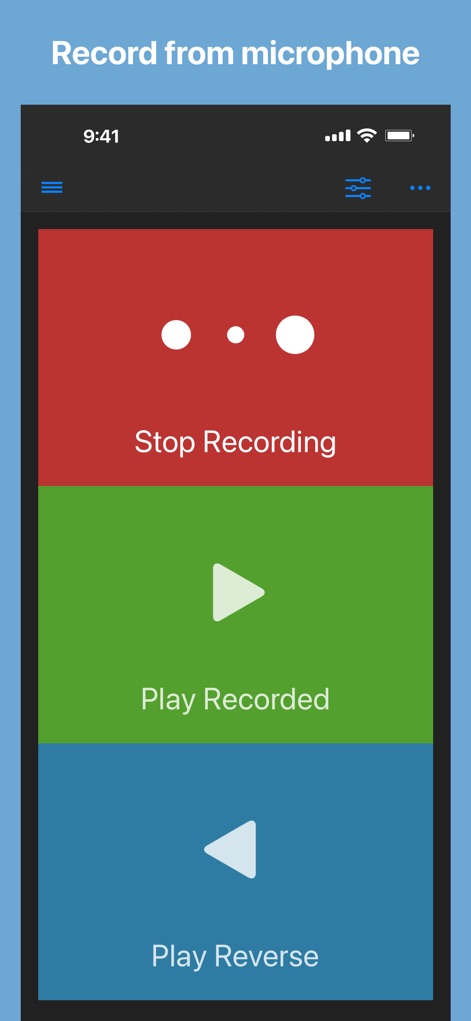
이 앱은 마이크로 간편하게 녹음할 수 있으며, 빨간색 '녹음 중지' 버튼과 초록색 '녹음 재생' 버튼을 통해 즉시 오디오를 조작할 수 있습니다.
간편한 오디오 녹음
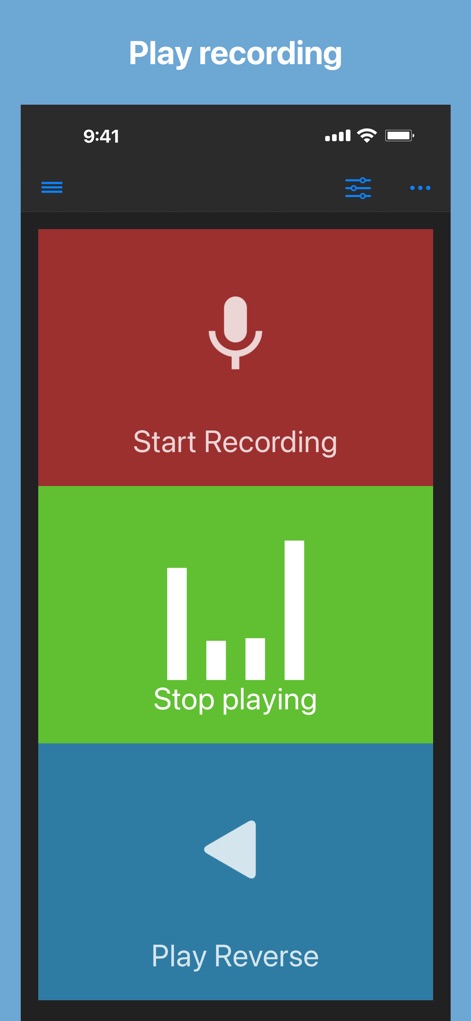
이 앱은 오디오 녹음 후 마이크 아이콘이 있는 '녹음 시작' 버튼으로 새 녹음을 준비하며, 재생 레벨이 표시된 '재생 중지' 버튼으로 현재 오디오 재생을 제어할 수 있습니다.
녹음 즉시 재생

이 도구는 녹음된 오디오를 역방향으로 재생하는 독특한 기능을 제공합니다. '녹음 재생' 버튼으로 정방향 청취를 선택하거나, 재생 레벨이 보이는 파란색 '재생 중지' 버튼으로 역방향 재생을 제어할 수 있습니다.
색다른 역방향 재생
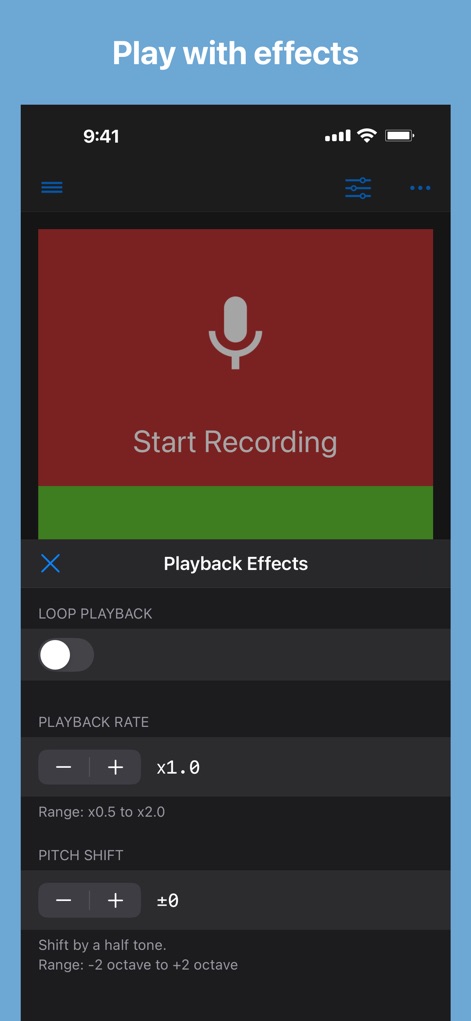
이 앱은 '재생 속도' 조절 기능(x0.5~x2.0 범위)과 '피치 시프트' 기능(-2옥타브에서 +2옥타브까지)을 통해 사용자가 오디오를 정교하게 조작할 수 있게 합니다.
오디오 효과 적용
설명
Download
비슷한 앱
유사한 기능과 사용자 경험을 가진 앱
Reverse Singing
Calico Studio Inc.
The Reverse Audio
Vida Apps Incorporated
Reverse Audio Play
Dino Apps OU
Reverse Singing Audio Play
Tech Consolidated INC.
Reverse Audio ™
Pretty Boa Media Ltd
Reverse Audio: Record & Play
芳 王
Reverse Singing & Audio
APPELIO DIGITAL SOLUTIONS - NIHAT DINC
Reverse Singing Fun Challenge
NGUYEN QUY SON
Reverse Audio Singing Trend
Oussama Chariffi
이 페이지는 앱이나 개발자의 공식 페이지가 아니며, 정보 제공 및 논평을 목적으로 작성된 독립 편집 간행물입니다. 명시적으로 달리 언급되지 않는 한, 해당 앱이나 개발자는 MWM, Apple, Google Play, 앱 퍼블리셔 또는 앱 개발자와 제휴, 보증, 후원, 승인 또는 공식적으로 연결되어 있지 않으며, 이 페이지의 어떤 내용도 해당 앱이 MWM의 서비스를 사용하여 개발되었음을 의미하지 않습니다. 모든 상표, 로고, 스크린샷 및 기타 콘텐츠는 해당 소유자의 자산입니다.