
이 페이지는 앱이나 개발자의 공식 페이지가 아니며, 정보 제공 및 논평을 목적으로 작성된 독립 편집 간행물입니다. 명시적으로 달리 언급되지 않는 한, 해당 앱이나 개발자는 MWM, Apple, Google Play, 앱 퍼블리셔 또는 앱 개발자와 제휴, 보증, 후원, 승인 또는 공식적으로 연결되어 있지 않으며, 이 페이지의 어떤 내용도 해당 앱이 MWM의 서비스를 사용하여 개발되었음을 의미하지 않습니다. 모든 상표, 로고, 스크린샷 및 기타 콘텐츠는 해당 소유자의 자산입니다.


SafeExamBrowser
감독관이 없어도 시험의 무결성을 유지합니다. 이 앱은 부정행위를 기술적으로 봉쇄하여, 교육 기관이 대규모 온라인 평가에서 발생하는 혼돈을 제어할 수 있도록 합니다.
다운로드
1M+사용자 평점
총 평가 수
6.6K개발사
카테고리
Education지원 언어
2최신 버전
3.6.2크기
66.8 MB출시일
2017년 6월 15일iOS 환경에서 보안 온라인 평가를 위한 핵심 역량
SafeExamBrowser 주요 기능 분석
강력한 시험 환경 잠금
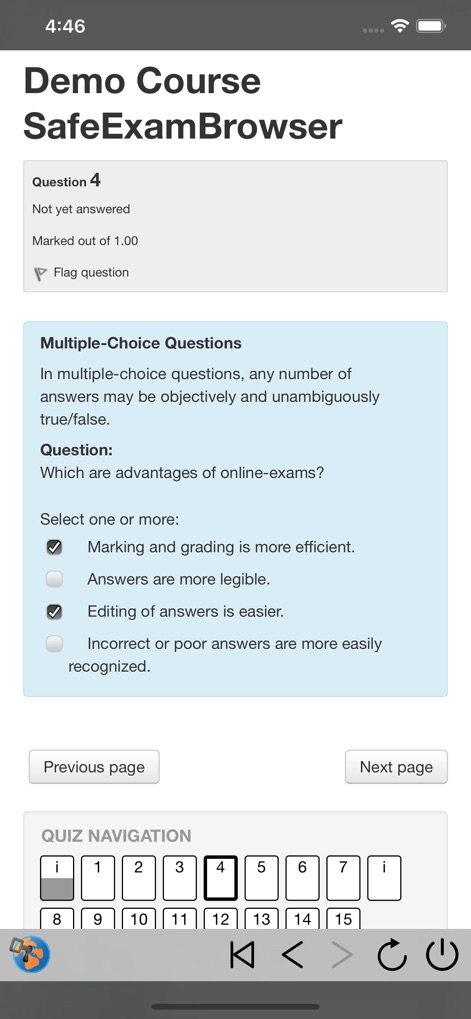
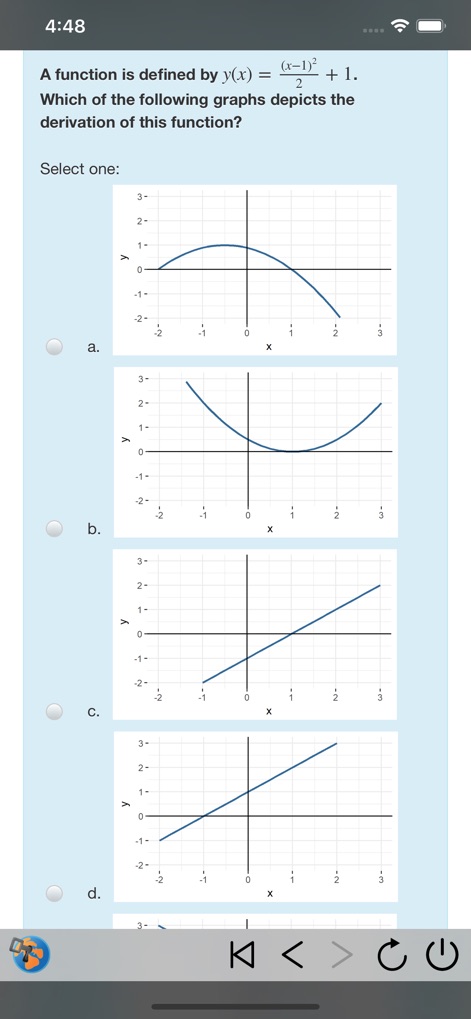
이 앱은 iPad를 시험 전용 키오스크 모드로 고정하여, 사용자가 다른 앱으로 전환하거나, 허용되지 않은 웹사이트에 접근하거나, 시험 중 다른 학생과 소통하는 것을 효과적으로 방지합니다.
유연한 구성 및 배포 옵션
이 도구는 API, 구성 파일, 특수 링크 및 QR 코드를 사용하여 개별 시험 요구 사항에 맞춰 유연하게 구성될 수 있으며, MDM(모바일 기기 관리) 시스템을 통한 초기 배포도 지원합니다.
다양한 평가 시스템과의 광범위한 호환성
이 앱은 대부분의 웹 기반 퀴즈 및 온라인 평가 시스템과 호환되며, Moodle, OpenOlat, ILIAS와 같은 주요 학습 관리 시스템(LMS) 및 상업적/비상업적 시험 시스템과 원활하게 통합됩니다.
관리형 및 비관리형 iOS 기기 지원
사용자가 소유한 iPad와 같은 비관리형 iOS 기기뿐만 아니라, 기관에서 소유하고 관리하는 iOS 기기 모두에서 보안 시험을 실행할 수 있도록 지원하여 높은 배포 유연성을 제공합니다.
탈중앙화된 독립형 운영
이 도구는 중앙 서버나 클라우드 서비스를 사용하지 않으므로, 기관이 시험 데이터에 대한 완전한 제어권을 유지하고 개인 정보 보호를 강화하며 자체 인프라 내에서 안전하게 운영할 수 있게 합니다.
간편한 시험 세션 종료 및 기기 잠금 해제
시험 제출 후 앱 자체 잠금 모드가 자동으로 종료되며, 필요한 경우 시험 감독관이 비밀번호를 사용하여 시험 세션을 수동으로 종료하고 기기를 잠금 해제할 수 있는 기능을 제공합니다.
크로스 플랫폼 구성 파일 호환성
이 앱은 다른 플랫폼용 SafeExamBrowser 버전과 동일한 형식의 암호화된 .seb 구성 파일을 사용하여, 여러 운영 체제 환경에서 일관된 시험 설정 관리와 쉬운 배포를 가능하게 합니다.
Apple Classroom 통합 지원
이 도구는 Apple Classroom과 연동되어 교사가 모든 학생 기기에서 개별적으로 구성된 시험을 효율적으로 시작하고 관리할 수 있도록 지원합니다.
자주 묻는 질문
에 대해 알아야 할 모든 것 SafeExamBrowser
What is SafeExamBrowser (SEB)?
SafeExamBrowser (SEB) is a secure kiosk web browser environment designed for e-assessments on iOS devices. It locks the device into an exam mode, preventing students from accessing other apps or websites during an exam.
Which devices does SafeExamBrowser support?
SafeExamBrowser supports iOS devices, specifically iPads, iPhones, and iPod Touches. It enables secure exams on both unmanaged student-owned devices and institution-managed devices.
How does SafeExamBrowser ensure exam security?
SafeExamBrowser locks an iOS device into assessment kiosk mode. This prevents students from switching to other apps, accessing unauthorized websites, or communicating during an exam.
Can SafeExamBrowser be used with existing learning management systems (LMS)?
Yes, SafeExamBrowser integrates well with learning management systems (LMS) such as Moodle, OpenOlat, and ILIAS. It also supports various commercial and non-commercial exam systems.
How can an exam be started in SafeExamBrowser?
Exams can be started in SafeExamBrowser by opening a configuration hyperlink from Safari, Mail, or a messenger app. Users can also scan a QR code or enter an institution's URL.
Does SafeExamBrowser use a cloud service for exams?
No, SafeExamBrowser does not use a centralized server or cloud service. It can be configured using an API, configuration files, special links, and QR codes.
Is SafeExamBrowser compatible with Apple Classroom?
Yes, SafeExamBrowser works with Apple Classroom. Teachers can start individually configured exams on all student devices directly through Apple Classroom.
How can an exam session be quit in SafeExamBrowser?
An exam session in SafeExamBrowser can be quit automatically after submission, or manually by an invigilator using a quit password. A left slider menu command also exists for quitting.
Can students reconfigure SafeExamBrowser during an exam?
Reconfiguring SafeExamBrowser during an exam session can be restricted. The "Allow Reconfiguring" option in the Exam Session settings controls this functionality.
Is SafeExamBrowser a free application?
Yes, SafeExamBrowser is released as freeware. Its code is subject to the Mozilla Public License Version 1.1, which permits its free use.
다음 스크린샷과 설명은 앱의 공식 스토어 목록에서 직접 가져온 것이며 앱 개발자의 자산입니다.
앱 스토어
스크린샷




설명
Download




이 페이지는 앱이나 개발자의 공식 페이지가 아니며, 정보 제공 및 논평을 목적으로 작성된 독립 편집 간행물입니다. 명시적으로 달리 언급되지 않는 한, 해당 앱이나 개발자는 MWM, Apple, Google Play, 앱 퍼블리셔 또는 앱 개발자와 제휴, 보증, 후원, 승인 또는 공식적으로 연결되어 있지 않으며, 이 페이지의 어떤 내용도 해당 앱이 MWM의 서비스를 사용하여 개발되었음을 의미하지 않습니다. 모든 상표, 로고, 스크린샷 및 기타 콘텐츠는 해당 소유자의 자산입니다.