
이 페이지는 앱이나 개발자의 공식 페이지가 아니며, 정보 제공 및 논평을 목적으로 작성된 독립 편집 간행물입니다. 명시적으로 달리 언급되지 않는 한, 해당 앱이나 개발자는 MWM, Apple, Google Play, 앱 퍼블리셔 또는 앱 개발자와 제휴, 보증, 후원, 승인 또는 공식적으로 연결되어 있지 않으며, 이 페이지의 어떤 내용도 해당 앱이 MWM의 서비스를 사용하여 개발되었음을 의미하지 않습니다. 모든 상표, 로고, 스크린샷 및 기타 콘텐츠는 해당 소유자의 자산입니다.


Santander Bank US
이 앱은 사용자에게 지루한 은행 업무를 스마트폰 화면으로 압축하는 능력을 부여합니다. 계좌 관리부터 카드 제어까지, 산탄데르 은행은 디지털 지갑을 여러분의 손 안에 놓습니다.
다운로드
2.5M+사용자 평점
총 평가 수
411.0K개발사
카테고리
Finance지원 언어
1최신 버전
5.9.18크기
104.0 MB출시일
2013년 3월 13일Santander Bank US 모바일 앱은 사용자의 디지털 금융 관리 편의성, 보안 및 효율성을 높이는 다양한 기능을 제공합니다.
Santander Bank US 앱 핵심 기능 분석
수표 모바일 입금
이 앱은 사용자가 ATM을 방문할 필요 없이 모바일 기기에서 직접 수표를 입금할 수 있게 해줍니다.
즉시 카드 정지
이 기능은 사용자가 분실했거나 잘못 놓아둔 직불카드나 신용카드에 대해 즉시 거래를 차단하여 보안을 강화할 수 있도록 합니다.
자금 이체
이 도구는 사용자가 산탄데르 계좌 간, 다른 금융 기관에서 산탄데르 계좌로, 또는 다른 산탄데르 고객 및 미국 내 타 은행 계좌로 자금을 이체할 수 있도록 포괄적인 기능을 제공합니다.
청구서 결제
이 앱은 사용자가 청구서 수신자를 추가하고, 결제를 예약하며, 청구서 결제 활동을 검토하고 미납된 전자 청구서를 지불할 수 있도록 합니다.
생체 인식 로그인
이 앱은 Touch ID® 또는 Face ID®를 사용하여 빠르고 안전하게 계좌에 로그인할 수 있는 기능을 제공합니다.
카드 관리
이 도구는 사용자가 직불카드 및 신용카드를 활성화하고, PIN을 생성 또는 변경하며, 분실 또는 도난 카드를 신고하고, 교체 카드를 주문할 수 있도록 지원합니다.
맞춤형 알림
이 기능은 사용자가 알림 설정을 관리하고, 선택하며, 사용자 지정하고, 문자, 이메일 또는 푸시 메시지를 통해 수신 방식을 선택할 수 있게 해줍니다.
빠른 잔액 확인
이 앱은 로그인하기 전에 Quick Balance 또는 Siri®를 사용하여 한 번의 터치로 계좌 잔액을 빠르게 확인할 수 있는 편리한 방법을 제공합니다.
자주 묻는 질문
에 대해 알아야 할 모든 것 Santander Bank US
How can I enroll in mobile banking with the Santander Bank US app?
Yes, you can enroll in Mobile and Online Banking directly through the Santander Bank US app. This allows you to manage your accounts conveniently.
Does the Santander Bank US app support Face ID for login?
Yes, the Santander Bank US app supports Face ID for secure login. Users can also utilize Touch ID® for authentication on compatible devices.
Can I view my account balances quickly in the Santander Bank US app?
Yes, the Santander Bank US app allows you to view balances quickly with one-touch through Quick Balance or by using Siri® before logging in.
How do I deposit checks using the Santander Bank US mobile app?
Yes, you can deposit checks directly from your mobile device using the Santander Bank US app, eliminating the need to visit an ATM.
Can I manage my credit card payments with Autopay in the Santander Bank US app?
Yes, the Santander Bank US app allows you to set up, change, or cancel Autopay for your credit card payments directly within the application.
How do I activate a new debit or credit card using the Santander Bank US app?
Yes, you can activate your debit and credit cards directly through the Santander Bank US app. You can also create or change your card PIN.
Can I temporarily block my Santander Bank US debit or credit card if it's misplaced?
Yes, the Santander Bank US app features Santander® Instant Card Hold, allowing you to temporarily put your misplaced debit or credit card on hold.
Does the Santander Bank US app support sending money with Zelle®?
Yes, the Santander Bank US app integrates Zelle®, allowing users to quickly and safely send, request, or receive money with trusted contacts.
How can I find a Santander branch or ATM using the app?
Yes, the Santander Bank US app provides functionality to find directions to the nearest Santander branch or ATM directly from your mobile device.
Can I set up account alerts in the Santander Bank US app?
Yes, you can manage, select, and customize your alerts within the Santander Bank US app. Choose how to receive them via text, email, or push messages.
다음 스크린샷과 설명은 앱의 공식 스토어 목록에서 직접 가져온 것이며 앱 개발자의 자산입니다.
앱 스토어
스크린샷

이 앱은 Face ID®를 통한 안전한 로그인과 사용자 ID, 비밀번호 입력 필드를 제공하여 편리한 접근을 지원합니다.
안전한 로그인

산탄데르 로고와 'QUICK BALANCE' 옵션이 통합된 깔끔한 로그인 인터페이스는 사용자의 금융 관리를 용이하게 합니다.
새로운 디자인
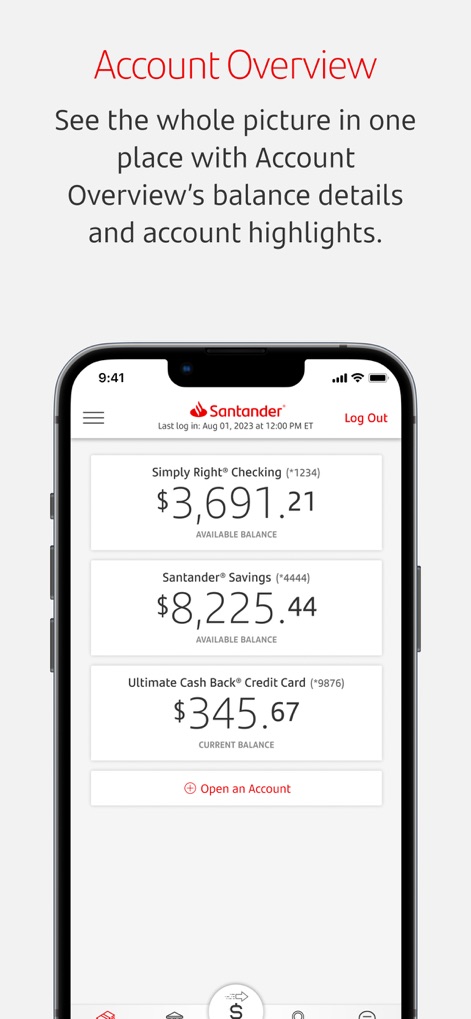
이 화면은 'Simply Right® Checking'과 'Santander® Savings'와 같은 여러 계좌의 현재 잔액을 한곳에서 볼 수 있도록 통합된 개요를 제공합니다.
계좌 한눈에 보기

이 앱의 하단 탐색 메뉴는 'DEPOSIT CHECK' 및 'BILL PAY'와 같은 주요 기능을 위한 접근하기 쉬운 아이콘을 통해 빠른 이동을 가능하게 합니다.
하단 탐색 메뉴
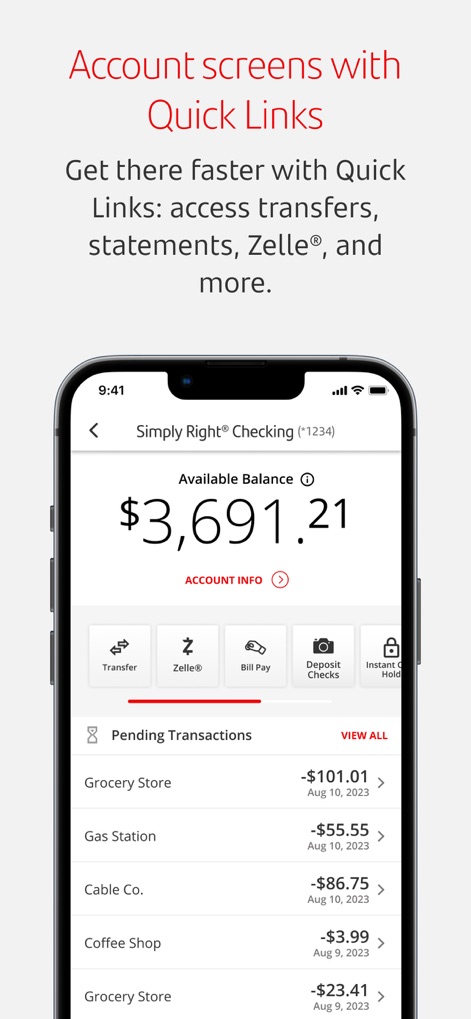
사용자는 'Available Balance'와 'Pending Transactions'를 확인하면서, 'Transfer' 및 'Deposit Checks'와 같은 빠른 링크를 통해 필요한 기능으로 즉시 이동할 수 있습니다.
빠른 링크로 이동

이 화면은 'Send' 및 'Request' 옵션을 포함한 Zelle® 기능을 제공하여 사용자가 빠르고 안전하게 자금을 관리할 수 있도록 돕습니다.
Zelle®로 송금

이 앱은 'Instant Card Hold'와 'Create/Change PIN'과 같은 기능을 통해 사용자가 직불 카드와 신용 카드를 편리하게 관리할 수 있도록 지원합니다.
카드 관리 용이

이 앱은 '$500.00' 입금 알림과 같은 중요한 계좌 활동에 대한 즉각적인 푸시 알림 기능을 제공하여 사용자에게 최신 정보를 전달합니다.
맞춤형 계좌 알림
설명
Download
비슷한 앱
유사한 기능과 사용자 경험을 가진 앱

Enpara Bank Cep Şube
Enpara Bank Anonim Sirketi

Alinma App - تطبيق الإنماء
Alinma Bank

Huntington Mobile Banking
The Huntington National Bank, Inc

國泰世華網路銀行CUBE
Cathay United Bank

中國信託行動銀行
CTBC Bank Co., Ltd.

FNB Banking App
FirstRand Bank Limited

Riyad Bank App
Riyad Bank

CIMB OCTO MY
CIMB Bank Berhad

Regions Mobile
Regions Financial
이 페이지는 앱이나 개발자의 공식 페이지가 아니며, 정보 제공 및 논평을 목적으로 작성된 독립 편집 간행물입니다. 명시적으로 달리 언급되지 않는 한, 해당 앱이나 개발자는 MWM, Apple, Google Play, 앱 퍼블리셔 또는 앱 개발자와 제휴, 보증, 후원, 승인 또는 공식적으로 연결되어 있지 않으며, 이 페이지의 어떤 내용도 해당 앱이 MWM의 서비스를 사용하여 개발되었음을 의미하지 않습니다. 모든 상표, 로고, 스크린샷 및 기타 콘텐츠는 해당 소유자의 자산입니다.