ScorePDF: Sheet Music Viewer
다운로드: App Store

이 페이지는 앱이나 개발자의 공식 페이지가 아니며, 정보 제공 및 논평을 목적으로 작성된 독립 편집 간행물입니다. 명시적으로 달리 언급되지 않는 한, 해당 앱이나 개발자는 MWM, Apple, Google Play, 앱 퍼블리셔 또는 앱 개발자와 제휴, 보증, 후원, 승인 또는 공식적으로 연결되어 있지 않으며, 이 페이지의 어떤 내용도 해당 앱이 MWM의 서비스를 사용하여 개발되었음을 의미하지 않습니다. 모든 상표, 로고, 스크린샷 및 기타 콘텐츠는 해당 소유자의 자산입니다.


로고: ScorePDF: Sheet Music Viewer
다운로드: App Store

ScorePDF: Sheet Music Viewer

무거운 바인더는 버리고 레퍼토리를 관리하세요. 정확한 주석, 전문적인 셋리스트 구성, 블루투스 페달 지원으로 손을 사용하지 않고 페이지 넘기기 - 현대 음악가를 위해 디자인된 하나의 우아한 앱에 모두 담았습니다.

주요 수치

다운로드

24K+

사용자 평점

4.5/5

총 평가 수

100

개발사

enoiu

카테고리

Music

지원 언어

7

최신 버전

14.5.1

크기

66.2 MB

출시일

2022년 8월 15일
기능

현대 음악가를 위한 연주 준비 도구

연습실부터 콘서트홀까지, ScorePDF는 손을 사용하지 않는 탐색과 전문적인 수준의 구성을 통해 워크플로우를 간소화합니다.

손쉬운 페이지 넘김

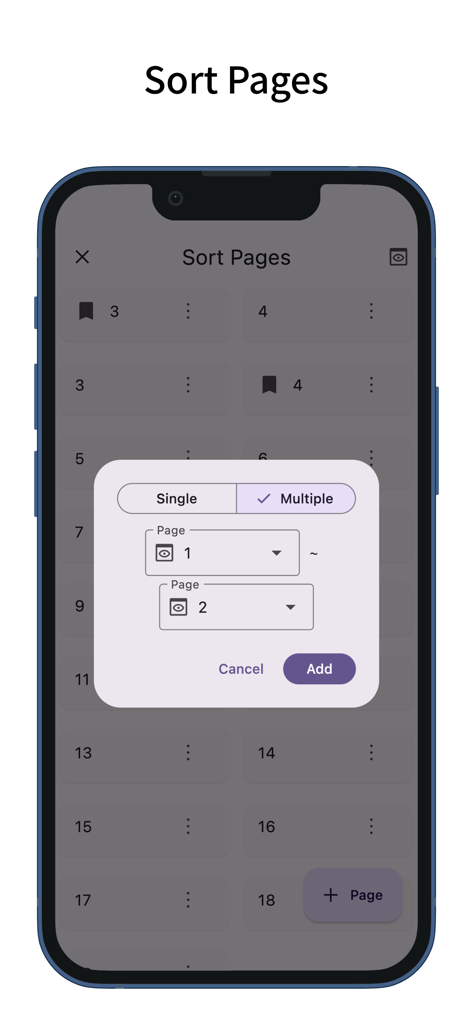
블루투스 풋 페달 또는 사용자 지정 제스처를 사용하여 연주에 집중하세요. 반복 및 코다를 쉽게 처리하기 위해 페이지를 재정렬하세요.

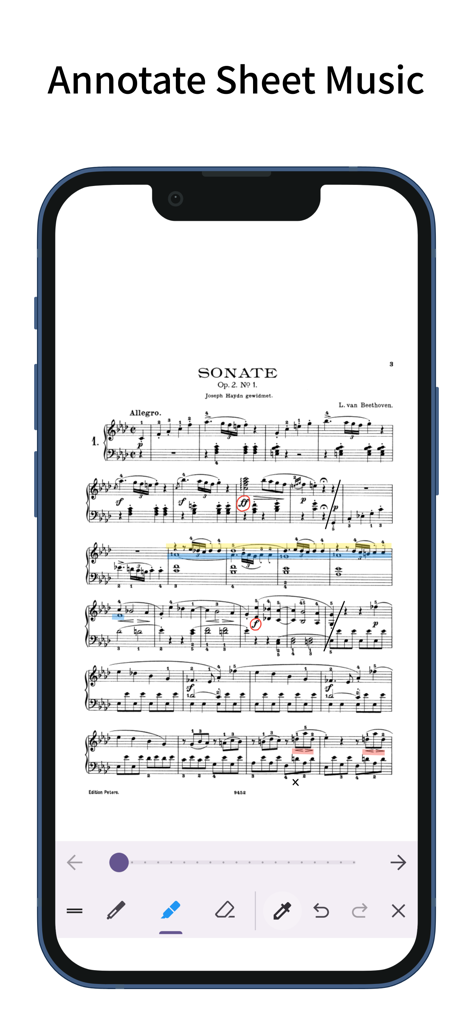
정확한 주석

사용자 지정 가능한 펜과 마커로 악보에 표시하세요. Apple Pencil을 사용하여 자연스러운 필기 메모와 쉬운 PDF 내보내기를 하세요.

다음 스크린샷과 설명은 앱의 공식 스토어 목록에서 직접 가져온 것이며 앱 개발자의 자산입니다.

앱 스토어

스크린샷
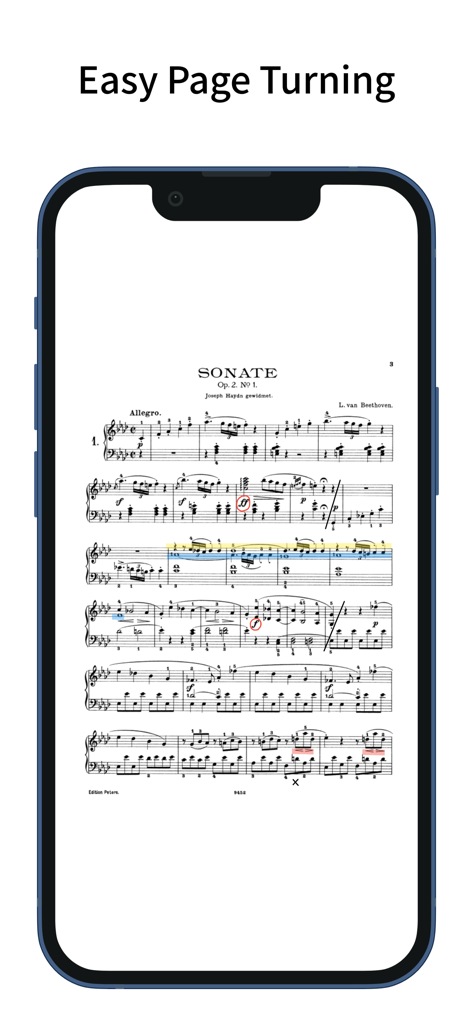
ScorePDF: Sheet Music Viewer - ScorePDF 앱이 iPhone 화면에 주석이 달린 베토벤 악보를 표시하고 있습니다.
ScorePDF 앱이 iPhone 화면에 주석이 달린 베토벤 악보를 표시하고 있습니다.

ScorePDF: Sheet Music Viewer - ScorePDF 악보 뷰어 앱에서 페이지를 정렬하고 재정렬하는 인터페이스
ScorePDF 악보 뷰어 앱에서 페이지를 정렬하고 재정렬하는 인터페이스

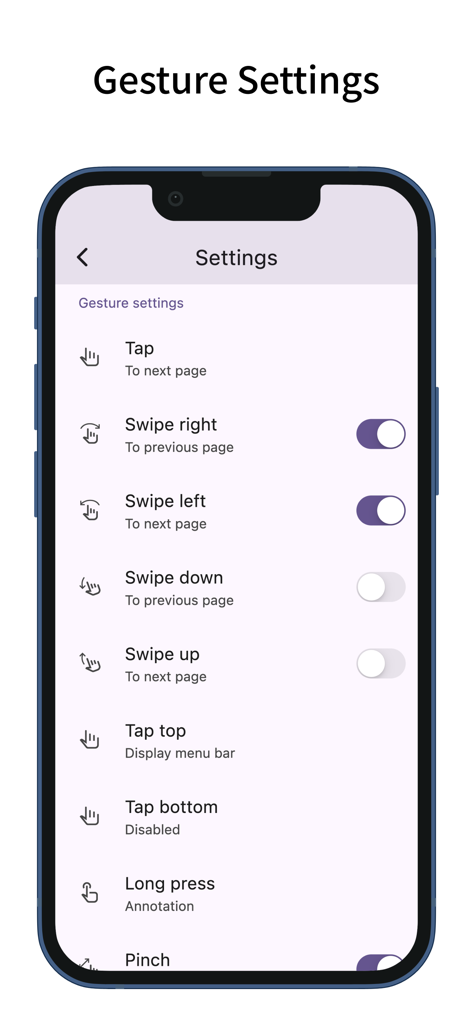
ScorePDF: Sheet Music Viewer - ScorePDF 앱의 제스처 설정 화면으로, 악보 넘김을 위한 탭 및 스와이프 사용자 지정 기능 표시
ScorePDF 앱의 제스처 설정 화면으로, 악보 넘김을 위한 탭 및 스와이프 사용자 지정 기능 표시

ScorePDF: Sheet Music Viewer - ScorePDF 앱과 주석이 달린 악보, 그리기 도구가 표시된 iPhone
ScorePDF 앱과 주석이 달린 악보, 그리기 도구가 표시된 iPhone

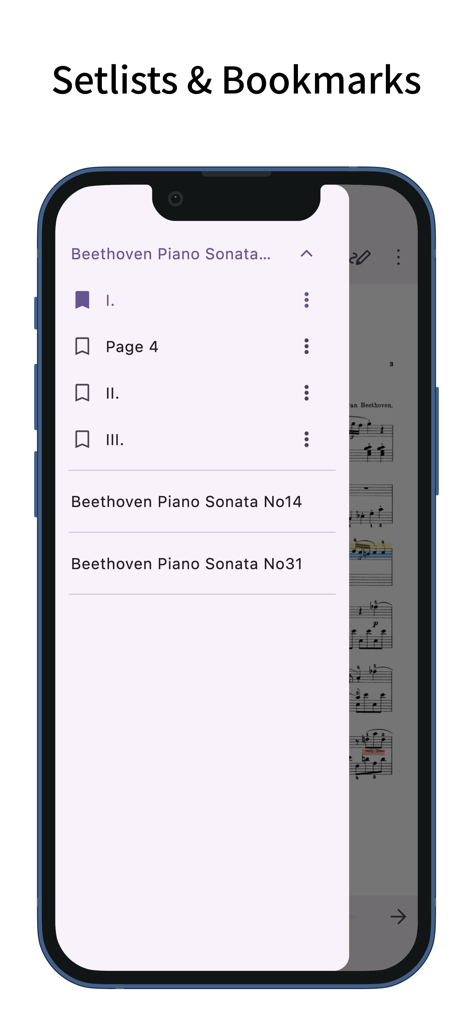
ScorePDF: Sheet Music Viewer - ScorePDF 앱 인터페이스가 베토벤 피아노 소나타의 셋리스트 및 북마크를 보여줍니다.
ScorePDF 앱 인터페이스가 베토벤 피아노 소나타의 셋리스트 및 북마크를 보여줍니다.

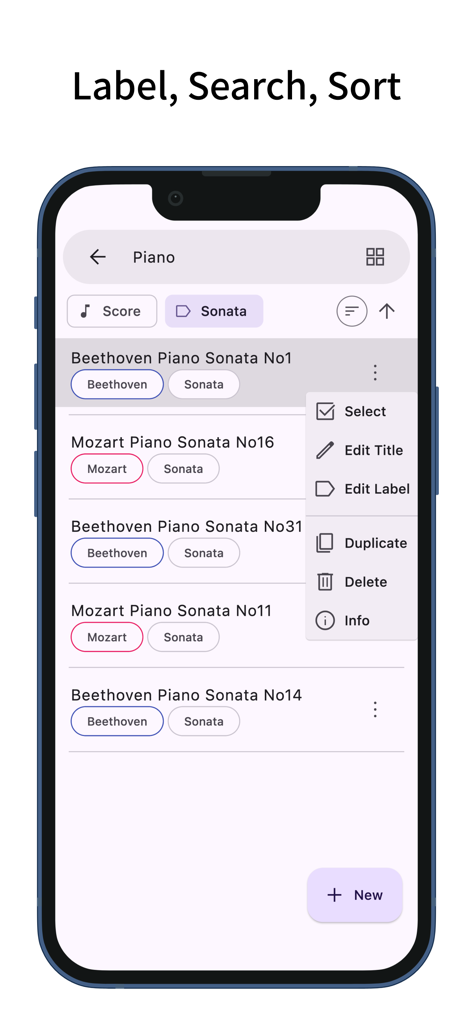
ScorePDF: Sheet Music Viewer - ScorePDF 앱 인터페이스가 피아노 악보를 위한 라벨 검색 및 정렬 옵션이 있는 악보 라이브러리를 보여줍니다.
ScorePDF 앱 인터페이스가 피아노 악보를 위한 라벨 검색 및 정렬 옵션이 있는 악보 라이브러리를 보여줍니다.

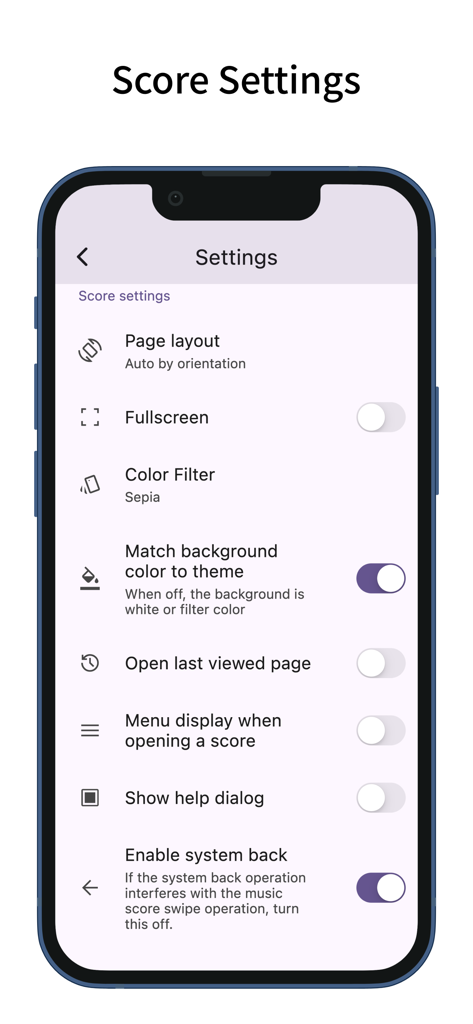
ScorePDF: Sheet Music Viewer - ScorePDF 앱 설정 화면으로 페이지 레이아웃 및 색상 필터를 포함한 악보 사용자 지정 기능 제공
ScorePDF 앱 설정 화면으로 페이지 레이아웃 및 색상 필터를 포함한 악보 사용자 지정 기능 제공

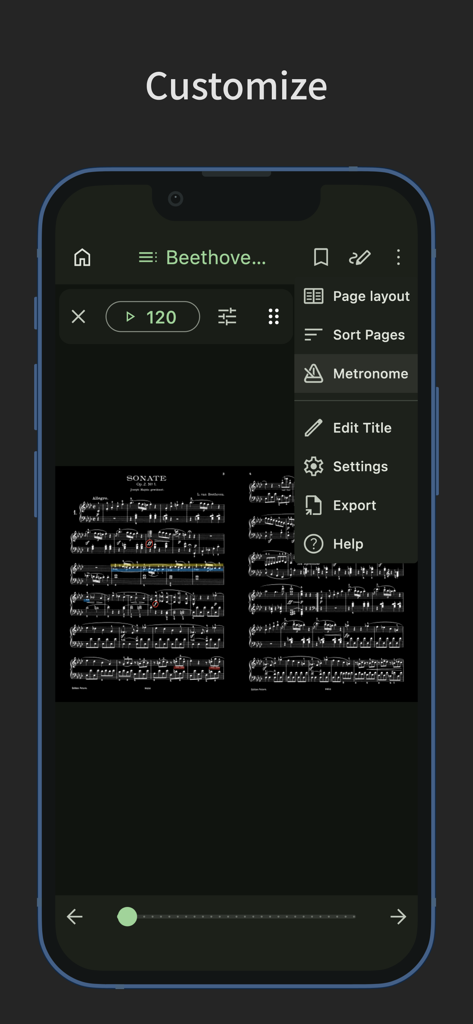
ScorePDF: Sheet Music Viewer - ScorePDF 사용자 지정 메뉴에 메트로놈 및 다크 모드 악보 표시 기능 표시

ScorePDF 사용자 지정 메뉴에 메트로놈 및 다크 모드 악보 표시 기능 표시

설명

A sheet music viewer app with easy page turning. Turn pages with taps and swipes. You can also reorder the pages of your sheet music. Easy Page Turning - You can turn pages with taps and swipes. - Supports Bluetooth page-turning foot pedals. - Tap assignments can be set to: previous page, left/right, top/bottom, next page, or disabled. - Swipe gestures can be toggled on or off individually for up, down, left, and right. - Actions other than page turning (such as displaying the menu or writing annotations) can be assigned to gestures that won’t interfere with page turning, such as long-pressing or tapping the top or bottom edges. - Zoom operations on the sheet music (pinch or double-tap) can also be toggled on or off. Page Reordering - Reordering the pages makes page turning easier during repeats, dal segno, codas, and similar situations. - When adding pages via reordering, you can add and drag multiple pages at once—not just one. - You can also delete pages or add blank pages. Annotations on Sheet Music - You can write handwritten annotations on your sheet music. - Two types of pens, markers, and an eraser are available, with undo and redo functions. - Pens and markers allow you to choose line thickness and color, and you can draw straight lines. - An eyedropper tool lets you pick up colors from the screen. - You can output a PDF that includes your annotations. Setlist - You can group multiple pieces of sheet music into a setlist for continuous viewing without reopening files. - Tapping the title in the menu bar displays the list of sheet music in the setlist; tapping one jumps to that piece. Bookmark - You can add bookmarks to specific pages of your sheet music. - Bookmarks can have custom titles. - Tapping the title in the menu bar displays a list of bookmarks; tapping one jumps to that page. Page Layout - You can choose from single-page, two-page (spread), fit width, fit height, half page (top/bottom), or half page (left/right) layouts for your sheet music. - The layout can automatically change based on the screen orientation. - When selecting fit width, the sheet music is displayed at full screen width, making it easier to view on small devices. Color Filter - You can apply a color filter to your sheet music, choosing from sepia, green, or inverted. - If you find the white of the sheet music too bright, this setting may improve readability. Adding Sheet Music - You can add sheet music in PDF format. - In the sheet music list screen, tapping the plus button at the bottom right lets you add PDF files from your device. (In the setlist screen, tapping the plus button opens the setlist addition screen.) - You can also add sheet music by sharing PDF files from other apps. - Multiple pieces of sheet music can be added at once. Managing Sheet Music - The label feature lets you add labels to sheet music or setlists, allowing you to filter by multiple labels. - Tapping the search bar lets you search for sheet music or setlists by title. - Sheet music and setlists can be sorted by title, creation date, or last viewed. Customization - Supports dark mode. - Allows you to change the theme color. - Features a simple design adhering to Material Design principles.

Download

다운로드: App Store

이 페이지는 앱이나 개발자의 공식 페이지가 아니며, 정보 제공 및 논평을 목적으로 작성된 독립 편집 간행물입니다. 명시적으로 달리 언급되지 않는 한, 해당 앱이나 개발자는 MWM, Apple, Google Play, 앱 퍼블리셔 또는 앱 개발자와 제휴, 보증, 후원, 승인 또는 공식적으로 연결되어 있지 않으며, 이 페이지의 어떤 내용도 해당 앱이 MWM의 서비스를 사용하여 개발되었음을 의미하지 않습니다. 모든 상표, 로고, 스크린샷 및 기타 콘텐츠는 해당 소유자의 자산입니다.







