
이 페이지는 앱이나 개발자의 공식 페이지가 아니며, 정보 제공 및 논평을 목적으로 작성된 독립 편집 간행물입니다. 명시적으로 달리 언급되지 않는 한, 해당 앱이나 개발자는 MWM, Apple, Google Play, 앱 퍼블리셔 또는 앱 개발자와 제휴, 보증, 후원, 승인 또는 공식적으로 연결되어 있지 않으며, 이 페이지의 어떤 내용도 해당 앱이 MWM의 서비스를 사용하여 개발되었음을 의미하지 않습니다. 모든 상표, 로고, 스크린샷 및 기타 콘텐츠는 해당 소유자의 자산입니다.


Security Bank App
이 앱은 당신의 금융 생활에 대한 통제권을 강화합니다. 복잡한 절차 없이, 직관적인 인터페이스로 당신의 돈이 어떻게 움직이는지 정확히 파악하게 해줍니다.
다운로드
750k+사용자 평점
총 평가 수
3.9K개발사
카테고리
Finance지원 언어
1최신 버전
1.43.0크기
95.4 MB출시일
2024년 8월 2일필리핀의 디지털 뱅킹 혁신을 위한 핵심 기능 평가
Security Bank 앱 심층 분석
송금 및 이체
이 앱은 사용자가 자신의 계정, 다른 Security Bank 계정 및 InstaPay를 통해 다른 은행으로 자금을 송금하거나 받을 수 있게 합니다. 또한, 반복 이체 및 송금 기능을 제공합니다.
계정 자동 동기화
이 도구는 사용자가 하나의 계정으로 등록하면 모든 Security Bank 계정, 신용카드, 투자, 저장된 청구처 및 즐겨찾기를 자동으로 연결합니다.
카드 제어
이 도구는 사용자가 일일 예산 알림을 설정하고 언제든지 신용카드를 잠금/해제할 수 있게 해줍니다.
신용카드 결제
이 앱은 사용자가 Security Bank 신용카드를 쉽고 편리하게 결제할 수 있게 해줍니다.
eSecure 저축 계좌 (eSS)
이 앱은 사용자가 최대 10개의 계좌를 개설하고 여행, 청구서, 비상 자금 등 특정 목표를 위해 저축할 수 있게 해줍니다.
간편한 청구서 결제
이 앱은 사용자가 청구서를 검색하고 확인하며, 반복 결제를 예약할 수 있도록 지원합니다.
eGiveCash (eGC)
이 앱은 사용자가 카드가 없어도 인출하거나 eGC 지원 ATM을 통해 사랑하는 사람에게 현금을 보낼 수 있도록 합니다.
빠른 잔액 조회
이 앱은 사용자가 로그인 없이도 안전하게 계정 잔액을 확인할 수 있도록 지원합니다.
인앱 알림 센터
이 앱은 사용자가 온라인 자금 이체 및 청구서 결제 거래 상태에 대한 인앱 알림을 수신하고 볼 수 있는 알림 센터를 제공합니다.
오프라인 소프트 토큰
이 앱은 사용자가 휴대전화가 오프라인 상태일 때도 웹 거래 및 로그인을 승인할 수 있게 해줍니다.
자주 묻는 질문
에 대해 알아야 할 모든 것 Security Bank App
Do I need to re-register for the new Security Bank app if I used the old app?
Yes, you need to register again for the new Security Bank app. Your old login credentials do not work. However, saved favorites and scheduled transactions automatically migrate to your new account.
Does the Security Bank app automatically link all my accounts?
Yes, the Security Bank app features auto-sync. Register with one account, and all other Security Bank accounts, credit cards, investments, saved billers, and favorites link automatically.
Can I view Joint "AND" accounts in the new Security Bank app?
No, Joint "AND" and Joint ITF accounts are not eligible for online enrollment and cannot be viewed in the new Security Bank app. Only Joint "OR" accounts are viewable by all account holders.
Can I enroll multiple mobile devices to the Security Bank app?
No, you can only enroll one mobile device to the Security Bank app at a time for security. This ensures only your designated device authorizes web logins and transactions.
Can I open a new account through the Security Bank app?
Yes, you can open a new account, including checking and savings accounts, directly through the Security Bank app. This eliminates the need to visit a physical branch.
How can I pay my Security Bank credit card in the app?
You can easily pay your Security Bank Credit Card directly within the app. The "Pay Credit Card" feature is available for convenient payments.
Can I convert my credit card limit to cash using the Security Bank app?
Yes, you can convert your available credit card limit into cash using the "Ready Cash" feature in the Security Bank app.
Does the Security Bank app offer installment options for credit card purchases?
Yes, the Security Bank app offers "ChargeLight" to convert big credit card purchases into lighter installments. This feature makes managing large transactions easier.
Can I scan and pay with QR codes using the Security Bank app?
Yes, you can scan and pay via QR Ph using the Security Bank app. This service is available at over 1 million merchants nationwide.
Does the Security Bank app support large fund transfers?
Yes, the Security Bank app supports large fund transfers up to PHP500,000 via PESONet. Gold Circle members and Wealth customers receive free transfer fees.
Can I check my account balance without logging into the Security Bank app?
Yes, the Security Bank app includes a Quick Balance feature. This allows you to check your accounts and balances safely without needing to log in.
Can the Security Bank app authorize web logins when my phone is offline?
Yes, the Security Bank app features an Offline Soft Token. This allows you to authorize your web transactions and logins even when your phone is offline.
Does the Security Bank app allow me to control my credit cards?
Yes, the Security Bank app features Card Control. You can set daily budget alerts and lock or unlock your credit cards anytime through the app.
How many eSecure Savings accounts can I open with the Security Bank app?
You can open up to 10 eSecure Savings (eSS) accounts using the Security Bank app. This feature helps you save for specific financial goals.
How can I contact customer support for the Security Bank app?
You can contact Security Bank customer support via the in-app Help Center, email at customercare@securitybank.com.ph, or through their 24-hour hotline (+632) 8887 9188.
다음 스크린샷과 설명은 앱의 공식 스토어 목록에서 직접 가져온 것이며 앱 개발자의 자산입니다.
앱 스토어
스크린샷

이 앱은 '계좌 개설' 버튼을 통해 신규 사용자가 간편하게 새 계좌를 시작할 수 있도록 하며, '환영 메시지'로 친근하게 안내합니다.
새 계좌 개설
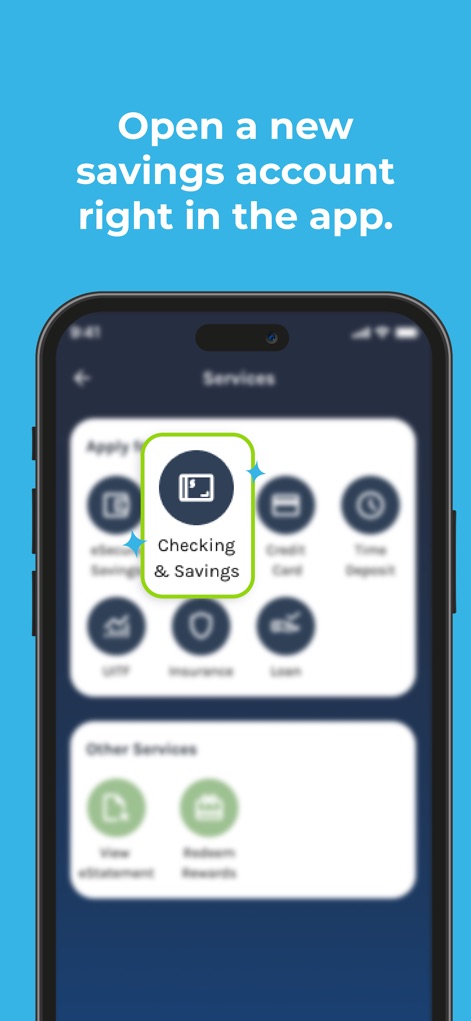
사용자는 '서비스' 메뉴에서 '체킹 및 저축' 아이콘을 선택하여 빠르게 새 저축 계좌를 개설할 수 있으며, 이로 인해 금융 관리가 더욱 편리해집니다.
저축 계좌 시작

이 앱은 '계좌 개설' 버튼을 명확히 제시하여 사용자가 지점을 방문할 필요 없이 새 계좌를 만들 수 있게 하며, '새로운 Security Bank 앱' 환영 문구가 표시됩니다.
비대면 계좌 개설
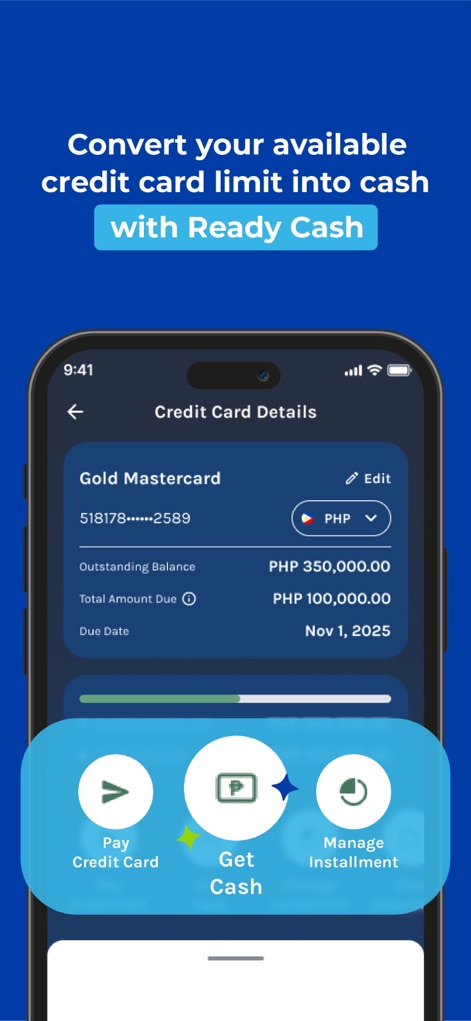
사용자는 '신용카드 세부 정보' 화면에서 '현금 받기' 옵션을 통해 신용카드 한도를 현금으로 전환할 수 있으며, '카드 관리' 기능도 함께 제공됩니다.
신용 한도 현금화
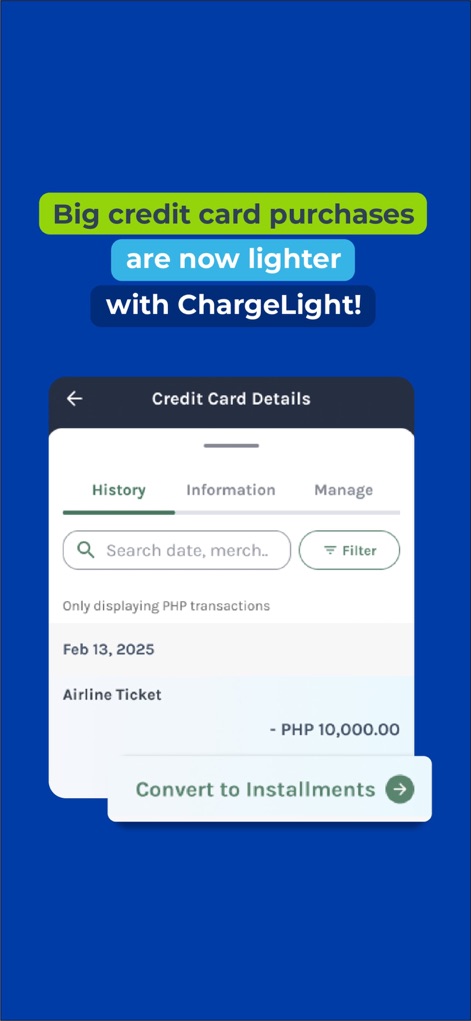
이 앱은 신용카드 '거래 내역'을 보여주며, 사용자는 '할부로 전환' 버튼을 클릭하여 큰 금액의 결제를 손쉽게 분할 납부할 수 있습니다.
큰 금액 할부 전환

사용자는 중앙에 표시된 'QR Ph 스캔' 기능을 활용하여 전국 백만 개 이상의 가맹점에서 간편하게 결제할 수 있으며, '수수료 없음' 표시로 혜택을 강조합니다.
간편 QR 결제
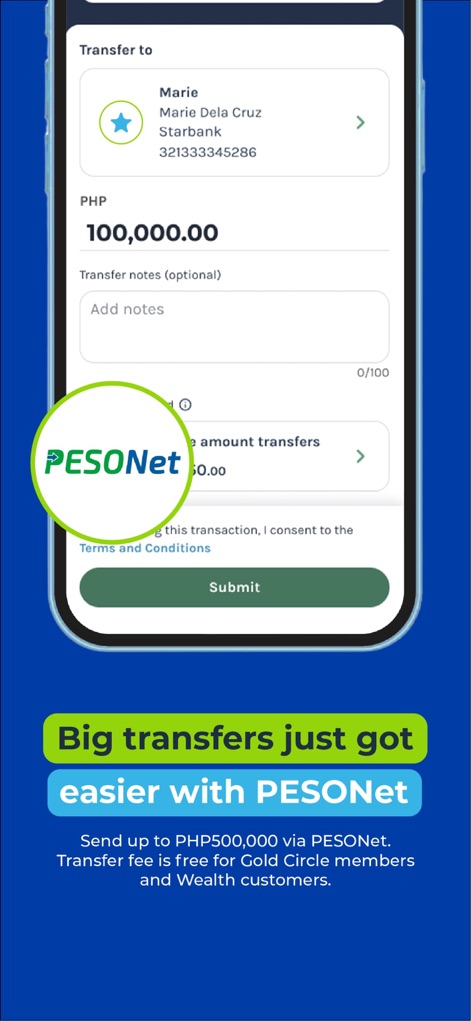
이 앱은 'PESONet'을 통해 사용자가 최대 PHP 500,000.00를 안전하고 쉽게 송금할 수 있도록 하며, '받는 사람 정보'를 명확하게 표시합니다.
PESONet 대규모 송금

'자동 동기화' 기능이 이 앱에 내장되어 있어, 사용자는 하나의 계좌만 등록하면 '체킹 및 저축 계좌'를 포함한 모든 Security Bank 계정을 자동으로 연결할 수 있습니다.
계좌 자동 연결

'청구서 납부' 화면은 '최근 청구 기관' 목록과 '저장된 청구 기관'을 제공하여 사용자가 쉽게 탐색하고 관리할 수 있도록 합니다.
직관적인 청구서 납부

이 앱은 '새 기기 로그인 감지' 알림을 통해 보안을 강화하며, 사용자는 '얼굴 인식' 또는 PIN을 사용하여 웹 로그인 및 거래를 안전하게 승인할 수 있습니다.
안전한 기기 인증
설명
Download
비슷한 앱
유사한 기능과 사용자 경험을 가진 앱

Enpara Bank Cep Şube
Enpara Bank Anonim Sirketi

Alinma App - تطبيق الإنماء
Alinma Bank

Huntington Mobile Banking
The Huntington National Bank, Inc

國泰世華網路銀行CUBE
Cathay United Bank

中國信託行動銀行
CTBC Bank Co., Ltd.

FNB Banking App
FirstRand Bank Limited

Riyad Bank App
Riyad Bank

CIMB OCTO MY
CIMB Bank Berhad

Regions Mobile
Regions Financial
이 페이지는 앱이나 개발자의 공식 페이지가 아니며, 정보 제공 및 논평을 목적으로 작성된 독립 편집 간행물입니다. 명시적으로 달리 언급되지 않는 한, 해당 앱이나 개발자는 MWM, Apple, Google Play, 앱 퍼블리셔 또는 앱 개발자와 제휴, 보증, 후원, 승인 또는 공식적으로 연결되어 있지 않으며, 이 페이지의 어떤 내용도 해당 앱이 MWM의 서비스를 사용하여 개발되었음을 의미하지 않습니다. 모든 상표, 로고, 스크린샷 및 기타 콘텐츠는 해당 소유자의 자산입니다.