모든 환경에서 팀의 생산성을 유지하도록 설계된 강력한 오프라인 기능, 직관적인 서비스 워크플로우, 즉각적인 데이터 액세스로 기술자의 역량을 강화하세요.
개발사
ServiceMax Inc
카테고리
Business
다운로드
36K+
사용자 평점
1.8/5
총 평가 수
0
지원 언어
25
효율성의 작동 방식
이 인터페이스를 사용하는 36K+ 명의 사용자.
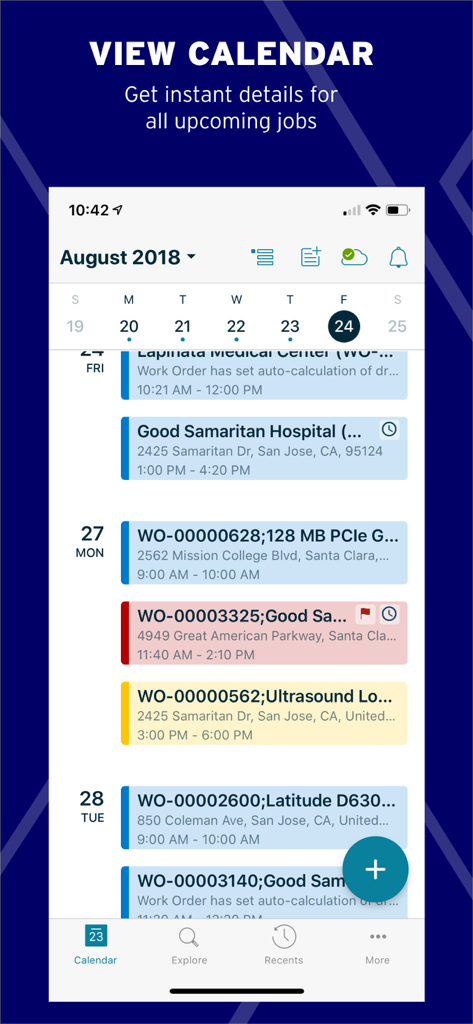
ServiceMax Go 모바일 앱에 예약된 현장 서비스 작업 주문의 캘린더 보기 표시
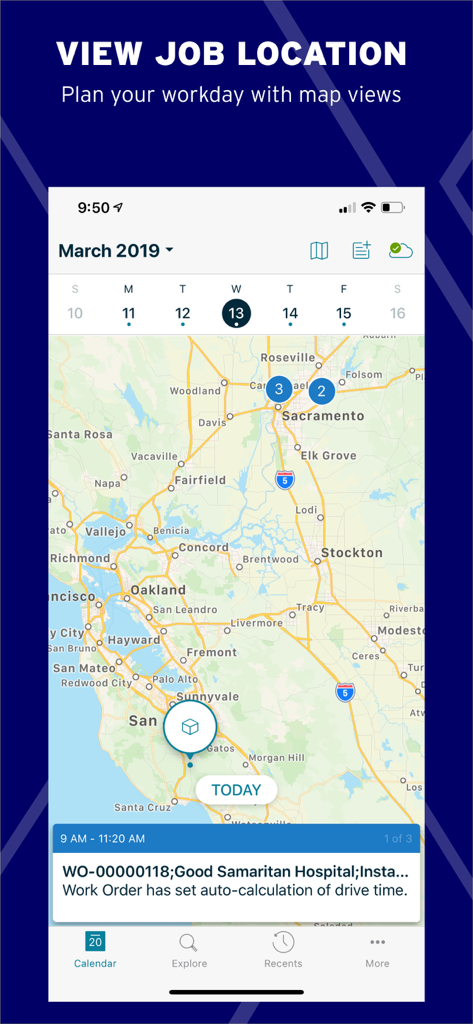
서비스 관리 현장 서비스에 대한 작업 주문 세부 정보와 함께 지도에 작업 위치를 보여주는 ServiceMax Go 모바일 인터페이스.
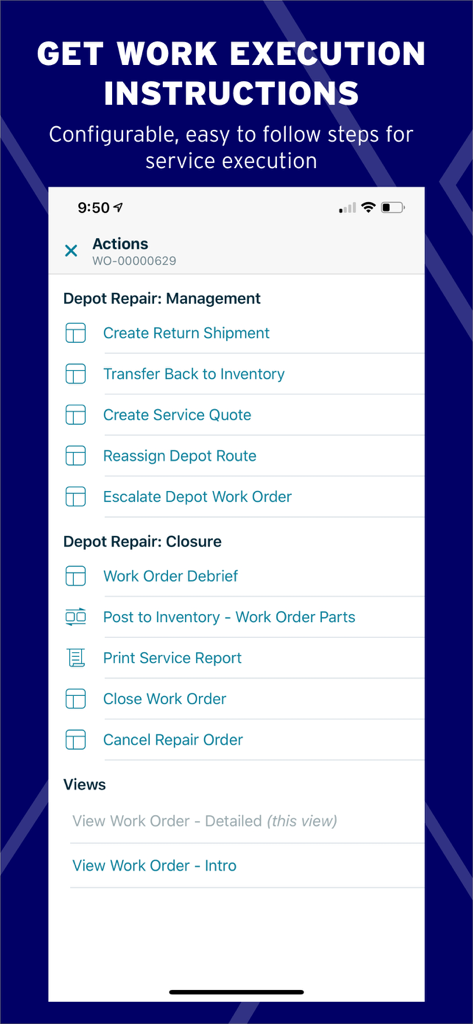
구성 가능한 작업 주문 작업 및 수리 관리 단계를 보여주는 ServiceMax Go 인터페이스
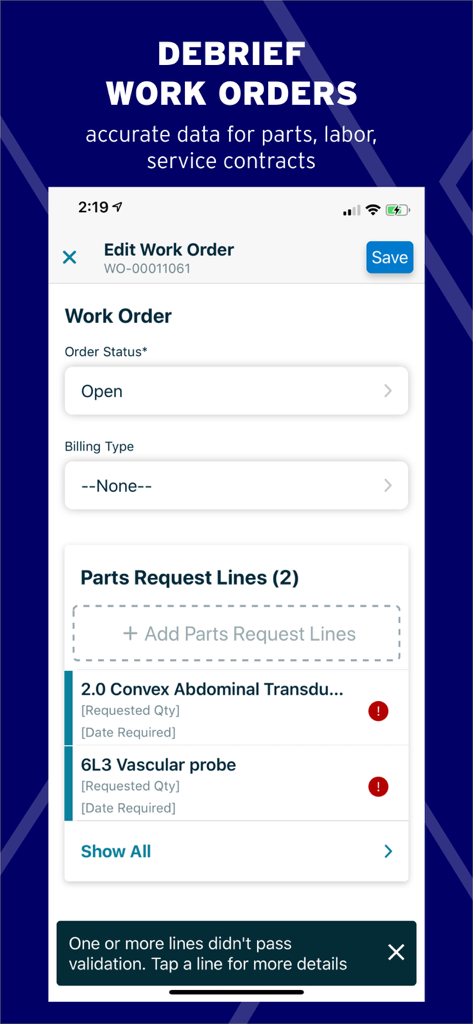
현장 서비스 작업 주문 편집 및 부품 요청 관리를 위한 ServiceMax Go 모바일 인터페이스
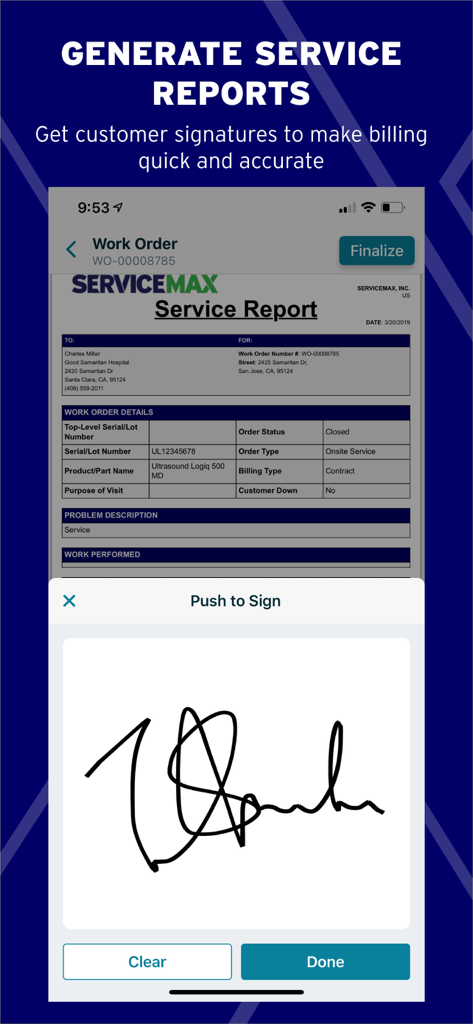
ServiceMax Go 앱에서 서비스 보고서에 대한 디지털 서명 캡처
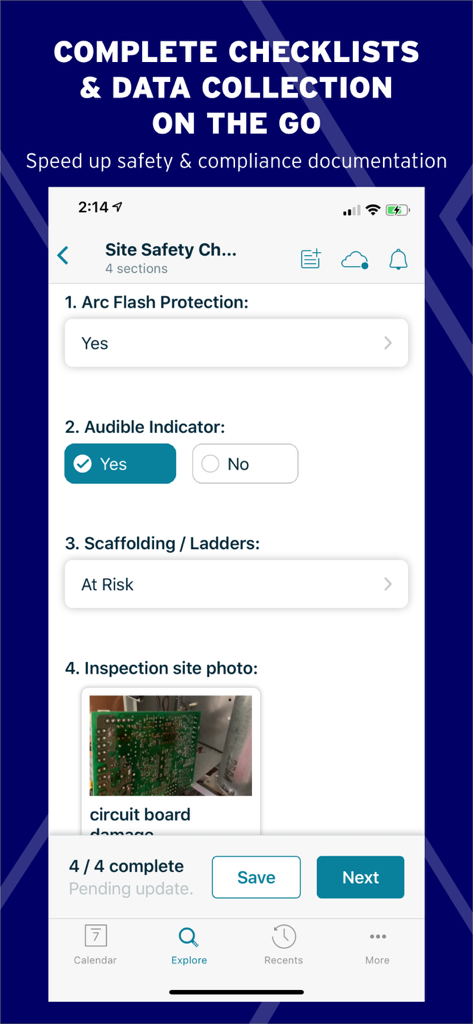
회로 기판 검사 사진과 함께 현장 안전 체크리스트를 보여주는 ServiceMax Go 앱의 모바일 인터페이스.
현대적인 현장 인력을 위해 구축됨
이 앱을 돋보이게 하는 도구, 36K+ 명의 사용자가 선택.
📶
안정적인 오프라인 성능
모든 환경에서 서비스 기록을 보고 데이터를 입력하세요. 당사의 고급 동기화 기능은 연결이 끊긴 영역에서 정보가 손실되지 않도록 합니다.
✅
스마트 서비스 실행
모든 현장에서 정확성과 안전성을 보장하기 위해 단계별 체크리스트와 자동화된 가격 책정으로 복잡한 수리를 간소화하세요.
📦
즉각적인 부품 가시성
왔다 갔다 하는 것을 멈추세요. 첫 번째 수리율을 높이기 위해 근처 트렁크 또는 현지 허브에서 중요한 부품을 검색하세요.
앱 소개
에 대해 알아야 할 모든 것 ServiceMax Go.
설명
Everything field teams need to plan, execute, and communicate about their work.
ServiceMax Go, available on smartphones and tablets, empowers technicians, field engineers, and maintenance personnel with everything they need to plan their work, execute it efficiently, and effectively communicate with customers and colleagues.
ServiceMax Go’s modern design is purpose-built for field workers with easy navigation, intuitive screens, and powerful offline capabilities—enabling complete visibility for maximum productivity.
Access Data, Online or Offline:
• Entitlement verifications
• Customer & product service history, location, contacts, estimates, warranties, parts, and more
• Industry-leading offline capabilities
• Flexible sync settings to control background and sync behavior, delivering fast, reliable app performance
• Advanced data and business rules validation during data entry ensures data integrity even if connectivity is not available
Interactive Calendar Views:
• Preview daily and weekly tasks
• Agenda calendar view
• Driving directions, travel times, appointment details, and more
Service Execution:
• Step-by-step instructions
• Service Flow Manager drives business process automation for technicians
• Templatized checklists with section navigation, progress status, and inline navigation for inspections, safety checks, diagnostics, and more
• Price list support for automated pricing validation on time and materials estimates
Smart Document Generation:
• Create service reports, invoices, etc. for customers to sign while on-site to expedite processing
• Signature capture support
Collaborate Freely:
• Instant access to documents, videos, and technician and expert collaboration
• Share photos and videos taken at the customer site, email service reports or contracts
• Seamlessly integrated with ServiceMax Zinc and ServiceMax Engage
Search:
• Locate parts and products in own or nearby technicians’ trunk stock, customer consignment, stocking hubs, spare parts, and more
• Search nearby for work orders, installed products, parts stock, and any other records
Intuitive, Modern UX:
• Intuitive, field-ready UI design enabling technicians to get work done with minimal clicks and taps
• Push and SMS notifications
• Allows for custom UI, extended navigation and functionality with Mobile Activity Space
최신 버전
13.1.0
크기
149.5 MB
출시일
2019년 3월 30일
현장 팀의 역량을 강화할 준비가 되셨나요?
종이 서류 작업을 없애고 복잡한 수리를 마스터하며 오프라인에서도 어디서든 생산성을 유지하기 위해 ServiceMax Go에 의존하는 수천 명의 현장 엔지니어에 동참하세요.
FAQ
자주 묻는 질문
에 대해 알아야 할 모든 것 ServiceMax Go
ServiceMax Go 사용자는 오프라인으로 데이터에 액세스할 수 있습니까?
예, ServiceMax Go는 업계 최고의 오프라인 기능을 제공하여 연결 없이도 보증 정보, 고객 기록 및 기타 중요 데이터에 액세스할 수 있습니다.
ServiceMax Go 기술자는 앱에서 어떤 종류의 정보를 볼 수 있습니까?
ServiceMax Go 기술자는 고객 및 제품 서비스 기록, 위치, 연락처, 견적, 보증 및 부품 정보를 앱 내에서 직접 볼 수 있습니다.
ServiceMax Go는 서비스 보고서 및 송장 생성을 지원합니까?
예, ServiceMax Go를 사용하면 현장에서 서비스 보고서 및 송장과 같은 스마트 문서를 생성할 수 있습니다. 또한 고객 승인을 위한 서명 캡처도 지원합니다.
ServiceMax Go는 현장 작업자가 일일 작업 관리를 하도록 어떻게 도와줍니까?
ServiceMax Go는 일일 및 주간 작업을 미리 볼 수 있는 대화형 캘린더 보기를 제공합니다. 또한 운전 경로, 이동 시간 및 약속 세부 정보를 제공하여 업무 일정을 정리합니다.
ServiceMax Go는 부품 및 제품을 찾는 데 도움이 됩니까?
예, ServiceMax Go를 사용하면 사용자는 자신의 차량이나 근처 기술자의 차량 재고, 고객 위탁, 재고 허브 및 예비 부품에서 부품 및 제품을 검색할 수 있습니다.
ServiceMax Go는 서비스 실행을 위한 안내 단계를 제공합니까?
예, ServiceMax Go는 검사, 안전 점검 및 진단을 위한 단계별 지침과 템플릿화된 체크리스트를 제공하여 서비스 실행 프로세스를 간소화합니다.
ServiceMax Go 앱에서 직접 고객 서명을 캡처할 수 있습니까?
예, ServiceMax Go는 서명 캡처를 지원하므로 고객은 기술자가 현장에 있는 동안 서비스 보고서 및 송장에 디지털 방식으로 서명할 수 있습니다.
ServiceMax Go는 오프라인 사용 중 데이터 무결성을 어떻게 보장합니까?
ServiceMax Go는 데이터 입력 중에 고급 데이터 및 비즈니스 규칙 유효성 검사를 포함합니다. 이를 통해 입력 시 연결을 사용할 수 없더라도 데이터 무결성을 보장합니다.
ServiceMax Go 사용자는 지도에서 작업 위치를 볼 수 있습니까?
예, ServiceMax Go를 사용하면 사용자가 작업 위치를 보여주는 지도 보기를 통해 업무 일정을 계획하고 기술자가 효율적으로 이동할 수 있도록 도울 수 있습니다.
ServiceMax Go는 사용자 정의 사용자 인터페이스 수정을 허용합니까?
예, ServiceMax Go는 Mobile Activity Space를 통해 사용자 정의 UI, 확장된 탐색 및 기능을 허용하여 맞춤형 사용자 경험을 가능하게 합니다.
App information, icons, screenshots, and descriptions displayed on this page are sourced from the Apple App Store and are the property of their respective developers. Download estimates and rankings are based on MWM's proprietary models and may not reflect actual figures. This page is provided for informational and analytical purposes only.
Believe this page infringes your intellectual property? File a dispute