Smart Watch Faces & Wallpaper
๋‹ค์šด๋กœ๋“œ: App Store

์ด ํŽ˜์ด์ง€๋Š” ์•ฑ์ด๋‚˜ ๊ฐœ๋ฐœ์ž์˜ ๊ณต์‹ ํŽ˜์ด์ง€๊ฐ€ ์•„๋‹ˆ๋ฉฐ, ์ •๋ณด ์ œ๊ณต ๋ฐ ๋…ผํ‰์„ ๋ชฉ์ ์œผ๋กœ ์ž‘์„ฑ๋œ ๋…๋ฆฝ ํŽธ์ง‘ ๊ฐ„ํ–‰๋ฌผ์ž…๋‹ˆ๋‹ค. ๋ช…์‹œ์ ์œผ๋กœ ๋‹ฌ๋ฆฌ ์–ธ๊ธ‰๋˜์ง€ ์•Š๋Š” ํ•œ, ํ•ด๋‹น ์•ฑ์ด๋‚˜ ๊ฐœ๋ฐœ์ž๋Š” MWM, Apple, Google Play, ์•ฑ ํผ๋ธ”๋ฆฌ์…” ๋˜๋Š” ์•ฑ ๊ฐœ๋ฐœ์ž์™€ ์ œํœด, ๋ณด์ฆ, ํ›„์›, ์Šน์ธ ๋˜๋Š” ๊ณต์‹์ ์œผ๋กœ ์—ฐ๊ฒฐ๋˜์–ด ์žˆ์ง€ ์•Š์œผ๋ฉฐ, ์ด ํŽ˜์ด์ง€์˜ ์–ด๋–ค ๋‚ด์šฉ๋„ ํ•ด๋‹น ์•ฑ์ด MWM์˜ ์„œ๋น„์Šค๋ฅผ ์‚ฌ์šฉํ•˜์—ฌ ๊ฐœ๋ฐœ๋˜์—ˆ์Œ์„ ์˜๋ฏธํ•˜์ง€ ์•Š์Šต๋‹ˆ๋‹ค. ๋ชจ๋“  ์ƒํ‘œ, ๋กœ๊ณ , ์Šคํฌ๋ฆฐ์ƒท ๋ฐ ๊ธฐํƒ€ ์ฝ˜ํ…์ธ ๋Š” ํ•ด๋‹น ์†Œ์œ ์ž์˜ ์ž์‚ฐ์ž…๋‹ˆ๋‹ค.

๋กœ๊ณ : Smart Watch Faces & Wallpaper
๋‹ค์šด๋กœ๋“œ: App Store

Smart Watch Faces & Wallpaper

33๊ฐ€์ง€ ์—„์„ ๋œ ์นดํ…Œ๊ณ ๋ฆฌ์—์„œ 3,000๊ฐœ ์ด์ƒ์˜ ๋ˆˆ๋ถ€์‹  ๋””์ž์ธ์„ ์ž ๊ธˆ ํ•ด์ œํ•˜์—ฌ ๋‹น์‹ ์˜ ์‹œ๊ณ„๋ฅผ ์˜์ƒ๊ณผ ๋ถ„์œ„๊ธฐ์— ๋งž์ถ”์„ธ์š”. ๋งค์ผ ์—…๋ฐ์ดํŠธ๋˜๋Š” ๊ด‘๊ณ  ์—†๋Š” ์ตœ๊ณ ์˜ ๋””์ง€ํ„ธ ์ž๊ธฐ ํ‘œํ˜„์„ ๊ฒฝํ—˜ํ•˜์„ธ์š”.

์ฃผ์š” ์ˆ˜์น˜

๋‹ค์šด๋กœ๋“œ

307K+

์‚ฌ์šฉ์ž ํ‰์ 

4.6/5

์ด ํ‰๊ฐ€ ์ˆ˜

1K+

๊ฐœ๋ฐœ์‚ฌ

Uladzislau Yanushka

์นดํ…Œ๊ณ ๋ฆฌ

Lifestyle

์ง€์› ์–ธ์–ด

29

์ตœ์‹  ๋ฒ„์ „

1.3

ํฌ๊ธฐ

48.6 MB

์ถœ์‹œ์ผ

2020๋…„ 5์›” 12์ผ
๊ธฐ๋Šฅ

๋‹น์‹ ์˜ ์‹œ๊ณ„, ๋‹น์‹ ์˜ ๋ถ„์œ„๊ธฐ

3,000๊ฐœ ์ด์ƒ์˜ ๋…์  ๋””์ž์ธ๊ณผ ๋งค์ผ ์—…๋ฐ์ดํŠธ๋˜๋Š” ์นดํ…Œ๊ณ ๋ฆฌ๋กœ ๋‹น์‹ ์˜ Apple Watch๋ฅผ ๋‹น์‹ ๋งŒ์˜ ๊ฐ๊ฐ์— ๋งž๋Š” ๊ฐœ์ธ ๋งž์ถค ํŒจ์…˜ ์•„์ดํ…œ์œผ๋กœ ๋ณ€์‹ ์‹œํ‚ค์„ธ์š”.

3,000๊ฐœ ์ด์ƒ์˜ ๊ฐ๊ฐ์ ์ธ ๋””์ž์ธ

๋ฏธ๋‹ˆ๋ฉ€๋ฆฌ์ŠคํŠธ๋ถ€ํ„ฐ ๋ณดํ—ค๋ฏธ์•ˆ๊นŒ์ง€ 33๊ฐ€์ง€ ์—„์„ ๋œ ์นดํ…Œ๊ณ ๋ฆฌ๋ฅผ ํƒ์ƒ‰ํ•˜๋ฉฐ ๋‹น์‹ ์˜ ์‹œ๊ณ„๊ฐ€ ํ•ญ์ƒ ์˜์ƒ๊ณผ ๊ธฐ๋ถ„์— ๋งž๋„๋ก ํ•˜์„ธ์š”.

๋งค์ผ ์ƒˆ๋กœ์šด ์—…๋ฐ์ดํŠธ

๋งค์ผ ์ถ”๊ฐ€๋˜๋Š” ํŠธ๋ Œ๋””ํ•œ ์›Œ์น˜ ํŽ˜์ด์Šค๋กœ ๊ธฐ๋ณธ ๋ฃฉ์— ๋งŒ์กฑํ•˜์ง€ ๋งˆ์„ธ์š”. ๋‹น์‹ ์˜ ์†๋ชฉ ๊ฒŒ์ž„์„ ๊ฐ•ํ•˜๊ฒŒ ์œ ์ง€ํ•˜์„ธ์š”.

๋‹ค์Œ ์Šคํฌ๋ฆฐ์ƒท๊ณผ ์„ค๋ช…์€ ์•ฑ์˜ ๊ณต์‹ ์Šคํ† ์–ด ๋ชฉ๋ก์—์„œ ์ง์ ‘ ๊ฐ€์ ธ์˜จ ๊ฒƒ์ด๋ฉฐ ์•ฑ ๊ฐœ๋ฐœ์ž์˜ ์ž์‚ฐ์ž…๋‹ˆ๋‹ค.

์•ฑ ์Šคํ† ์–ด

์Šคํฌ๋ฆฐ์ƒท

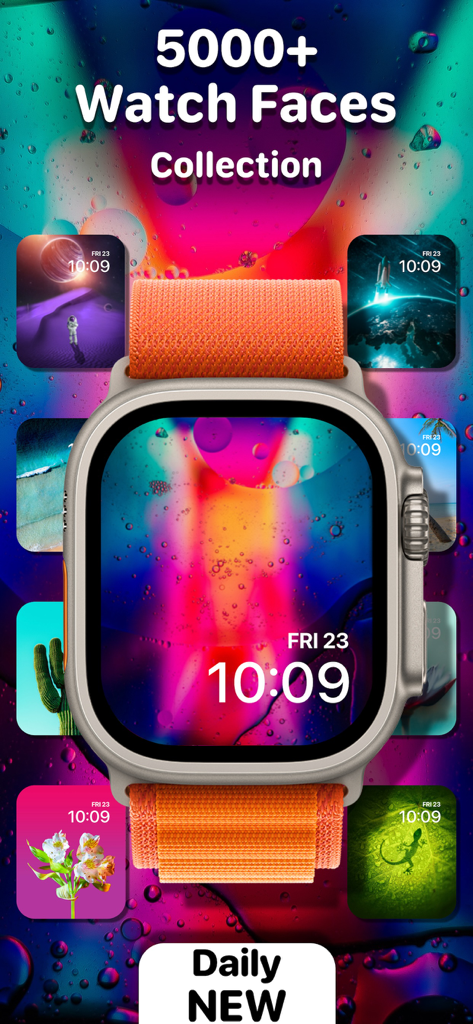
Smart Watch Faces & Wallpaper - ๋‹ค์–‘ํ•œ ํ…Œ๋งˆ์˜ ๋‹ค์ฑ„๋กญ๊ณ  ๊ฐ๊ฐ์ ์ธ Apple Watch ํŽ˜์ด์Šค ๊ฐค๋Ÿฌ๋ฆฌ

๋‹ค์–‘ํ•œ ํ…Œ๋งˆ์˜ ๋‹ค์ฑ„๋กญ๊ณ  ๊ฐ๊ฐ์ ์ธ Apple Watch ํŽ˜์ด์Šค ๊ฐค๋Ÿฌ๋ฆฌ

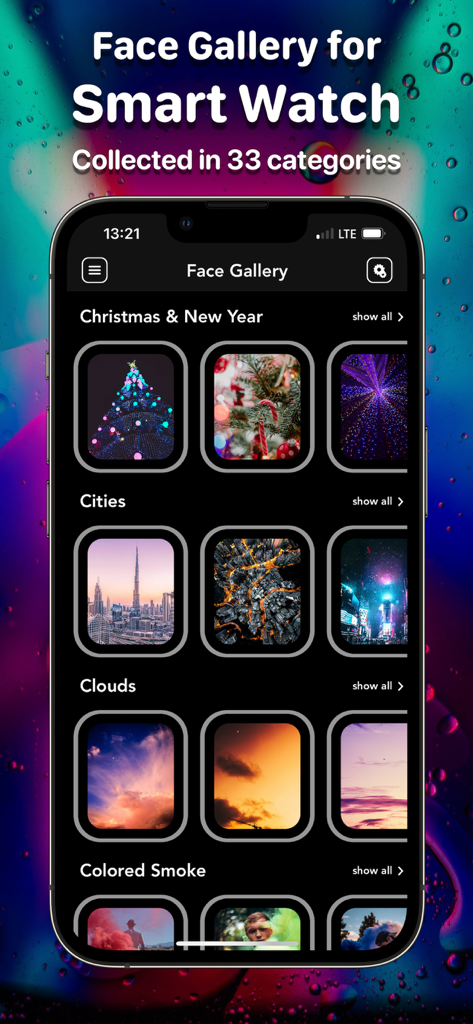
Smart Watch Faces & Wallpaper - iPhone ํ™”๋ฉด์— ํ‘œ์‹œ๋œ ๊ฐ๊ฐ์ ์ธ ์Šค๋งˆํŠธ ์›Œ์น˜ ํŽ˜์ด์Šค ์นดํ…Œ๊ณ ๋ฆฌ ๊ฐค๋Ÿฌ๋ฆฌ

iPhone ํ™”๋ฉด์— ํ‘œ์‹œ๋œ ๊ฐ๊ฐ์ ์ธ ์Šค๋งˆํŠธ ์›Œ์น˜ ํŽ˜์ด์Šค ์นดํ…Œ๊ณ ๋ฆฌ ๊ฐค๋Ÿฌ๋ฆฌ

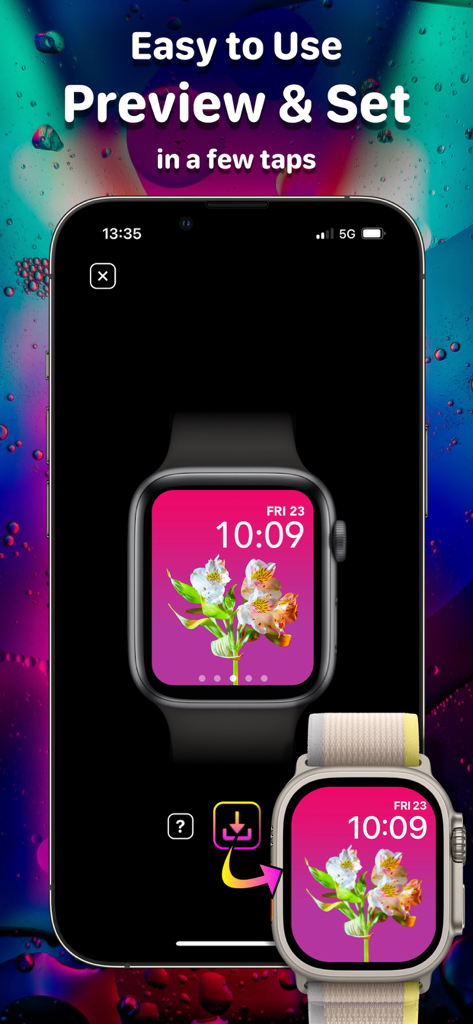
Smart Watch Faces & Wallpaper - ๊ฝƒ๋ฌด๋Šฌ ์›Œ์น˜ ํŽ˜์ด์Šค ๋ฏธ๋ฆฌ๋ณด๊ธฐ์™€ Apple Watch ์„ค์ • ๋ฐฉ๋ฒ•์„ ๋ณด์—ฌ์ฃผ๋Š” ๋ชจ๋ฐ”์ผ ์•ฑ ์ธํ„ฐํŽ˜์ด์Šค

๊ฝƒ๋ฌด๋Šฌ ์›Œ์น˜ ํŽ˜์ด์Šค ๋ฏธ๋ฆฌ๋ณด๊ธฐ์™€ Apple Watch ์„ค์ • ๋ฐฉ๋ฒ•์„ ๋ณด์—ฌ์ฃผ๋Š” ๋ชจ๋ฐ”์ผ ์•ฑ ์ธํ„ฐํŽ˜์ด์Šค

์„ค๋ช…

Dive into the app and enjoy the absolutely new collection of incredibly beautiful and colorful Watch Faces for Smart Watch for every taste, color and mood. Make your watch unique! Discover the unique Face Gallery of aesthetic Watch Faces grouped into 33 different categories, such as: Animals, Nature, etc. How to Use: โ€“ Make sure that your Smart Watch is paired with the device on which this app is installed. If not, please pair them; โ€“ Make sure that your device on which this app is installed is connected to Wi-Fi or mobile Internet for the correct app work; โ€“ Select the Watch Face you like and save it by clicking on the โ€œSaveโ€ button; โ€“ Allow access to your โ€œPhotosโ€ to save Watch Faces there; โ€“ Open your โ€œPhotosโ€ and click on the saved Watch Face; โ€“ Click the โ€œShareโ€ button and select the โ€œCreate Watch Faceโ€ option; โ€“ Then, select the โ€œPhotos Watch Faceโ€ option; โ€“ Then, click the โ€œAddโ€ button; โ€“ Enjoy your new Watch Face and surprise your friends and family! Unclear? Do not worry! You can find more detailed guide with pictures inside the app, which will help you to easily install a new Watch Face on your watch. App Content and Features: โ€“ 33 categories of Watch Faces for every taste, color and mood; โ€“ 3000+ Watch Faces with daily updates; โ€“ 5 Free Watch Faces in each category (165 Watch Faces for Free); โ€“ Convenient Watch Face preview - you can see how the selected Watch Face will look on watch before saving it; โ€“ No ads! Premium Subscription Info: With a premium subscription, you get full, unlimited access to all the content and features offered by Watch Faces App. The app contains the following auto-renewable subscription: โ€“ Weekly ($0,99) with a 3-days for free period * Subscription price may vary depending on your location. * Payment will be charged to iTunes Account at confirmation of purchase; * Subscription automatically renews unless auto-renew is turned off at least 24-hours before the end of the current period; * Account will be charged for renewal within 24-hours prior to the end of the current period, and identify the cost of the renewal; * Subscriptions may be managed by the user and auto-renewal may be turned off by going to the user's Account; * Any unused portion of a free trial period, if offered, will be forfeited when the user purchases a subscription to that publication, where applicable. Privacy Policy: https://sites.google.com/view/watch-faces-privacy/ Terms of Use: https://sites.google.com/view/watch-faces-terms/ Requested Access: Photos โ€“ access to save Watch Faces in your Photos to set them on your Smart Watch.

Download

๋‹ค์šด๋กœ๋“œ: App Store

์ด ํŽ˜์ด์ง€๋Š” ์•ฑ์ด๋‚˜ ๊ฐœ๋ฐœ์ž์˜ ๊ณต์‹ ํŽ˜์ด์ง€๊ฐ€ ์•„๋‹ˆ๋ฉฐ, ์ •๋ณด ์ œ๊ณต ๋ฐ ๋…ผํ‰์„ ๋ชฉ์ ์œผ๋กœ ์ž‘์„ฑ๋œ ๋…๋ฆฝ ํŽธ์ง‘ ๊ฐ„ํ–‰๋ฌผ์ž…๋‹ˆ๋‹ค. ๋ช…์‹œ์ ์œผ๋กœ ๋‹ฌ๋ฆฌ ์–ธ๊ธ‰๋˜์ง€ ์•Š๋Š” ํ•œ, ํ•ด๋‹น ์•ฑ์ด๋‚˜ ๊ฐœ๋ฐœ์ž๋Š” MWM, Apple, Google Play, ์•ฑ ํผ๋ธ”๋ฆฌ์…” ๋˜๋Š” ์•ฑ ๊ฐœ๋ฐœ์ž์™€ ์ œํœด, ๋ณด์ฆ, ํ›„์›, ์Šน์ธ ๋˜๋Š” ๊ณต์‹์ ์œผ๋กœ ์—ฐ๊ฒฐ๋˜์–ด ์žˆ์ง€ ์•Š์œผ๋ฉฐ, ์ด ํŽ˜์ด์ง€์˜ ์–ด๋–ค ๋‚ด์šฉ๋„ ํ•ด๋‹น ์•ฑ์ด MWM์˜ ์„œ๋น„์Šค๋ฅผ ์‚ฌ์šฉํ•˜์—ฌ ๊ฐœ๋ฐœ๋˜์—ˆ์Œ์„ ์˜๋ฏธํ•˜์ง€ ์•Š์Šต๋‹ˆ๋‹ค. ๋ชจ๋“  ์ƒํ‘œ, ๋กœ๊ณ , ์Šคํฌ๋ฆฐ์ƒท ๋ฐ ๊ธฐํƒ€ ์ฝ˜ํ…์ธ ๋Š” ํ•ด๋‹น ์†Œ์œ ์ž์˜ ์ž์‚ฐ์ž…๋‹ˆ๋‹ค.