이 페이지는 앱이나 개발자의 공식 페이지가 아니며, 정보 제공 및 논평을 목적으로 작성된 독립 편집 간행물입니다. 명시적으로 달리 언급되지 않는 한, 해당 앱이나 개발자는 MWM, Apple, Google Play, 앱 퍼블리셔 또는 앱 개발자와 제휴, 보증, 후원, 승인 또는 공식적으로 연결되어 있지 않으며, 이 페이지의 어떤 내용도 해당 앱이 MWM의 서비스를 사용하여 개발되었음을 의미하지 않습니다. 모든 상표, 로고, 스크린샷 및 기타 콘텐츠는 해당 소유자의 자산입니다.
Speaker Polarity
업계 최고의 DSP 분석으로 완벽한 음향 정렬을 달성하세요. 홈 시어터, 차량 오디오 및 전문 시스템의 극성을 즉시 확인하여 사운드가 절대 위상이 어긋나지 않도록 하세요.
고급 DSP 분석을 활용하여 모든 스피커 콘이 완벽하게 동기화되어 움직이도록 하여 손실된 저음과 선명도를 복원합니다.
범용 애플리케이션
DIY 차량 오디오 프로젝트부터 복잡한 홈 시어터 및 전문 스튜디오까지, 모든 배선 단자를 쉽게 확인할 수 있습니다.
다음 스크린샷과 설명은 앱의 공식 스토어 목록에서 직접 가져온 것이며 앱 개발자의 자산입니다.
앱 스토어
스크린샷
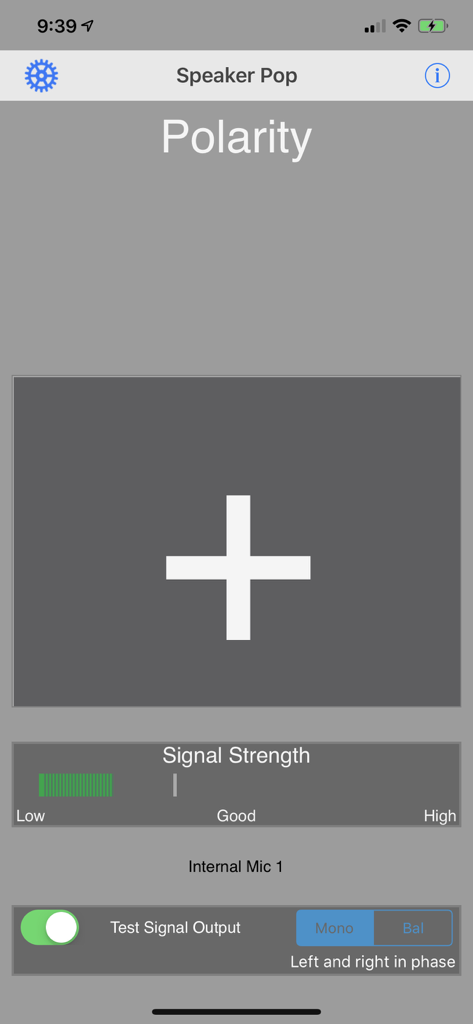
스피커 극성 앱 인터페이스에 신호 강도 측정기와 함께 올바른 스피커 위상을 나타내는 큰 더하기 기호가 표시됩니다.
설명
This app is a speaker polarity tester. Find out if your speakers are wired correctly (in phase or out of phase). Test your surround speakers, stereo speakers, PA speakers, in fact any speaker with wiring terminals on the back.
This speaker polarity tester was designed by the same people who built the Audio Toolbox, and the polarity tester in that unit was known as the most accurate and reliable polarity tester available. Now that technology is available in your iPhone.
Use this app to test your home speakers, recording studio monitors, home theater systems, car audio systems, or as part of your professional contractor work. Speakers wired backwards are the most common error in sound system setup, cause big problems, and are easily corrected. This app will give you the answers, no matter how difficult the wiring may be to trace.
Speaker Pop works by watching for a proprietary "pop" sound from the speaker, and doing DSP analysis of the sound to determine if the speaker cone is moving in the correct direction.
For iOS devices with headset jacks, as long as you use a standard 1/8" stereo plug, you can use any normal 1/8" to RCA adapter to get the signal into your system. You can also to record the "pop" test signal to a CD, DVD, or another iPod, and play this signal through your speakers.
We also support both Bluetooth and AirPlay streaming of the test signal to any device which supports one of these protocols.
If you are working on a home theater system, download our Apple TV app "Surround Generator". This app includes the Speaker Polarity signal, and can route the signal directly to any 5.1 or Atmos 9.6.1 speaker.
Speaker Polarity works with iAudioInterface and iTestMic2.
There is automatic adaptive technology to support any speaker type, Woofer, Midrange, or Tweeter, so you will get reliable readings.
Once you have the test signal coming out of the speaker, position your phone near the speaker (we suggest you flip it over to point the internal mic directly at the speaker -- the display will flip). In a few seconds you will get the reading on the screen, either a Plus or a Minus. Plus indicates correct speaker polarity, Minus means you need to swap the wires coming into the speaker.
We also have stereo and surround test signals available for download from our web site which are ready for burning to USB stick, CD, or DVD. See our web site or for more information.
See our other audio apps: AudioTools, our premier audio and acoustics test and analysis app, SPL, the professional grade sound level meter for the iPhone, SPL Graph, for recording SPL over time, RTA, a 1/3 octave real time analyzer, FFT, for detailed acoustic analysis, ETC, the Energy Time Curve app, RT60, for automated octave-band decay time analysis, and Generator, the iPhone signal generator. Watch for more coming soon.
이 페이지는 앱이나 개발자의 공식 페이지가 아니며, 정보 제공 및 논평을 목적으로 작성된 독립 편집 간행물입니다. 명시적으로 달리 언급되지 않는 한, 해당 앱이나 개발자는 MWM, Apple, Google Play, 앱 퍼블리셔 또는 앱 개발자와 제휴, 보증, 후원, 승인 또는 공식적으로 연결되어 있지 않으며, 이 페이지의 어떤 내용도 해당 앱이 MWM의 서비스를 사용하여 개발되었음을 의미하지 않습니다. 모든 상표, 로고, 스크린샷 및 기타 콘텐츠는 해당 소유자의 자산입니다.