sqsl RSVP
sqsl RSVP
다운로드: App Store

이 페이지는 앱이나 개발자의 공식 페이지가 아니며, 정보 제공 및 논평을 목적으로 작성된 독립 편집 간행물입니다. 명시적으로 달리 언급되지 않는 한, 해당 앱이나 개발자는 MWM, Apple, Google Play, 앱 퍼블리셔 또는 앱 개발자와 제휴, 보증, 후원, 승인 또는 공식적으로 연결되어 있지 않으며, 이 페이지의 어떤 내용도 해당 앱이 MWM의 서비스를 사용하여 개발되었음을 의미하지 않습니다. 모든 상표, 로고, 스크린샷 및 기타 콘텐츠는 해당 소유자의 자산입니다.


로고: sqsl RSVP
다운로드: App Store

sqsl RSVP

DAW 그리드에서 벗어나세요. 소닉 탐험가와 모듈러 애호가를 위해 설계된 독립형 샘플러로 폴더의 오디오를 진화하는 퍼포먼스로 변환하세요.

주요 수치

다운로드

500

사용자 평점

1.0/5

총 평가 수

0

개발사

Michal Macura

카테고리

Music

지원 언어

1

최신 버전

1.33

크기

3.5 MB

출시일

2024년 3월 4일
기능

진화하는 사운드스케이프 조각하기

sqsl RSVP는 생성적 시퀀싱 및 촉각 퍼포먼스를 통해 샘플 라이브러리를 살아 숨 쉬는 악기로 변환합니다.

확률적 재생

밀도 및 역방향 확률 제어를 통해 4개의 슬롯을 제어하여 작곡이 유기적이고 예측 불가능하며 반복적인 루프에서 벗어나도록 하세요.

촉각 공간 잼

근접 기반 터치 인터페이스를 통해 15개의 방향이 있는 점을 탐색하여 표현적인 물리적 제스처로 볼륨, 팬 및 속도를 조작하세요.

다음 스크린샷과 설명은 앱의 공식 스토어 목록에서 직접 가져온 것이며 앱 개발자의 자산입니다.

앱 스토어

스크린샷
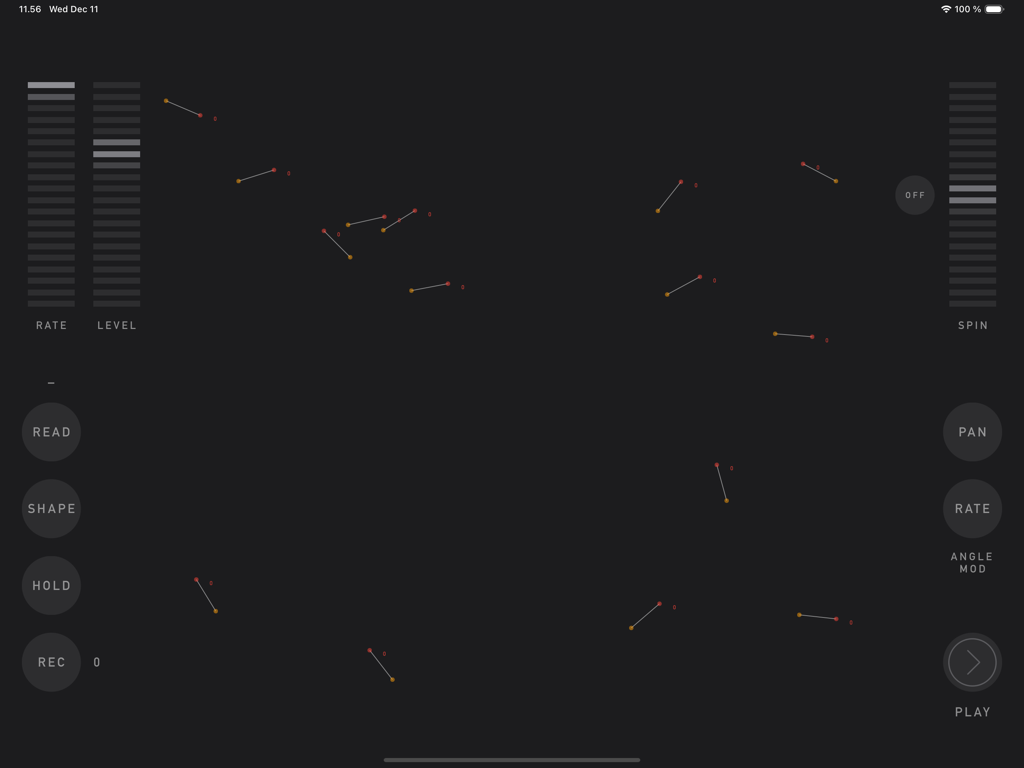
sqsl RSVP - sqsl RSVP 앱의 JAM 페이지 인터페이스. 생성적 사운드 디자인을 위한 대화형 점과 슬라이더를 보여줍니다.
sqsl RSVP 앱의 JAM 페이지 인터페이스. 생성적 사운드 디자인을 위한 대화형 점과 슬라이더를 보여줍니다.

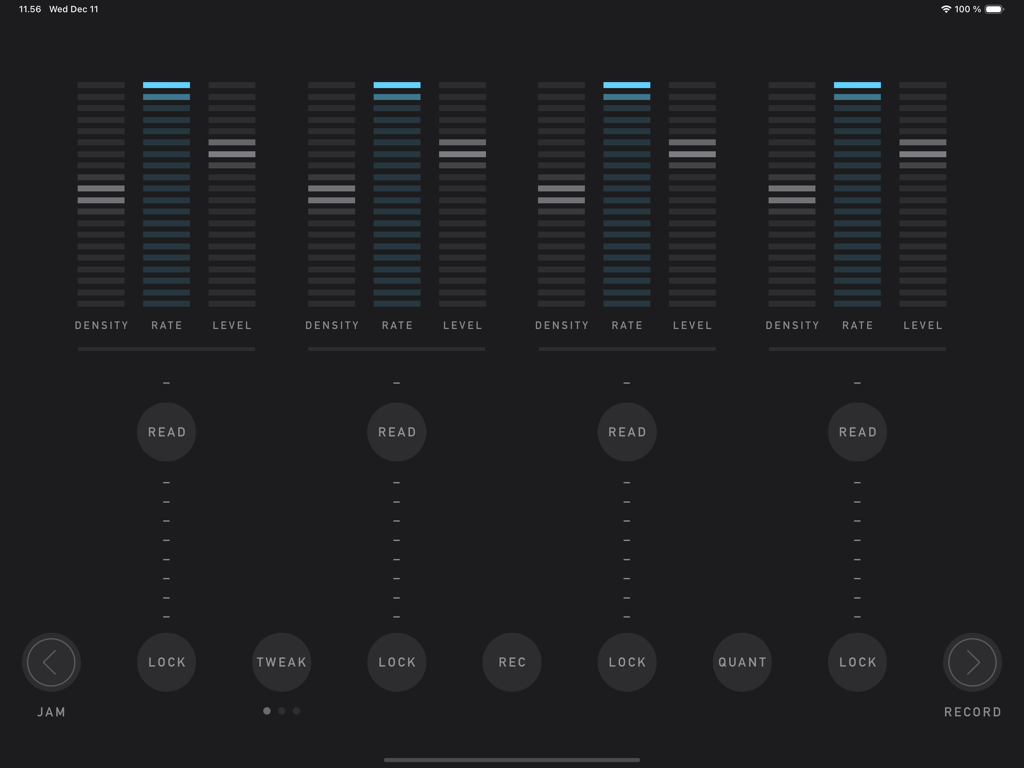
sqsl RSVP - sqsl RSVP 앱의 인터페이스. 4개의 수직 오디오 슬롯과 밀도, 속도, 레벨 제어가 있는 PLAY 페이지를 보여줍니다.
sqsl RSVP 앱의 인터페이스. 4개의 수직 오디오 슬롯과 밀도, 속도, 레벨 제어가 있는 PLAY 페이지를 보여줍니다.

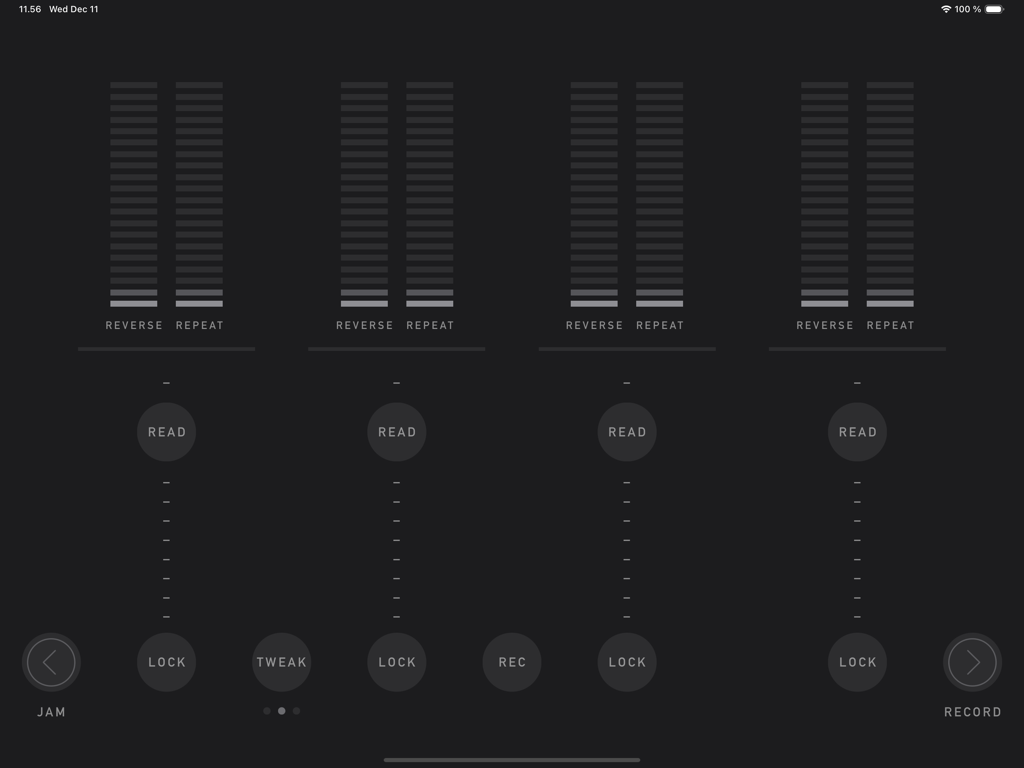
sqsl RSVP - sqsl RSVP의 플레이 인터페이스. 미니멀리스트 다크 테마에서 역방향 및 반복 확률 제어가 있는 4개의 샘플 슬롯을 보여줍니다.
sqsl RSVP의 플레이 인터페이스. 미니멀리스트 다크 테마에서 역방향 및 반복 확률 제어가 있는 4개의 샘플 슬롯을 보여줍니다.

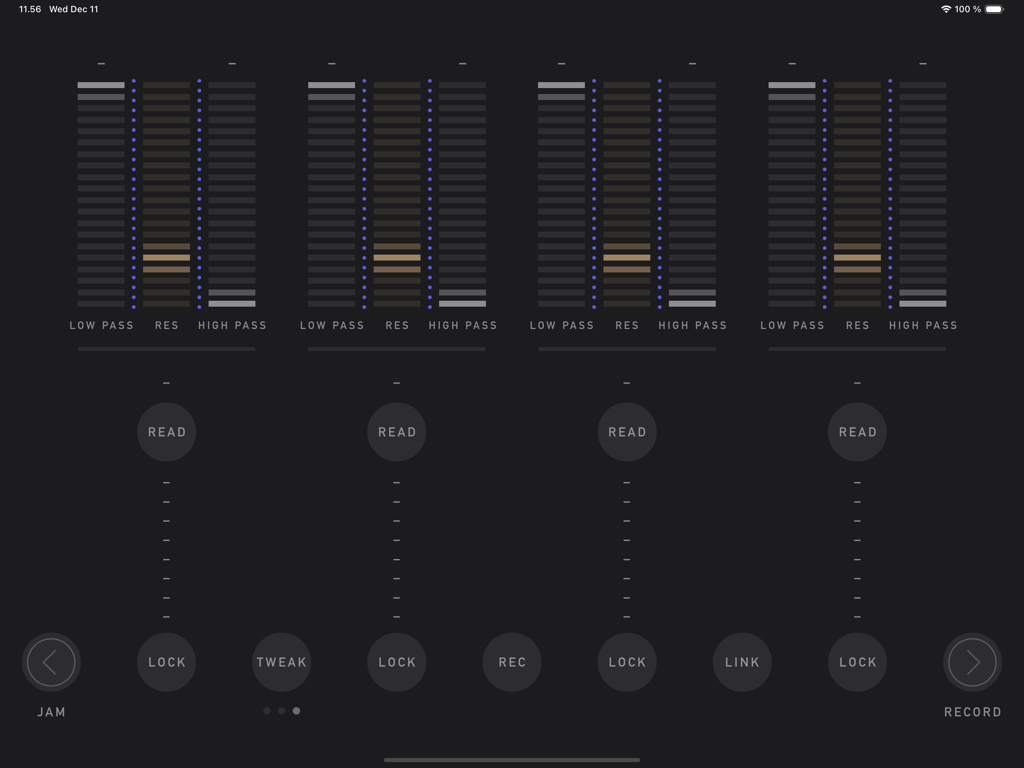
sqsl RSVP - sqsl RSVP 앱의 인터페이스. 4개의 오디오 슬롯에 대한 필터 슬라이더 및 조정 가능한 매개변수를 보여줍니다.
sqsl RSVP 앱의 인터페이스. 4개의 오디오 슬롯에 대한 필터 슬라이더 및 조정 가능한 매개변수를 보여줍니다.

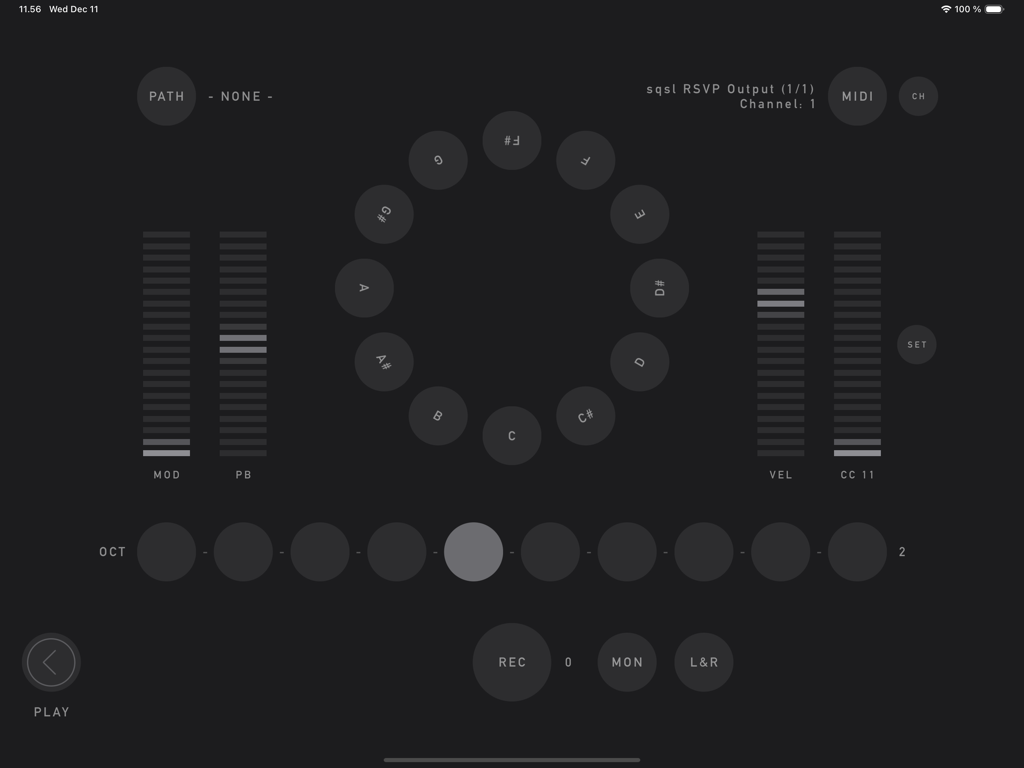
sqsl RSVP - sqsl RSVP 앱의 RECORD 페이지. 순환 MIDI 노트 선택기와 변조 및 피치 벤드용 슬라이더가 특징입니다.

sqsl RSVP 앱의 RECORD 페이지. 순환 MIDI 노트 선택기와 변조 및 피치 벤드용 슬라이더가 특징입니다.

설명

sqsl RSVP is a random sample player and recorder. There are 3 pages: PLAY, RECORD and JAM. PLAY There are 4 slots, each can have a separate directory assigned - assign directory using READ button. Slots have 3 sets of parameters, sets can be accessed using TWEAK button. Tweakable parameters are: - DENSITY – number of samples played at the same time (max 8 per slot); - RATE – playback speed, smooth (2 octaves range) or quantized to semitones (1 octave range) if QUANT is enabled; - LEVEL – slot’s volume (individual samples have their volume and pan slightly randomized); - REVERSE – probability that sample will be played backwards; - REPEAT – probability that sample will be played immediately again; - LOW PASS – LP filter frequency; - HIGH PASS – HP filter frequency; - RES – resonance for both filters. If sample is selected to be played, its name appears in the slot’s column. Its name appears brighter if it is currently played and if it is played backwards, its name is shown backwards. If sample has played, it will not play again until all other unused samples in its slot/directory have been played. Horizontal line above READ button displays amount of played/not-yet-played samples. The process restarts when all the samples in the selected directory have been used. If new directory is selected, it will not play until all samples from current directory are used unless FWD button is pressed (FWD button is visible only if new directory is queued) - in that case, samples from original directory that are already scheduled will still be played before samples from new directory are queued. Audio output can be recorded to WAV file (REC button) - it is necessary to select recording path beforehand on RECORD page (PATH). If audio interface with 8+ outputs is detected, playback of each slot can be sent to separate audio output (MULTI). Assignment is: output 1|2 for 1st slot, 3|4 for 2nd, 5|6 for 3rd and 7|8 for 4th. RECORD RECORD page provides a way to record acoustic samples or sounds from MIDI controlled synths. Recorded material is added to playback queue automatically if the recording directory is also assigned to one of playback slots. Recording directory is selected using PATH button. Names of the newly recorded samples will be derived from target directory name (directory name + index).  Incoming audio can be sent to outputs 1-2 for monitoring (MON). L+R button activates stereo mode - stereo (vs mono) samples will be recorded using signal from input channels 1-2.  Integrated "MIDI controller" can be used to send MIDI notes, mod-wheel, pitch bend and one CC messages to selected MIDI destination. MIDI button cycles through available destination (destinations are scanned on start-up), CH button sets MIDI channel. JAM JAM page is a touch interface proximity sample player. There are 15 oriented dots on screen. Each dot has a looping sample assigned. When screen is touched, distance and angle are detected and used as playback parameters. Distance controls volume; angle can be assigned to control PAN and/or playback speed (RATE). Shortest distance takes priority if multiple touches are present. To assign samples to locations, select directory containing audio files - READ button (samples are assigned randomly and are set to loop in the background indefinitely). SHAPE controls the way dots are placed on screen (random by default). Use HOLD button to lock current touch points in place. Dots can be set to rotate using SPIN control. Audio output of JAM section can be recorded to WAV file by pressing REC button - before that, it is necessary to select recording path (folder where the file will be saved) on RECORD page (PATH button). Newly recorded material is added to playback pool/queue automatically if the recording directory is also assigned to one of the playback slots. — sqsl RSVP is a standalone application (it can not be used as plugin and its output can not be routed to other apps within software environment).

Download

다운로드: App Store

이 페이지는 앱이나 개발자의 공식 페이지가 아니며, 정보 제공 및 논평을 목적으로 작성된 독립 편집 간행물입니다. 명시적으로 달리 언급되지 않는 한, 해당 앱이나 개발자는 MWM, Apple, Google Play, 앱 퍼블리셔 또는 앱 개발자와 제휴, 보증, 후원, 승인 또는 공식적으로 연결되어 있지 않으며, 이 페이지의 어떤 내용도 해당 앱이 MWM의 서비스를 사용하여 개발되었음을 의미하지 않습니다. 모든 상표, 로고, 스크린샷 및 기타 콘텐츠는 해당 소유자의 자산입니다.