Stagehand: PRO DJ LINK Manager
다운로드: App Store

이 페이지는 앱이나 개발자의 공식 페이지가 아니며, 정보 제공 및 논평을 목적으로 작성된 독립 편집 간행물입니다. 명시적으로 달리 언급되지 않는 한, 해당 앱이나 개발자는 MWM, Apple, Google Play, 앱 퍼블리셔 또는 앱 개발자와 제휴, 보증, 후원, 승인 또는 공식적으로 연결되어 있지 않으며, 이 페이지의 어떤 내용도 해당 앱이 MWM의 서비스를 사용하여 개발되었음을 의미하지 않습니다. 모든 상표, 로고, 스크린샷 및 기타 콘텐츠는 해당 소유자의 자산입니다.

로고: Stagehand: PRO DJ LINK Manager
다운로드: App Store

Stagehand: PRO DJ LINK Manager

CDJ-3000 및 DJM-A9 설정을 위한 원격 하드웨어 제어, 실시간 상태 모니터링 및 정밀한 조명 동기화로 프로덕션 워크플로우를 간소화하세요.

주요 수치

다운로드

1K+

사용자 평점

1.0/5

총 평가 수

0

개발사

AlphaTheta Corporation

카테고리

Entertainment

지원 언어

12

최신 버전

1.0.4

크기

8.9 MB

출시일

2023년 4월 17일
기능

무대 뒤를 어디서든 완벽하게 제어

FOH 엔지니어 및 프로덕션 팀이 PRO DJ LINK를 통해 Pioneer DJ 하드웨어를 원격으로 관리, 모니터링 및 동기화할 수 있는 업계 최초의 iPad 솔루션입니다.

원격 사운드 체크 효율성

댄스 플로어에서 트랙을 트리거하고, 유틸리티 설정을 관리하며, 음향을 테스트하세요. 2인 1조 규칙을 없애고 설정 시간을 절반으로 줄이세요.

실시간 상태 모니터링

마스터 레벨 및 장치 상태를 모니터링하면서 부스에서 전문적인 거리를 유지하세요. 세트가 망가지기 전에 레벨이 과도하게 올라가는 문제나 기술적인 문제를 발견하세요.

다음 스크린샷과 설명은 앱의 공식 스토어 목록에서 직접 가져온 것이며 앱 개발자의 자산입니다.

앱 스토어

스크린샷
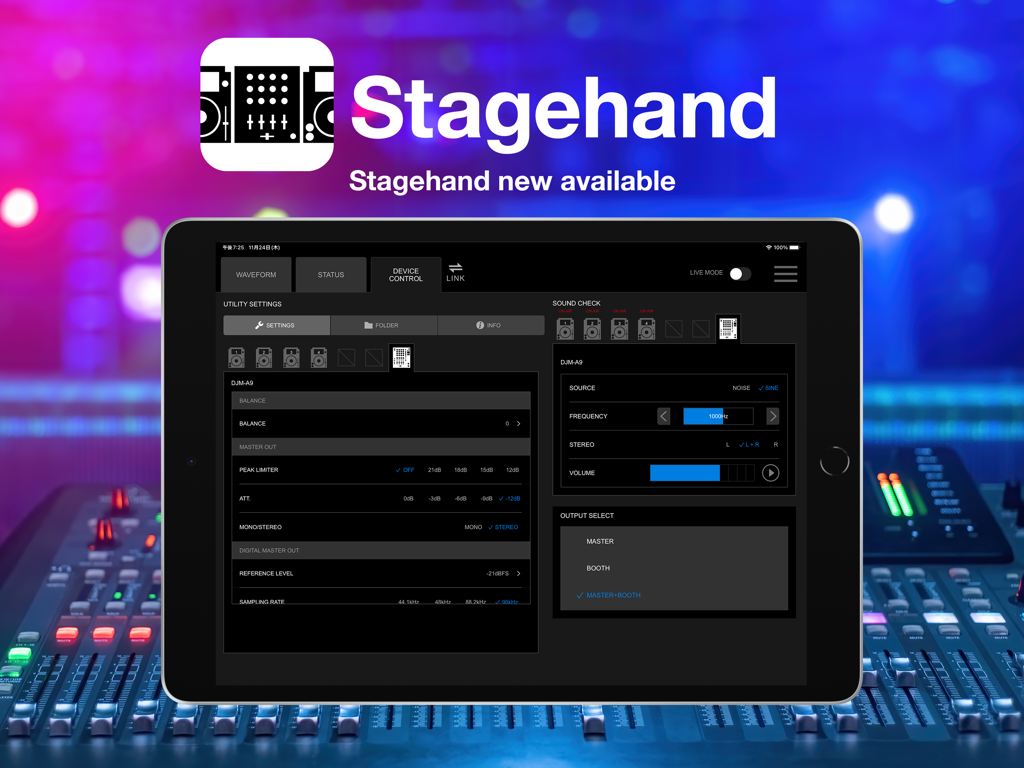
Stagehand: PRO DJ LINK Manager - 원격 DJ 장비 제어를 위한 Stagehand PRO DJ LINK Manager 인터페이스를 표시하는 iPad
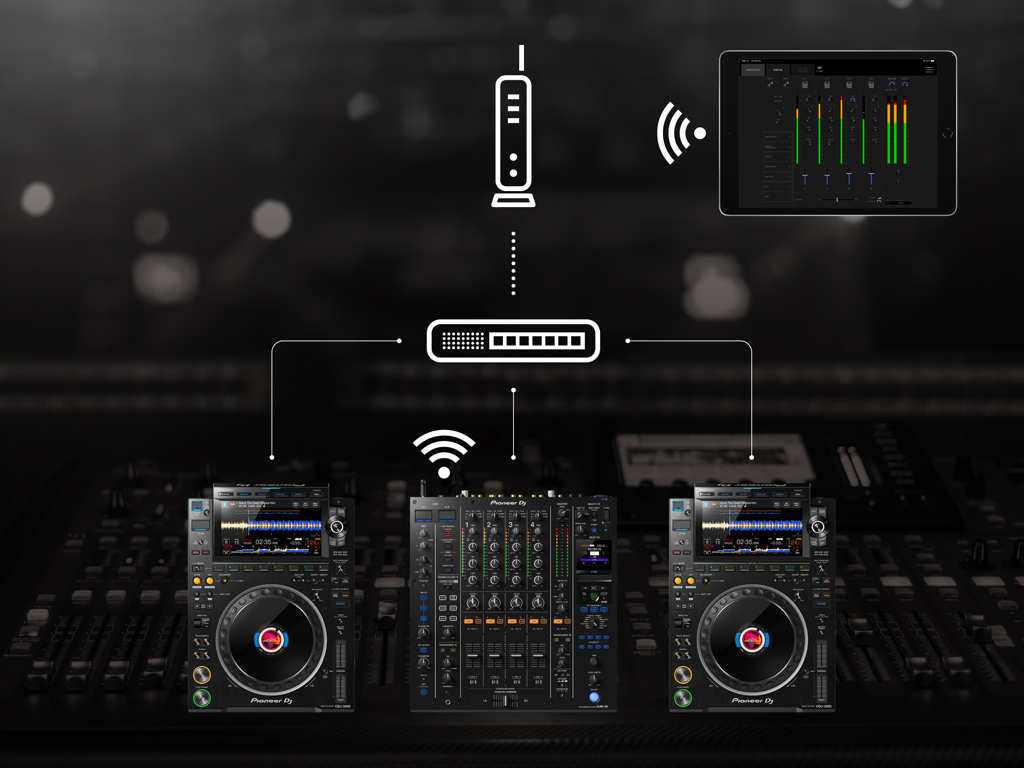
원격 DJ 장비 제어를 위한 Stagehand PRO DJ LINK Manager 인터페이스를 표시하는 iPad

Stagehand: PRO DJ LINK Manager - 네트워크를 통해 Pioneer DJ 믹서 및 멀티 플레이어를 무선으로 모니터링하고 제어하기 위해 Stagehand 앱을 사용하는 iPad
네트워크를 통해 Pioneer DJ 믹서 및 멀티 플레이어를 무선으로 모니터링하고 제어하기 위해 Stagehand 앱을 사용하는 iPad

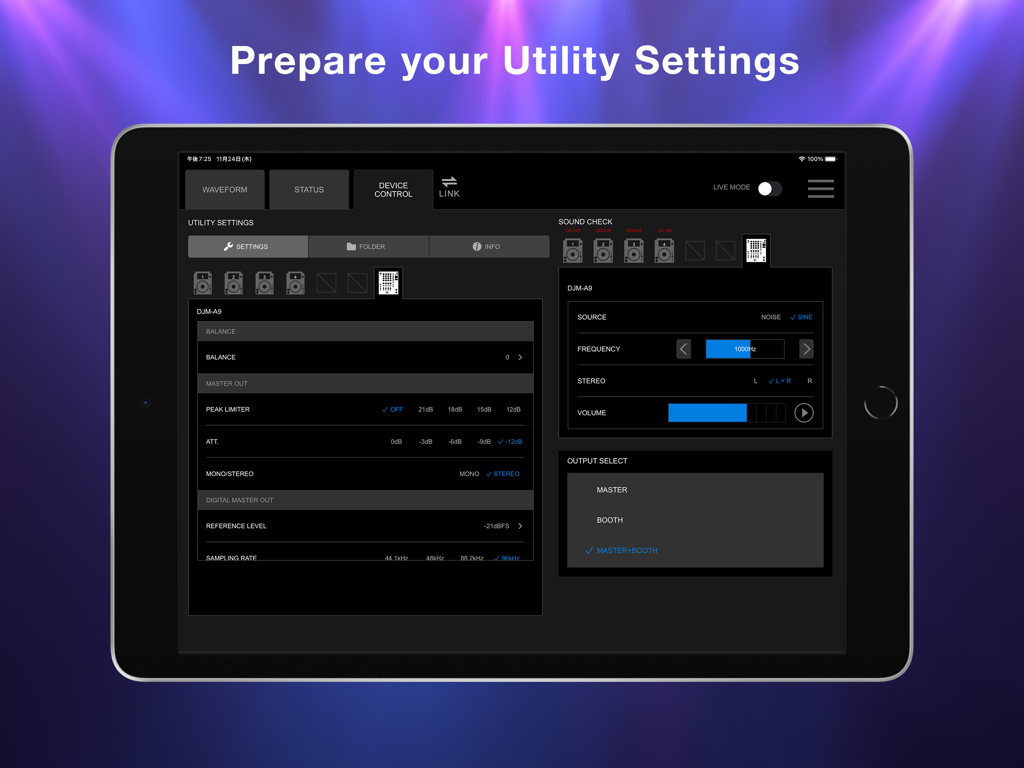
Stagehand: PRO DJ LINK Manager - DJM-A9 믹서 유틸리티 설정 및 사운드 체크 컨트롤이 있는 Stagehand 앱이 표시된 iPad 화면
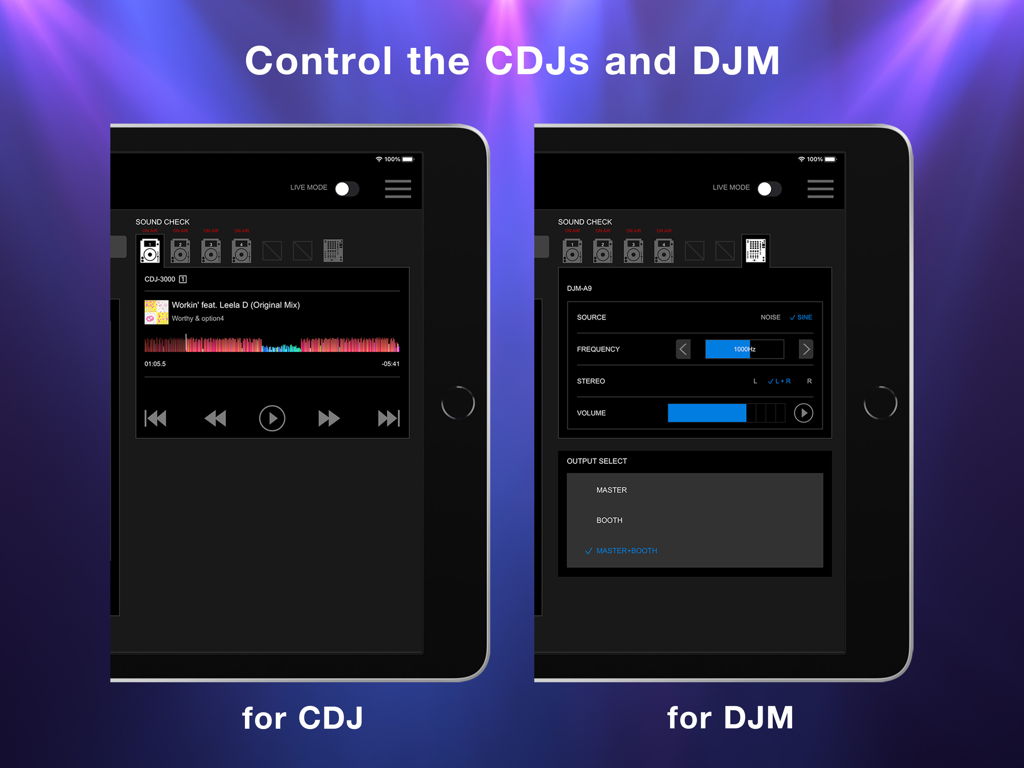
DJM-A9 믹서 유틸리티 설정 및 사운드 체크 컨트롤이 있는 Stagehand 앱이 표시된 iPad 화면

Stagehand: PRO DJ LINK Manager - CDJ 플레이어 및 DJM 믹서의 원격 제어를 위한 Stagehand 앱 인터페이스가 표시된 iPad 화면
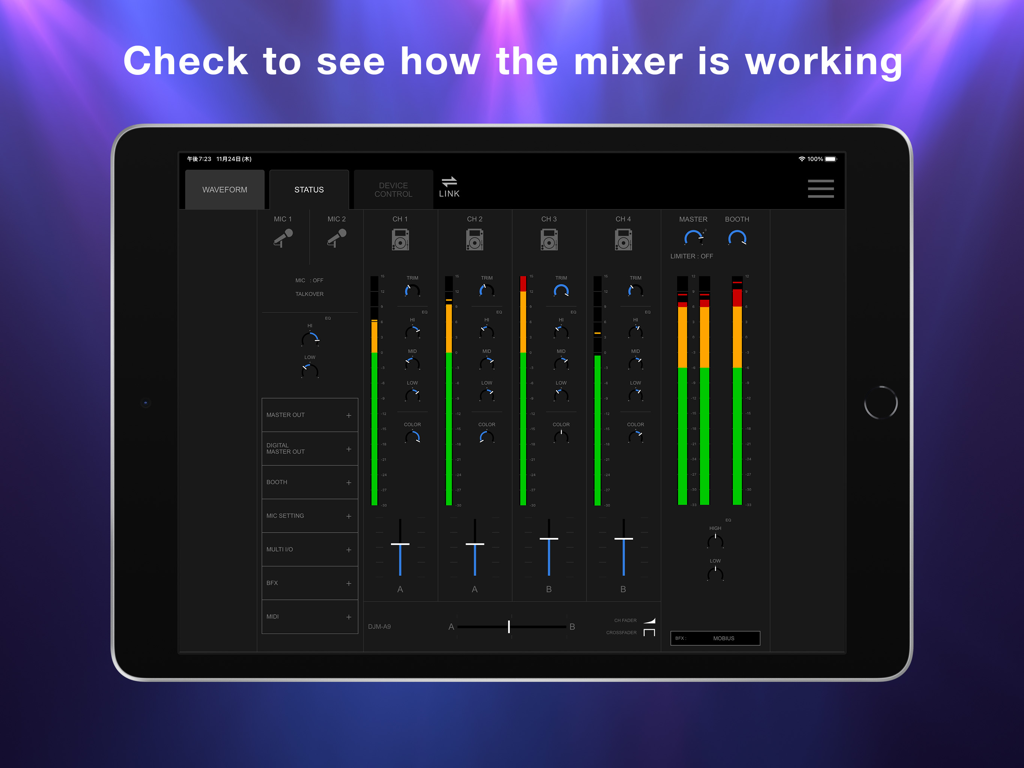
CDJ 플레이어 및 DJM 믹서의 원격 제어를 위한 Stagehand 앱 인터페이스가 표시된 iPad 화면

Stagehand: PRO DJ LINK Manager - 실시간 DJ 믹서 채널 레벨 및 페이더 위치가 있는 Stagehand 앱 상태 화면이 표시된 iPad
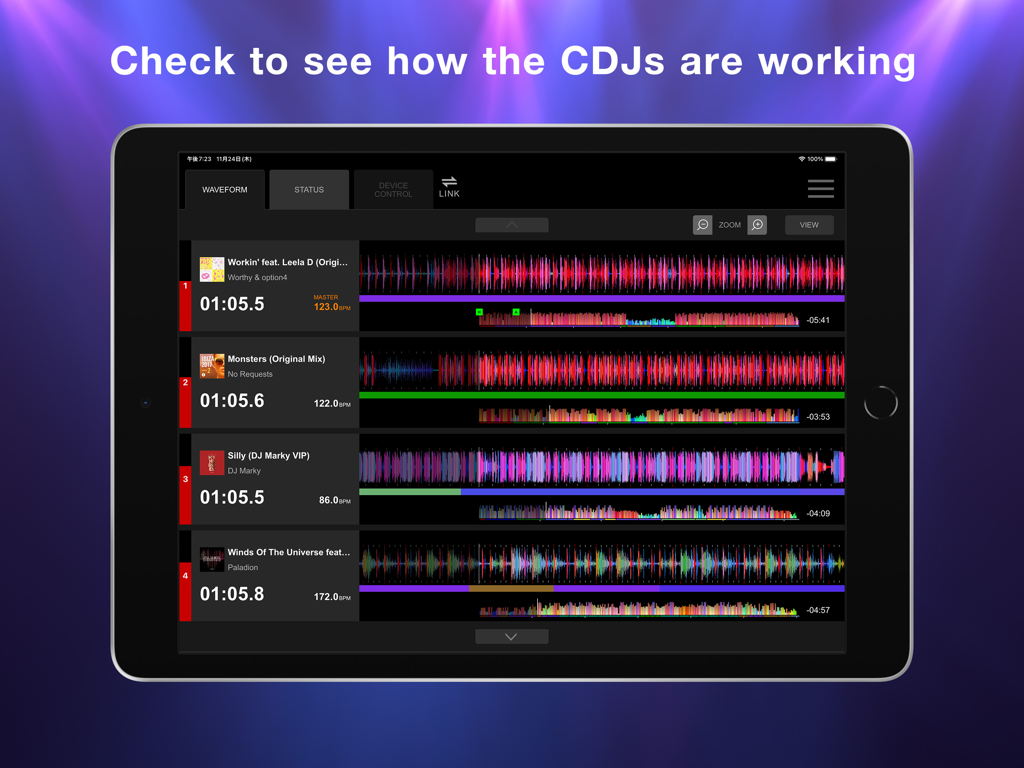
실시간 DJ 믹서 채널 레벨 및 페이더 위치가 있는 Stagehand 앱 상태 화면이 표시된 iPad

Stagehand: PRO DJ LINK Manager - 여러 CDJ 장치를 모니터링하기 위한 Stagehand 앱 파형 표시가 표시된 iPad 화면

여러 CDJ 장치를 모니터링하기 위한 Stagehand 앱 파형 표시가 표시된 iPad 화면

설명

This indispensable new app, the first of its kind, enables you to keep an eye on a host of information and remotely adjust settings on DJM-A9 and CDJ-3000, CDJ-3000X units in a PRO DJ LINK network, all from your iPad. By managing the mixer and multi players via Stagehand, you can run smoother shows and produce more exciting lighting in sync with sound. Before your event begins, you can use Stagehand to remotely check and change the Utility settings of the DJM-A9 and CDJ-3000, CDJ-3000X units for quicker setup. Stagehand is also useful once a gig is underway as you can monitor the DJ’s use of the mixer and players without needing to enter the booth. The app enables you to keep an eye on volume levels and settings, and use beatgrid, BPM, and time information to help create effective lighting displays. There’s a Live mode too, which disables many of the app’s features so you can’t accidentally stop the music during the show. You can try Stagehand free for 60 days. Download the app from App Store to use it with an iPad. To use Stagehand, update the mixer and player's firmware to the latest version via our support page [https://www.pioneerdj.com/support/software/]. A device with the A12 Bionic chip or later is recommended. [Key Features] - Device Control If you’re the designated Admin user of the system, you can easily check and change the Utility settings of the DJM-A9 and CDJ-3000, CDJ-3000X units in the PRO DJ LINK network via the Device Control screen. You can create multiple settings files in advance, giving you the option to apply multiple changes in one go if you need to, and you can share them in numerous ways, including via AirDrop or email to make event preparations run smoother. Speed up sound checks with remote control of the CDJ-3000, CDJ-3000X. There’s no need to go back and forth between the booth and the dancefloor; simply use Sound Check in Stagehand to play, stop, fast-forward, and rewind tracks. You can also control sine waves and noise from the DJM-A9 to make sure the sound system is set up correctly for the room’s acoustics. When the gig starts, turn on Live mode to disable Device Control functions so you can’t accidentally interrupt the music in the middle of a DJ’s set. - Status Keep an eye on a host of information without needing to look over the DJ’s shoulder – or even enter the booth. The Status screen gives you a remote view of almost everything happening on the DJM-A9, including the status of Utility settings, enabling you to quickly spot problems such as excessive volume from the trim and master levels so you can troubleshoot effectively. You can also check the playing information on the CDJ-3000, CDJ-3000X units from here. - Waveform Remotely view various elements of track information from your iPad to help you create exciting lighting sequences in sync with sound. From the Waveform screen, you can view not only the waveforms of tracks playing on CDJ-3000, CDJ-3000X units in real time but also the beatgrid, BPM, and time information. DJs have a choice of public and private settings in their own rekordbox account for sharing most of the music information, and settings made in advance will be reflected in Stagehand.

Download

다운로드: App Store

이 페이지는 앱이나 개발자의 공식 페이지가 아니며, 정보 제공 및 논평을 목적으로 작성된 독립 편집 간행물입니다. 명시적으로 달리 언급되지 않는 한, 해당 앱이나 개발자는 MWM, Apple, Google Play, 앱 퍼블리셔 또는 앱 개발자와 제휴, 보증, 후원, 승인 또는 공식적으로 연결되어 있지 않으며, 이 페이지의 어떤 내용도 해당 앱이 MWM의 서비스를 사용하여 개발되었음을 의미하지 않습니다. 모든 상표, 로고, 스크린샷 및 기타 콘텐츠는 해당 소유자의 자산입니다.








