Surge 5

Surge 5

다운로드: App Store
로고: Surge 5

Surge 5: 전문가를 위한 고급 네트워크 도구 상자

세분화된 규칙 기반 라우팅, MITM 복호화 및 JavaScript 스크립팅으로 장치 트래픽을 마스터하세요. Surge 5는 정교한 엔지니어링 워크플로우에 필요한 정밀한 네트워크 제어 및 진단 기능을 제공합니다.

개발사

Surge Networks Inc.

카테고리

Developer Tools

다운로드

375K+

사용자 평점

3.6/5

총 평가 수

400

지원 언어

3

시각화된 네트워크 정밀도

이 인터페이스를 사용하는 375K+ 명의 사용자.

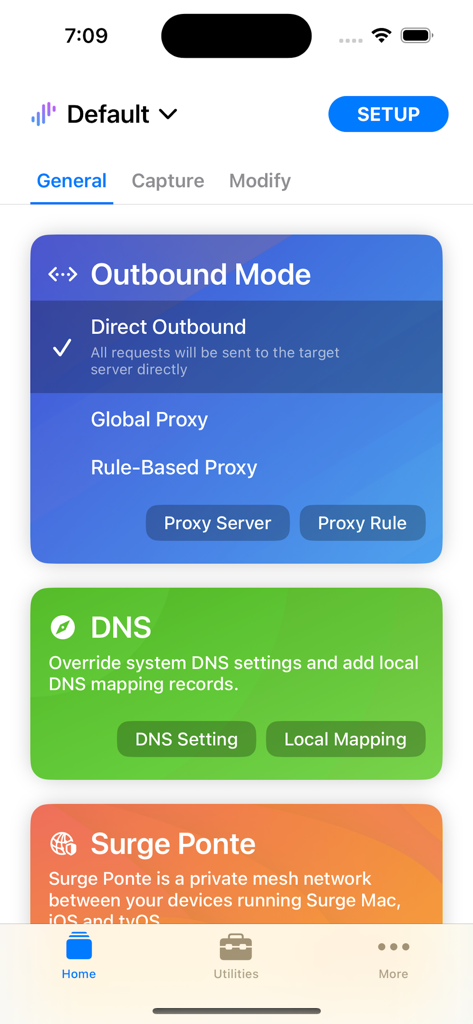
Surge 5 앱 홈 화면으로 아웃바운드 모드 선택 및 DNS 구성 도구를 표시합니다.
Surge 5 앱 홈 화면으로 아웃바운드 모드 선택 및 DNS 구성 도구를 표시합니다.

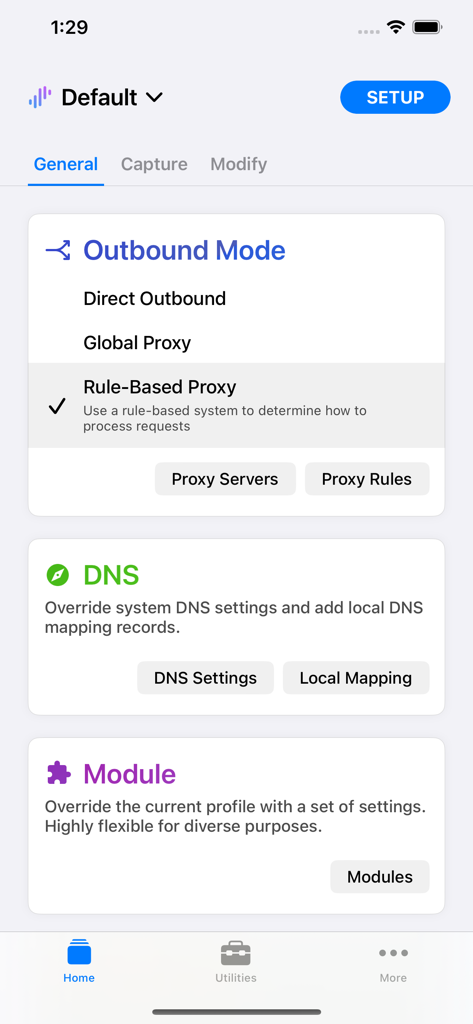
Surge 5 앱 대시보드로 아웃바운드 모드 DNS 및 네트워크 모듈의 일반 설정을 보여줍니다.
Surge 5 앱 대시보드로 아웃바운드 모드 DNS 및 네트워크 모듈의 일반 설정을 보여줍니다.

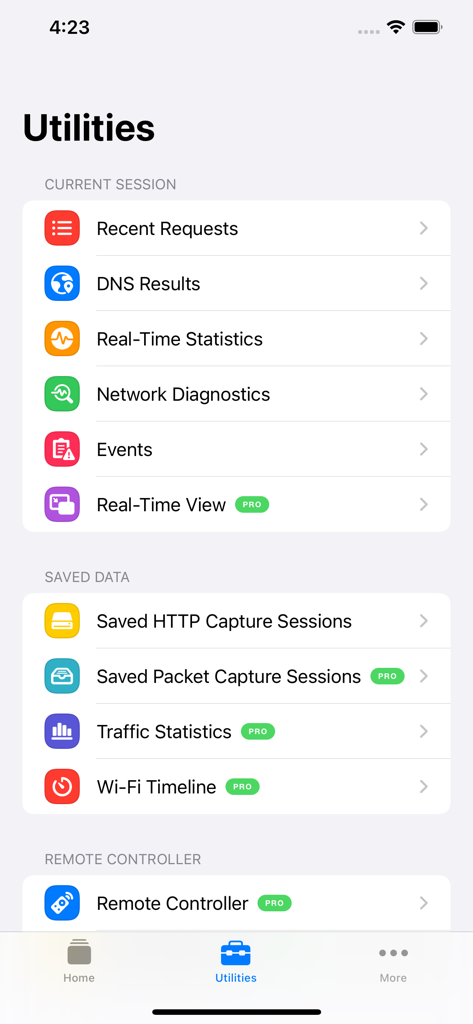
Surge 5 유틸리티 메뉴로 실시간 통계 및 네트워크 진단 도구를 특징으로 합니다.
Surge 5 유틸리티 메뉴로 실시간 통계 및 네트워크 진단 도구를 특징으로 합니다.

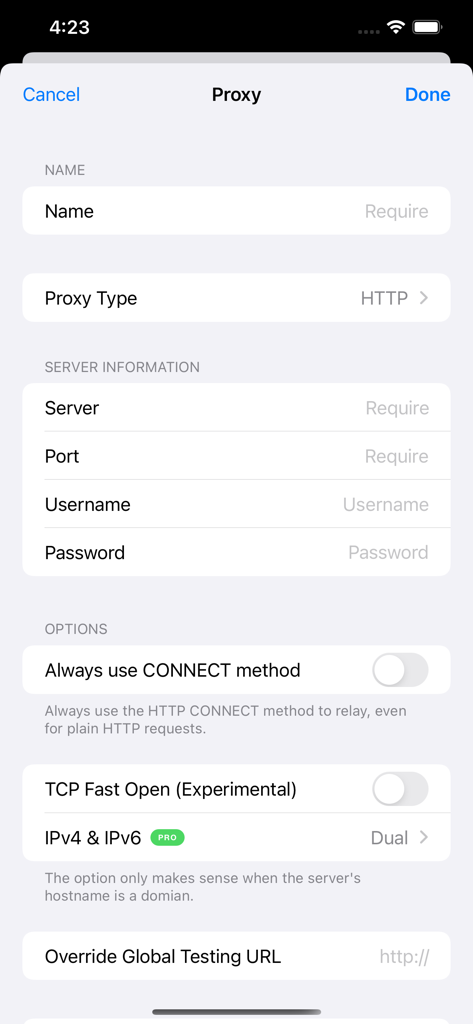
Surge 5 앱에서 프록시 서버 추가를 위한 구성 인터페이스로 서버 세부 정보 및 네트워크 옵션이 포함됩니다.
Surge 5 앱에서 프록시 서버 추가를 위한 구성 인터페이스로 서버 세부 정보 및 네트워크 옵션이 포함됩니다.

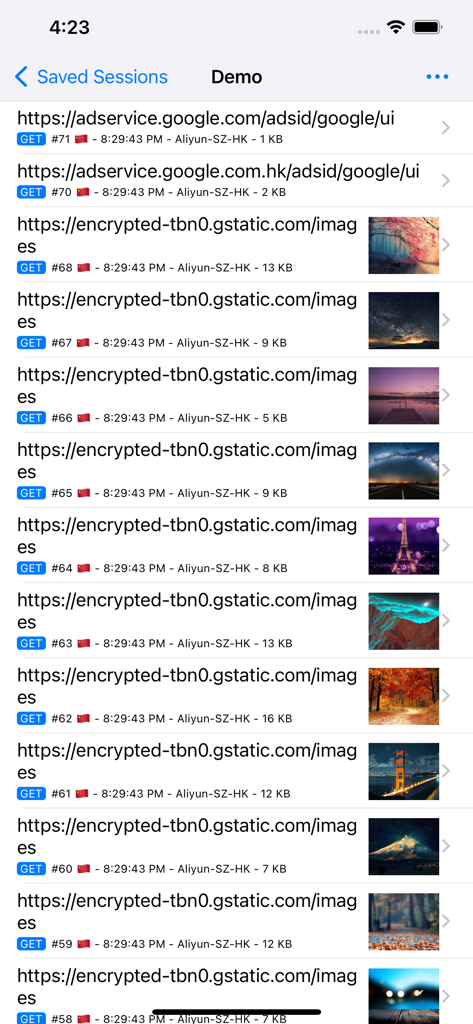
Surge 5에서 이미지 썸네일과 함께 캡처된 네트워크 요청 목록입니다.
Surge 5에서 이미지 썸네일과 함께 캡처된 네트워크 요청 목록입니다.

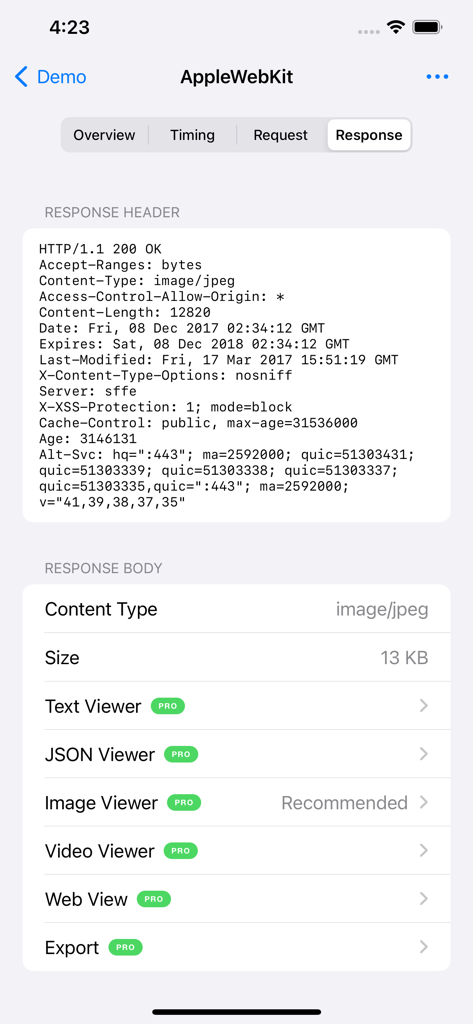
Surge 5 네트워크 응답 헤더 및 본문 검사 인터페이스입니다.

Surge 5 네트워크 응답 헤더 및 본문 검사 인터페이스입니다.

완벽한 네트워크 제어를 위해 설계됨

이 앱을 돋보이게 하는 도구, 375K+ 명의 사용자가 선택.

🔍

고급 MITM 및 HTTPS 복호화

암호화된 트래픽을 즉석에서 검사, 기록 및 디버깅합니다. 모바일 워크스테이션에서 직접 JSON 페이로드, 헤더 및 응답 시간을 봅니다.

🔀

세분화된 규칙 기반 라우팅

도메인 일치, CIDR 범위 및 GeoIP 조회를 사용하여 복잡한 아웃바운드 정책을 만들어 복잡한 네트워크 트래픽을 쉽게 조정합니다.

📜

JavaScript 확장성

사용자 지정 스크립트를 사용하여 네트워크 수정을 자동화하고 Surge의 기능을 확장하여 고유한 개발 및 테스트 시나리오를 처리합니다.

앱 소개

에 대해 알아야 할 모든 것 Surge 5.

설명

Surge is a web development and proxy utility. It is designed for developers and therefore requires professional knowledge to use. These four capabilities form the core workflow of Surge: · Takeover: You can take over the network connection sent by the device. Surge supports both proxy service and virtual NIC takeover. · Processing: You can modify the network requests and responses that have been taken over. This includes URL redirection, local file mapping, custom modification using JavaScript, and many other methods. · Forwarding: You can forward the taken over network requests to other proxy servers. This can be global forwarding or with a flexible rule system to determine an outbound policy. · Intercept: You can intercept and save specific data of network requests and responses, and you can also decrypt HTTPS traffic with MITM. Highlighted Features · Takeover all HTTP/HTTPS/TCP traffic from any applications on your device, and redirect to an HTTP/HTTPS/SOCKS5/SOCKS5-TLS/SSH proxy server following highly configurable rules. · Used as a WireGuard Client to convert the L3 VPN as a proxy. · Record and display HTTP requests and responses sent from your iOS devices, including body and header. · Configure rules using domain match, domain suffix, domain keyword, CIDR IP range, and GeoIP lookup. · Measure traffic usage and network speed on WiFi, cellular, and proxy connections. · High performance and suitable for intensive use. · Block ads by domain rules. · Local DNS Map (equivalent to /etc/hosts). You can use this function to switch the production/development environment for your app without changing any code. · All features work on the cellular network. · Decrypt HTTPS traffic with Man-in-the-Middle. · Perform URL rewrite. · Fully IPv6 supports. · Header rewrite. · Raw L3 packets capture. · Safari extension to add rules. · JSON, text, image and video viewer for the captured body. · Album mode for the request list. · Pre-filter for capturing. · HTTPS proxy protocol supports client-side SSL/TLS certificate validation. · Scripting: Use JavaScript to extend the ability of Surge as your wish. · Sync profiles cross devices with iCloud Drive or Dropbox. · DNS-over-HTTPS, DNS-over-HTTP3, DNS-over-QUIC, TLS 1.3 and more advanced features. You may read the online manual for more information: http://manual.nssurge.com/ Terms and Conditions: https://nssurge.com/legal/terms Privacy Policy: https://nssurge.com/legal/privacy

최신 버전

5.16.3

크기

73.4 MB

출시일

2018년 11월 17일

네트워크 환경 마스터하기

고급 프록시, MITM 복호화 및 세분화된 트래픽 제어를 위해 Surge 5를 사용하는 수천 명의 개발자 및 네트워크 전문가들과 함께하세요. 오늘 모바일 워크스테이션을 완벽하게 제어하세요.

다운로드: App Store

App information, icons, screenshots, and descriptions displayed on this page are sourced from the Apple App Store and are the property of their respective developers. Download estimates and rankings are based on MWM's proprietary models and may not reflect actual figures. This page is provided for informational and analytical purposes only.

Believe this page infringes your intellectual property? File a dispute