
이 페이지는 앱이나 개발자의 공식 페이지가 아니며, 정보 제공 및 논평을 목적으로 작성된 독립 편집 간행물입니다. 명시적으로 달리 언급되지 않는 한, 해당 앱이나 개발자는 MWM, Apple, Google Play, 앱 퍼블리셔 또는 앱 개발자와 제휴, 보증, 후원, 승인 또는 공식적으로 연결되어 있지 않으며, 이 페이지의 어떤 내용도 해당 앱이 MWM의 서비스를 사용하여 개발되었음을 의미하지 않습니다. 모든 상표, 로고, 스크린샷 및 기타 콘텐츠는 해당 소유자의 자산입니다.


다운로드
2.5M+사용자 평점
총 평가 수
6.0K개발사
카테고리
Music지원 언어
1최신 버전
10.9.2크기
20.0 MB출시일
2012년 12월 10일시각적 학습자와 디지털 피아노 사용자에게 최적화된 피아노 학습 도구
Synthesia 앱 핵심 기능 분석
직관적인 낙하 노트 학습
악보를 읽지 못해도 시각적인 낙하 노트를 통해 즉시 피아노 연주를 시작할 수 있게 해줍니다.
올바른 손가락 사용 힌트
각 곡에 포함된 힌트를 통해 올바른 손가락 사용법을 익히도록 돕습니다.
디지털 피아노 연결 지원
디지털 피아노나 MIDI 키보드를 연결하여 실제 건반으로 연주를 연습할 수 있는 환경을 제공합니다.
지능형 멜로디 연습 모드
사용자가 정확한 음을 칠 때까지 기다려주는 멜로디 연습 모드를 통해 효과적인 자기 주도 학습을 가능하게 합니다.
방대한 곡 라이브러리 및 MIDI 지원
150곡 이상의 내장 곡과 모든 MIDI 파일을 지원하여 무한한 학습 및 연주 기회를 제공합니다.
라이트 키보드 호환성
대부분의 라이트 키보드 조명과 호환되어 시각적인 학습 경험을 더욱 몰입감 있게 만듭니다.
유연한 악보 표기 옵션
전통 악보, 낙하 노트 블록 또는 둘의 조합 중에서 학습 방식을 선택할 수 있도록 하여 다양한 학습 스타일에 맞춥니다.
양손 분리 연습 기능
각 손 또는 양손으로 개별적으로 연습할 수 있는 기능을 제공하여 복잡한 곡을 단계적으로 습득할 수 있게 돕습니다.
자주 묻는 질문
에 대해 알아야 할 모든 것 Synthesia
What is Synthesia?
Synthesia is an app that teaches users to play the piano using falling notes, supporting both touchscreen play and external digital keyboards. It works for beginners and experienced players.
How does Synthesia teach piano?
Synthesia teaches piano by using falling note blocks. It offers a Melody Practice mode that waits for the user to hit the correct note. Users can also view traditional sheet music.
Can I connect a real piano keyboard to Synthesia?
Yes, Synthesia allows users to connect their own digital piano keyboard. The app is also compatible with the lights in most lighted keyboards for an interactive learning experience.
Does Synthesia use a subscription model?
No, Synthesia does not use a monthly subscription. Users unlock the full app features with a single, one-time purchase, which includes all future upgrades forever.
What features are included in the free version of Synthesia?
The free version of Synthesia allows users to try more than 20 songs. It includes features like playing with falling notes, touchscreen or digital keyboard input, and finger hints.
What do I get with the full unlocked version of Synthesia?
The full unlocked version of Synthesia provides access to all 150 included songs and any MIDI song ever created. It also features a multi-track recorder and includes all future upgrades.
Does Synthesia provide finger guidance for playing piano?
Yes, Synthesia provides hints for learning the correct fingers to use with every song. These hints are visually integrated into the learning interface to guide the user.
Can I view traditional sheet music in Synthesia?
Yes, Synthesia allows users to choose between traditional sheet music, falling note blocks, or display both simultaneously for learning.
다음 스크린샷과 설명은 앱의 공식 스토어 목록에서 직접 가져온 것이며 앱 개발자의 자산입니다.
앱 스토어
스크린샷

이 도구는 떨어지는 음표 블록과 하단에 표시되는 대화형 피아노 건반을 통해 사용자가 쉽게 피아노를 배울 수 있도록 돕습니다.
직관적인 건반 학습
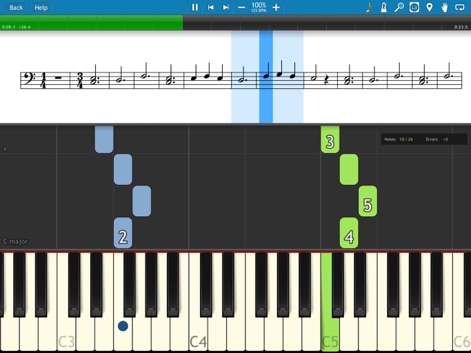
사용자는 전통적인 악보와 시각적으로 직관적인 떨어지는 음표 블록을 동시에 보며 학습 효과를 높일 수 있습니다.
악보와 함께 연주
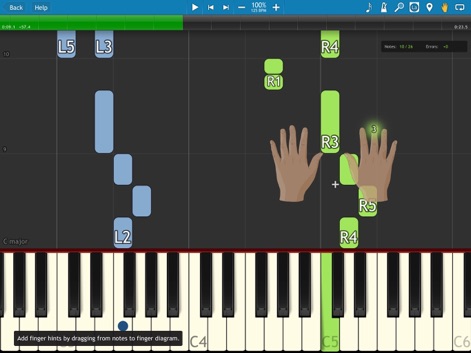
이 앱은 애니메이션 손가락 가이드를 제공하여 사용자가 정확한 운지법을 익히고, 떨어지는 음표 블록으로 시각적인 학습을 지원합니다.
정확한 운지법 안내
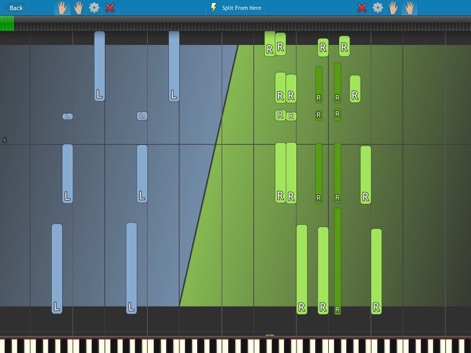
이 앱은 사용자가 색상으로 구분된 음표 블록과 명확하게 분할된 연습 영역을 통해 양손을 효율적으로 연습할 수 있도록 돕습니다.
양손 분리 연습
설명
Download
비슷한 앱
유사한 기능과 사용자 경험을 가진 앱

Artie: Learn Piano with AI
Art Master Academy s.r.o.
Piano - Piano keyboard, Learn
梦莹 张

InstaPiano - Easy and Fun
Xiaoyezi Beijing Technology Co., Ltd.
Simply Piano: Learn Piano Fast
Simply Ltd
flowkey – Learn to Play Piano
flowkey GmbH
Perfect Piano - Learn to Play
Revontulet Soft Inc.
Skoove: Learn to Play Piano
Learnfield GmbH
Piano Academy by Yokee Music
Yokee Music LTD
Simpia – Learn piano by songs
SMULIE COMPANY LIMITED
이 페이지는 앱이나 개발자의 공식 페이지가 아니며, 정보 제공 및 논평을 목적으로 작성된 독립 편집 간행물입니다. 명시적으로 달리 언급되지 않는 한, 해당 앱이나 개발자는 MWM, Apple, Google Play, 앱 퍼블리셔 또는 앱 개발자와 제휴, 보증, 후원, 승인 또는 공식적으로 연결되어 있지 않으며, 이 페이지의 어떤 내용도 해당 앱이 MWM의 서비스를 사용하여 개발되었음을 의미하지 않습니다. 모든 상표, 로고, 스크린샷 및 기타 콘텐츠는 해당 소유자의 자산입니다.