
이 페이지는 앱이나 개발자의 공식 페이지가 아니며, 정보 제공 및 논평을 목적으로 작성된 독립 편집 간행물입니다. 명시적으로 달리 언급되지 않는 한, 해당 앱이나 개발자는 MWM, Apple, Google Play, 앱 퍼블리셔 또는 앱 개발자와 제휴, 보증, 후원, 승인 또는 공식적으로 연결되어 있지 않으며, 이 페이지의 어떤 내용도 해당 앱이 MWM의 서비스를 사용하여 개발되었음을 의미하지 않습니다. 모든 상표, 로고, 스크린샷 및 기타 콘텐츠는 해당 소유자의 자산입니다.


다운로드
12.5M+사용자 평점
총 평가 수
40.5K개발사
카테고리
Education지원 언어
1최신 버전
7590크기
162.4 MB출시일
2010년 10월 14일지적 호기심이 많은 학습자를 위한 핵심 경험 요소 평가
TED Talks: Watch and Learn 앱 주요 기능 분석
개인 맞춤 추천 및 기기 간 동기화
이 앱은 사용자의 시청 기록과 관심사에 기반한 개인 맞춤형 강연을 추천하며, 모든 기기에서 시청 진행 상황을 동기화하여 끊김 없는 학습 경험을 제공합니다.
100개 이상 언어 자막 지원
이 도구는 100가지가 넘는 언어로 자막을 제공하여, 전 세계 사용자들이 언어 장벽 없이 강연 내용을 이해하고 지식을 습득할 수 있게 해줍니다.
오프라인 시청을 위한 동영상 다운로드
사용자는 강연 동영상을 다운로드하여 인터넷 연결 없이도 언제 어디서든 학습을 계속할 수 있으며, 이는 이동 중이거나 네트워크 환경이 불안정한 경우에도 유용합니다.
다양한 콘텐츠 탐색 옵션
이 앱은 최신 유행 강연, 주제별 탐색, 엄선된 큐레이터 추천 등 다양한 방법을 통해 사용자가 흥미로운 지식과 새로운 관점을 발견할 수 있도록 돕습니다.
“나를 놀라게 하세요!” 기능
이 기능은 무작위로 영감을 주는 강연을 즉시 제공하여, 사용자가 예상치 못한 주제나 아이디어를 접하며 호기심을 자극받고 새로운 학습의 기회를 얻을 수 있게 해줍니다.
나중에 볼 목록 기능
사용자는 관심 있는 강연을 '나중에 볼 목록'에 추가하여 시간을 효율적으로 관리하고, 중요한 내용을 놓치지 않고 원하는 시점에 시청할 수 있습니다.
AirPlay를 통한 스트리밍
이 앱은 AirPlay를 지원하여 사용자가 강연을 Apple TV 등 대형 화면으로 스트리밍하여, 더욱 몰입감 있는 시청 경험을 즐기거나 여러 사람과 함께 콘텐츠를 공유할 수 있도록 합니다.
다크/라이트 모드 전환
사용자는 눈의 편안함을 위해 다크 모드와 라이트 모드 간에 전환할 수 있으며, 이는 다양한 환경과 시간대에 최적화된 시청 경험을 제공합니다.
자주 묻는 질문
에 대해 알아야 할 모든 것 TED Talks: Watch and Learn
Is the TED Talks: Watch and Learn app free to use?
Yes, the TED Talks: Watch and Learn app offers thousands of inspiring, informative, and transformational videos available for free viewing to all users.
Does the TED Talks app offer personalized video recommendations?
The TED Talks app provides personalized video recommendations. Users can sign in to receive tailored suggestions based on their unique interests and viewing history.
Can I download videos for offline viewing in the TED Talks app?
Yes, the TED Talks: Watch and Learn app allows users to download videos. This feature enables offline viewing of content without an internet connection.
How many languages do TED Talks: Watch and Learn app subtitles support?
The TED Talks app supports subtitles in over 100 languages. This extensive language support enhances accessibility for a global audience.
Does the TED Talks app have a 'Surprise Me!' feature?
Yes, the TED Talks app includes a 'Surprise Me!' feature. This allows users to discover instant inspiration by playing a randomly selected talk with a single tap.
Can I save TED Talks videos to watch later?
The TED Talks app allows users to save talks to a 'watch later' list. This helps users organize and access preferred content efficiently within their library.
Does the TED Talks: Watch and Learn app support AirPlay for Apple TV?
Yes, the TED Talks app supports streaming videos to Apple TV using AirPlay. This allows users to enjoy talks on a larger screen.
Can I use dark mode in the TED Talks app?
Yes, the TED Talks app supports both dark and light modes. Users can toggle between these display settings to suit their viewing preference or environment.
Does the TED Talks app sync video progress across multiple devices?
Yes, the TED Talks app syncs videos across all your devices when you sign in. This ensures a consistent viewing experience on iPhone, iPad, and iPod touch.
Does the TED Talks: Watch and Learn app include podcasts?
Yes, the TED Talks app offers podcasts in addition to videos. Users can play award-winning podcasts and listen to them in the background.
다음 스크린샷과 설명은 앱의 공식 스토어 목록에서 직접 가져온 것이며 앱 개발자의 자산입니다.
앱 스토어
스크린샷

이 앱은 사용자의 관심사에 맞춰 최신 추천 콘텐츠를 제공하며, 라이브 연사 강연 영상과 다양한 강연 목록을 한눈에 볼 수 있도록 시각적으로 제시합니다.
맞춤형 아이디어 탐색

사용자는 과학, 기술, 예술 및 디자인 등 다양한 카테고리 태그를 통해 자신의 관심 분야에 특화된 강연을 쉽게 탐색하고 발견할 수 있습니다.
관심사별 추천
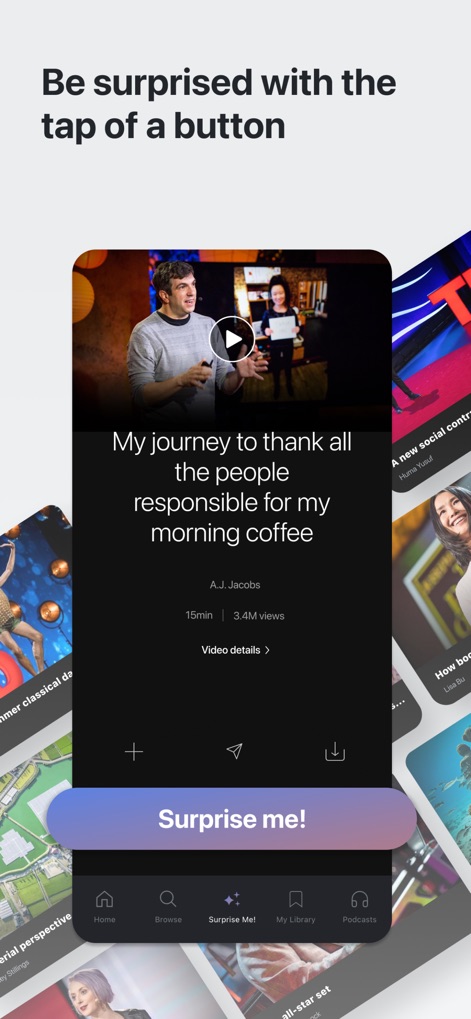
'Surprise me!' 기능을 통해 사용자는 예상치 못한 강연을 즉시 시청할 수 있으며, 영상 재생 버튼과 강연 제목 및 연사 정보가 명확하게 표시됩니다.
무작위 영감 발견
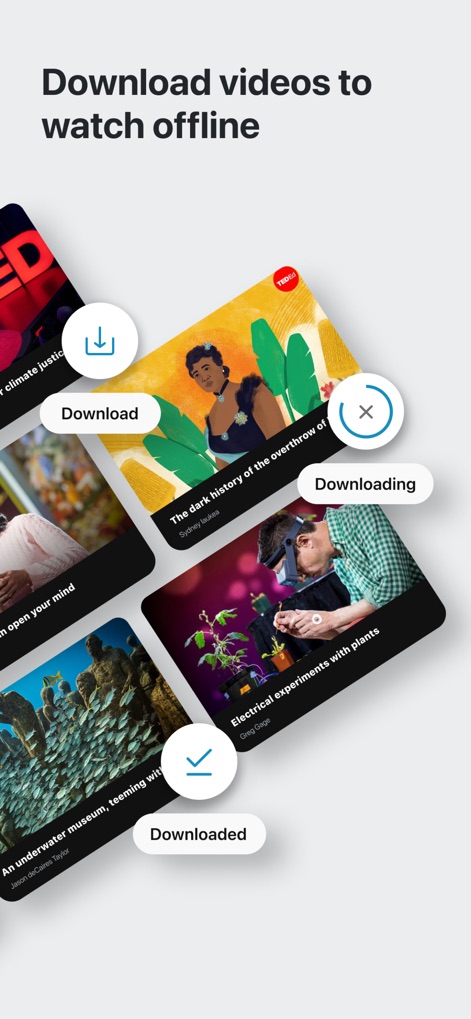
이 앱은 사용자가 보고 싶은 강연을 다운로드하여 오프라인에서도 시청할 수 있도록 지원하며, 다운로드 진행 상황을 나타내는 아이콘과 완료된 다운로드 표시를 명확히 보여줍니다.
오프라인 시청 가능
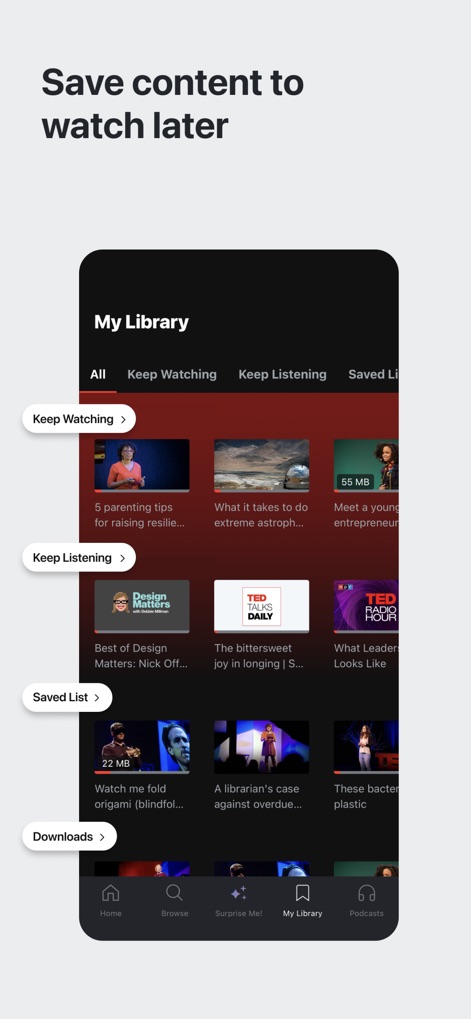
사용자는 '내 라이브러리'에서 '계속 시청하기' 및 '저장된 목록'과 같은 섹션을 통해 콘텐츠를 체계적으로 관리하고 나중에 볼 수 있도록 저장할 수 있습니다.
나만의 라이브러리

이 도구는 100개 이상의 언어로 자막을 제공하여, 사용자가 원하는 언어를 목록에서 선택하고 아랍어처럼 선택된 언어를 체크 표시로 확인할 수 있습니다.
다국어 자막 지원
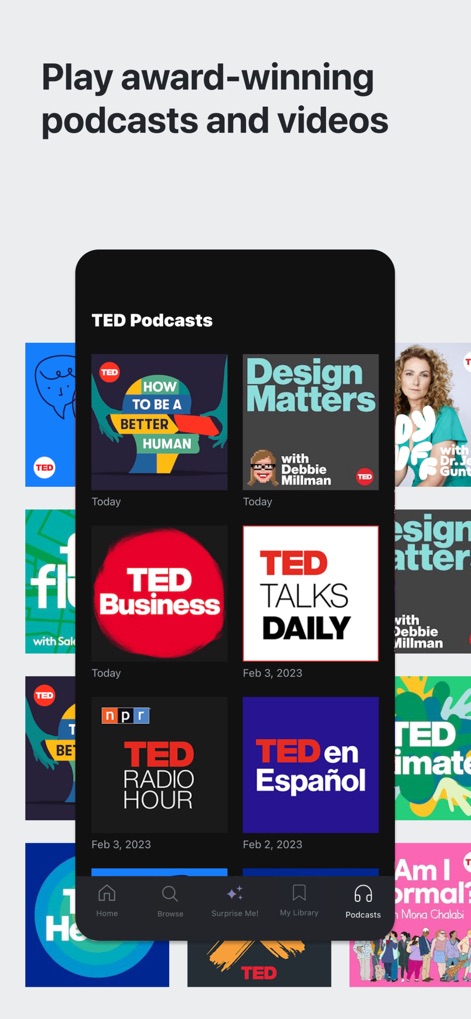
사용자는 'TED 팟캐스트' 섹션에서 TED Radio Hour 및 TED Business와 같은 다양한 주제의 수상 경력에 빛나는 팟캐스트 커버 이미지를 탐색하고 들을 수 있습니다.
오디오 콘텐츠 탐색
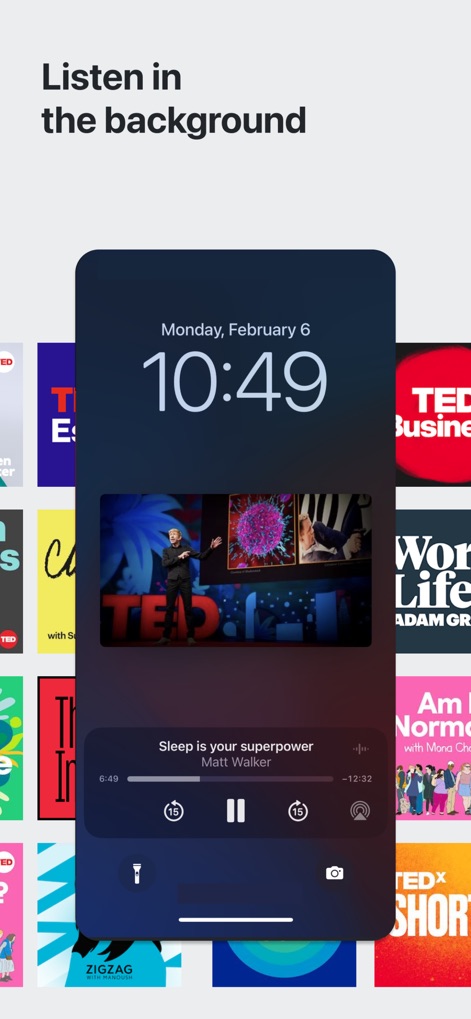
이 앱은 잠금 화면에서 배경 재생을 지원하여 사용자가 재생 바와 함께 현재 재생 중인 강연 제목과 연사를 편리하게 제어하고 확인할 수 있습니다.
배경 재생 지원
설명
Download





이 페이지는 앱이나 개발자의 공식 페이지가 아니며, 정보 제공 및 논평을 목적으로 작성된 독립 편집 간행물입니다. 명시적으로 달리 언급되지 않는 한, 해당 앱이나 개발자는 MWM, Apple, Google Play, 앱 퍼블리셔 또는 앱 개발자와 제휴, 보증, 후원, 승인 또는 공식적으로 연결되어 있지 않으며, 이 페이지의 어떤 내용도 해당 앱이 MWM의 서비스를 사용하여 개발되었음을 의미하지 않습니다. 모든 상표, 로고, 스크린샷 및 기타 콘텐츠는 해당 소유자의 자산입니다.