
이 페이지는 앱이나 개발자의 공식 페이지가 아니며, 정보 제공 및 논평을 목적으로 작성된 독립 편집 간행물입니다. 명시적으로 달리 언급되지 않는 한, 해당 앱이나 개발자는 MWM, Apple, Google Play, 앱 퍼블리셔 또는 앱 개발자와 제휴, 보증, 후원, 승인 또는 공식적으로 연결되어 있지 않으며, 이 페이지의 어떤 내용도 해당 앱이 MWM의 서비스를 사용하여 개발되었음을 의미하지 않습니다. 모든 상표, 로고, 스크린샷 및 기타 콘텐츠는 해당 소유자의 자산입니다.


Teleprompter Automatic
카메라 앞에서 버벅거리는가? 이제 그럴 일 없다. 이 앱은 당신의 연설을 매끄러운 영상으로 탈바꿈시킨다.
다운로드
250k+사용자 평점
총 평가 수
1.7K개발사
카테고리
Photo & Video지원 언어
30최신 버전
4.3.2크기
63.8 MB출시일
2022년 2월 1일전문 테크 분석가의 관점에서 본 Teleprompter Automatic 앱의 핵심 기능과 사용자 경험 향상 요소에 대한 심층 분석.
Teleprompter Automatic 앱 분석: 주요 기능 및 사용자 가치 평가
자동 텍스트 스크롤
이 앱은 대본 스크롤 속도를 자동 제어하여 사용자에게 유연하고 자연스러운 영상 녹화 및 프레젠테이션 환경을 제공합니다.
스크립트 가져오기
사용자는 외부에서 스크립트나 텍스트를 손쉽게 가져와 녹화에 활용할 수 있어 콘텐츠 준비 시간을 단축합니다.
자동 자막 및 번역
이 도구는 영상에 자동으로 자막을 추가하고 여러 언어로 번역하여 콘텐츠의 접근성과 도달 범위를 확장합니다.
커스텀 로고 및 배경
사용자는 영상에 자신의 로고를 오버레이하고, 그린 스크린 배경을 원하는 커스텀 이미지로 교체하여 브랜드 아이덴티티를 강화할 수 있습니다.
영상 편집 기능
녹화 후, 이 앱은 영상 자르기, 뒤집기, 회전과 같은 기본적인 편집 기능을 제공하여 사용자가 최종 영상을 다듬을 수 있도록 돕습니다.
소셜 미디어용 크기 조정
이 도구는 다양한 소셜 미디어 플랫폼이나 기타 요구사항에 맞춰 영상 크기를 완벽하게 조정할 수 있는 기능을 제공합니다.
텍스트 미러링
이 앱은 텍스트를 가로 또는 세로로 미러링하는 기능을 갖추고 있어, 사용자의 특정 장비 설정에 맞춰 완벽한 가독성을 제공합니다.
카운트다운 타이머
사용자는 녹화 시작 전 카운트다운 타이머를 통해 준비 시간을 확보하여 보다 전문적으로 녹화를 시작할 수 있습니다.
카메라 줌
이 도구는 녹화 중에 카메라 줌 기능을 활용하여 특정 중요한 순간에 초점을 맞출 수 있도록 지원합니다.
특수 효과 필터
이 앱은 흑백, 단색 필터 등 다양한 특수 효과를 적용하여 영상의 시각적 매력을 높일 수 있게 합니다.
자주 묻는 질문
에 대해 알아야 할 모든 것 Teleprompter Automatic
What is Teleprompter Automatic?
Teleprompter Automatic is a powerful tool for creating professional videos with automatic text scrolling, video editing, and special effects. It supports script import and features like auto subtitles.
Can Teleprompter Automatic control text scrolling speed?
Yes, Teleprompter Automatic allows users to easily control their script's speed, which is ideal for video recording and presentations.
Does Teleprompter Automatic support script import?
Yes, Teleprompter Automatic allows users to quickly add any script or text for seamless recording within the app.
Can I mirror text in Teleprompter Automatic?
Yes, Teleprompter Automatic offers text mirroring capabilities, allowing users to mirror their text horizontally or vertically for perfect alignment.
What video editing features does Teleprompter Automatic offer?
Teleprompter Automatic provides video editing functions such as trimming, flipping, rotating, resizing, and adjusting video speed after recording.
Does Teleprompter Automatic add subtitles automatically?
Yes, Teleprompter Automatic automatically adds subtitles and can translate them into multiple languages, enhancing video accessibility.
Can Teleprompter Automatic customize video backgrounds?
Yes, Teleprompter Automatic allows users to replace a green screen with any custom background or blur the background for professional videos.
Are there special effects available in Teleprompter Automatic?
Yes, Teleprompter Automatic includes special effects like black & white and monochrome filters to enhance video appearance. It also offers various text effects.
Does Teleprompter Automatic include a countdown timer for recording?
Yes, Teleprompter Automatic features a countdown timer, allowing users to prepare before recording begins.
Can I use camera zoom with Teleprompter Automatic?
Yes, Teleprompter Automatic integrates a camera zoom feature to focus on key moments during video recording.
Does Teleprompter Automatic support AirPlay?
Yes, Teleprompter Automatic supports AirPlay, enabling users to play their recorded videos on any compatible device.
Can I resize videos for social media using Teleprompter Automatic?
Yes, Teleprompter Automatic allows users to resize their videos to perfectly fit social media platforms or other specific requirements.
What are the terms of use for Teleprompter Automatic?
The terms of use for Teleprompter Automatic are available at https://appbox.group/terms.html, providing legal guidelines for app usage.
Where can I find the privacy policy for Teleprompter Automatic?
The privacy policy for Teleprompter Automatic is accessible at http://appbox.group/privacy.html, detailing how user data is handled.
Does Teleprompter Automatic allow adding custom logos to videos?
Yes, Teleprompter Automatic enables users to overlay their own logo onto videos, which helps in branding content.
Can Teleprompter Automatic shoot videos in 4K?
Yes, Teleprompter Automatic supports shooting videos in 4K resolution, offering high-quality video capture.
Does Teleprompter Automatic offer speech recognition for scrolling?
Yes, Teleprompter Automatic allows users to move the script forward using voice scrolling, which syncs with speech.
다음 스크린샷과 설명은 앱의 공식 스토어 목록에서 직접 가져온 것이며 앱 개발자의 자산입니다.
앱 스토어
스크린샷
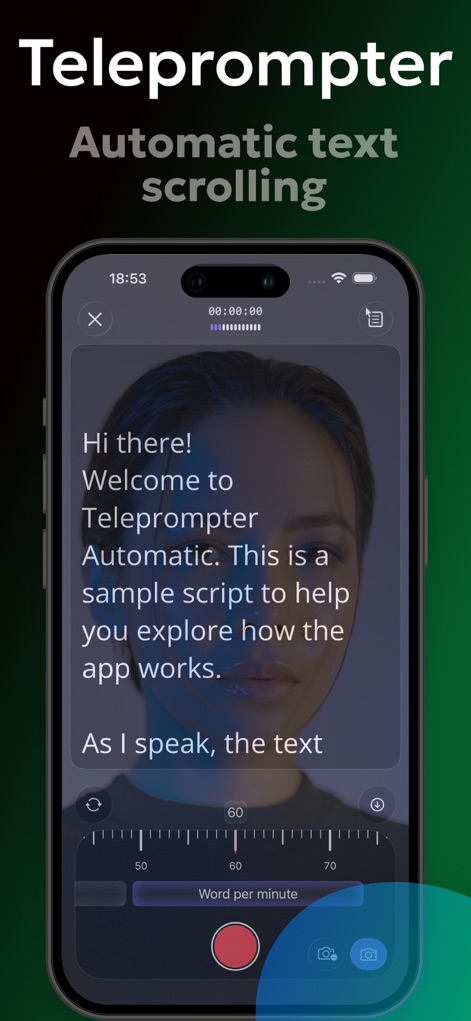
이 앱은 미리 작성된 대본이 자동으로 스크롤되는 모습을 보여주며, 하단 컨트롤 바에서 '분당 단어' 속도를 조절할 수 있습니다.
자동 스크롤 대본
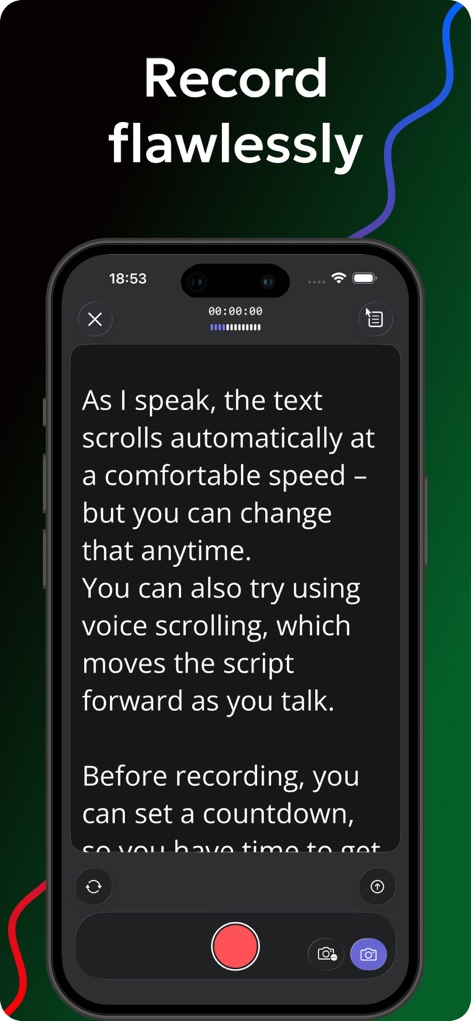
이 화면은 대본이 음성 인식에 따라 자동으로 스크롤되는 기능과, 녹화 시작 전 카운트다운 설정 옵션을 제공합니다.
완벽한 녹화 준비
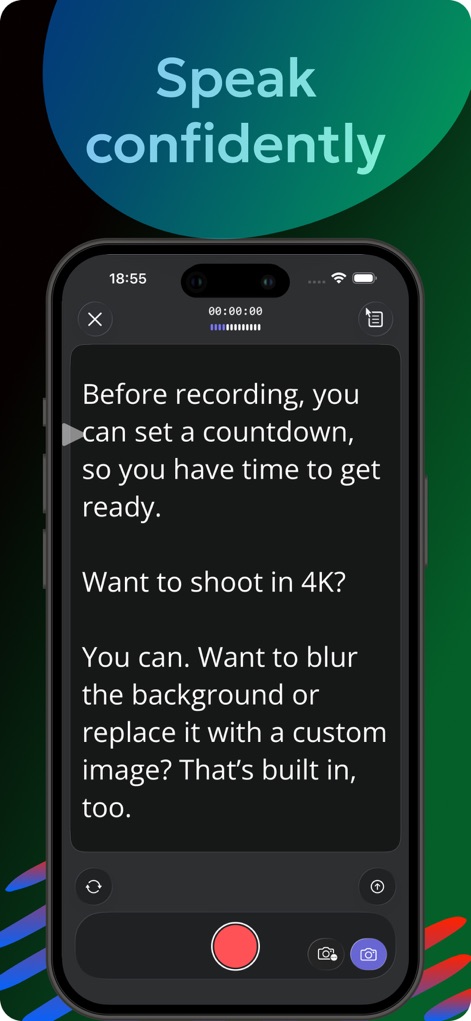
이 스크린샷은 4K 해상도로 영상을 촬영할 수 있음을 나타내며, 배경을 흐리게 하거나 사용자 지정 이미지로 교체하는 기능을 지원합니다.
자신감 있는 촬영
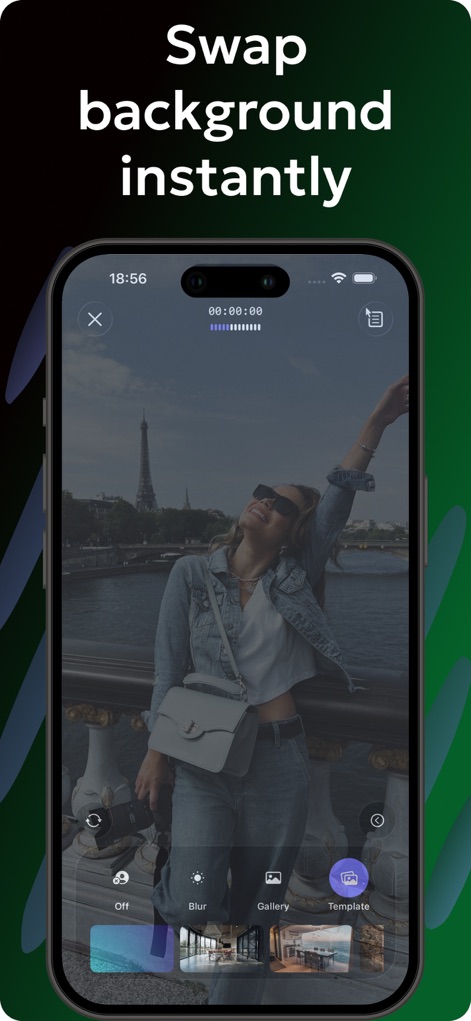
이 스크린샷은 실시간 배경 교체 기능을 보여주며, '갤러리'에서 이미지를 선택하거나 '템플릿'을 적용할 수 있습니다.
배경 즉시 변경
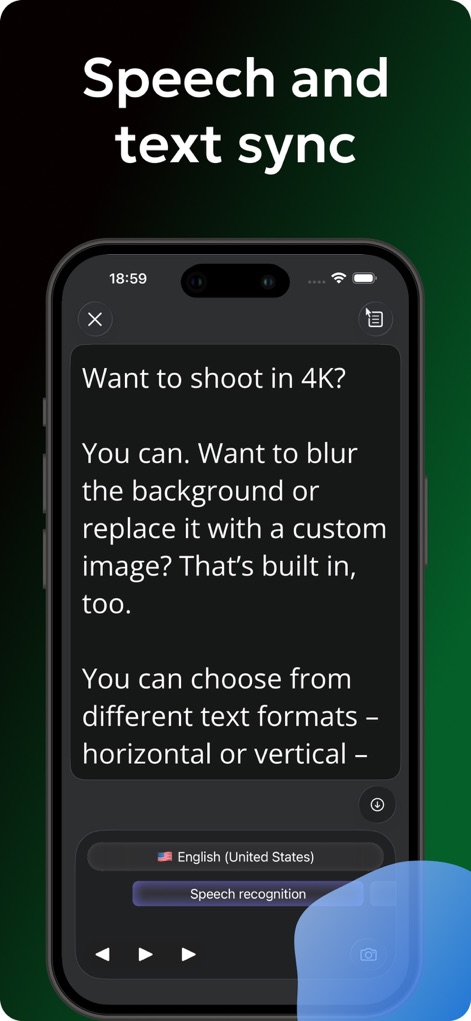
이 화면은 음성 인식 기능을 활성화하여 대본을 제어하는 것을 보여주며, 녹화 언어를 'English (United States)'로 선택할 수 있습니다.
음성-텍스트 동기화
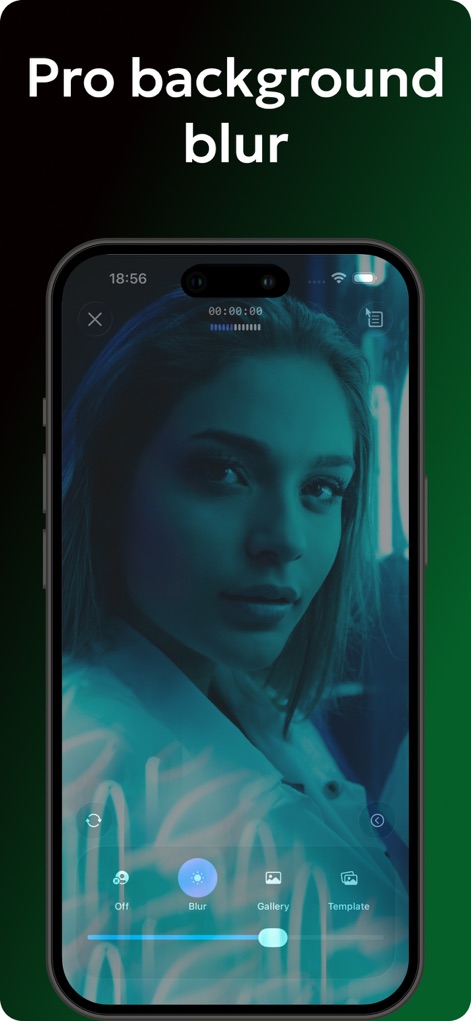
이 스크린샷은 비디오 배경에 전문적인 흐림 효과를 적용하는 기능을 보여주며, '블러' 옵션을 통해 원하는 깊이를 조절할 수 있습니다.
전문적인 배경 흐림
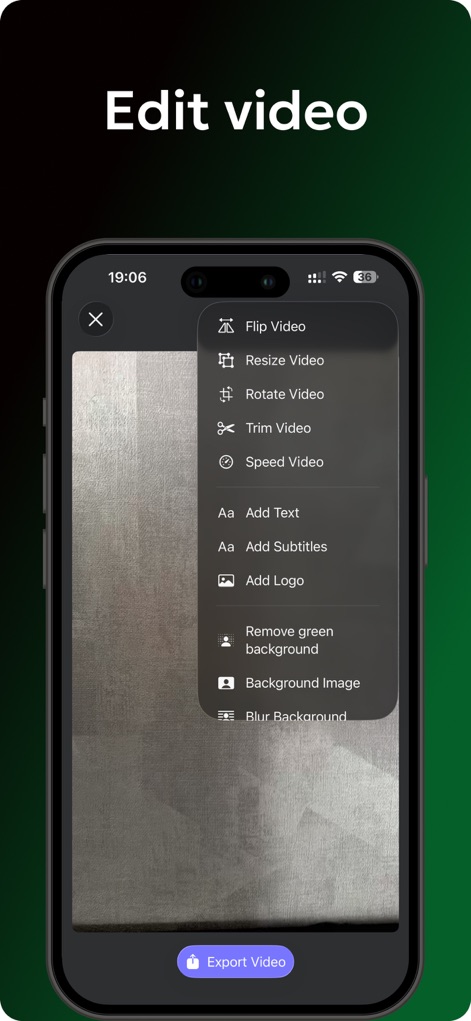
이 화면은 비디오를 자르거나(Trim Video) 크기를 조정하는(Resize Video) 다양한 편집 옵션과 함께, 자막 추가 기능도 제공합니다.
영상 편집 마법사
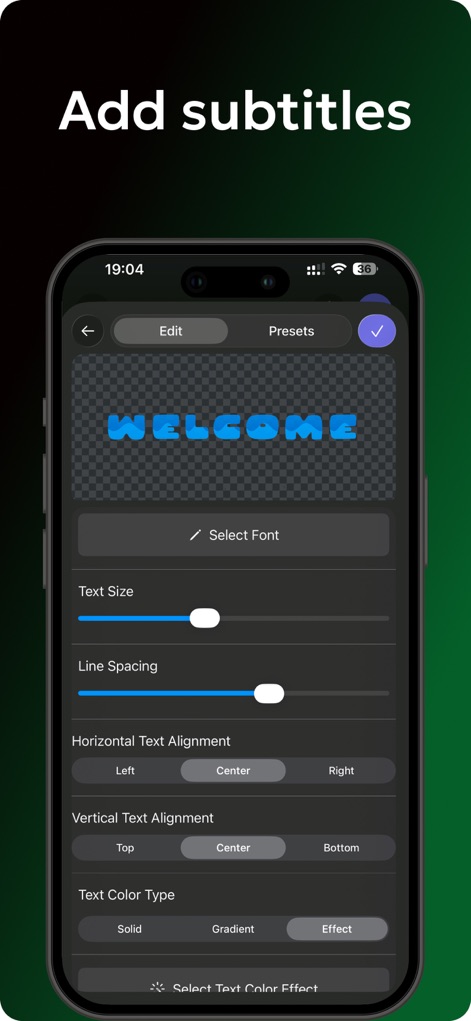
이 스크린샷은 'WELCOME'이라는 텍스트가 있는 자막 편집 화면을 보여주며, 텍스트 크기 및 수평 정렬을 세밀하게 조정할 수 있습니다.
자막 완벽 제어

이 화면은 'Flame'과 'Neon'과 같은 다양한 텍스트 효과 프리셋을 제공하여, 영상에 시각적으로 매력적인 요소를 추가할 수 있습니다.
창의적인 텍스트 효과
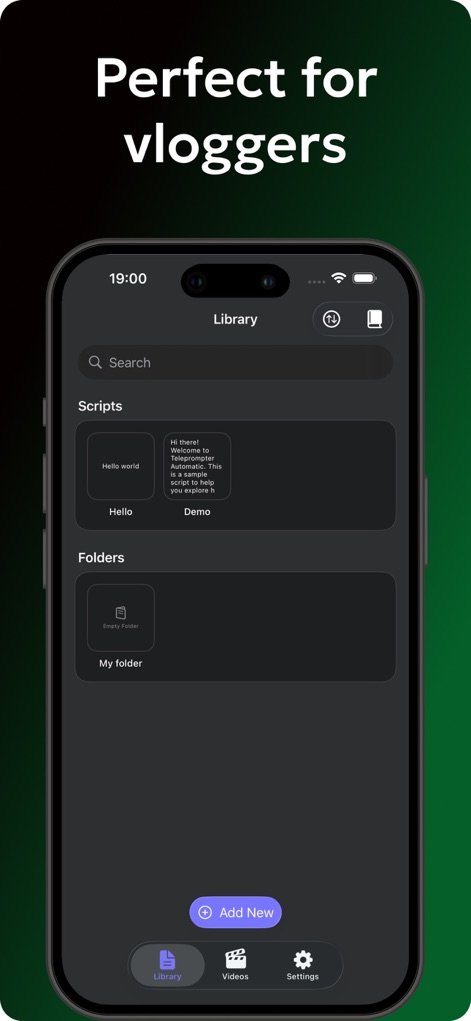
이 스크린샷은 'Hello world'와 같은 저장된 스크립트 목록을 보여주며, 하단의 '새로 추가' 버튼으로 새 스크립트를 생성할 수 있습니다.
스크립트 간편 관리
설명
Download
비슷한 앱
유사한 기능과 사용자 경험을 가진 앱

Teleprompter
Teleprompter Apps Ltd

BIGVU Teleprompter Captions AI
BIGVU INC

Teleprompter for Video
Norton Five Ltd

Teleprompter.com
Teleprompter LLC

Vmake: AI Talking Video Editor
Starii Tech Pty Ltd

说得AI提词器相机-全能的脚本创作提词拍摄快速剪辑口播神器
Hangzhou Gaishi Technology Co., Ltd.

Teleprompter-Record Script
晨铭 李

Verba: Captions & Video Editor
Verba Creative Inc.

Teleprompter: Video Recording
志威 王
이 페이지는 앱이나 개발자의 공식 페이지가 아니며, 정보 제공 및 논평을 목적으로 작성된 독립 편집 간행물입니다. 명시적으로 달리 언급되지 않는 한, 해당 앱이나 개발자는 MWM, Apple, Google Play, 앱 퍼블리셔 또는 앱 개발자와 제휴, 보증, 후원, 승인 또는 공식적으로 연결되어 있지 않으며, 이 페이지의 어떤 내용도 해당 앱이 MWM의 서비스를 사용하여 개발되었음을 의미하지 않습니다. 모든 상표, 로고, 스크린샷 및 기타 콘텐츠는 해당 소유자의 자산입니다.