TheMagic5
TheMagic5
다운로드: App Store

이 페이지는 앱이나 개발자의 공식 페이지가 아니며, 정보 제공 및 논평을 목적으로 작성된 독립 편집 간행물입니다. 명시적으로 달리 언급되지 않는 한, 해당 앱이나 개발자는 MWM, Apple, Google Play, 앱 퍼블리셔 또는 앱 개발자와 제휴, 보증, 후원, 승인 또는 공식적으로 연결되어 있지 않으며, 이 페이지의 어떤 내용도 해당 앱이 MWM의 서비스를 사용하여 개발되었음을 의미하지 않습니다. 모든 상표, 로고, 스크린샷 및 기타 콘텐츠는 해당 소유자의 자산입니다.


로고: TheMagic5
다운로드: App Store

TheMagic5

독자적인 3D 스캔 기술로 완벽한 핏을 경험하세요. 당신의 고유한 얼굴 구조에 맞춰 제작된 고글로 물샘, 김 서림, 압박 자국을 없애세요.

주요 수치

다운로드

97K+

사용자 평점

4.7/5

총 평가 수

1K+

개발사

TheMagic5 Inc.

카테고리

Sports

지원 언어

4

최신 버전

3.48.1

크기

63.3 MB

출시일

2018년 2월 8일
기능

최고의 퍼포먼스를 위해 설계됨

독자적인 AI 스캔 기술을 활용하여 고유한 얼굴 구조에 맞춰 제작된 맞춤형 고글로 방해 요소를 제거하여 물에 집중할 수 있도록 합니다.

독자적인 3D 얼굴 스캔

60초 안에 고급 AI를 사용하여 고유한 얼굴 윤곽을 매핑하여 100% 물샘 방지, 고정밀 핏을 보장합니다.

'너구리 눈' 방지

맞춤 성형된 개스킷이 압력을 고르게 분산시켜 물샘과 일반 기성품 장비에서 흔히 발생하는 깊은 수영 후 자국을 방지합니다.

다음 스크린샷과 설명은 앱의 공식 스토어 목록에서 직접 가져온 것이며 앱 개발자의 자산입니다.

앱 스토어

스크린샷
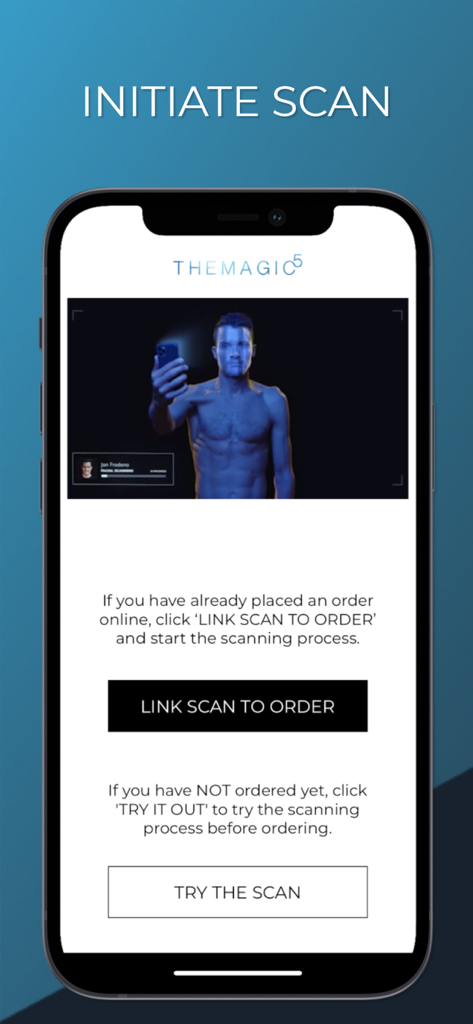
TheMagic5 - 맞춤형 수경을 위한 얼굴 스캔 시작 옵션을 보여주는 TheMagic5 앱 인터페이스
맞춤형 수경을 위한 얼굴 스캔 시작 옵션을 보여주는 TheMagic5 앱 인터페이스

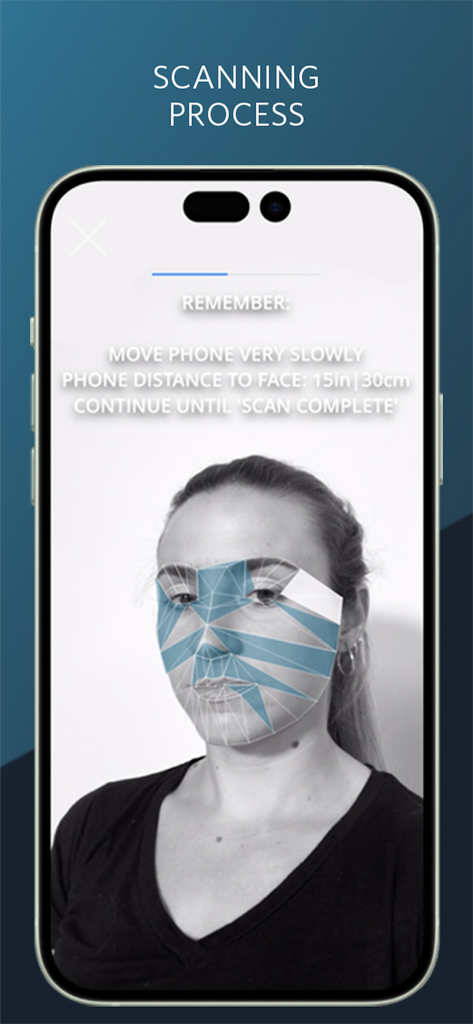
TheMagic5 - 맞춤형 수경을 위한 TheMagic5 앱 얼굴 스캔 인터페이스

맞춤형 수경을 위한 TheMagic5 앱 얼굴 스캔 인터페이스
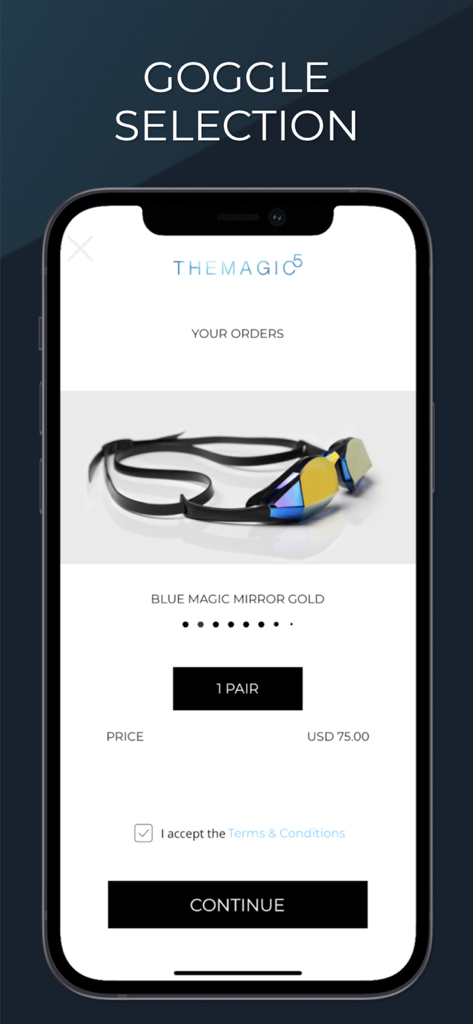
TheMagic5 - 75달러에 맞춤형 블루 매직 미러 골드 수경 선택을 보여주는 TheMagic5 앱 화면.

75달러에 맞춤형 블루 매직 미러 골드 수경 선택을 보여주는 TheMagic5 앱 화면.

설명

With THEMAGIC5 app it is now possible to purchase a pair of custom fitted swimming goggles. The app in-cludes an innovative scanning technology, which is easy to use and enables the company to produce gog-gles that are fitted to your facial structure. Follow these 3 simple steps and your first ever custom fitted swimming goggles will be on their way to your mailbox! 3-step process: - Download the app - Scan yourself and select your preferred color/mirror coating - Enter shipment and payment details* Main features in the app Scanning Technology: The scanning technology is proprietary and is developed with the purpose of securing an optimal fit of your goggles. This will minimize discomfort and prevent water leakage. The scan is easy to complete and typically takes less than a minute. See the scanning introduction videos in the app and follow these instructions when you do the scan: - Access to high-speed internet, preferably Wi-Fi - Check that you have constant light exposure - Have your back against an even surface (e.g. a wall or a door) Manage your orders: If you have already bought your goggles via our website, you can login to the app and your account will automatically have a voucher equal to your purchase. All you have to do is complete the scan and select your color/mirror option. If you have not yet bought your goggles, you can purchase them goggles directly in the app. Simply follow the 3-step process described at the top. Reorder goggles from your purchase history. We will register your previous purchases in your app. This way it is easy to reorder your favorites. You can also reorder for your family members if they have used your ac-count to do their scan. Find your favorite goggles: In the app you can browse through our product catalogue to find your favorite goggles. You can see non-mirror and mirror coating to find out what best suits your needs. *You will not have to add in your payment details if you have already bought your goggles via our website.

Download

다운로드: App Store

이 페이지는 앱이나 개발자의 공식 페이지가 아니며, 정보 제공 및 논평을 목적으로 작성된 독립 편집 간행물입니다. 명시적으로 달리 언급되지 않는 한, 해당 앱이나 개발자는 MWM, Apple, Google Play, 앱 퍼블리셔 또는 앱 개발자와 제휴, 보증, 후원, 승인 또는 공식적으로 연결되어 있지 않으며, 이 페이지의 어떤 내용도 해당 앱이 MWM의 서비스를 사용하여 개발되었음을 의미하지 않습니다. 모든 상표, 로고, 스크린샷 및 기타 콘텐츠는 해당 소유자의 자산입니다.