
이 페이지는 앱이나 개발자의 공식 페이지가 아니며, 정보 제공 및 논평을 목적으로 작성된 독립 편집 간행물입니다. 명시적으로 달리 언급되지 않는 한, 해당 앱이나 개발자는 MWM, Apple, Google Play, 앱 퍼블리셔 또는 앱 개발자와 제휴, 보증, 후원, 승인 또는 공식적으로 연결되어 있지 않으며, 이 페이지의 어떤 내용도 해당 앱이 MWM의 서비스를 사용하여 개발되었음을 의미하지 않습니다. 모든 상표, 로고, 스크린샷 및 기타 콘텐츠는 해당 소유자의 자산입니다.

다운로드
25M+사용자 평점
총 평가 수
607.0K개발사
카테고리
Utilities지원 언어
25최신 버전
4.13.3크기
293.5 MB출시일
2013년 5월 17일TP-Link Tether 앱 주요 기능 분석
일반 가정 및 소규모 사무실 사용자를 위한 네트워크 관리 솔루션 평가
강력한 자녀 보호 기능
이 앱은 특정 시간 동안 또는 특정 URL에 대한 인터넷 액세스를 관리하는 자녀 보호 기능을 제공하여, 부모가 자녀의 온라인 활동을 효과적으로 제어할 수 있도록 돕습니다.
간편한 네트워크 설정 및 관리
사용자가 모바일 장치로 라우터의 SSID, 비밀번호 및 인터넷 설정을 쉽고 빠르게 구성하고 관리할 수 있게 해줍니다.
무단 사용자 차단 및 보안 강화
이 도구는 사용자가 네트워크에 무단으로 접근하는 사용자를 차단하여 네트워크 보안을 강화할 수 있도록 지원합니다.
다중 TP-Link 장치 통합 관리
사용자가 여러 TP-Link 장치(라우터, 확장기 등)를 동시에 관리할 수 있어, 복잡한 네트워크 환경에서도 효율적인 제어가 가능합니다.
클라이언트 장치 권한 관리
사용자가 네트워크에 연결된 각 클라이언트 장치의 권한을 세밀하게 관리할 수 있게 해줍니다.
범위 확장기 최적 배치 지원
사용자가 Wi-Fi 범위 확장기를 최적의 위치에 배치할 수 있도록 도와 네트워크 커버리지를 극대화합니다.
자주 묻는 질문
에 대해 알아야 할 모든 것 TP-Link Tether
What is the TP-Link Tether app used for?
TP-Link Tether is a mobile application that allows users to access and manage their TP-Link Router, xDSL Router, and Range Extender devices. It provides a simple interface for device status, client management, and network settings.
How does TP-Link Tether facilitate the setup of my TP-Link router?
TP-Link Tether facilitates setup by guiding users to connect their TP-Link router to a modem's WAN port via an Ethernet cable. The app then provides an easy, straightforward configuration process for network settings like SSID and passwords.
Does the TP-Link Tether app include parental control features?
Yes, TP-Link Tether includes parental control functionality. Users can manage schedules and apply URL-based internet access restrictions for client devices, as well as block or adjust access for specific family members.
How can I view connected devices using the TP-Link Tether app?
Yes, TP-Link Tether allows users to view all online client devices. The app displays a list of connected devices, including their online status, upload/download rates, and connection types like Wi-Fi bands (5G, 6G).
What network security features does the TP-Link Tether app provide?
TP-Link Tether includes network security features, enhanced by HomeShield Pro. This protection encompasses web protection, intrusion prevention, and IoT protection, safeguarding the network from malicious attacks.
Can I block unauthorized users from my network using TP-Link Tether?
Yes, TP-Link Tether allows users to block unauthorized devices accessing their network. It provides tools to manage permissions of client devices and control who connects to the network.
Does TP-Link Tether require a firmware upgrade for my device?
Yes, a firmware upgrade is required for TP-Link Tether to function correctly. Users must visit the TP-Link download page to choose and install the correct, latest firmware version for their specific device.
Can the TP-Link Tether app manage multiple TP-Link devices simultaneously?
Yes, the TP-Link Tether app allows users to manage most of their compatible TP-Link devices simultaneously. This includes various routers, xDSL routers, and range extenders.
Where can I find a list of devices compatible with TP-Link Tether?
A list of compatible routers for TP-Link Tether is available on the TP-Link website. The app's description provides a direct link to this product list for user reference.
Does the TP-Link Tether app function when connected to a guest network?
No, TP-Link Tether does not work when connected to a guest network. For proper functionality, the mobile device running the app must be connected to the main network managed by the TP-Link device.
How does TP-Link Tether help optimize range extender placement?
TP-Link Tether helps users find the optimal location to place their range extender. This feature guides users to ensure maximum Wi-Fi coverage and performance for their entire network.
Can I get network activity reports from TP-Link Tether?
Yes, TP-Link Tether generates reports on network data. These reports can include network protection summaries, detailing potential risks prevented, network scans, and optimizations over specified periods.
다음 스크린샷과 설명은 앱의 공식 스토어 목록에서 직접 가져온 것이며 앱 개발자의 자산입니다.
앱 스토어
스크린샷
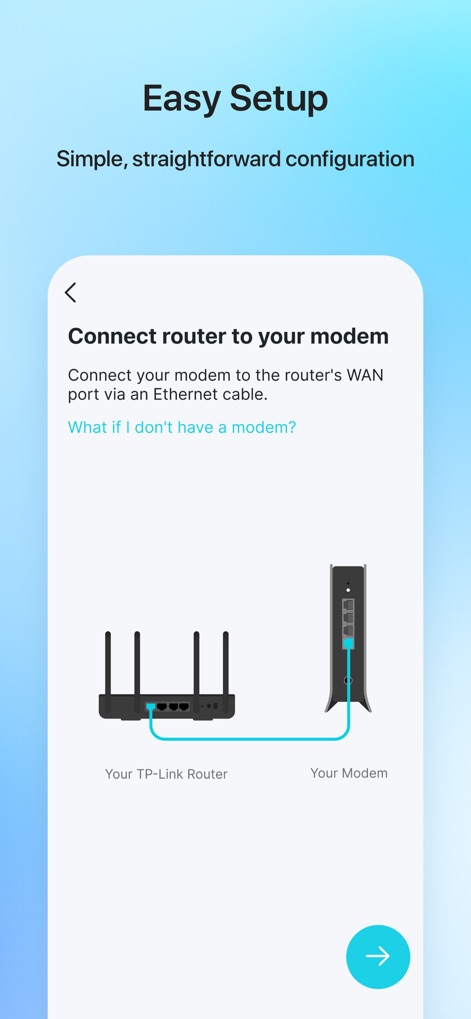
간편한 초기 설정
이 앱은 라우터를 모뎀에 연결하는 명확한 시각적 다이어그램과 쉬운 단계별 지침을 제공하여 사용자가 쉽게 네트워크를 설정할 수 있도록 돕습니다.
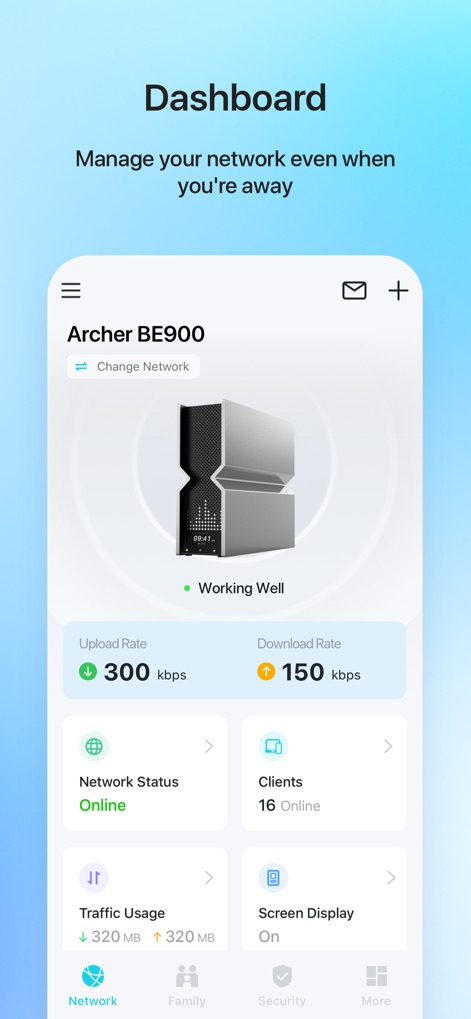
한눈에 보는 대시보드
이 대시보드는 실시간 업로드 및 다운로드 속도를 명확하게 보여주며, 네트워크에 연결된 16개의 온라인 클라이언트 장치를 한눈에 파악할 수 있도록 합니다.
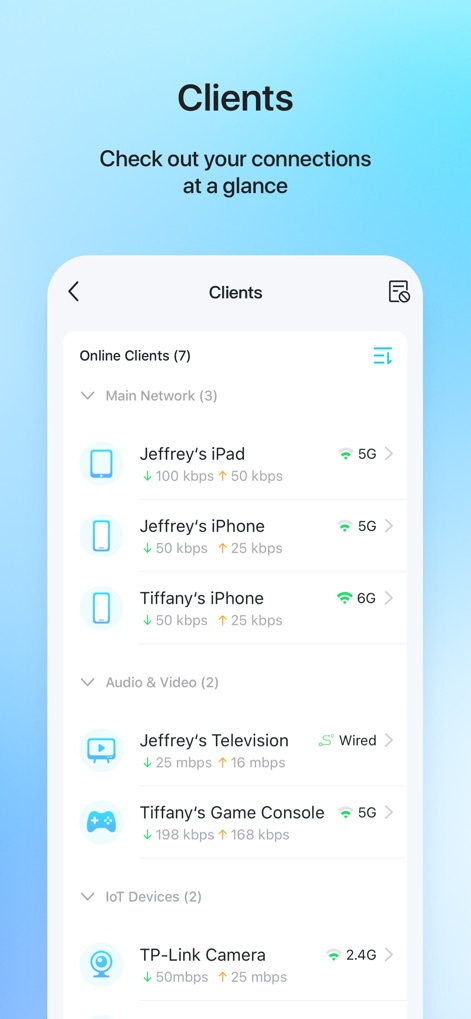
연결된 장치 관리
사용자는 연결된 모든 클라이언트 장치의 목록을 보고, 각 기기의 실시간 업로드/다운로드 속도와 5G, 6G, 2.4G와 같은 연결 유형을 확인할 수 있습니다.
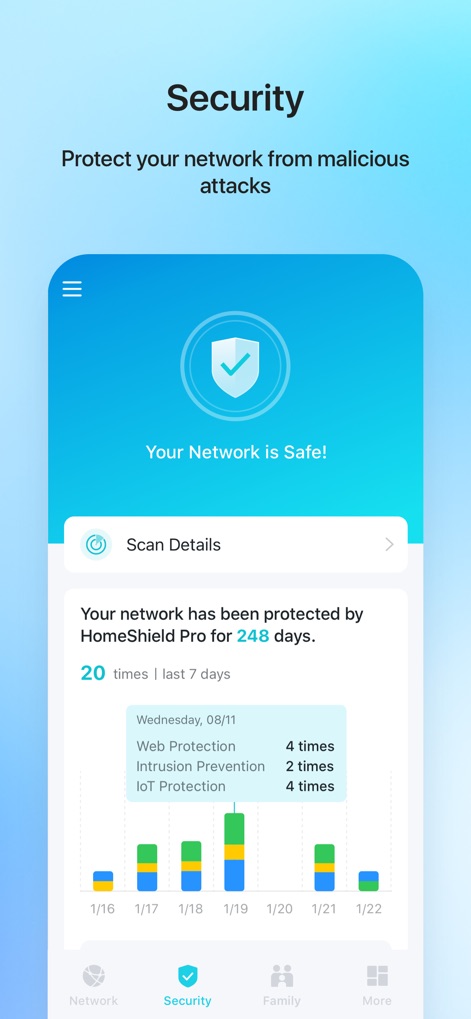
강력한 네트워크 보호
이 앱은 'Your Network is Safe!' 메시지로 네트워크의 보안 상태를 시각적으로 보여주며, 지난주 웹 보호 및 침입 방지 등 다양한 보안 이벤트 발생 횟수를 막대 그래프로 상세하게 제공합니다.
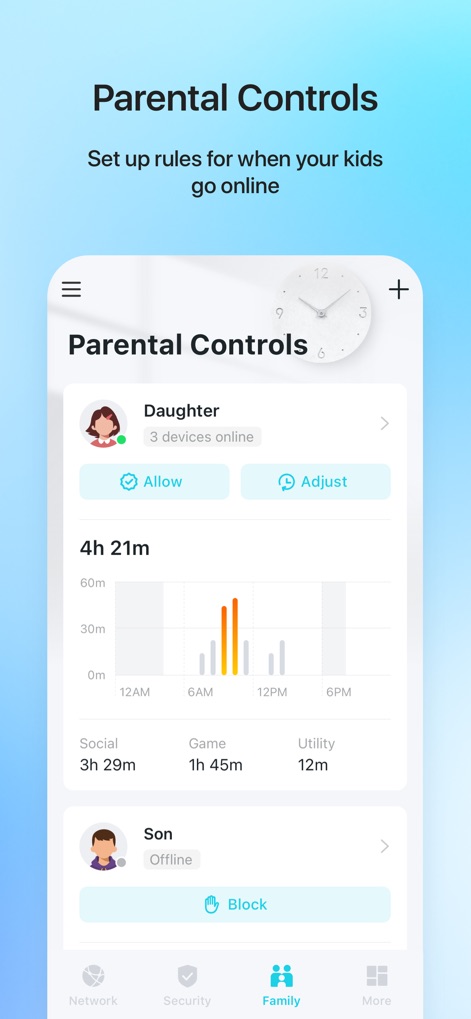
스마트 자녀 보호
사용자는 자녀별 프로필을 통해 온라인 활동을 관리하고, 인터넷 사용량을 시간대별 그래프로 확인하며 소셜, 게임 등 카테고리별 사용 시간을 쉽게 파악할 수 있습니다.
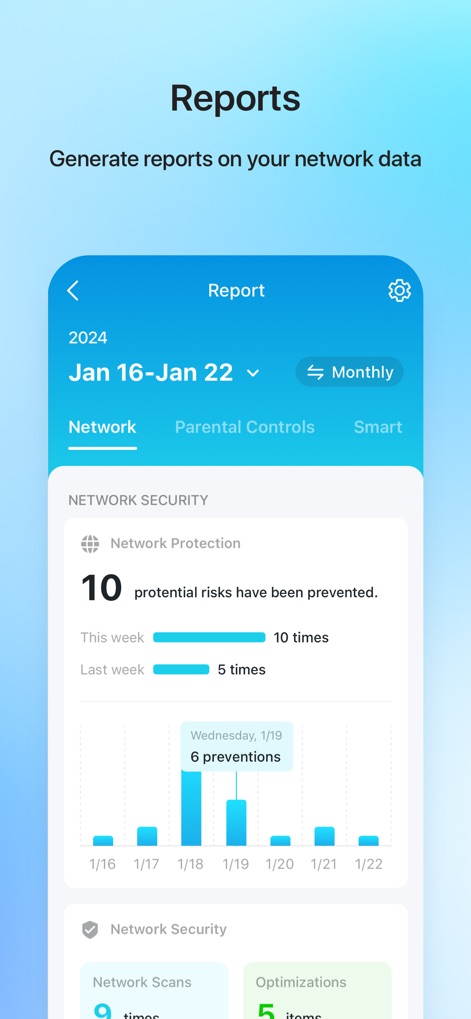
상세한 네트워크 보고서
사용자는 주간 또는 월간 단위로 네트워크 보고서 기간을 설정할 수 있으며, 예방된 잠재적 위험 수량과 날짜별 예방 이벤트가 시각적인 막대 그래프로 제공됩니다.
설명
Download
비슷한 앱
유사한 기능과 사용자 경험을 가진 앱

Smart Home Manager
AT&T Services, Inc.

TP-Link Deco
TP-Link Systems Inc.

eero wifi system
eero LLC

MERCUSYS
MERCUSYS Technologies Co., Ltd.

TP-Link Aginet
TP-Link Systems Inc.

T-Mobile Fiber: eero
eero LLC

NETGEAR Nighthawk - WiFi App
NETGEAR, Inc.

UniFi
Ubiquiti Inc.

Freebox Connect
Freebox
이 페이지는 앱이나 개발자의 공식 페이지가 아니며, 정보 제공 및 논평을 목적으로 작성된 독립 편집 간행물입니다. 명시적으로 달리 언급되지 않는 한, 해당 앱이나 개발자는 MWM, Apple, Google Play, 앱 퍼블리셔 또는 앱 개발자와 제휴, 보증, 후원, 승인 또는 공식적으로 연결되어 있지 않으며, 이 페이지의 어떤 내용도 해당 앱이 MWM의 서비스를 사용하여 개발되었음을 의미하지 않습니다. 모든 상표, 로고, 스크린샷 및 기타 콘텐츠는 해당 소유자의 자산입니다.